


Writing a winning Upwork proposal isn’t about using big words. It isn’t about sounding “professional” in a cold, boring way either. It’s about one thing. You need to make the client feel, “This person gets my problem.” That’s it. Most freelancers miss this. They start with long introductions. They talk about their experience before they talk about the client’s problem. They write the same proposal for every job. Then they wonder why no one replies.
A client doesn’t have time to read 30 copy-paste messages. They scan fast. If your first few lines sound like everyone else, you’re gone.
Upwork is still a huge marketplace. In Q1 2026, Upwork reported 784,000 active clients, $987.1 million in gross services volume, and $195.5 million in revenue. The opportunity is there. But so is the competition.
That’s why your proposal matters.
A good proposal shows that you read the job post, understand the real problem, have relevant proof, and know what to do next. It doesn’t beg. It doesn’t ramble. It makes hiring you feel easy.
This guide will show you how to write a winning Upwork proposal with better hooks, smarter portfolio use, stronger pricing, and a more natural outreach style.
Why a Winning Upwork Proposal Matters in 2026
Your proposal is your first impression.
Before a client checks your full profile, reads your reviews, or opens your portfolio, they usually scan your proposal. And often, they only give it a few seconds.
So the first lines matter a lot.
| What the Client Notices | What It Tells Them |
|---|---|
| Your opening line | Did you actually read the job post? |
| Your proof | Have you done something similar before? |
| Your process | Will this project feel organized? |
| Your pricing style | Do you understand the scope? |
| Your final question | Is it easy to reply to you? |
Clients Don’t Read Slowly
Clients skim first. They only read closely when something catches their eye.
A weak opening sounds like this:
Hi, I am an experienced freelancer and I can do this job perfectly.
That tells the client nothing useful.
A stronger opening sounds like this:
You mentioned that your ads are getting clicks but not sales. I’d first check whether the landing page message matches the ad promise.
Now the client has a reason to pause.
You’ve shown insight. You’ve pointed to a real issue. You’ve made the proposal about them, not you.
Connects Make Every Proposal Count
Upwork uses Connects for job proposals and some visibility features. Each Connect currently costs $0.15 when purchased.
That means every proposal costs something. Even if the amount feels small, random applying adds up quickly.
So don’t apply everywhere.
Apply where you can say something specific. Apply where you have proof. Apply where the job actually matches your skill.
Your Proposal Isn’t Your Resume
Your Upwork profile already has your skills, work history, rate, reviews, and portfolio.
Your proposal has a different job.
It should answer these questions:
- What problem is the client trying to solve?
- Why are you a safe choice?
- What would you do first?
- What proof can you show?
- What should the client reply with?
That’s the real purpose of a proposal.
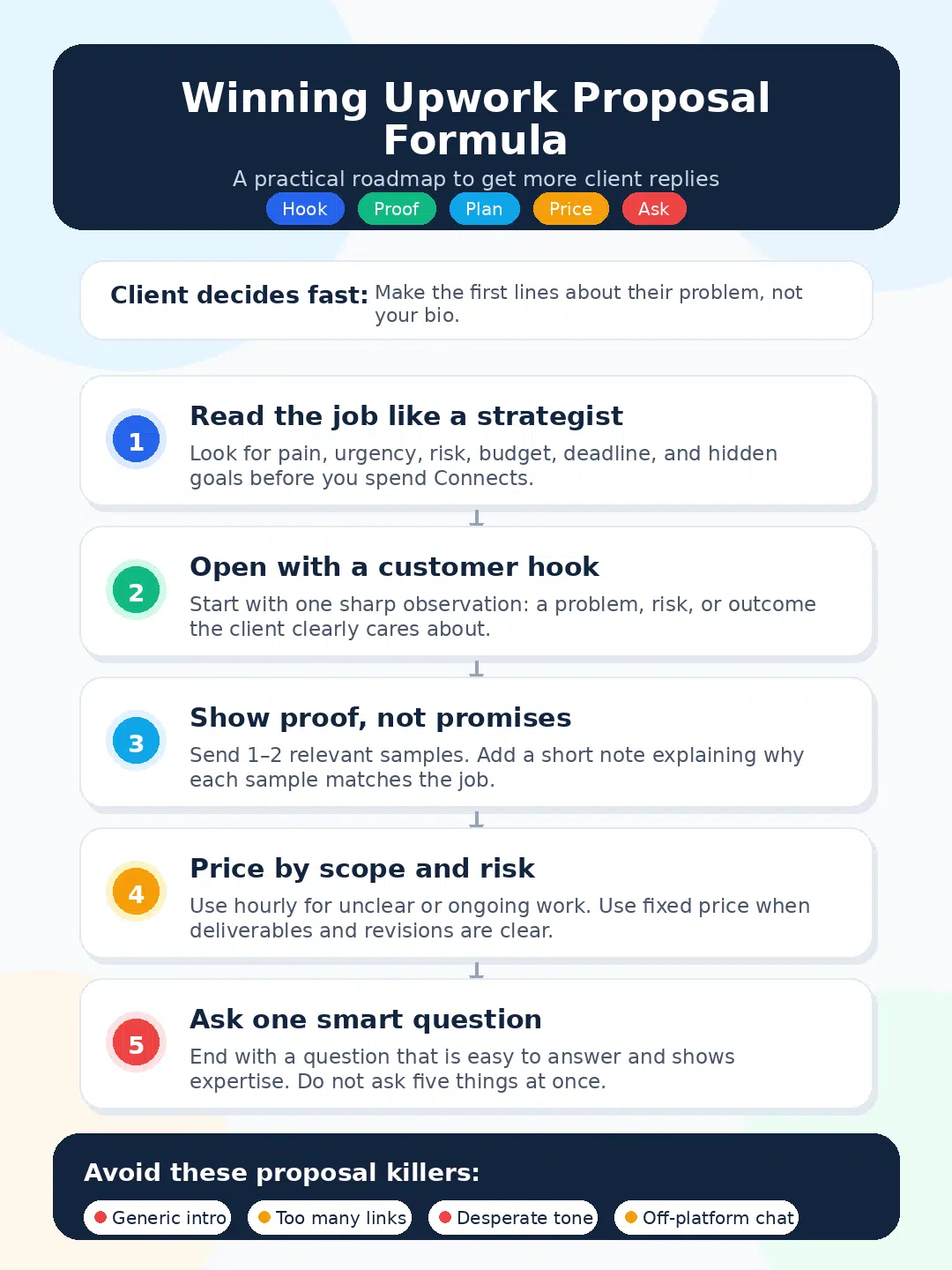
Winning Upwork Proposal: The Simple Structure That Works
A winning Upwork proposal doesn’t need to be long. It needs to be clear.
Most good proposals follow a simple flow:
- Start with a custom hook.
- Show that you understand the problem.
- Add relevant proof.
- Explain your first steps.
- Share one strong sample.
- Ask one smart question.
- End with a simple next step.
| Proposal Part | Purpose | Example |
|---|---|---|
| Hook | Gets attention | “This looks like a conversion issue, not just a design issue.” |
| Problem insight | Shows understanding | “Traffic is coming, but the offer may not feel clear enough.” |
| Proof | Builds trust | “I worked on a similar landing page cleanup recently.” |
| Process | Reduces doubt | “I’d start with a quick audit, then rewrite the hero section.” |
| Portfolio | Supports your claim | “Here’s a similar sample.” |
| Question | Encourages a reply | “Is your main goal leads or direct sales?” |
Start With the Client’s Problem
Don’t start by saying how great you are.
Start with what the client needs.
For example, if a client wants SEO content, don’t write:
I am an SEO writer with strong keyword research skills.
Write:
If your goal is organic traffic, I’d first map search intent before writing. That way the article is built to rank, not just fill the blog.
That sounds more useful. It shows you understand the job behind the job.
Keep It Short, But Not Empty
Most proposals should stay around 150–250 words.
For bigger technical jobs, you can write more. But don’t turn the proposal into a full essay.
Use short paragraphs. Say what matters. Cut the rest.
A client should understand your message in under a minute.
Make Hiring You Feel Safe
Clients worry about bad communication, missed deadlines, unclear scope, and poor quality.
Your proposal should calm those fears.
You can write:
To keep the project clean, I’d split this into two milestones: first draft and revision-ready final delivery.
That one line tells the client you know how to manage work.
Read the Job Post Like a Strategist
Most freelancers read job posts too quickly.
They look at the title, budget, and required skills. Then they apply.
That’s not enough.
A serious freelancer reads for pain, urgency, risk, and buying signals.
| Job Post Signal | What It May Mean | How to Use It |
|---|---|---|
| “Need ASAP” | The client has urgency | Offer a fast first step |
| “Previous freelancer failed” | The client has trust issues | Lead with process and reliability |
| “Long-term role” | They want consistency | Mention updates and workflow |
| “Need expert” | Quality matters | Show proof early |
| “Small test first” | They want low risk | Suggest a paid test milestone |
| Vague brief | They need guidance | Ask one smart discovery question |
Find the Real Problem
Clients don’t always describe the real problem clearly.
A client may write:
Need someone to redesign my website.
But the real issue may be:
- Low conversion
- Slow loading speed
- Weak mobile layout
- Confusing service copy
- Poor trust signals
- Outdated branding
A better proposal would say:
A redesign can help, but I’d first check the hero message, CTA placement, and mobile layout. Those usually affect leads more than colors alone.
That shows you’re not just a task-taker. You’re thinking about results.
Check Client Quality Before Applying
Before spending Connects, check the client.
Look at:
- Is the payment method verified?
- Has the client hired before?
- Is the budget realistic?
- Does the post feel clear?
- Are freelancer reviews positive?
- Is the deadline reasonable?
- Can you show a relevant sample?
Don’t apply just because you can do the job.
Apply when you can prove you’re a good fit.
Avoid Red-Flag Jobs
Some jobs look simple but become painful.
Be careful with posts that say:
- “Need expert, low budget.”
- “This should take only 10 minutes.”
- “Unlimited revisions required.”
- “Payment after full satisfaction.”
- “Must be available 24/7.”
- “Cheapest freelancer needed.”
A bad client can cost more than a missed opportunity.
Write Client Hooks That Stop the Scroll
Your hook is the first strong line in your proposal.
It should not sound desperate. It should not sound copied. It should show that you noticed something useful.
| Hook Type | Best For | Example |
|---|---|---|
| Diagnosis hook | SEO, ads, UX, strategy | “This looks like an offer clarity issue, not only a traffic issue.” |
| Risk hook | Development, migration, finance | “The risky part is moving the data without breaking current workflows.” |
| Proof hook | Any service | “I handled a similar Shopify cleanup last month.” |
| Outcome hook | Content, sales, marketing | “The goal should be better qualified replies, not just more posts.” |
| Question hook | Vague jobs | “Before quoting, I’d confirm whether the issue is speed, design, or conversion.” |
Openings You Should Avoid
Skip lines like:
- “Dear hiring manager”
- “I hope you are doing well”
- “I read your job description carefully”
- “I am the best fit”
- “Give me one chance”
- “I can do this perfectly”
These lines are everywhere. They waste your best space.
Use the One-Observation Method
Read the post and write one useful observation.
For SEO:
You already have published content, so I wouldn’t start by writing more. I’d first check which pages are stuck on page two and improve those.
For web design:
The main challenge is not adding more sections. It’s making the offer clear above the fold.
For virtual assistance:
This role needs consistency more than speed. I’d set up a simple daily task tracker from day one.
That’s how you sound specific without writing too much.
Write Like a Person
Don’t over-polish your proposal until it sounds fake.
Avoid this:
I can leverage my expertise to deliver optimized outcomes.
Say this:
I can help you clean this up and make the next steps clear.
Simple language wins because clients understand it fast.
Use Portfolio Proof the Right Way
Your portfolio isn’t decoration. It’s proof.
A client wants to know one thing: “Can this person do my type of work?”
So don’t send every sample you have. Send the right sample.
| Portfolio Mistake | Better Move |
|---|---|
| Sending 10 random links | Send 1–2 relevant samples |
| No explanation | Add one line of context |
| Only showing visuals | Explain the problem and result |
| Sharing old work only | Keep samples fresh |
| No client work yet | Create honest sample projects |
Send Fewer, Stronger Samples
Clients don’t want to open 12 links.
Send one or two samples that closely match the job.
If the client wants a landing page, send a landing page.
If they want a dashboard, send a dashboard.
If they want blog writing, send a blog sample with similar search intent.
Relevance matters more than quantity.
Add Context Before the Link
Don’t just paste a link.
Write:
This sample is close to your project because the client also needed a cleaner service page and stronger CTA placement.
Or:
Here’s a similar dashboard using sample data. It shows how I organize messy information into a weekly reporting view.
That little explanation helps the client understand why the sample matters.
New Freelancers Can Still Show Proof
You don’t need paid client work to show skill.
You can create sample projects, such as:
- A mock SEO audit
- A sample landing page rewrite
- A dummy data dashboard
- A social media content calendar
- A product description sample
- An email welcome sequence
- A website speed checklist
- A brand mood board
- An automation workflow diagram
Just be honest. Say it’s a sample.
A clean sample is better than no proof.
Price Remote Projects With Confidence
Pricing is part of your proposal. It tells the client how you think.
If you price too low, serious clients may doubt your quality.
If you price too high without explaining scope, they may skip you.
The goal is not to be cheap. The goal is to make your price make sense.
Upwork’s freelancer service fee currently ranges from 0% to 15% per contract. Freelancers can see the fee before submitting a proposal or accepting an offer.
| Pricing Model | Best For | What to Watch |
|---|---|---|
| Hourly | Ongoing or unclear work | Weekly limits and tracking |
| Fixed price | Clear deliverables | Scope creep |
| Milestone-based | Bigger projects | Weak milestone wording |
| Paid audit | Complex projects | Client must see the value |
| Retainer | Monthly work | Deliverables must be clear |
When Hourly Pricing Works Best
Hourly pricing works well when the scope may change.
Use hourly for:
- Virtual assistance
- Customer support
- SEO maintenance
- Development support
- Research
- Admin tasks
- Technical troubleshooting
A good proposal line:
Since the scope may change after the first review, hourly with a weekly cap would keep the budget controlled.
That sounds fair and professional.
When Fixed Price Works Best
Fixed price works best when the deliverables are clear.
Use fixed price for:
- One landing page
- Five blog posts
- A logo package
- A website audit
- An email sequence
- Product listing upload
- Resume rewrite
A good proposal line:
This looks clear enough for fixed pricing. I’d split it into two milestones: first draft and final revision.
That protects both sides.
Build Your Real Cost Into the Quote
Don’t price only for the main task.
Include time for:
- Research
- Calls and messages
- Revisions
- Testing
- Project management
- File handover
- Documentation
- Platform fees
If you want to earn $300, don’t quote $300 without thinking about fees and extra time.
Price like a business owner, not like someone begging for work.
Protect Yourself With Funded Milestones
For fixed-price jobs, make sure the milestone is funded before you start.
Don’t begin work based only on a message.
Keep the milestone clear. Submit work through Upwork’s system. Match your delivery with the milestone description.
That protects your time.
Use Connects and Boosted Proposals Strategically
Connects are part of your client acquisition cost.
Treat them like a small marketing budget.
Don’t spend them randomly. Spend them where you have a real chance.
| Job Situation | Best Action |
|---|---|
| Strong fit, fresh post | Apply quickly with a custom hook |
| Weak fit, many proposals | Skip it |
| Clear budget, serious client | Apply with proof |
| Vague post, no hiring history | Be careful |
| Exact niche match | Apply with your best sample |
| Unrealistic deadline | Clarify scope or avoid |
Don’t Apply to Everything
Sending 50 weak proposals isn’t a strategy.
A better plan:
- Apply to fewer jobs.
- Write stronger first lines.
- Use better samples.
- Track your results.
- Improve your template every week.
Quality beats volume.
Boost Only When the Job Is a Strong Match
Boosted proposals can help your proposal appear higher in the client’s list. But boosting doesn’t guarantee a job.
Boost only when:
- The job matches your niche
- The budget is realistic
- You have a relevant sample
- Your first line is strong
- The client has a good hiring history
Don’t boost a weak proposal. It only makes a weak message more visible.
Track Your Proposal Results
Use a simple tracker.
| What to Track | Why It Helps |
|---|---|
| Job title | Shows which niches you target |
| Connects spent | Tracks outreach cost |
| Proposal hook | Shows what gets replies |
| Sample sent | Shows which proof works |
| Client response | Measures quality |
| Interview booked | Shows proposal strength |
| Hired or not | Shows conversion |
After 20–30 proposals, you’ll start seeing patterns.
Maybe one service gets more replies. Maybe one hook works better. Maybe your price is too low or too high.
Tracking turns guessing into learning.
Build Proposal Templates That Still Feel Personal
Templates save time.
But copy-paste messages kill trust.
Use a structure, not a script.
| Template Section | Can Reuse? | Must Customize? |
|---|---|---|
| Greeting | Yes | Slightly |
| First hook | No | Always |
| Proof paragraph | Partly | Yes |
| Process | Yes | Adjust |
| Portfolio note | Partly | Yes |
| Pricing line | Partly | Yes |
| Closing question | Yes | Adjust |
A Simple Winning Upwork Proposal Template
Use this as a base:
Hi [Name],
Your post caught my attention because [specific observation about their problem].
I’ve worked on similar projects where [relevant proof or context].
For your project, I’d start with [step 1], then [step 2], and deliver [final outcome].
Here’s a relevant sample: [link].
One quick question: [smart question].
Happy to help if you want a clean, practical approach.
Example for SEO Freelancers
Hi [Name],
You mentioned that your site has content but rankings aren’t improving. I wouldn’t start by writing more articles right away. I’d first check search intent, internal links, indexing, and pages stuck near page one.
I’ve handled similar SEO cleanup work where improving existing pages worked better than adding new content.
I’d start with a quick audit and prepare a priority list of fixes.
One question: are you trying to recover lost traffic or build new keyword growth?
Example for Web Designers
Hi [Name],
Your project sounds like it needs a cleaner landing page structure, not just a prettier design. I’d focus first on the hero section, CTA placement, trust signals, and mobile readability.
I’ve worked on similar service pages where the goal was to make the offer easier to understand.
I can start with a wireframe before moving into the full design.
Do you already have the copy ready, or should the first milestone include content structure too?
Example for Virtual Assistants
Hi [Name],
This role looks like it needs someone organized and consistent, not just fast. I’d set up a simple task tracker, daily update format, and weekly summary so you always know what’s done.
I’ve supported similar admin workflows involving email, scheduling, data entry, and customer follow-up.
One quick question: do you already use a tool like Trello, Notion, or Asana?
Ask Better Questions Inside the Proposal
A good question can start a conversation.
A bad question creates more work for the client.
| Weak Question | Better Question |
|---|---|
| “Can we discuss?” | “Do you want the page optimized for leads or direct sales?” |
| “What is your budget?” | “Would you prefer fixed milestones or hourly after the audit?” |
| “When do you need it?” | “Is there a launch date I should plan around?” |
| “Do you have details?” | “Do you already have brand guidelines and copy?” |
Ask One Question Only
Don’t ask five questions in the first proposal.
That feels like homework.
Ask one smart question that’s easy to answer.
Example:
Are you mainly trying to improve rankings for existing pages, or do you want new content clusters built from scratch?
That question shows you understand SEO strategy.
Don’t Ask Lazy Questions
Never ask something the client already answered in the post.
If they mentioned the deadline, don’t ask for the deadline.
If they mentioned Shopify, don’t ask what platform they use.
Read properly. It shows respect.
Stay Safe With Upwork Communication Rules
This part matters.
Upwork expects pre-contract communication to stay on Upwork in most cases. That means you shouldn’t move the conversation to WhatsApp, email, Telegram, or Skype before a contract starts.
| Situation | Safe Action |
|---|---|
| Client asks for WhatsApp before contract | Keep the chat on Upwork |
| Client asks for email before contract | Say Upwork requires platform communication |
| Client wants a call | Use Upwork’s built-in call option |
| Client wants off-platform payment | Refuse |
| Contract has started | Follow Upwork’s current workroom rules |
A Safe Reply You Can Use
I’m happy to discuss the project. To stay aligned with Upwork’s rules, let’s keep the conversation here until the contract is active.
This keeps things professional and protects your account.
Improve Your Profile Before Sending More Proposals
Sometimes the proposal isn’t the only problem.
A client may like your proposal, click your profile, and leave because your profile feels weak or too broad.
Your profile must support your proposal.
| Profile Area | What to Improve |
|---|---|
| Title | Make it specific |
| Overview | Focus on client problems |
| Portfolio | Add relevant samples |
| Skills | Match your niche |
| Rate | Match your positioning |
| Specialized profiles | Use them for different services |
| Testimonials | Add trust where possible |
Make Your Profile Title Specific
Weak:
Digital Marketer
Better:
SEO Content Strategist for SaaS and Service Businesses
Weak:
Graphic Designer
Better:
Landing Page and Brand Identity Designer
Specific titles attract better-fit clients.
Match Your Profile With Your Proposal
If your proposal says you specialize in Shopify landing pages, your profile should show Shopify or landing page work.
If your proposal says you do SEO audits, your profile should include audit samples.
The client should feel the same message everywhere.
Write Portfolio Descriptions Properly
Each portfolio item should explain:
- What the problem was
- What you did
- Which tools you used
- What changed after the work
- Why the sample matters
Don’t just upload screenshots. Add context.
Advanced Proposal Tips for 2026
Freelance competition is getting sharper. Clients now see more AI-written proposals than ever. That makes a natural, specific, human proposal stand out even more.
| Advanced Tip | Why It Works |
|---|---|
| Mention risk | Shows real experience |
| Offer a first step | Lowers hiring fear |
| Use niche language | Shows you know the work |
| Avoid robotic writing | Builds trust |
| Explain your process | Makes the work feel safer |
Mention the Risk the Client May Not See
For website migration:
The main risk is changing the site structure without mapping URLs first. I’d start with a URL map before touching the live site.
For data work:
The risky part is cleaning duplicates before automation. If the data is messy, automation will repeat the same errors faster.
This kind of line makes you sound experienced.
Offer a Low-Risk First Step
Clients often hesitate because the full project feels big.
Offer something smaller first:
- Paid audit
- One test article
- One design concept
- One automation workflow
- One landing page section
- One dashboard sample
- One technical review
A small first step can lead to a bigger project.
Don’t Sound Like an AI Template
Avoid phrases like:
- “I am excited to apply”
- “I bring a wealth of experience”
- “I am confident I can exceed expectations”
- “I am the perfect candidate”
- “In today’s fast-paced digital landscape”
Clients have seen these lines too many times.
Write like a real person who understands the job.
Common Mistakes That Stop Clients From Replying
Most failed proposals aren’t terrible. They’re just forgettable.
| Mistake | Why It Fails | Better Approach |
|---|---|---|
| Long self-introduction | Client loses interest | Start with the project |
| Generic message | Looks copied | Add one specific observation |
| Too many samples | Creates confusion | Send 1–2 relevant links |
| No process | Feels risky | Explain first steps |
| Weak CTA | Hard to reply | Ask one clear question |
| Desperate tone | Reduces trust | Stay calm and professional |
Don’t Beg for Work
Avoid lines like:
- “Please give me one chance.”
- “I’ll work for cheap.”
- “I need this job.”
- “I can do anything.”
- “I promise 100% satisfaction.”
Clients want someone reliable. Desperation doesn’t build trust.
Don’t Overpromise
Don’t promise guaranteed rankings, viral growth, or overnight results.
Say this instead:
I can’t promise exact ranking positions, but I can audit the current pages, fix search intent gaps, and improve the internal linking structure.
That sounds honest. It also sounds professional.
Don’t Do Free Work
A small insight is fine.
Doing the full job for free is not.
Good:
One quick thought: your first section may need a clearer CTA.
Bad:
Sending a full homepage rewrite before getting hired.
Protect your time.
Final Thoughts
A winning Upwork proposal is not a long cover letter. It’s a short, clear message that makes the client feel understood.
Start with the problem. Add one useful observation. Show proof. Explain your first step. Price with confidence. Ask one smart question.
That’s the formula.
You don’t need to sound fancy. You need to sound sharp, honest, and easy to work with.
The freelancers who win good Upwork jobs aren’t always the cheapest. They aren’t always the most experienced either.
They’re the ones who make the client think:
“This person understands what I need.”
And once your proposal does that, you’re already ahead of most freelancers in the list.
Uncommon FAQs About Writing a Winning Upwork Proposal
Should I apply if the client already has many proposals?
Yes, but only if the job is a strong fit.
If you have a sharp hook and relevant proof, you still have a chance. If you’re sending a generic message, save your Connects.
Should I mention my price in the proposal?
Yes, but don’t lead with price unless the job is very budget-focused.
Show fit first. Then explain pricing.
Example:
This can work as a fixed-price project if the deliverables stay limited to three pages. If the scope expands, hourly may be safer.
Is hourly better than fixed price?
It depends on the work.
Hourly works better for ongoing or unclear projects.
Fixed price works better when the deliverables, timeline, and revision limits are clear.
Should beginners use portfolio samples?
Yes.
If you don’t have client work yet, create honest samples. A mock audit, sample landing page, content calendar, or dummy dashboard can still prove your skill.
Do boosted proposals guarantee interviews?
No.
Boosting can help with visibility, but it can’t fix a weak proposal. You still need a strong hook, relevant proof, and clear positioning.
In most cases, no.
Keep pre-contract communication on Upwork. It protects your account and keeps the project within platform rules.
How long should an Upwork proposal be?
For most jobs, 150–250 words is enough.
The goal is not to write more. The goal is to say the right things clearly.
What should I do if the client’s budget is too low?
Don’t insult the budget.
Offer a smaller scope.
Example:
At this budget, I’d suggest starting with the homepage only. If you want the full five-page rewrite, we can split it into milestones.
That keeps the conversation professional.




























