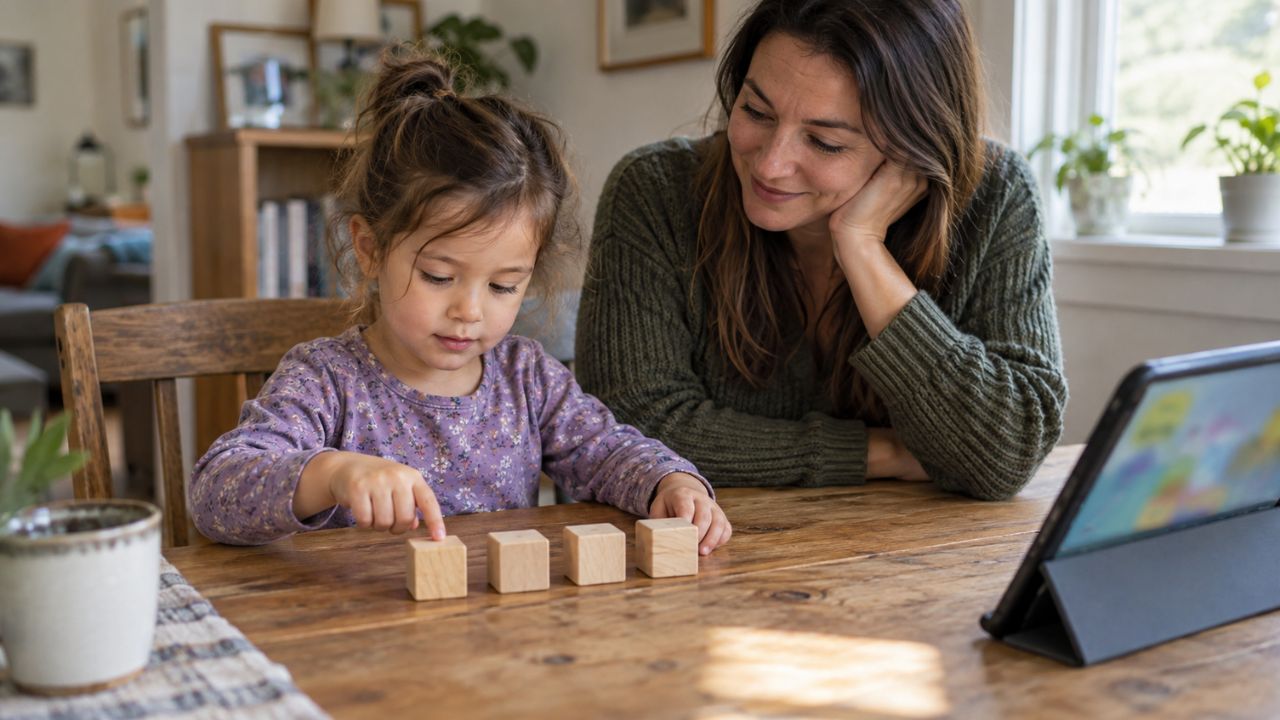
Homeschooling with technology is no longer just about giving a child a tablet and opening an online lesson. It is about building a thoughtful learning environment where parents, children, digital tools, offline activities, live classes, learning games, and real-world experiences work together.
A few years ago, many families understood homeschooling as a parent-led alternative to traditional school. Today, that picture has changed. The rise of AI, online homeschool platforms, educational apps, digital communities, and interactive learning tools has reshaped how children learn at home.
At Editorialge Media LLC, we have seen this shift closely. We are no longer just a publisher. We are growing as a digital venture studio that connects technology, media, education, and everyday life. That vision inspired us to build Edutorial, our sister concern focused on early learning games for preschool children.
Through Edutorial, we have developed learning games such as Alphabet Magic Trace & Phonics, 123 Numbers: Count and Tracing Game, and Spell & Learn: Kids Spelling Game for Android, iOS, and other platforms. Our goal has never been to create noisy games that only keep children busy. Our goal is to support real learning through safe, playful, child-friendly, and expert-informed digital experiences.
That same belief should guide every family using homeschooling with technology.
Technology should not replace parents. It should not replace books, outdoor play, handwriting, storytelling, curiosity, or family discussion. Instead, the best homeschool tech tools should help families save time, personalize lessons, support children’s natural learning behavior, and make education more accessible.
This guide will help you understand how to use digital homeschooling wisely, from choosing online curriculum and homeschool tech tools to setting family rules, tracking progress, teaching digital citizenship, planning STEM activities, and preparing homeschoolers for college.
Why Homeschooling with Technology Matters Now
Children today are growing up in a learning environment that is very different from the one many parents experienced.
Parents have less time. Children’s attention patterns are changing. Online content is everywhere. AI is becoming part of daily learning. Traditional education systems are also changing. In this environment, homeschooling with technology can be powerful, but only if it is used with intention.
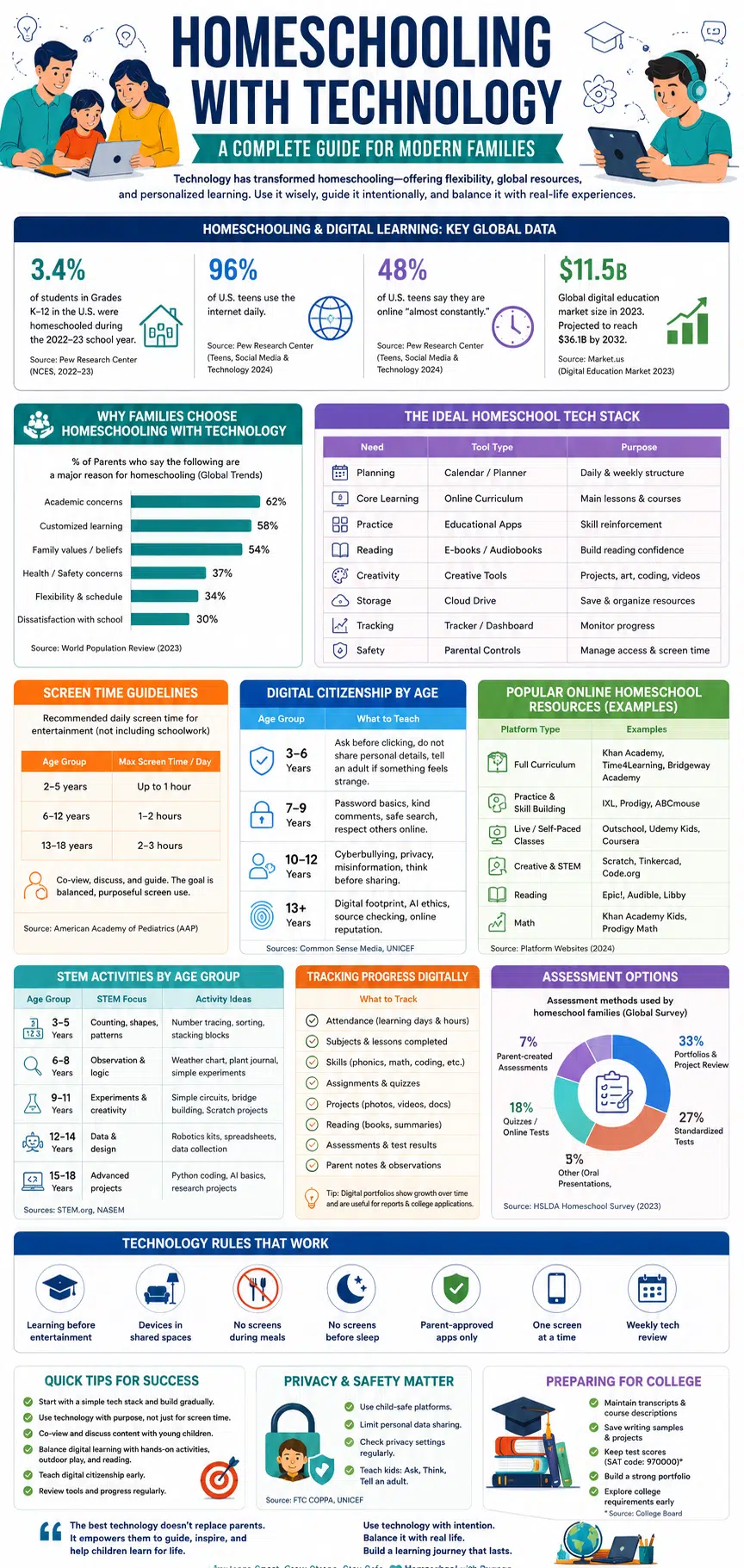
Recent data shows why this matters. Pew Research Center reported that 3.4% of U.S. K–12 students were homeschooled during the 2022–23 academic year, based on NCES data. While this is U.S.-specific, it reflects a broader global conversation about flexible education models.
At the same time, children and teens are deeply connected to digital spaces. Pew’s 2024 research found that nearly half of U.S. teens say they are online almost constantly, and 96% use the internet daily.
For parents, this creates both opportunity and responsibility.
The opportunity is clear: children can learn from high-quality online homeschool resources, virtual field trips, educational apps, coding tools, live classes, and global communities.
The responsibility is equally clear: children need guidance, safety, structure, and digital citizenship skills.
That is why homeschooling with technology should never mean unlimited screen time. It should mean guided, purposeful, balanced learning.
What Is Homeschooling with Technology?
Homeschooling with technology means using digital tools to support home-based education. It may include online curriculum, learning apps, video lessons, digital worksheets, live online classes, virtual field trips, coding platforms, educational games, parent dashboards, progress trackers, and online homeschool communities.
But true digital homeschooling is not just “school on a screen.”
A strong online homeschool system usually combines:
| Learning Area | Digital Support | Offline Balance |
| Reading | Phonics apps, e-books, audiobooks | Read-aloud time, printed books |
| Writing | Typing tools, story apps, grammar tools | Handwriting, journaling |
| Math | Digital practice, number games | Manipulatives, real-life counting |
| Science | Videos, simulations, virtual labs | Experiments, nature observation |
| Art | Drawing apps, design tools | Painting, crafts, sketching |
| Social learning | Live classes, co-ops, forums | Playdates, family projects |
| Assessment | Digital portfolios, quizzes | Parent observation, presentations |
The best homeschool tech tools support both learning and real-life practice.
For example, a preschool child may use a number tracing app, then count fruits in the kitchen. A middle school child may watch a science video, then build a small experiment. A high school student may take an online coding class, then build a project portfolio.
Technology becomes useful when it helps children move from passive viewing to active learning.
Our Philosophy: Technology Should Be a Guided Learning Space
One of the strongest lessons we have learned from building Edutorial is this: leaving a child alone in a digital ecosystem is like dropping them in a massive city without a map.
Children need guidance.
A strong screen-time philosophy does not treat technology as a babysitter. It treats the digital world as a place families visit together. Parents can co-view content, ask questions, discuss what is happening on screen, and help children understand what they are learning.
This turns passive screen use into active, guided learning.
For preschool children especially, this matters deeply. A young child does not always understand why a game is asking them to trace a letter, match a sound, or count an object. But when a parent sits nearby and says, “That is the letter B. Can you find something in the room that starts with B?” The digital lesson becomes part of real life.
That is the kind of balance homeschooling with technology needs.
1. Building a Homeschool Tech Stack
A homeschool tech stack is the collection of tools your family uses for learning, planning, practice, communication, creativity, and progress tracking. Many parents make one common mistake: they download too many apps too quickly. This creates confusion for both the parent and the child.
A better approach is to start small.
A Simple Homeschool Tech Stack
| Need | Tool Type | Purpose |
| Planning | Calendar or homeschool planner | Daily and weekly structure |
| Core learning | Online curriculum | Main lessons |
| Practice | Educational apps | Skill reinforcement |
| Reading | E-books or audiobook tools | Reading support |
| Creativity | Drawing, video, audio, or writing apps | Project-based learning |
| Storage | Cloud drive | Save worksheets, photos, projects |
| Tracking | Spreadsheet or homeschool tracker | Monitor progress |
| Safety | Parental controls | Manage access and screen time |
For preschool learners, the stack should stay very simple. They do not need complicated dashboards. They need safe, visual, easy-to-use tools that support alphabet recognition, phonics, counting, memory, and early problem-solving.
That is why apps like Alphabet Magic Trace & Phonics and 123 Magic Number Fun can be useful supporting tools for early learners when used with parent guidance.
For older children, the tech stack may include online homeschool classes, research databases, writing tools, coding platforms, digital flashcards, presentation tools, and portfolio systems.
Best Rule for Parents
Start with only five tools:
- One main curriculum platform
- One practice app per key subject
- One planning or tracking tool
- One creative tool
- One safety/control tool
Add more only when there is a clear learning need.
2. Online Curriculum Options Compared
Online curriculum is one of the biggest decisions in digital homeschooling. Some parents want a complete curriculum that covers every subject. Others prefer to combine free resources, live classes, books, games, and projects.
There is no single best online homeschool curriculum for every family. The right choice depends on your child’s age, learning style, budget, country, legal requirements, and your available time as a parent.
Types of Online Homeschool Curriculum
| Curriculum Type | Best For | Strength | Limitation |
| Full online curriculum | Parents wanting structure | Organized and complete | May feel rigid |
| Self-paced platform | Independent learners | Flexible pacing | Requires monitoring |
| Live online classes | Social learners | Teacher interaction | Fixed schedule |
| Skill-based apps | Practice and repetition | Great for specific skills | Not complete curriculum |
| Game-based learning | Young children | High engagement | Needs parent guidance |
| Open resources | Budget-conscious families | Often free | Requires planning |
| Hybrid model | Most families | Balanced | Needs organization |
Khan Academy, for example, offers free learning resources across many K–12 and early college subjects. IXL provides personalized practice in several subjects. Outschool offers live and self-paced online classes for children across many interests. These examples show how wide the online homeschool ecosystem has become.
The best approach for many families is hybrid learning.
Use one main curriculum for structure. Then add learning games, books, hands-on activities, field trips, and live classes where needed.
3. Choosing Homeschool Tech Tools Wisely
Not every educational app is truly educational.
This is something we noticed before building our own Edutorial games. Many children’s apps depend heavily on flashy badges, coins, loud sounds, and constant rewards to pull children through the content. That may increase screen time, but it does not always support deep learning.
Another problem is rigid design. Many apps push every child through the same linear path. If the app moves too fast, the child feels frustrated. If it moves too slowly, the child becomes bored.
Many apps are also built by software teams first and educators second. That creates a gap between what looks fun and what actually supports learning.
Before developing our learning games, we discussed ideas with local educators. That helped us focus on early childhood needs, skill development, and child-friendly learning. This educator-informed process also helped one of our apps, 123 Magic Number Fun: Math Kid, earn the Teacher Approved badge on Google Play.
How to Evaluate Homeschool Tech Tools
| Question | Why It Matters |
| What skill does this tool teach? | Avoids empty screen time |
| Is it age-appropriate? | Protects confidence and attention |
| Does it adapt to the child? | Supports different learning speeds |
| Is it safe and child-friendly? | Protects privacy and focus |
| Can parents guide or review progress? | Supports accountability |
| Does it encourage creation or only consumption? | Builds deeper learning |
| Is it calm or overstimulating? | Helps children stay focused |
Parents can also explore Editorialge’s guides on best educational apps for kids, best alphabet learning games for kids, and drawing apps and websites for kids when choosing tools for young learners.
4. Digital Citizenship for Kids Explained
Digital citizenship means teaching children how to use technology safely, respectfully, responsibly, and thoughtfully.
This should be part of every online homeschool plan.
Children need to know that the internet is not just a place for games and videos. It is a public space where privacy, kindness, attention, and truth matter.
Common Sense Media describes digital citizenship as helping students make smart choices online, think critically, and build healthy habits through a K–12 curriculum. UNICEF also notes that digital learning brings opportunities for children but introduces risks that need to be managed effectively.
Digital Citizenship by Age
| Age Group | What to Teach |
| 3–6 | Ask before clicking, do not share personal details |
| 7–9 | Password basics, kind comments, safe search |
| 10–12 | Cyberbullying, privacy, misinformation |
| 13+ | Digital footprint, AI ethics, source checking, online reputation |
For preschoolers, digital citizenship should be simple:
“Ask before you click.”
“Do not talk to strangers online.”
“Do not share your name, photo, school, or home.”
“Tell an adult if something feels strange.”
For older children, digital citizenship should include privacy, plagiarism, online research, misinformation, respectful debate, healthy screen use, and responsible AI use.
5. Setting Family Technology Rules That Stick
Family technology rules are essential for homeschooling with technology. Without rules, learning devices can quickly become entertainment devices.
The American Academy of Pediatrics recommends that families create a media plan that fits their needs, including screen-free times, screen-free zones, notification control, and healthy routines.
A good family rule is not complicated. It is clear, visible, and repeated.
Practical Family Tech Rules
| Rule | Why It Helps |
| Learning before entertainment | Keeps priorities clear |
| Devices in shared spaces | Makes supervision easier |
| No screens during meals | Protects family time |
| No screens before sleep | Supports rest |
| Parent-approved apps only | Improves safety |
| One screen at a time | Reduces distraction |
| Weekly tech review | Builds responsibility |
A simple family statement can help:
“In our home, technology is for learning, creating, practicing, and connecting. It is not for avoiding sleep, family, effort, or real life.”
That sentence can become the foundation of your online homeschool culture.
6. Live Online Classes for Homeschoolers
Live online classes can add structure, social connection, and expert instruction to homeschooling.
They are especially helpful for subjects parents may not feel confident teaching, such as advanced math, science, coding, foreign languages, music, debate, or writing.
But live classes should not take over the whole homeschool day.
Children still need quiet study, hands-on work, outdoor play, reading, family conversation, and creative projects.
When Live Online Classes Work Best
| Good Sign | Why It Matters |
| Teacher interacts with students | Prevents passive watching |
| Class size is manageable | Allows participation |
| Assignments are clear | Reduces parent confusion |
| Parents can review expectations | Builds trust |
| Schedule fits child’s energy | Improves focus |
| Platform is safe | Protects children |
For many families, two or three strong live classes per week work better than long daily video sessions.
7. Project-Based Learning with Technology
Project-based learning is one of the best ways to make digital homeschooling meaningful. Instead of only watching lessons or completing quizzes, children create something.
They may build a model, record a video, design a poster, write a story, make a slideshow, create a digital drawing, build a simple game, or present a science experiment.
Project-Based Learning Ideas
| Subject | Project | Technology Used |
| Science | Weather journal | Weather app, spreadsheet |
| History | Timeline project | Timeline tool, maps |
| Writing | Book review video | Camera, editing app |
| Math | Family budget | Spreadsheet |
| Art | Digital portfolio | Drawing app |
| Coding | Simple animation | Scratch or block coding |
| Geography | Country comparison | Maps, slides |
Scratch is a free programming language and online community where children can create interactive stories, games, and animations. ScratchJr introduces similar creative coding ideas for younger children ages 5–7.
Parents can also use ideas from Editorialge’s guides on engaging and educational activities for kids and educational toys for kids to combine digital and hands-on learning.
The best project-based learning question is:
“What can my child make to show they understood this?”
That one question changes learning from passive consumption to active creation.
8. Homeschool Co-ops and Online Communities
Homeschooling does not have to be isolated. Online homeschool communities and co-ops can help parents share resources, find classes, organize field trips, and give children social learning opportunities.
A homeschool co-op may offer:
- Group classes
- Book clubs
- Science labs
- Art workshops
- Sports days
- Field trips
- Parent-led projects
- Online discussion groups
How to Choose a Safe Homeschool Community
| Checkpoint | What to Look For |
| Moderation | Active admins and clear rules |
| Privacy | No pressure to share child details |
| Safety | No unsupervised private chats for young kids |
| Educational value | Useful lessons and resources |
| Respect | Supportive tone |
| Parent involvement | Parents can observe and participate |
For global families, online homeschool communities can be especially valuable because they connect children and parents across countries, cultures, and learning systems.
9. Tracking Homeschool Progress Digitally
Tracking progress is one of the biggest advantages of homeschool tech tools.
Parents can track lessons, reading, assignments, attendance, projects, quizzes, videos, field trips, and skill development.
This is important because homeschool laws and reporting rules vary widely by location. In the U.S., HSLDA organizes state-by-state homeschool legal information, including requirements related to testing, subjects, and records. For global readers, the same principle applies: always check the official rules where you live.
What to Track
| Category | Examples |
| Attendance | Learning days and hours |
| Subjects | Math, reading, science, history |
| Assignments | Completed lessons |
| Skills | Phonics, writing, counting, coding |
| Projects | Photos, videos, presentations |
| Assessments | Quizzes, tests, portfolios |
| Reading | Books, summaries, vocabulary |
| Parent notes | Strengths, struggles, next steps |
A spreadsheet is enough for many families. Others may prefer a homeschool planner or learning management system.
For preschool children, tracking can be simple. Save monthly examples of tracing, counting, drawing, phonics, or memory activities. Over time, these samples show real progress.
10. Virtual Field Trips for Homeschoolers
Virtual field trips allow children to explore museums, zoos, science centers, historical sites, national parks, oceans, and space from home.
But a virtual field trip should not be passive. It should include preparation, observation, and reflection.
Virtual Field Trip Structure
| Stage | Activity |
| Before | Ask three questions |
| During | Take notes or draw what you see |
| After | Make a poster, summary, or short presentation |
Example questions:
- What did you notice first?
- What surprised you?
- What did you learn?
- What question do you still have?
Virtual field trips are useful for history, geography, science, art, and culture. They also help children build observation and communication skills.
11. STEM Activities by Age Group
STEM learning begins long before advanced coding or robotics. For preschoolers, STEM starts with counting, sorting, stacking, comparing, matching, tracing, predicting, and asking questions.
STEM Activities by Age
| Age Group | STEM Focus | Activity Ideas |
| 3–5 | Counting, shapes, patterns | Number tracing, sorting, blocks |
| 6–8 | Observation and logic | Weather chart, plant journal |
| 9–11 | Experiments | Circuits, bridges, Scratch projects |
| 12–14 | Data and design | Robotics, spreadsheets |
| 15–18 | Advanced projects | Python, AI basics, research |
This is where early learning games can support preschool foundations. A child who practices pattern recognition, memory, sequencing, counting, and problem-solving is preparing for later math, coding, and scientific thinking.
Parents can support this with tools like number games, alphabet games, drawing apps, building toys, puzzles, and simple experiments.
12. Introducing Programming to Young Kids
Programming helps children learn logic, sequencing, patience, creativity, and problem-solving. Young children do not need to start with real code. They can begin with unplugged coding.
For example, ask your child to guide you from one side of the room to another using exact steps:
“Move forward.”
“Turn left.”
“Stop.”
“Pick up the book.”
This teaches the idea of instructions and sequence.
Coding Roadmap for Homeschoolers
| Age | Best Starting Point |
| 4–6 | Unplugged coding, patterns, arrows |
| 7–9 | Block coding and simple animations |
| 10–12 | Scratch projects and logic games |
| 13–15 | Python, HTML, CSS |
| 16–18 | Apps, websites, AI projects, portfolio |
The goal is not to force every child to become a programmer. The goal is to help children understand that technology is something they can create with, not only consume.
13. Standardized Testing for Homeschoolers
Standardized testing depends on where you live. Some regions require homeschool testing. Others allow portfolio reviews. Some families use testing voluntarily to measure progress or prepare for college.
HSLDA lists common assessment options such as timed standardized tests, untimed tests, portfolios, evaluators, anecdotal records, and checklists.
Common Assessment Options
| Assessment Type | Purpose |
| Parent-created quizzes | Check weekly understanding |
| Online tests | Fast feedback |
| Portfolio review | Show long-term progress |
| Standardized tests | External benchmark |
| Oral presentation | Communication skills |
| Project review | Applied learning |
| SAT/ACT | College admissions support |
For U.S. college-bound homeschoolers, testing codes matter. College Board says homeschoolers should use high school code 970000 for the SAT. ACT provides homeschool resources and guidance for homeschooled students registering for the ACT.
For global homeschoolers, parents should check local university, exam board, and education authority requirements.
14. Transitioning from Homeschool to College
The transition from homeschool to college should begin before the final year of high school.
Digital tools can help students organize evidence of learning, including transcripts, writing samples, projects, certificates, reading lists, lab reports, volunteer work, and portfolios.
What Homeschool Students Should Keep
| Record | Why It Matters |
| Course list | Shows academic coverage |
| Grades or mastery notes | Helps build transcript |
| Reading list | Shows academic depth |
| Writing samples | Shows communication skills |
| Projects | Shows applied learning |
| Test scores | External benchmark |
| Certificates | Shows completed courses |
| Portfolio | Shows ability and growth |
College Board’s homeschool planning resources also explain important registration details for homeschool students applying to college.
A strong homeschool record should show not only what the student studied but also what the student can do.
Child Privacy and Safety in Digital Homeschooling
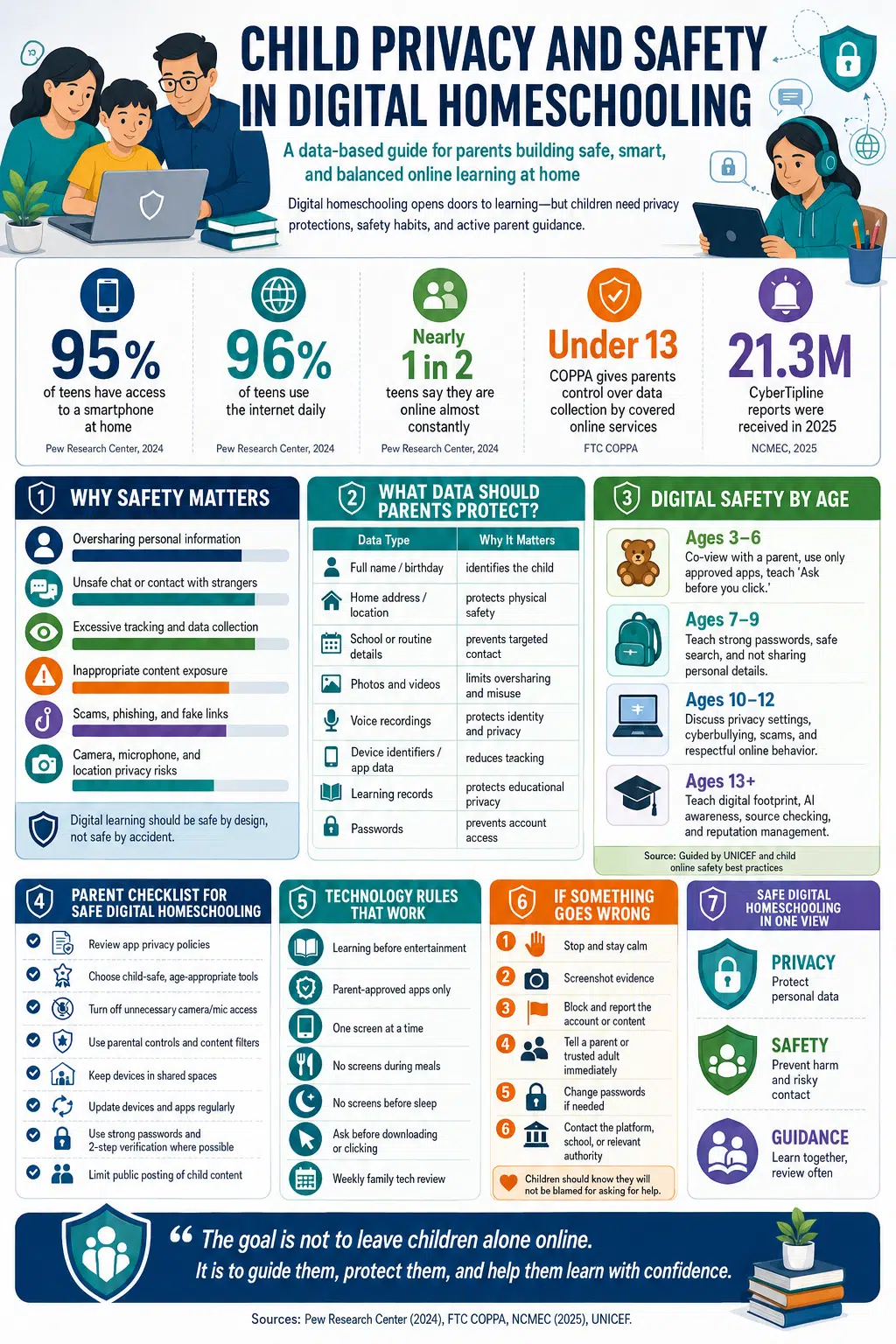
Parents should treat privacy as part of the curriculum. Children should not be pushed into apps, websites, or platforms without checking how their data is handled.
The FTC’s Children’s Online Privacy Protection Rule, known as COPPA, places requirements on operators of websites and online services directed to children under 13, including rules around collecting personal information from children.
For global families, the exact law may differ, but the safety principle is the same:
- Use child-safe platforms
- Avoid unnecessary accounts
- Check privacy settings
- Limit data sharing
- Avoid public posting of children’s faces or personal details
- Use strong passwords
- Teach children to ask before clicking or sharing
Online homeschool safety is not only about blocking bad content. It is about teaching children how to move through digital spaces with awareness.
A Balanced Weekly Digital Homeschool Plan
Here is a sample weekly rhythm for families using homeschooling with technology.
| Day | Core Learning | Technology Use | Offline Balance |
| Monday | Reading + Math | Phonics app, math lesson | Read aloud, count objects |
| Tuesday | Science | Video lesson | Simple experiment |
| Wednesday | Writing | Story app or typing tool | Handwritten journal |
| Thursday | History/Geography | Virtual field trip | Map drawing |
| Friday | STEM/Art | Coding or drawing app | Build, paint, present |
| Saturday | Review | Portfolio update | Family discussion |
| Sunday | Rest | No required screens | Outdoor play |
This type of rhythm keeps online homeschool learning structured but not overwhelming.
Common Mistakes Parents Should Avoid
1. Using Too Many Tools
More apps do not mean better learning. A simple, consistent tech stack is better than a crowded digital environment.
2. Letting Screens Replace Parent Guidance
Digital homeschooling works best when parents stay involved. Co-viewing, asking questions, and discussing content matter.
3. Ignoring Screen Balance
Children need sleep, movement, outdoor time, play, conversation, and boredom. These are not distractions from learning. They are part of healthy development.
4. Choosing Flashy Apps Over Thoughtful Apps
Avoid tools that depend only on coins, rewards, and loud animations. Look for tools that support real skills.
5. Forgetting Digital Citizenship
Children need to learn privacy, kindness, online safety, research skills, and responsible technology use.
6. Not Saving Work Samples
Digital portfolios make it easier to show progress, prepare reports, and support future academic transitions.
Best Practices for Homeschooling with Technology
| Best Practice | Why It Works |
| Keep the tech stack simple | Reduces confusion |
| Use technology with purpose | Avoids passive screen time |
| Co-view with young children | Builds media literacy |
| Mix digital and offline learning | Deepens understanding |
| Teach digital citizenship early | Builds safety and responsibility |
| Track progress weekly | Helps parents adjust |
| Use projects often | Encourages creativity |
| Choose calm, safe apps | Protects focus |
| Review tools regularly | Removes what is not working |
UNESCO’s global education technology report also emphasizes that technology in education should be introduced based on evidence and should be appropriate, equitable, scalable, and sustainable.
That is a strong principle for homeschool families too.
Do not use technology because it is trendy. Use it because it helps your child learn better.
How Edutorial Fits into This Conversation
Edutorial is not the whole answer to homeschooling with technology. No single app or platform is.
But Edutorial represents one supporting example of how early digital learning can be designed more thoughtfully.
Our focus is preschool learning. We care about alphabet recognition, early literacy, counting, tracing, memory, problem-solving, and child-friendly design. We also believe educational games should be shaped by both technology teams and educators.
That matters because the future of digital homeschooling will not be built by software alone. It will be built by collaboration among parents, educators, designers, developers, researchers, and children themselves.
This is also connected to the broader conversation Editorialge has explored around the future of education and platforms such as Roblox as an interactive learning platform.
The future is not simply online learning. It is guided, safe, creative, personalized learning.
FAQs About Homeschooling with Technology
What is homeschooling with technology?
Homeschooling with technology means using digital tools such as online curriculum, educational apps, live classes, learning games, digital portfolios, virtual field trips, and progress trackers to support home education.
What are the best homeschool tech tools?
The best homeschool tech tools include a planning system, online curriculum, educational apps, digital reading tools, creative apps, parental controls, and progress trackers. The best tools depend on the child’s age and learning goals.
Is digital homeschooling good for preschool children?
Digital homeschooling can support preschool learning when tools are safe, simple, age-appropriate, and used with parent guidance. Preschool children still need play, conversation, movement, books, and hands-on activities.
How much screen time is healthy for homeschoolers?
There is no perfect number for every child. A better approach is to create a family media plan, set screen-free times, co-view with young children, protect sleep, and balance online learning with offline activities.
Can learning games help homeschoolers?
Yes, learning games can help when they teach real skills such as phonics, counting, tracing, memory, problem-solving, and early literacy. Parents should avoid games that rely only on rewards, noise, or overstimulation.
Are online homeschool classes enough?
Usually, no. Online classes are useful, but children also need reading, writing, projects, discussion, play, outdoor time, and real-world activities.
How can homeschoolers track progress digitally?
Parents can use spreadsheets, homeschool planner apps, cloud folders, digital portfolios, quizzes, and saved work samples to track learning progress.
How do homeschoolers prepare for college?
Homeschoolers should keep transcripts, course descriptions, test scores, reading lists, project portfolios, writing samples, certificates, and records of extracurricular activities.
Final Thoughts: The Best Technology Still Needs Human Guidance
Homeschooling with technology works best when families remember one truth: technology is a tool, not the teacher of the child’s whole life.
A screen can show a lesson. A game can practice a skill. An app can track progress. A live class can connect a child with a teacher. But parents still provide the emotional safety, values, rhythm, discussion, and real-world connection children need.
The best digital homeschooling is not about using more technology. It is about using the right technology with the right purpose.
At Editorialge and Edutorial, our belief is simple: children deserve learning tools that are safe, thoughtful, playful, and meaningful. The future of homeschooling will belong to families who can combine the power of technology with the wisdom of human guidance.
That is the real promise of homeschooling with technology.