
Parents frequently worry about children spending excessive hours on tablets, smartphones, and consoles. Figuring out what actually counts as too much can feel overwhelming. Fortunately, understanding the latest Screen Time Guidelines For Kids helps turn tech battles into balanced routines.
The American Academy of Pediatrics recently updated its approach, no longer treating every screen minute equally. Instead, the modern focus shifts to evaluating the child, the specific content, the context, and what vital offline activities get displaced. This realistic perspective makes navigating digital parenting much easier today.
By breaking down these recommendations age by age, families can confidently establish calmer boundaries that actively protect early development, physical activity, media literacy, mental health, and online safety without causing unnecessary household stress.
What is Screen Time?

Screen time means time spent using digital media on smartphones, tablets, computers, televisions, handheld devices, gaming consoles, and even a browser on a school laptop. It includes entertainment, schoolwork, video chat, online reading, and social media.
Definition and types of screen time
The part that trips parents up is simple: screen time is not one single thing. Common Sense Media sorts media use into a few clear buckets, and that makes it much easier to set rules that fit real life.
- Passive use: watching shows, clips, or streams with little interaction.
- Interactive use: games, quizzes, and apps that ask a child to respond or solve problems.
- Communication: video chatting, messaging, and social connection.
- Creation: drawing, making music, coding, recording, or editing.
As of February 2026, the AAP has pushed this idea even further with the 5 Cs: Child, Content, Calm, Crowding Out, and Communication. In everyday terms, ask who your child is, what they are watching, whether they use screens to calm down, what screens are replacing, and whether you talk about what they see.
The best screen time rule is not “less at all costs.” It is “use screens in a way that does not crowd out sleep, play, movement, learning, and family connection.”
The role of digital media in children’s lives
Screens are woven into childhood now. A 2025 Common Sense Media census found that children ages 8 and under average about 2.5 hours of screen media a day, 40% have a tablet by age 2, nearly 1 in 4 have a personal cellphone by age 8, and gaming time for this age group jumped 65% in four years.
That is why early habits matter. If you wait until a child is upset or a family routine is already off track, rules can feel like punishment instead of structure.
- Use one set of rules for entertainment screens and a different set for schoolwork.
- Keep video chatting in its own category, especially for babies and toddlers.
- Treat background television as real screen exposure, even if no one seems to be watching it.
At Children’s Hospital Los Angeles, or CHLA, Marian Williams, PhD, highlights the value of back-and-forth “serve-and-return” interaction. For young children, that means talking, pointing, laughing, and responding together, which is exactly what passive media cannot do on its own.
Screen Time Recommendations by Age
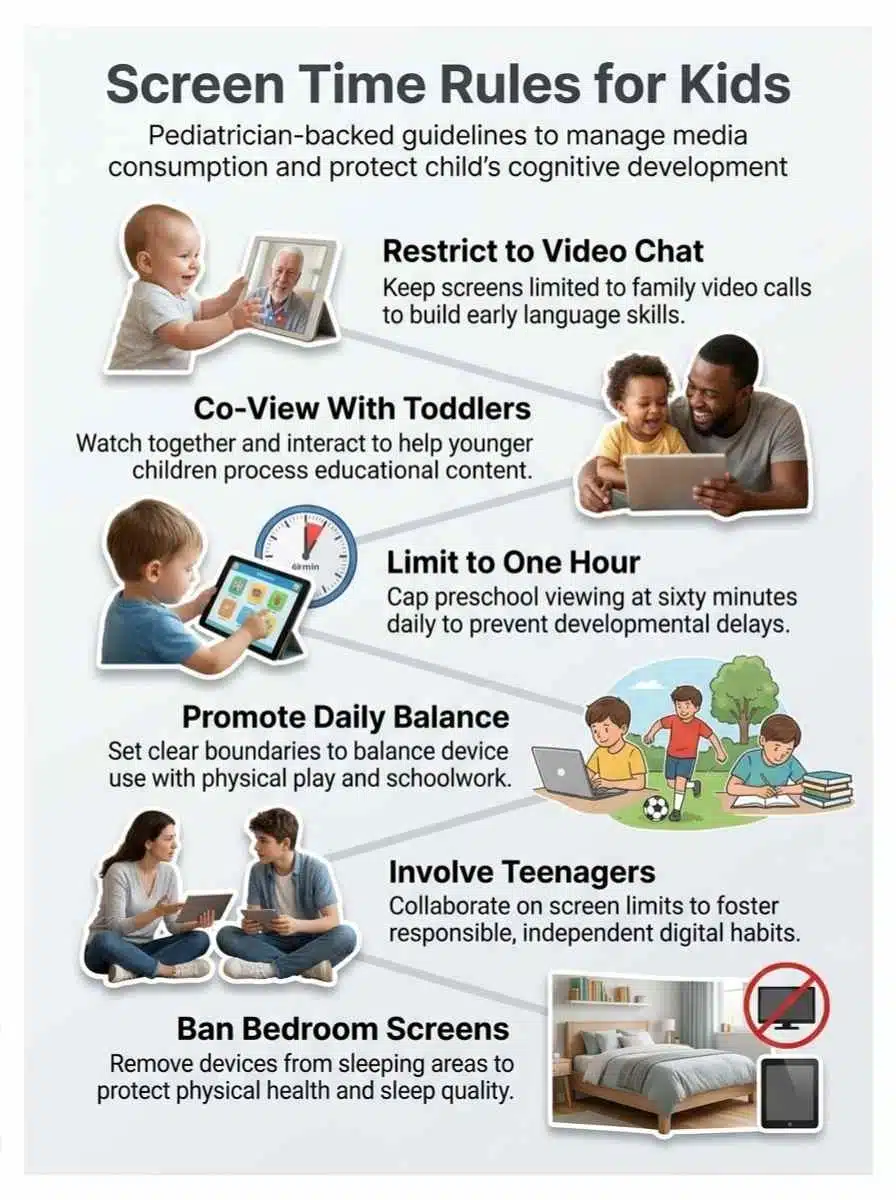
The short version is this: age matters most under 5, and after that the bigger question is whether screens interfere with sleep, physical activity, schoolwork, mental health, and face-to-face relationships. Use the table below as your fast starting point, then adjust for your child’s needs.
| Age | What experts actually say | What that looks like at home |
|---|---|---|
| 0 to 18 months | Video chatting with an adult is the main exception. | Keep entertainment media off and protect feeding, play, and sleep routines. |
| 18 to 24 months | If you introduce media, use high-quality educational content and stay with your child. | Short sessions, simple shows, lots of talking, and no solo scrolling. |
| 2 to 5 years | AAP guidance still points parents to about 1 hour a day of high-quality programming. The American Academy of Child and Adolescent Psychiatry offers a practical limit of about 1 hour on weekdays and 3 hours on weekend days for noneducational use. | Pick age-appropriate educational content, co-view, and keep background TV off. |
| 5 to 12 years | No single universal cap fits every child. | Set clear limits that protect homework, sleep, movement, chores, and family time. |
| 13 to 18 years | Focus on function, habits, and safety, not just minutes. | Watch for mood, sleep, privacy, cyberbullying, and whether phones are taking over real life. |
Infants (0-18 months): Video chatting only
For babies, experts stay pretty firm. The AAP and the American Academy of Child and Adolescent Psychiatry say video chatting with a responsive adult is the main exception, because babies learn best from faces, voices, touch, and shared attention in the real world.
If you want one easy rule, keep the television off during feeding, floor play, and bedtime routines. The screen your baby ignores can still pull your attention away from the eye contact and conversation that build early language.
Toddlers (18-24 months): Limited screen use with parental interaction
If you introduce media here, choose high-quality educational content and stay with your child. This is the age to name objects, repeat words, sing along, and turn what is on the screen into a real conversation.
- Choose slow-paced shows or simple interactive apps.
- Turn off autoplay and in-app purchases.
- Skip solo use on a phone whenever you can.
Preschoolers (2-5 years): Up to 1 hour of high-quality content
This is the clearest age group. The AAP still uses about 1 hour a day of high-quality programming as a strong guide, and AACAP gives parents a practical ceiling of about 1 hour on weekdays and 3 hours on weekend days for noneducational screen time.
Co-viewing matters just as much as the clock. Well-designed educational content can help at this age, especially when you pause, ask questions, sing along, or copy an activity off the screen.
Elementary-Age Children (5-12 years): Encourage healthy habits and balance
There is no perfect universal number here. The smarter test is whether screen use is crowding out homework, sleep, reading, outdoor play, chores, or face-to-face time.
The CDC says children ages 6 to 17 need at least 60 minutes of physical activity each day, so your family rules should protect that first. A simple order works well: homework, movement, family responsibilities, then entertainment media.
Teens (13-18 years): Focus on responsible and mindful usage
By the teen years, content and context matter more than trying to police every minute. In May 2026, HHS said national estimates show adolescents average seven to nine hours a day on entertainment screens, which helps explain why sleep, mood, and online safety need to stay in the conversation.
Ask different questions with teens: Is this technology use helping them connect, create, or learn, or is it making them more tired, isolated, anxious, or distracted? Keep bedtime, charging spots, privacy settings, and social media check-ins as part of the plan.
Effects of Excessive Screen Time
Too much screen time rarely causes just one problem. It usually shows up as a pattern: less sleep, less movement, more arguments, shakier focus, and less room for the things kids need most.
Cognitive and language development challenges
The youngest kids pay the highest price when passive media replaces conversation. A 2024 systematic review found heavier early screen exposure was linked with weaker language and executive function outcomes, and earlier pediatric reviews found that background television can interfere with attention, vocabulary growth, and problem-solving in children under 5.
That does not mean every show causes harm. It means screens are most likely to hurt when they replace the back-and-forth talk children need to learn words, build focus, and understand social cues.
- Turn off background TV during meals, play, and homework.
- Pause shows and ask simple questions out loud.
- Keep books, toys, and art supplies within reach so screens are not the automatic default.
Social-emotional impacts
Too much screen time can show up as irritability, fast frustration, secrecy, or more fights over devices. CHLA says common red flags include disrupted sleep, attention challenges, less creative play, and higher rates of depression and anxiety in older kids and teens.
If your child falls apart every time a device turns off, treat that as useful information. The answer is usually not a harsher punishment, it is a steadier routine, clearer transition warnings, and more offline activities that genuinely compete with the screen.
If screens are crowding out sleep, movement, schoolwork, or friends, that is the red flag parents should take seriously.
Physical health concerns
Physical health gets hit in quiet ways. Long stretches on screens can mean less movement, later bedtimes, poorer posture, snack grazing, and digital eye strain.
Mayo Clinic and the AAP both point parents toward simple fixes that work: keep screens out of bedrooms before sleep, place the screen at a comfortable height, and use the 20-20-20 rule, every 20 minutes, look 20 feet away for 20 seconds. CHLA also tells families that once a child has been on a device for about 30 minutes, it is probably time for a break.
- For ages 3 to 5, protect active play throughout the day.
- For ages 6 to 17, protect at least 60 minutes of daily physical activity.
- Shut screens down 30 to 60 minutes before bedtime.
- Use larger screens at a distance for family viewing instead of long solo sessions on a phone held close to the face.
Tips for Healthy Screen Time Management
Healthy screen habits do not come from one big rule. They come from a few clear routines that your family can actually repeat on busy weekdays.
Set consistent boundaries and time limits
Kids handle limits better when the rules are boring, clear, and predictable. The AAP Family Media Plan is helpful because it turns vague intentions into house rules that everyone can see and follow.
- Set screen-free times for meals, homework, and the hour before bed.
- Use parental controls on phones, tablets, smart TVs, and gaming consoles.
- Turn off autoplay, push alerts, and in-app purchases on kid devices.
- Keep one charging spot outside bedrooms.
- Review the plan every month or at the start of each school term.
Encourage screen-free zones and activities
Screen-free zones work because they remove the argument before it starts. Dining tables, bedrooms, and homework spaces are the big three because they protect talk, sleep, and concentration.
| Screen-free zone | Why it helps |
|---|---|
| Bedroom | Improves sleep, reduces late-night scrolling, and makes morning routines easier. |
| Dining table | Protects conversation, language growth, and family connection. |
| Homework area | Reduces distraction and makes it easier to separate schoolwork from entertainment media. |
If a full screen-free evening feels unrealistic, start smaller. One device-free dinner or one screen-free walk after school can change the tone of the whole day.
Focus on face-to-face interactions
For babies, toddlers, and preschoolers, face-to-face interaction is the main event. Marian Williams at Children’s Hospital Los Angeles has stressed that children build language and social skills through responsive back-and-forth, not by passively watching people talk on a screen.
A good shortcut is this: if a screen activity can become a conversation, it is much better than a silent session. Pause a show, ask what a character is feeling, copy a dance move, or act out the story with toys after it ends.
Choose age-appropriate and educational content
Educational content works best when it is made for your child’s stage, not just labeled “for kids.” The AAP points parents of toddlers and preschoolers toward trusted programs such as PBS KIDS shows, Sesame Street, Blue’s Clues, and Daniel Tiger’s Neighborhood because they are built around repetition, language, and social learning.
Before you download a new app or hand over a tablet, check three things: what the child will actually do, whether autoplay or ads are pushing them onward, and what data the app collects. Under FTC rules tied to COPPA, apps and sites directed to children under 13 need parental consent before collecting personal information, so online privacy is part of healthy screen habits, not an extra chore.
| Good signs | Caution signs |
|---|---|
| Slow pace, clear story, age fit, invites talking or problem-solving | Fast cuts, endless autoplay, heavy ads, open chat, in-app purchases |
| Lets you co-view and pause easily | Keeps pulling kids to the next video or reward |
| Protects privacy and has clear parental controls | Asks for more personal information than it needs |
Benefits of Mindful Screen Time Use
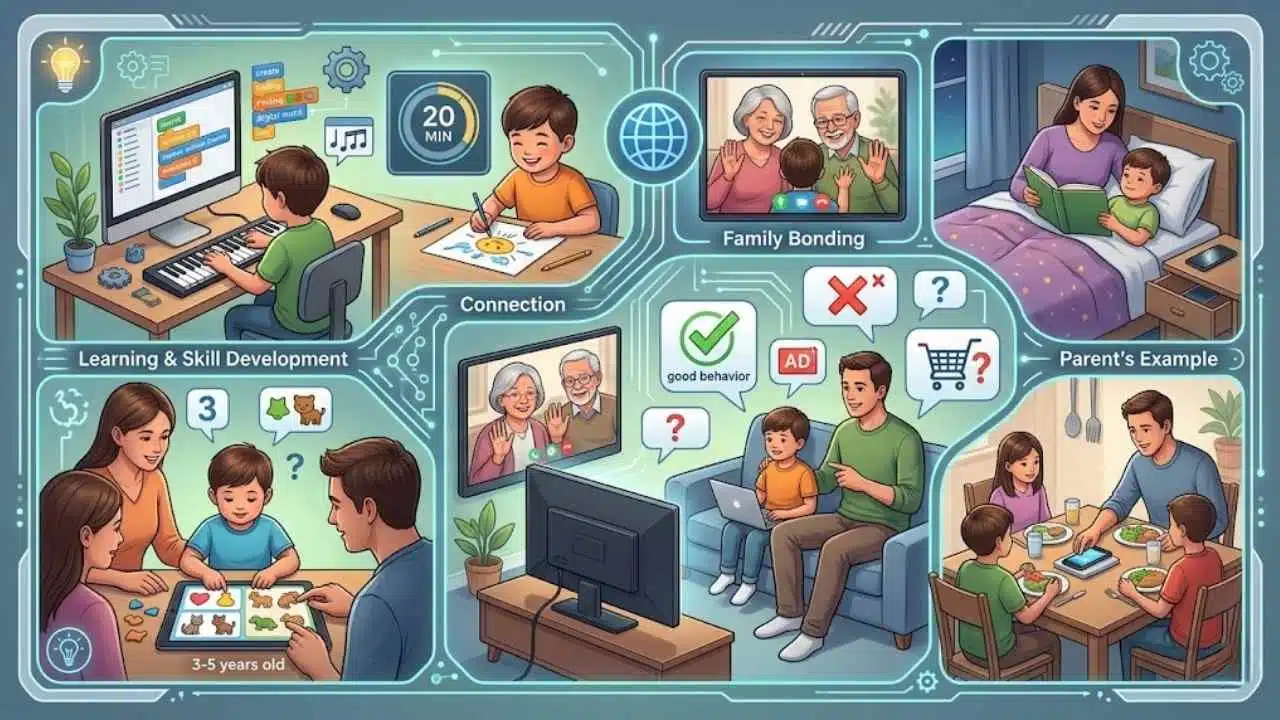
Screen time is not automatically bad. Used well, it can support learning, connection, creativity, and family bonding.
Opportunities for learning and skill development
Mindful screen time can support learning. The AAP notes that well-designed media can help children ages 3 to 5 build social, language, and early reading skills, especially when an adult watches with them and carries the lesson into real life.
- Use video chat to keep long-distance family relationships active.
- Pick one short educational program and do a matching offline activity right after.
- Let older kids use computers for creating, coding, music, writing, or research, not just consuming.
This is where quality beats quantity in a very practical way. Twenty focused minutes that lead to a craft, recipe, drawing, or family discussion usually give more value than an hour of random clips.
Quality family bonding through co-viewing
Co-viewing turns media from background noise into shared time. You can point out new words, talk about good choices and bad choices, and spot ads, influencer pitches, or unrealistic behavior together, which builds media literacy and online safety skills at the same time.
Children’s Hospital Los Angeles and Mayo Clinic both stress that your example matters. If you want calmer technology use at home, let your child see you put the phone down during meals, conversations, and bedtime too.
Final Thoughts
Good screen time guidelines should lower stress, not raise it. Start with one change this week, maybe a device-free dinner, a bedtime charging spot, or turning off autoplay, and give it a few days before judging the result.
If your child’s screen time is affecting sleep, mood, schoolwork, or social skills, talk with your pediatrician. Clear rules, better content, and steady family routines can make a real difference.
You do not need perfect technology use. You need a plan that helps your child grow, play, move, learn, and stay connected.
Frequently Asked Questions (FAQs) About Screen Time Guidelines for Kids
1. What is generative AI for marketing?
Generative AI for marketing uses large language models to create content and ai generated content for marketing materials. It can also make highly realistic images and product demo videos.
2. How can businesses use marketing generative ai?
Businesses use generative ai to automate content creation, help with keyword research, and to businesses identify seo friendly terms. It can analyze customer data, predict consumer behavior, and handle customer inquiries.
3. Will implementing generative ai replace my team?
No, implementing generative ai can speed work, but it still needs human oversight to match the intended audience. Teams should use generative ai promises wisely and combine machine ideas with human judgment.
4. Is the output accurate and up to date information?
Large language models may not always have up to date information, so staff must analyze data and fact check outputs. Software developers and marketers should review ai generated content and other marketing materials before use.
5. What kinds of marketing materials can it create?
It can create content, emails, ads, blog posts, and other marketing materials. It can also personalize customer interactions, produce market research summaries, help with keyword research, and build highly realistic images or product demo videos.