
Building an AI research agent sounds exciting until you actually try to make one useful. Then the fantasy disappears very quickly. I did not want another chatbot that could summarize random search results. I wanted a system that could help me research a topic, collect sources, compare claims, organize evidence, and give me something I could actually use for writing, analysis, or editorial planning. That difference matters.
A normal AI chatbot answers. A research agent investigates. That means it needs tools. It needs a workflow. It needs memory or state. It needs a way to track sources. Most importantly, it needs rules that stop it from sounding confident when the evidence is weak.
That was the real lesson for me. Building an AI research agent is not mainly about choosing the most powerful model. It is about designing a reliable research process around the model.
Why I Wanted To Build An AI Research Agent
Manual research has one ugly problem: it looks simple from the outside, but it eats time in small pieces. You open ten tabs. Then twenty. You copy notes into a document. You forget where one statistic came from. You compare three sources. One is outdated. One is vague. One sounds correct but has no real evidence. By the end, you may have information, but you do not always have a clean research trail.
That is where a research agent becomes useful. My goal was not to remove human judgment. That would be a bad idea. The goal was to reduce repetitive research work and make the early research stage more organized.
I wanted the agent to do five things well:
- Break a topic into research questions.
- Search across useful sources.
- Extract important claims, dates, names, and numbers.
- Connect each claim to a source.
- Give me a structured brief that I could review.
That last part is important. I did not want the agent to “write the final truth.” I wanted the agent to prepare a strong evidence pack.
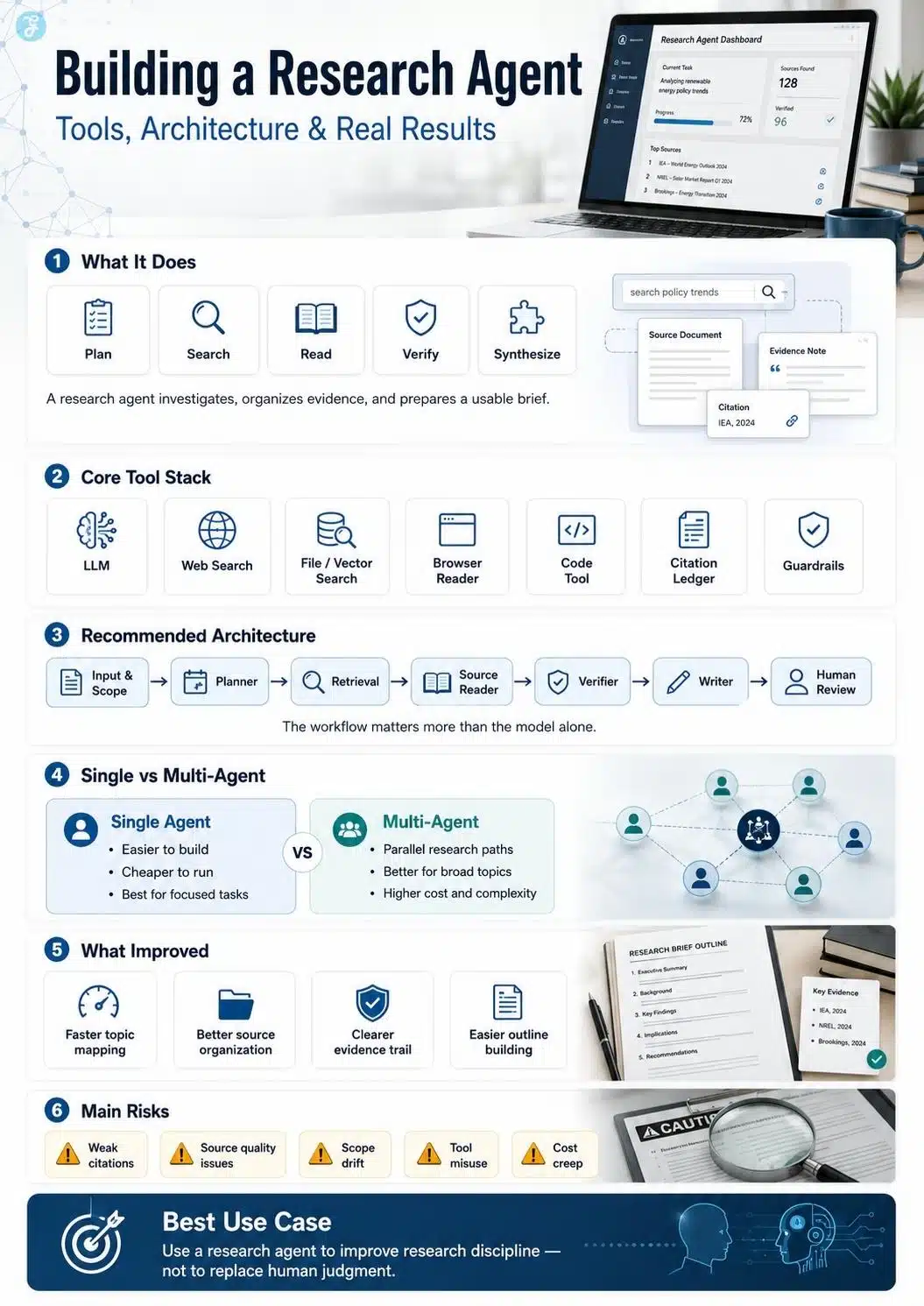
What A Research Agent Actually Does
A research agent is an AI system that can plan, use tools, follow steps, and complete a research task across multiple actions. OpenAI describes agents as systems that can plan, call tools, collaborate across specialists, and keep enough state to complete multi-step work.
In simple words, a research agent is not just a prompt. It is a workflow.
A basic research agent may follow this path:
| Stage | What Happens |
| Planning | The agent breaks the topic into smaller questions |
| Searching | It looks for sources, papers, reports, docs, or web pages |
| Reading | It extracts useful claims and facts |
| Filtering | It removes weak, old, repeated, or irrelevant sources |
| Verifying | It checks whether claims are supported |
| Synthesizing | It turns findings into a structured brief |
| Reporting | It gives the final output with notes, sources, and gaps |
That structure sounds obvious, but it changes everything. Without it, the model tends to jump from question to answer too quickly. With it, the model behaves more like a junior researcher: not perfect, but useful when supervised.
The Tools I Used In The Research Agent Stack
The tool stack does not need to be complicated in the beginning. In fact, I think the first version should be boring.
A practical research agent needs these parts:
| Tool Layer | Purpose |
| Large Language Model | Reasoning, planning, extraction, synthesis |
| Web Search Tool | Fresh public research |
| File Search / Vector Search | Private documents, PDFs, past reports, internal notes |
| Browser / Reader Tool | Reading full pages, not just snippets |
| Code Tool | Calculations, charts, CSV analysis, data cleaning |
| Citation Ledger | Claim-source tracking |
| Evaluation Sheet | Accuracy, speed, source quality, editing effort |
| Guardrails | Rules for safety, source quality, and unsupported claims |
For frameworks, I looked at the agent ecosystem in a practical way. The OpenAI Agents SDK is useful for tool calling, handoffs, guardrails, structured outputs, and tracing. OpenAI’s own documentation positions the SDK around multi-step agent work, and its agent-building tools include handoffs, guardrails, and tracing for building more controlled agent workflows.
LangGraph is useful when you want stateful, long-running workflows. Its documentation describes it as a low-level orchestration framework for building, managing, and deploying long-running, stateful agents.
LlamaIndex is strong when the work is document-heavy. Its agent and workflow documentation focus on custom agentic workflows, tools, and document-based retrieval.
Microsoft Agent Framework is more enterprise-oriented. Microsoft describes it as a way to build AI agents and multi-agent workflows in .NET and Python, combining ideas from AutoGen and Semantic Kernel with state management, telemetry, filters, and model support.
MCP, or Model Context Protocol, also matters in 2026. It is an open standard for connecting AI applications to external systems such as files, databases, search engines, calculators, and workflows.
My takeaway was simple: do not start with every framework. Start with the workflow. Then pick the framework that supports it.
My Research Agent Architecture
The architecture that made the most sense to me was not a fully autonomous monster. It was a controlled research pipeline. Here is the structure I would use again:
1. Input And Scope Layer
This is where the agent receives the topic, audience, timeline, output format, and research depth.
For example:
“Research Building AI research agent for a 2026 SEO article. Focus on tools, architecture, real results, risks, and first-hand lessons.”
A vague input gives vague research. A scoped input gives direction.
2. Planner
The planner breaks the topic into sub-questions. For this topic, the planner may ask:
- What is a research agent?
- What tools does it need?
- What architecture works best?
- Is a single-agent or multi-agent setup better?
- How should accuracy be measured?
- What are the real risks?
- What results should a builder expect?
This step prevents the agent from doing shallow research.
3. Search And Retrieval Layer
This layer searches the web, internal files, PDFs, notes, databases, or academic sources. For public research, web search matters. For company-specific or editorial work, file search matters even more.
4. Source Reader
The reader extracts claims, dates, numbers, names, and source context. This is where the agent should stop summarizing too loosely and start collecting evidence.
I prefer a simple format:
| Claim | Source | Date | Confidence | Notes |
This creates an evidence trail.
5. Verifier
The verifier checks whether the claims are supported. It also flags outdated sources, weak sources, contradictions, and missing context. This is the step many people skip. It is also the step that makes the system useful.
6. Writer
The writer turns the verified research into a brief outline, article draft, report, or decision memo. The writer should not invent. It should use the evidence file.
7. Human Review
This is still necessary. A research agent can speed up research, but it cannot take responsibility for your published work. The final judgment still belongs to the editor, analyst, founder, or writer.
Single-Agent Vs Multi-Agent: What Worked Better?
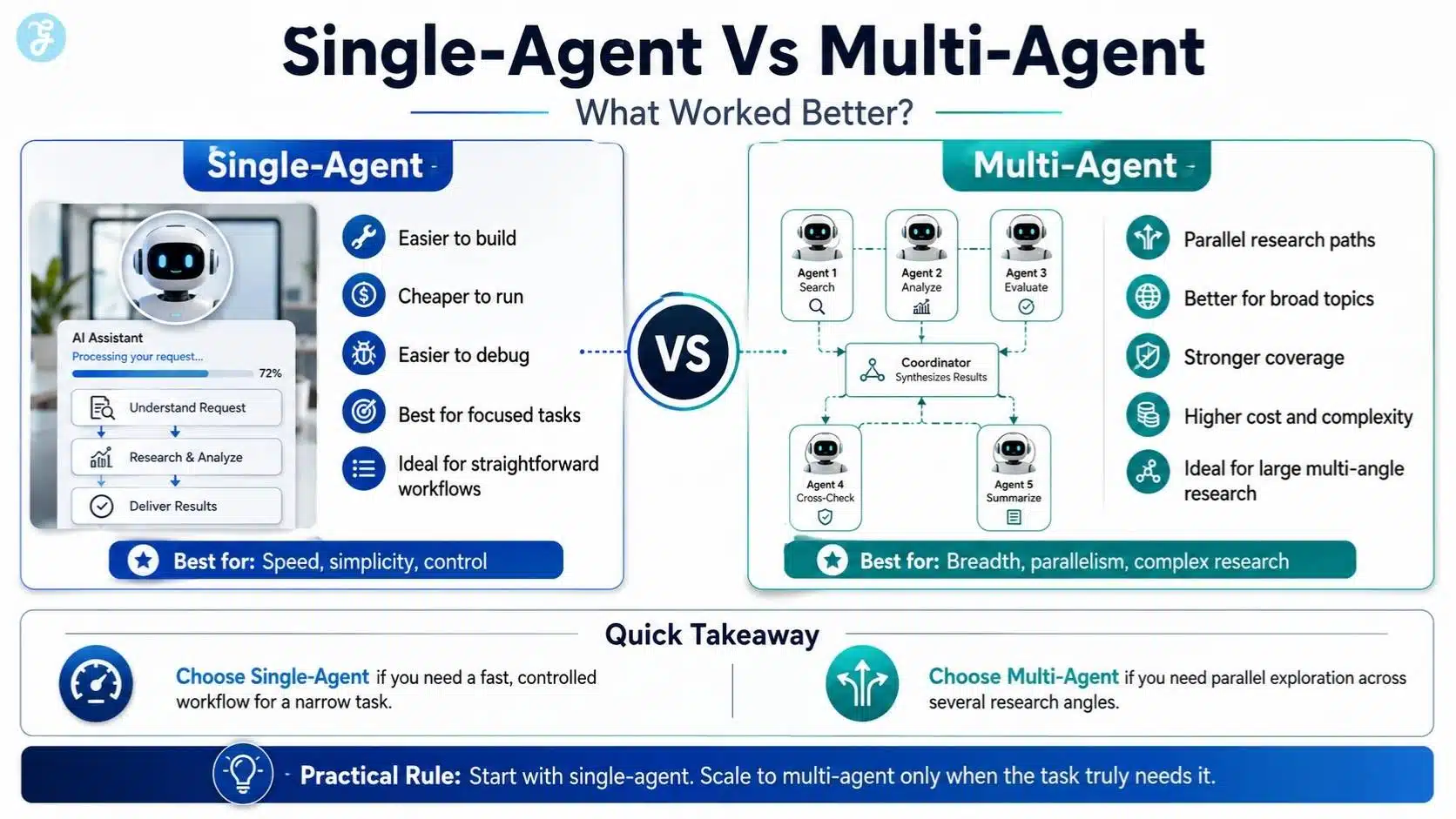
A single-agent system is enough for most early builds. It is easier to understand, easier to debug, and cheaper to run. If the topic is narrow, one well-instructed agent with tools can do a good job.
Multi-agent systems become more useful when the topic is broad. Anthropic has written about its multi-agent research system, where a lead agent creates subagents to investigate different directions in parallel. Anthropic reported that its multi-agent setup outperformed a single-agent setup by 90.2% on its internal research evaluation, especially for breadth-first research tasks.
But there is a catch. Multi-agent systems can cost more, use more tokens, and create more coordination problems. They may produce more research, but not always better judgment.
So my practical rule is this:
Use a single agent when the task is focused. Use multiple agents when the topic has several independent research paths.
For example, “find recent statistics about remote work” can be handled by one agent. But “prepare a market research report on AI agents in healthcare, finance, education, and legal services” may benefit from multiple agents.
Real Results: What Actually Improved
The biggest result was not that the agent produced a perfect article. It did not. The biggest result was that the research became easier to audit.
That matters more than people think. Before using an agent-style workflow, research often felt scattered. After using the workflow, the output had a clearer structure:
- Research questions,
- Useful sources,
- Claim summaries,
- Missing evidence,
- Contradictions,
- Draftable outline.
That saved mental energy. The agent was especially useful for:
| Task | Result |
| Breaking down broad topics | Faster topic mapping |
| Finding research angles | Better coverage |
| Collecting sources | Less manual tab-hopping |
| Summarizing long documents | Faster first pass |
| Building outlines | More structured drafts |
| Finding gaps | Easier editorial planning |
But it was not equally good at everything. The weakest areas were citation judgment and source quality. The agent could find information quickly, but it still needed rules to separate official documentation, research papers, company blogs, media coverage, and low-quality SEO content. That is why I started treating the agent like an assistant, not an authority.
What Failed During Testing
The first failure was overconfidence. The agent sometimes wrote as if every source had the same value. A company blog, a documentation page, and a random marketing post could all be treated similarly unless I forced source scoring.
The second failure was weak citation discipline. A research agent may summarize the right idea but attach it to the wrong source, or cite a source that only partly supports the claim. This is dangerous because it creates the appearance of accuracy.
The third failure was scope drift. If the original question was not tight enough, the agent wandered. It collected interesting information, but not always useful information.
The fourth failure was cost and complexity. Adding more tools sounds powerful. In reality, every new tool creates a new failure path. The agent may choose the wrong tool, call it too often, or use it when a simple answer would be better.
The fifth failure was a security risk. This is not theoretical. OWASP’s Top 10 for Agentic Applications 2026 focuses on risks in autonomous and agentic AI systems that plan, act, and make decisions across workflows.
Once an agent can use tools, read pages, call APIs, or act across systems, security becomes part of the architecture. Prompt injection, bad tool permissions, data leakage, and unsafe automation are not side issues. They are core design problems.

How I Improved The Research Agent
The biggest improvement came from adding stricter rules. I used rules like:
- Prefer official documentation for product claims.
- Prefer academic papers or benchmarks for performance claims.
- Do not use a statistic unless the source, date, and context are clear.
- Separate facts from interpretation.
- Mark makes unsupported claims instead of hiding them.
- Show contradictions instead of forcing one answer.
- Keep a source ledger.
- Add a human review step before writing.
I also added a “source quality” check. The agent had to label sources as:
| Source Type | Trust Level |
| Official documentation | High for product features |
| Peer-reviewed or academic paper | High for research claims |
| Company engineering blog | Medium to high, depending on claim |
| Reputable media | Medium |
| Generic SEO blog | Low |
| Forum/social post | Low unless used for user sentiment |
This made the output more honest. It also made the writing better because the final draft had stronger evidence behind it.
Why This Matters For SEO In 2026
For SEO, research agents are useful because search is becoming more evidence-heavy and AI-shaped. Google’s official guidance for generative AI features says SEO still matters because AI features in Search are rooted in Google’s core ranking and quality systems. Google also says site owners should focus on helpful, unique content and make sure pages are technically accessible to Search.
That means a research agent should not be used to mass-produce thin content. That is the lazy use case. The smarter use case is to improve research quality before writing. A good research agent can help you find better angles, verify claims, compare sources, and create content that has real information gain.
For an SEO writer, that matters. The internet already has enough generic articles. The advantage now is not “more content.” The advantage is better evidence, sharper experience, and stronger editorial judgment.
Should You Build A Research Agent Or Use A Ready-Made Tool?
It depends on your goal. If you only need quick research once in a while, a ready-made deep research tool may be enough. But if you have a repeatable workflow, building your own research agent makes more sense. For example, an editorial team may want the agent to follow specific rules:
- Check source freshness,
- Prefer official sources,
- Collect competitor angles,
- Build SEO outlines,
- Prepare FAQ ideas,
- Flag weak claims,
- Create a final research brief.
A generic tool may not follow those rules exactly. A custom research agent gives you control. But that control comes with responsibility. You have to maintain prompts, tools, permissions, evaluation, and review standards.
So the honest answer is this: Use ready-made tools for occasional research. Build your own agent when research is part of your regular workflow.
The Part Nobody Likes To Admit
Building an AI research agent will not magically make bad research good. If your prompts are vague, the output will be vague. If your sources are weak, the synthesis will be weak. If you skip verification, the final article may sound smart while quietly carrying errors.
The real value of building an AI research agent is not full automation. It is a better research discipline. A good research agent slows down the right parts of the process. It asks what needs to be checked. It tracks where claims came from. It shows gaps. It makes the first draft less chaotic. It gives the human editor a cleaner battlefield.
That is the real result. Not a robot researcher replacing human judgment. A structured research system that helps humans think, verify, and write better.
Frequently Asked Questions About AI Research Agent
1. What Is A Research Agent In Simple Words?
A research agent is an AI system that can plan, search, read, compare, and summarize information using tools. Unlike a normal chatbot, it does not just answer from memory. It can follow a research workflow, collect sources, check facts, and prepare a structured brief that a human can review.
2. Why is building an AI research agent Useful For Writers And Researchers?
Building an AI research agent is useful because it reduces repetitive research work. It can help you find sources faster, organize claims, spot missing information, and build a cleaner outline. For writers, marketers, analysts, and SEO teams, this means less time jumping between tabs and more time judging the quality of the information.
3. What Tools Do You Need To Build A Research Agent?
At minimum, you need a strong language model, a web search tool, a source-reading system, and a way to store findings. For better results, you can add file search, vector search, citation tracking, a code tool for data analysis, and an evaluation system. The goal is not to use every tool possible, but to use the right tools for your research workflow.
4. Is A Research Agent Better Than Manual Research?
A research agent is faster at collecting and organizing information, but it is not automatically better than a skilled human researcher. It can miss context, trust weak sources, or summarize claims too confidently. The best setup is a hybrid one: let the agent handle the repetitive groundwork, then let a human verify, edit, and make the final judgment.
5. What Is The Biggest Problem With AI Research Agents?
The biggest problem is overconfidence. A research agent may produce a clean, polished answer even when the evidence is incomplete or weak. That is why citation tracking, source quality checks, and human review are essential. A good research agent should not only provide answers; it should also show what it checked, where the information came from, and what still needs verification.
6. Should Beginners Build A Single-Agent Or Multi-Agent Research System?
Beginners should usually start with a single-agent system. It is easier to build, cheaper to run, and simpler to debug. Multi-agent systems are useful for large research tasks where different agents can investigate different angles, but they also add cost and complexity. Start simple, test the workflow, and only add more agents when the research task truly needs them.