You are suffering from “Chatbot Fatigue.” You spend hours crafting the perfect prompt for ChatGPT, tweaking the output, copy-pasting it into an email, and then manually hitting send. You aren’t saving time; you’ve just traded doing the work for managing a clumsy intern.
The era of “Chatbots” is ending. The era of “Agentic AI” has begun. While generative AI (like standard ChatGPT) is a consultant that gives you advice, Agentic AI is an employee that actually does the work. These tools don’t just generate text; they have “agency.” They can open a browser, click buttons, negotiate schedules, navigate complex software, and execute multi-step workflows without you holding their hand.
For solopreneurs and small business owners, this is the holy grail: a 24/7 workforce that costs a fraction of a human virtual assistant. In this guide, we’ll break down the top 5 Agentic AI tools that can genuinely replace your administrative workload in 2026.
What is “Agentic” AI? (And Why It Matters)
Before we dive into the tools, it is critical to understand the shift in technology.
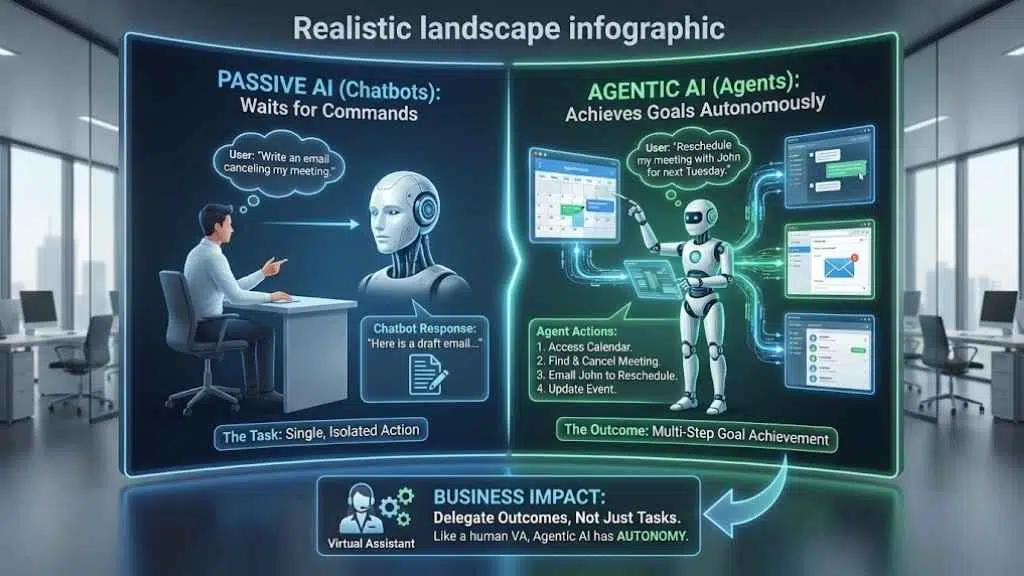
- Passive AI (Chatbots): You ask a question, it gives an answer. It waits for you. (e.g., “Write an email canceling my meeting.”)
- Agentic AI (Agents): You give a goal, and it figures out the steps to achieve it. It acts for you. (e.g., “Go into my calendar, find the meeting with John, cancel it, and email him to reschedule for next Tuesday.”)
Why this matters for your business
A human Virtual Assistant (VA) is valuable because they have autonomy. You don’t tell them how to use Google Calendar; you just tell them to book a meeting. Agentic AI brings that same level of autonomy to software, allowing you to delegate outcomes, not just tasks.
Top 5 Agentic AI Tools for 2026
We have tested and analyzed the leading tools in the market to bring you this curated list. Each tool serves a specific “role” in your digital workforce.
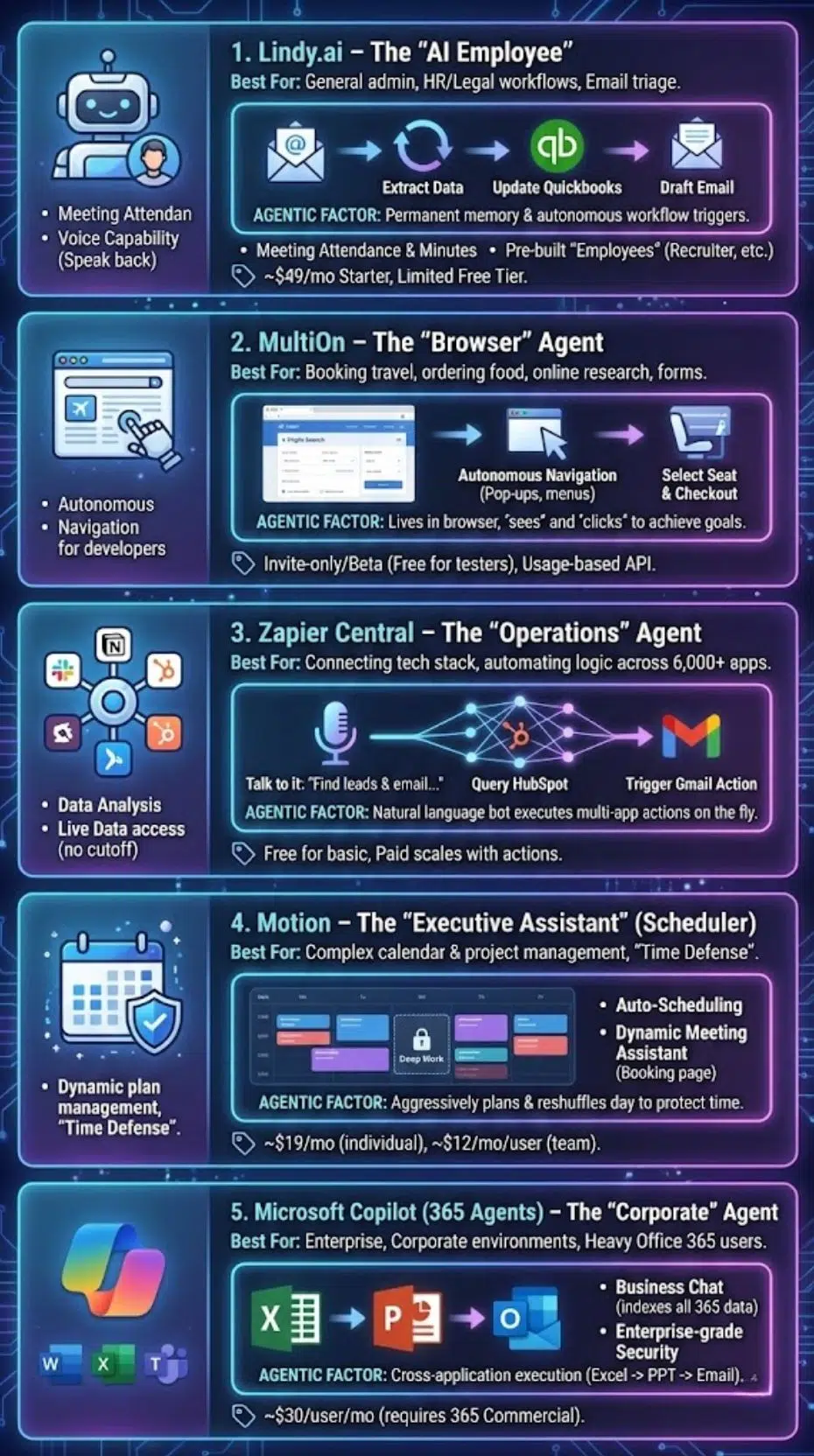
1. Lindy.ai – The “AI Employee”
Best For: General admin tasks, email triage, and specialized workflows (HR, Medical, Legal).
Lindy is not just a tool; it is designed to feel like a person. When you sign up, you create an “identity” for your Lindy. It has a permanent memory, meaning it learns your preferences over time and doesn’t reset after every conversation.
The “Agentic” Factor
Lindy shines in its ability to trigger workflows autonomously. You can set a rule like: “Whenever I receive an invoice in my Gmail, extract the data, add it to my Quickbooks, and draft a payment confirmation email.” Lindy monitors your inbox and executes this loop without you ever opening the email.
Key Features:
- Meeting Attendance: Lindy can join your Zoom/Google Meet calls, take minutes, and automatically assign action items to your team.
- Voice Capability: You can speak to Lindy, and it can speak back, making it capable of handling basic phone screening tasks.
- Pre-built “Employees”: Don’t want to build an agent from scratch? Hire a pre-trained “Recruiter Lindy” or “Medical Scribe Lindy.”
Pricing:
- Starts around $49/month for the Starter plan.
- Offers a limited free tier to test the “persona” capabilities.
Pro Tip: Use Lindy for “triage.” Give it access to your support email and let it draft responses for you to approve. It creates a “Human-in-the-loop” workflow that saves 90% of your time.
2. MultiOn – The “Browser” Agent
Best For: Booking travel, ordering food, filling out repetitive web forms, and online research.
Most AI tools are trapped inside a chat box. MultiOn lives in your browser. It acts as a digital layer over Google Chrome, allowing it to “see” websites and “click” buttons just like a human would.
The “Agentic” Factor
You can give MultiOn a vague, high-level goal: “Book a flight to Austin for under $300 on United, leaving next Friday morning.”
MultiOn will autonomously:
- Open United.com.
- Search for the flights.
- Filter by price and time.
- Select the seat.
- Enter your saved passenger details.
- Complete the checkout (if you’ve authorized it).
Key Features
- Autonomous Navigation: It handles pop-ups, cookie banners, and complex menus that usually break simple scrapers.
- API Integration: Developers can build apps that use MultiOn to perform actions on the web (e.g., an app that automatically orders UberEats based on your calendar location).
Pricing
- Personal plans are currently invite-only or waitlisted as they scale, with beta access often free for early testers.
- API pricing is usage-based (per step).
3. Zapier Central – The “Operations” Agent
Best For: Connecting your tech stack (Slack, Notion, HubSpot, Gmail) and automating logic.
You likely know Zapier for its “If This Then That” automation. Zapier Central is the evolution of that concept. It is a natural language bot that sits on top of your 6,000+ Zapier-connected apps.
The “Agentic” Factor
Instead of building complex “Zaps” with logic trees, you just talk to Central. You can say: “Find the last 5 leads in HubSpot who haven’t replied, and send them a follow-up email.”
Central understands the request, queries the HubSpot database, identifies the leads, and triggers the Gmail action—all on the fly. You can also “teach” it behaviors, so it proactively watches for these triggers in the future.
Key Features
- Data Analysis: It can look at a Google Sheet or Notion database and answer questions like, “Which sales rep closed the most deals this week?”
- Live Data: unlike ChatGPT, which has a knowledge cutoff, Central sees your live company data instantly.
Pricing
- Free for basic usage (limited number of activities).
- Paid plans scale based on the number of “actions” performed across your apps.
4. Motion – The “Executive Assistant” (Scheduler)
Best For: Complex calendar management, project management, and “Time Defense.”
Motion is an AI that aggressively manages your time. It is perfect for people who wake up, look at their to-do list, and feel overwhelmed by decision fatigue.
The “Agentic” Factor
Motion doesn’t just record your tasks; it plans your day. You dump a list of 20 tasks into Motion, assign priorities and deadlines, and Motion uses an algorithm to slot them into the free space in your calendar. Here is the magic: If a meeting runs late or an emergency task pops up, Motion automatically reshuffles your entire week in seconds. It acts like a ruthless executive assistant, protecting your “Deep Work” blocks and ensuring you never miss a deadline.
Key Features
- Auto-Scheduling: No more manual dragging and dropping on a calendar.
- Meeting Assistant: It creates a booking page (like Calendly) but dynamically shows availability based on your workload, not just empty slots.
Pricing
- $19/month (billed annually) for individuals.
- $12/month/user for teams.
5. Microsoft Copilot (365 Agents) – The “Corporate” Agent
Best For: Enterprise users, corporate environments, and heavy Office 365 users.
If your life revolves around Word, Excel, PowerPoint, and Teams, Microsoft’s new “Copilot Agents” are the native solution.
The “Agentic” Factor
Copilot can cross application boundaries to complete a project. You can command: “Look at this Excel spreadsheet of Q4 sales, create a 10-slide PowerPoint summary, and draft an email to the team with the presentation attached.” It perceives the data in Excel, reasons how to structure a slide deck, acts to create the file, and then acts again to email it.
Key Features
- Business Chat: It indexes all your emails, chats, and files. You can ask, “What did Sarah say about the Project X deadline?” and it will find the answer across Teams, Outlook, and Word.
- Security: Built with enterprise-grade security (your data doesn’t train the public model).
Pricing
- $30/user/month (requires a Microsoft 365 Commercial subscription).
Agentic AI vs. Human Virtual Assistants
Can software really replace a human? The honest answer is: It depends on the task.
Use this table to decide where to deploy AI and where to keep a human.
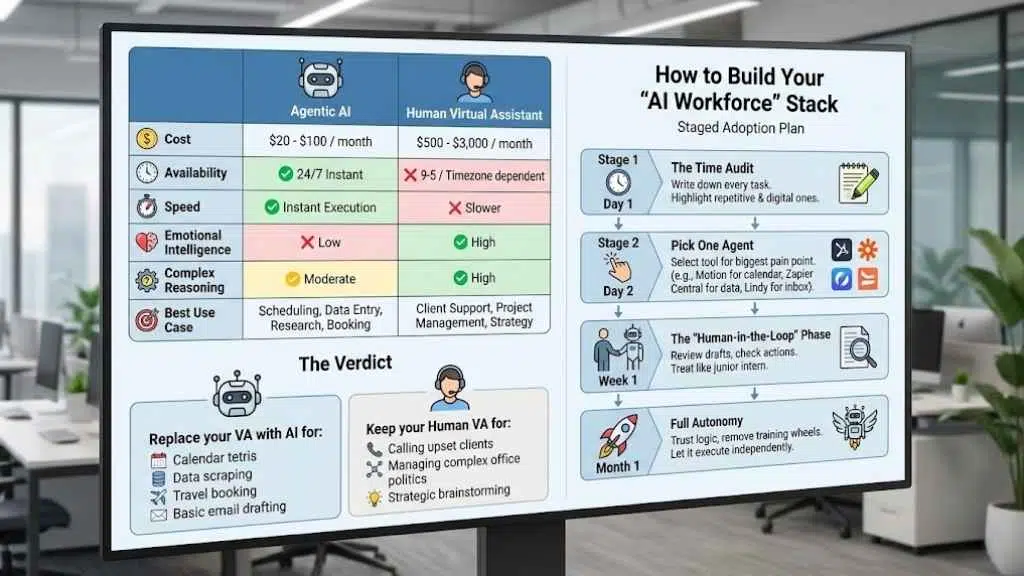
| Feature | Agentic AI | Human Virtual Assistant |
| Cost | $20 – $100 / month | $500 – $3,000 / month |
| Availability | 24/7 Instant | 9-5 / Timezone dependent |
| Speed | Instant Execution | Slower (Requires context switching) |
| Emotional Intelligence | Low (Cannot “read the room”) | High (Essential for client relations) |
| Complex Reasoning | Moderate (Best for defined rules) | High (Best for ambiguity) |
| Best Use Case | Scheduling, Data Entry, Research, Booking | Client Support, Project Management, Strategy |
The Verdict
- Replace your VA with AI for: Calendar tetris, data scraping, travel booking, and basic email drafting.
- Keep your Human VA for: Calling upset clients, managing complex office politics, and strategic brainstorming.
How to Build Your “AI Workforce” Stack
Don’t try to fire your assistant and install 5 new tools tomorrow. You will fail. Follow this “staged adoption” plan:
The Time Audit (Day 1): For one day, write down every single task you do. Highlight the ones that are repetitive and digital. (e.g., “Emailing invoices,” “Scheduling podcast guests”).
Pick One Agent (Day 2): Select the tool that solves your biggest pain point.
- Calendar chaos? Pick Motion.
- Data entry hell? Pick Zapier Central.
- Inbox overload? Pick Lindy.
The “Human-in-the-Loop” Phase (Week 1): Do not let the AI run fully autonomous yet. Review every email it drafts. Check every meeting it moves. Treat it like a junior intern on their first week.
Full Autonomy (Month 1): Once you trust the agent’s logic, remove the training wheels. Let it send the emails and book the flights.
Final Thoughts
The shift to Agentic AI requires you to change your role. You are no longer a “doer”; you are a “manager.” Your job is not to write the email; it is to define the goal of the email. Your job is not to find the flight; it is to define the budget for the trip. The most successful entrepreneurs in 2026 will be the ones who can orchestrate a team of AI agents to do the busy work, freeing themselves to focus on strategy, creativity, and human connection.