
Relying on generic corporate communication tools for classroom instruction often leaves educators fighting against the software rather than focusing on their students. For institutions ready to upgrade their digital infrastructure, finding the right SMEs for School Video Conferencing means stepping away from the massive tech monopolies. Independent American developers are building specialized video platforms that prioritize pedagogical needs, low-bandwidth accessibility, and strict student data security over standard corporate boardroom features.
Establishing a reliable digital connection requires a strict evaluation process to ensure long-term stability and instructional success.
How We Selected Our 15 Best Video Conferencing Platforms
Identifying the most effective video architecture required strict filtering to separate genuine educational innovators from bloated enterprise resellers. We focused entirely on independent American studios that adapt rapidly to the changing technical demands of modern school districts.
-
Geographic Baseline. Operated and headquartered strictly within the United States as independent entities.
-
Independence. Verified as independent SMEs to guarantee agile customer support and transparent data policies.
-
Pedagogical Architecture. Proven inclusion of specialized teaching aids like proximity audio, secure breakout rooms, and digital assessment tools.
-
Data Security. Complete adherence to FERPA and COPPA regulations, ensuring student video feeds are never mined for external data.
Understanding these core requirements helps identify exactly which platforms are equipped to handle the rigorous daily demands of synchronous learning.
Whom This is for
This guide serves district IT directors, university procurement officers, and instructional designers seeking to replace outdated or generic meeting software with dedicated teaching environments. It is also a vital resource for independent educational networks that require secure, high-fidelity video communication for specialized tutoring.
With the audience defined, we can examine the specific developers leading the industry.
Evaluating the Top 15 SMEs for School Video Conferencing
The following independent studios are actively reshaping how academic institutions conduct live online learning. Here is our curated breakdown of the standout developers driving video conferencing innovation today.
Starting with platforms built directly on familiar frameworks provides an easy transition for hesitant faculty members.
1. Class Technologies
Operating out of Washington, DC, Class Technologies built their specialized instructional environment directly on top of the Zoom infrastructure. They take a universally understood video backbone and layer it with dedicated teaching tools like automated attendance and interactive quizzes. It completely transforms a standard corporate meeting window into a highly structured digital classroom.
Best for:
-
Institutions already familiar with Zoom but needing dedicated educational features and better classroom management.
Why We Chose It:
-
It leverages world-class video stability while providing a custom interface specifically designed for teachers.
-
The system includes a dedicated proctoring view that allows instructors to monitor student screens during digital exams securely.
Things to consider:
-
It requires a baseline institutional understanding of Zoom architecture to deploy effectively across a campus.
The 2026 Edge:
-
Upgraded engagement dashboards that track exactly how much time a student spends speaking versus listening during a live call.
Reimagining the digital seating chart requires platforms that focus entirely on group collaboration.
2. Engageli
Headquartered in San Mateo, California, Engageli completely abandons the traditional grid of video squares. Their platform organizes students into digital tables where they can collaborate privately while still listening to the main lecture. This unique architecture naturally encourages peer-to-peer discussion without requiring the instructor to manually build clunky breakout rooms.
Best for:
-
Large university lectures that want to incorporate active learning and small group discussions seamlessly.
Why We Chose It:
-
The digital table layout mimics the physical design of modern collaborative classrooms.
-
Instructors can seamlessly jump from table to table to answer specific group questions privately without disrupting the main room.
Things to consider:
-
The distinct interface requires a brief onboarding period for students accustomed to standard corporate video grids.
The 2026 Edge:
-
Automated seating assignments based on student academic performance to balance group dynamics perfectly.
Creating a sense of spatial awareness completely changes how students interact online.
3. InSpace
Based in Burlington, Vermont, InSpace utilizes proximity-based audio to create a fluid digital campus. Students are represented by small video circles that can move freely around a digital canvas. As a student moves their circle closer to another person, their audio becomes louder, which flawlessly replicates the natural flow of physical classroom conversations.
Best for:
-
Digital networking events, foreign language practice, and interactive lab sessions where fluid movement is necessary.
Why We Chose It:
-
It completely eliminates the awkwardness of one person speaking while fifty people listen in silence.
-
The software allows educators to design custom backgrounds that look like laboratories, campus quads, or art studios.
Things to consider:
-
The free-roaming nature of the platform can be distracting during highly structured, top-down lectures.
The 2026 Edge:
-
Advanced directional audio capabilities that make digital group work feel incredibly realistic and immersive.
Student support services require specialized video tools for advising and counseling.
4. ConexED
Located in Salt Lake City, Utah, ConexED provides a video meeting platform specifically designed for higher education student services. Their software powers digital campus support, allowing students to wait in virtual lobbies, meet securely with financial aid advisors via video, and securely share sensitive documents in real time.
Best for:
-
University advising centers, financial aid offices, and campus mental health clinics requiring secure virtual lobbies.
Why We Chose It:
-
It bridges the gap between academic instruction and the critical administrative support services that keep students enrolled.
-
The platform is highly secure, ensuring sensitive financial and personal data discussed on video is protected.
Things to consider:
-
It is heavily focused on one-on-one advising and small group support rather than massive lecture broadcasting.
The 2026 Edge:
-
Integrated triage bots that automatically route students to the correct advisor’s video lobby based on their specific needs.
Spatial video chat environments bring a sense of geography back to distance learning.
5. Kumospace
Operating out of New York City, Kumospace provides an immersive video conferencing platform where students navigate 2D virtual environments. As their avatars walk through digital libraries or student lounges, their video feeds pop up when they approach other users. It is an excellent tool for building digital campuses where students can socialize between classes.
Best for:
-
Online high schools and remote university programs looking to recreate the casual social interactions of a physical hallway.
Why We Chose It:
-
It gamifies the video conferencing experience, drastically reducing the digital fatigue associated with standard meetings.
-
Teachers can set up distinct audio zones within a single digital room to isolate different group projects.
Things to consider:
-
The casual, game-like interface may feel overly informal for strict graduate-level seminars.
The 2026 Edge:
-
Customizable campus building tools that allow students to design and decorate their own digital study rooms.
Complex corporate and higher-ed training demands software with massive analytical capabilities.
6. Jigsaw Interactive
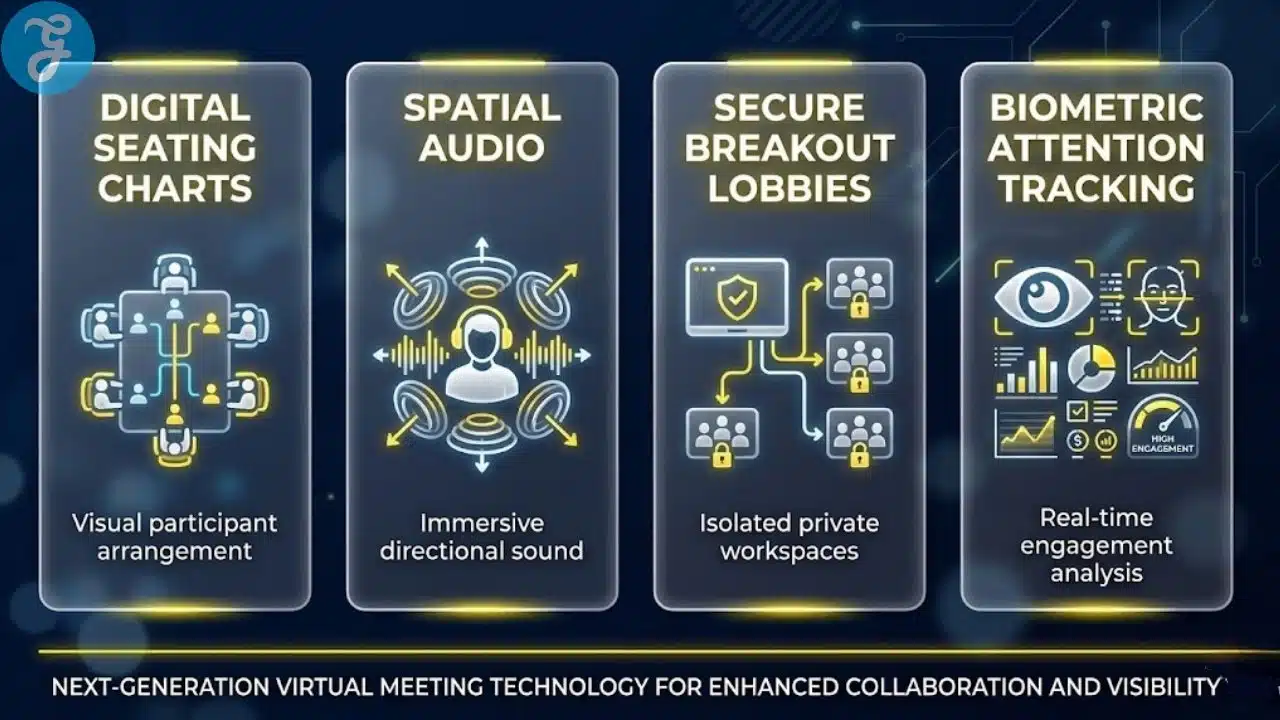
Located in Atlanta, Georgia, Jigsaw Interactive provides a multi-dimensional video environment designed for complex higher education. The software forces active participation by requiring students to interact with 3D models and complete live assessments across multiple digital panes. It captures thousands of data points to prove a student actually learned the material.
Best for:
-
Corporate workforce development and specialized technical training programs that require strict accountability.
Why We Chose It:
-
It features four distinct digital panes that allow simultaneous viewing of live video, presentations, and interactive assessments.
-
The system generates incredibly detailed reports on individual student engagement down to the second.
Things to consider:
-
The heavy feature set makes it slightly overpowered for a standard middle school history class.
The 2026 Edge:
-
Enhanced biometric attention tracking that flags when a student continuously looks away from their primary monitor.
Replicating physical presence requires a blend of video communication and pixel-art navigation.
7. Gather
Headquartered in San Francisco, California, Gather (often known as Gather.town) blends retro video game aesthetics with high-fidelity video conferencing. Students navigate a customizable, top-down map using avatars, and their webcam activates only when they approach a classmate or professor. It is highly favored by computer science departments and digital bootcamps.
Best for:
-
Coding bootcamps, digital hackathons, and remote science fairs requiring highly interactive spatial video.
Why We Chose It:
-
The platform empowers students to explore a digital space autonomously, fostering a deep sense of digital agency.
-
It seamlessly integrates external collaborative tools like digital whiteboards directly into the virtual environment.
Things to consider:
-
Navigating the map requires active keyboard input, which can be difficult for very young students or those with limited mobility.
The 2026 Edge:
-
Upgraded physics engines that allow digital avatars to interact realistically with embedded 3D educational models.
Ensuring completely brand-independent meetings requires highly customizable, white-label software.
8. MegaMeeting
Located in Encino, California, MegaMeeting provides a completely white-labeled WebRTC video conferencing solution. The platform runs entirely directly in the browser. It allows independent tutoring companies to completely strip away external branding and present the digital classroom as their own proprietary technology.
Best for:
-
Private tutoring agencies and independent educational consultants wanting a fully branded, seamless client experience.
Why We Chose It:
-
Students never have to download a dedicated desktop application or plugin to join a class.
-
Agencies can host the video platform directly on their own custom domain names.
Things to consider:
-
It offers a clean but relatively basic feature set compared to heavily specialized pedagogical tools.
The 2026 Edge:
-
Upgraded high-definition audio codecs that significantly reduce background noise for students in busy home environments.
Visual thinkers require video software that centers around infinite digital canvases.
9. Pencil Spaces
Operating from San Francisco, California, Pencil Spaces completely centers the digital learning experience around a massive collaborative whiteboard. Instead of prioritizing massive video feeds, the platform shrinks the webcams to focus entirely on shared digital workspaces where students and teachers can draw and map out complex ideas in real time.
Best for:
-
Mathematics tutoring, architectural design reviews, and highly visual STEM brainstorming sessions.
Why We Chose It:
-
The infinite digital canvas allows for sprawling mind maps and complex equation solving alongside live video.
-
It utilizes incredibly low bandwidth, ensuring students with poor internet connections can still participate smoothly.
Things to consider:
-
The platform actively minimizes video presence to maximize the functional whiteboard space.
The 2026 Edge:
-
Advanced geometry tools that automatically straighten hand-drawn shapes into perfect digital diagrams during a live call.
Schools building their own proprietary software need access to highly stable video architecture.
10. LiveSwitch
Based in Raleigh, North Carolina, LiveSwitch provides enterprise-grade live video infrastructure and WebRTC streaming. While they offer standalone conferencing, their true power lies in allowing universities to embed high-fidelity live video directly into their own custom applications and websites without relying on third-party meeting links.
Best for:
-
University IT departments looking to build proprietary, deeply integrated video platforms from the ground up.
Why We Chose It:
-
The underlying architecture is remarkably stable and scales flawlessly from a one-on-one session to a massive digital broadcast.
-
It provides developers with complete control over the video routing and data security protocols.
Things to consider:
-
Utilizing their API tools requires a dedicated team of software engineers.
The 2026 Edge:
-
Automated bandwidth adaptation that smoothly downgrades video quality to prioritize clear audio on weak network connections.
Broadcasting to massive digital audiences requires specialized presentation and staging tools.
11. Shindig
Based in New York City, Shindig was designed to handle massive digital assemblies and online campus events. The platform allows a central speaker to broadcast to thousands of attendees via high-quality video while still enabling audience members to form spontaneous private video chats with one another.
Best for:
-
University town halls, massive guest lectures, and digital alumni networking events.
Why We Chose It:
-
Hosts can invite an audience member to the main digital stage with a single click to ask a live question on video.
-
The software allows participants to network privately without interrupting the main broadcast.
Things to consider:
-
It is built for massive scale and will feel unnecessarily vast for a small seminar of five students.
The 2026 Edge:
-
Automated stage management tools that queue up student video questions perfectly for the main speaker.
Evaluating soft skills requires specialized video assessment infrastructure alongside live streaming.
12. Bongo
Operating out of Loveland, Colorado, Bongo focuses heavily on experiential learning and video-based assessment. While it functions beautifully as a live conferencing platform, its true power lies in allowing students to record and submit video presentations for structured peer review and instructor feedback.
Best for:
-
Business schools and communications departments teaching public speaking, sales, or negotiation.
Why We Chose It:
-
It provides structured video assignments where peers can leave time-stamped feedback directly on a live or recorded presentation.
-
The platform integrates flawlessly into every major institutional learning management system.
Things to consider:
-
The platform emphasizes individual video assessment over massive, multi-pane lecture broadcasting.
The 2026 Edge:
-
Automated conversational analysis that grades a student on filler words and speaking cadence.
Independent educators need platforms that bundle live instruction with business management.
13. BrainCert
Headquartered in Herndon, Virginia, BrainCert provides a unified platform combining a live virtual classroom with a complete commercial learning management system. Instructors can host secure WebRTC video sessions and process student payments all within the same digital ecosystem.
Best for:
-
Freelance tutors and independent training companies selling their own live educational content.
Why We Chose It:
-
It features a built-in shopping cart to monetize live video training sessions instantly.
-
The embedded digital whiteboard includes advanced mathematical equation editors and coding syntax highlighters.
Things to consider:
-
The interface is highly utilitarian and focuses on raw functionality over flashy modern aesthetics.
The 2026 Edge:
-
Upgraded global payment gateways that simplify currency conversion for international tutoring clients joining a live class.
Improving pedagogy requires video platforms built specifically for teacher observation.
14. Sibme
Located in Houston, Texas, Sibme is a video coaching and collaboration platform designed strictly for educator professional development. The software allows instructional coaches to observe live classroom feeds or recorded videos, dropping specialized feedback pins directly onto the timeline to help teachers refine their craft.
Best for:
-
School districts prioritizing professional development and live video observation for teacher training.
Why We Chose It:
-
It provides a highly secure environment where teachers feel safe sharing their classroom video feeds for peer review.
-
The platform includes robust analytics tracking how pedagogical skills improve over time based on video evidence.
Things to consider:
-
It is hyper-focused on teacher observation and coaching rather than direct student broadcasting.
The 2026 Edge:
-
Enhanced mobile integration allowing supervisors to stream and tag live video using a tablet from anywhere in the room.
Managing specialized performance assessments requires high-fidelity video tools.
15. GoReact
Operating out of Orem, Utah, GoReact specializes in skill-based video feedback. The platform is widely used by nursing programs, sign language departments, and student-teacher practicums. It allows for live streaming or asynchronous uploads where instructors can leave precise, time-coded text, audio, or video feedback.
Best for:
-
Nursing programs, performing arts departments, and language classes requiring precise video critique.
Why We Chose It:
-
It eliminates the massive friction of managing and transferring large video files within a university system.
-
The time-stamped feedback feature perfectly aligns an instructor’s critique with the exact moment a student makes an error.
Things to consider:
-
The software is highly specialized for assessment and may not serve as a primary replacement for daily, general-purpose lecturing.
The 2026 Edge:
-
Automated transcription features that immediately generate searchable text from live student video submissions.
Reviewing these varied digital environments side-by-side helps administrators clarify their institutional priorities.
An Overview Of SMEs for School Video Conferencing
Examining these distinct providers collectively provides a clear perspective on the digital infrastructure available to modern educators. The following data points highlight the primary functional differences between these independent providers.
Overview Comparison Table
Comparing these specific metrics highlights the structural differences between traditional broadcasting and specialized educational environments.
| SME Developer | Headquarter Location | Core Focus Area | Primary Function |
| Class Technologies | Washington, DC | Zoom Enhancement | Custom Teaching Interface |
| Engageli | San Mateo, CA | Collaborative Learning | Digital Table Seating |
| InSpace | Burlington, VT | Proximity Networking | Spatial Audio Chat |
| ConexED | Salt Lake City, UT | Student Services | Secure Advising Lobbies |
| Kumospace | New York, NY | Virtual Campuses | Spatial Video Environments |
| Jigsaw Interactive | Atlanta, GA | Corporate Training | Multi-Dimensional Analytics |
| Gather | San Francisco, CA | Interactive Spaces | Pixel-Art Video Navigation |
| MegaMeeting | Encino, CA | White-Label Hosting | Brand-Independent WebRTC |
| Pencil Spaces | San Francisco, CA | Visual Tutoring | Infinite Digital Whiteboard |
| LiveSwitch | Raleigh, NC | API Integration | Embedded Live Video |
| Shindig | New York, NY | Massive Assemblies | Interactive Broadcasting |
| Bongo | Loveland, CO | Experiential Learning | Video Assessment |
| BrainCert | Herndon, VA | Freelance Education | Integrated LMS & Sales |
| Sibme | Houston, TX | Professional Dev. | Teacher Video Coaching |
| GoReact | Orem, UT | Skill Assessment | Time-Coded Video Feedback |
Evaluating these diverse administrative tools naturally leads to our primary recommendations for specific institutional use cases.
Our Top 3 Picks and Why?
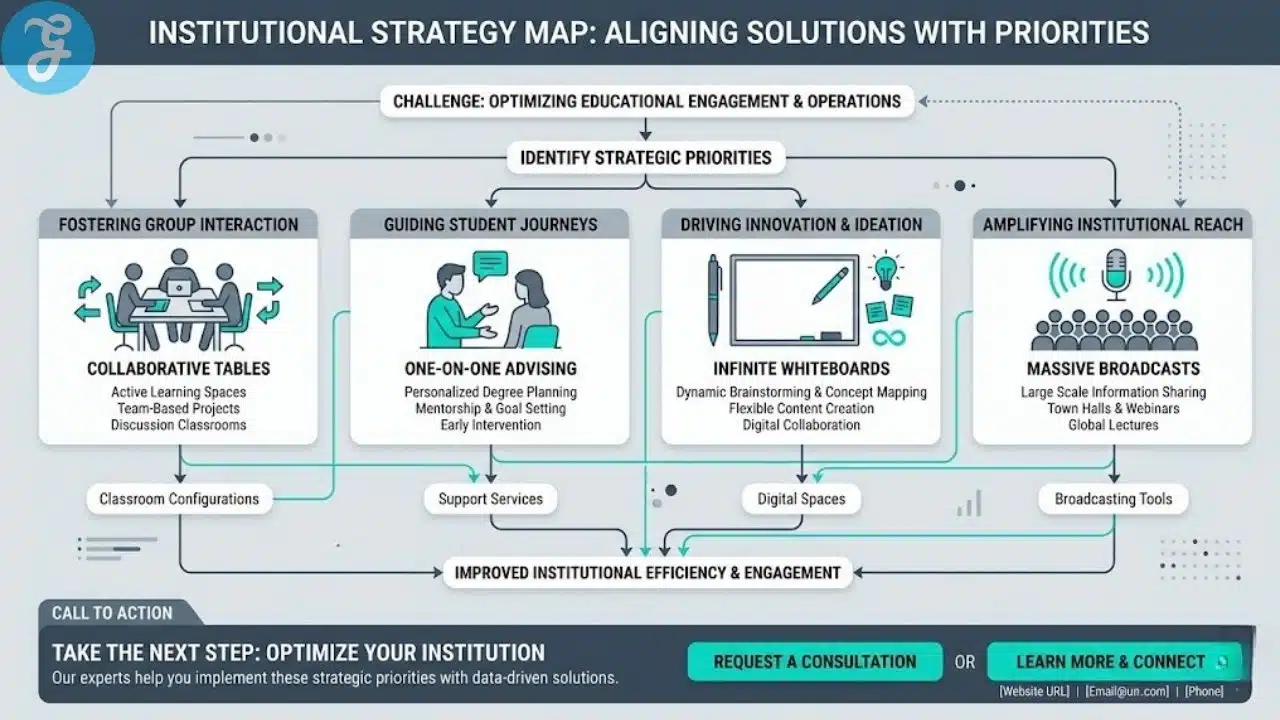
Narrowing down the field highlights three developers making exceptional contributions to digital pedagogy. Engageli completely revolutionizes the digital layout by organizing students into collaborative tables, proving that online learning does not have to be an isolating experience. InSpace offers a brilliant solution to digital fatigue by utilizing spatial audio to make networking and group work feel natural and fluid. Finally, GoReact delivers unmatched utility for specialized academic departments by focusing entirely on high-fidelity, time-stamped video critique for skill-based learning.
Selecting the right digital infrastructure requires balancing the technical capabilities of the software with the actual needs of the teaching staff.
How to Choose the Right SMEs for School Video Conferencing by Yourself?
Implementing a new synchronous learning environment successfully means finding a platform that aligns with your specific pedagogical philosophy and budget constraints.
-
Identify the Teaching Style. Decide if your faculty primarily lectures to massive crowds, relies heavily on small peer-to-peer breakout sessions, or needs secure one-on-one lobbies.
-
Evaluate the Bandwidth Requirements. Ensure the software functions smoothly and degrades video gracefully if your student demographic lacks access to high-speed internet.
-
Check LMS Integration. Verify that the platform connects seamlessly to Canvas, Blackboard, or Moodle to automatically sync attendance data and video links.
-
Analyze Data Sovereignty. Require the developer to provide proof that student video feeds and chat logs are encrypted and never harvested for external corporate training models.
Applying this framework directly to your specific campus needs allows you to match the right developer to your university.
Decision Matrix
Matching your specific institutional priorities with the right developer ensures a seamless digital transformation.
| Choose This SME… | If You Prioritize… |
| Engageli or InSpace | Fostering organic peer-to-peer collaboration and dismantling the traditional video grid. |
| ConexED or Sibme | Managing secure, one-on-one video interactions for student advising or teacher coaching. |
| Pencil Spaces or BrainCert | Teaching complex visual subjects using highly responsive digital whiteboards alongside video. |
| Shindig or LiveSwitch | Broadcasting massive digital lectures and embedding secure video infrastructure into custom apps. |
Before signing a long-term institutional contract, running through a rapid technical verification process is vital.
The Final Checklist
Running through this quick verification process guarantees you are adopting a secure, scalable platform.
-
Verify the developer complies entirely with federal regulations regarding student privacy and end-to-end encryption.
-
Ensure the platform allows students to join via a standard web browser without demanding heavy desktop installations.
-
Test the platform’s mobile application to check for basic video functionality and ease of use on smaller screens.
-
Confirm the developer provides dedicated onboarding training for faculty members transitioning from legacy software.
-
Check that the software includes built-in closed captioning features to comply strictly with modern accessibility standards.
Implementing these systems successfully requires a deep understanding of what synchronous education actually represents.
Beyond the Screen: The 2026 Classroom
The rapid expansion of educational technology has created a false belief that software can perfectly replicate the physical classroom. The uncomfortable truth is that even the most advanced SMEs for School Video Conferencing struggle to capture the subtle human nuances of a physical lecture hall. As universities pour massive funding into hyper-analytical tracking software, they often prioritize surveillance over genuine pedagogical connection. Relying entirely on biometric engagement scores or forced webcam mandates to determine if a student is learning fundamentally ignores the complex realities of digital fatigue.
The future of online education does not rely on building more intense tracking algorithms to force attention. It relies on educators leveraging these specialized digital tools to create deeply engaging, collaborative experiences that respect the limitations of the screen. True digital learning happens when institutions stop trying to copy the physical classroom and start designing entirely new methods of intellectual connection.
To further clarify the implementation of these digital systems, addressing common technical concerns is essential.
Frequently Asked Questions (FAQs) About SMEs for School Video Conferencing
Why should a school use specialized platforms instead of standard corporate video tools?
Corporate tools are built for business meetings where one person presents and everyone else listens. Specialized educational platforms include built-in pedagogical tools like seating charts, interactive whiteboards, spatial audio, and nuanced engagement tracking designed specifically to foster student learning.
Do these educational platforms integrate with standard learning management systems?
Yes, reputable independent developers build their software using Learning Tools Interoperability standards. This ensures the live classroom connects securely with systems like Canvas or Blackboard to automatically sync grading rubrics, meeting links, and attendance records.
How do these platforms manage digital classroom disruptions?
Educational platforms provide instructors with deep moderation controls that are often missing from corporate software. Teachers can universally mute microphones, lock digital whiteboards, and restrict private chats to maintain a highly focused learning environment securely.
Are specialized virtual classrooms accessible for students with disabilities?
Independent American developers strictly adhere to Web Content Accessibility Guidelines. Their platforms typically feature integrated screen reader support, high-contrast visual modes, and automated closed captioning to ensure equal access for all enrolled students.
Can students participate effectively using only a mobile phone?
Modern independent platforms utilize highly responsive architecture that scales perfectly to mobile devices. While complex document editing might be difficult on a small screen, students can easily watch lectures, participate in polls, and join audio discussions using only a smartphone.