
Being online is part of everyday life now. You check your bank app, scroll through social media, shop, stream, work, and maybe even let your kids use your phone. But for all that convenience, there’s a catch: the internet can also open the door to scams, tracking, and unwanted snooping. That’s where cybersecurity comes in—but most advice sounds like it’s written for engineers, not real people.
Here’s the thing: you don’t need to be a tech genius to protect yourself. You just need to build a few smart habits and know where to pay attention. This guide follows that idea. It’s built for you, not someone who spends their weekends tweaking firewalls for fun. If you’ve ever thought, “I should probably be doing more to protect my stuff online,” this one’s for you.
Phishing, Scams, and Fake Alerts: How to Spot the Setup
Let’s break it down. Most online threats don’t come through the back door—they walk right up and ask you to let them in. Phishing emails, fake text messages, sketchy popups… they all have one goal: to trick you into giving up something valuable. A password. A credit card number. Access to your inbox.
Here’s what that usually looks like: you get an email that looks like it’s from your bank, telling you your account is locked. It includes a link and a nice little panic button. That’s the trap. Real companies don’t ask you to log in through a random link.
If you ever get a message that feels urgent or off in any way, don’t click. Go to the actual website or app yourself. Check the sender’s email address—sometimes it’s a mess of random characters. If it seems too weird, trust your gut. The scam only works if you play along. Stop. Breathe. Investigate. That alone can block half the threats coming your way.
Passwords Don’t Have to Be a Nightmare
We’ve all done it. Used the same password for five different accounts. Picked our pet’s name and added a “123.” Promised we’d update it later. But weak or repeated passwords are like putting the same key under every doormat you own. It’s not secure—it’s convenient for hackers.
So what’s the fix? Use a password manager. It’s not fancy, just practical. These apps create strong, random passwords and remember them for you. You only need to remember one. Set it up once, and it’ll handle the rest.
Also, turn on two-factor authentication when it’s offered. That’s the thing where you log in and get a code texted to you. Yes, it’s one extra step. But it’s worth it. Even if someone guesses your password, they still can’t get in without that second piece.
Good password habits aren’t about being paranoid. They’re about making it harder for someone else to take what’s yours. And you don’t need to be techy to do that.
Using Public Wi-Fi? Read This First
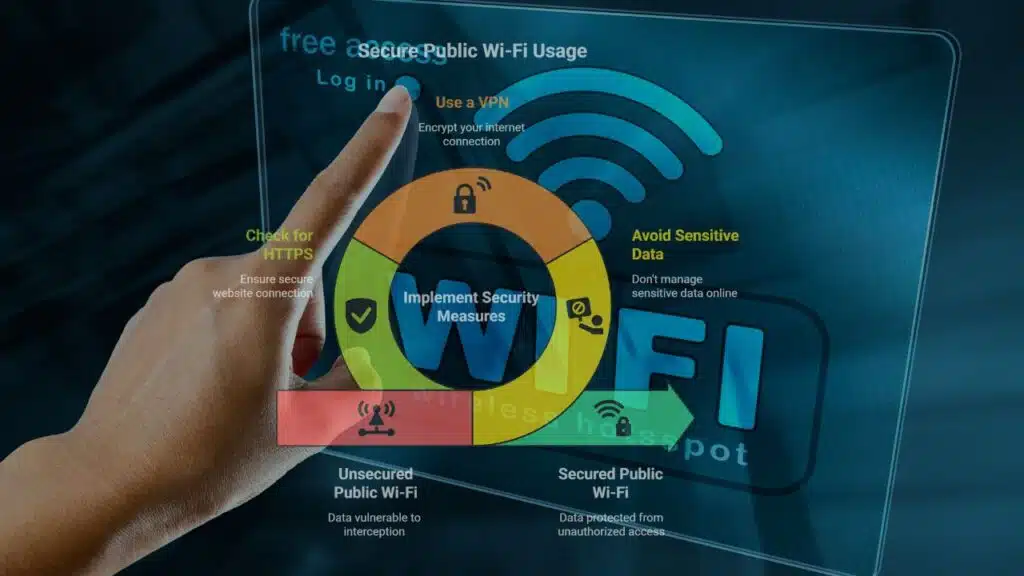
Free Wi-Fi at the airport. At your favorite café. On the train. Super convenient, right? Here’s the problem: public Wi-Fi is often wide open. That means anyone nearby with the right tools can see what you’re doing.
Like digital imposters, they pose as the networks you trust in order to track your activities, eavesdrop on your every move, and even steal your valuable login credentials. The frequency of man-in-the-middle (MITM) attacks is far higher than most people think.
What, therefore, ought a wise internet user to do? First and foremost, stay away from public Wi-Fi while managing sensitive data. Consider business emails, bank account details, or anything else you wouldn’t shout into a crowded room. Should you need to connect in a public place, you should get a Virtual Private Network (VPN). Encrypting your connection to stop unauthorized access secures you online.
You should also constantly check that the websites you visit start with “https://” instead of just “http://”. That crucial “s” stands for secure, which is a little but critical element that makes a big difference.
Public Wi-Fi is not a bad thing. It just wasn’t made with privacy in mind. Consider it similar to taking a restroom in public.
Public Wi-Fi isn’t evil. It’s just not built for privacy. Think of it like using a public bathroom. Quick and valuable—but not the place to do sensitive business.
Don’t Ignore Updates. They Actually Matter
Those update notifications on your phone or laptop? They’re not just about new features. Most of the time, they fix security holes. Hackers look for those weak spots, and if you’re running outdated software, you’re an easy target.
So stop hitting “later” and let your devices update. Better yet, turn on automatic updates where you can. It’s one less thing to remember.
The same goes for antivirus or anti-malware software. Get one that fits your setup and let it do its thing in the background. Although it won’t capture everything, it puts an additional barrier between you and the criminals.
An additional piece of advice is to backup your data. Make sure you have a duplicate of all of your documents, including pictures, files, and private notes, in a secure location. Because you’ll be happy you did in case something goes wrong, be it hardware failure, ransomware, or anything else.
Updates aren’t annoying. They’re essential. Let your tech take care of itself, and you’ll stay ahead of the curve without lifting a finger.
Tidy Up Your Digital Life and Lock Down Your Privacy
Most of us, let’s face it, never check our browser settings, app permissions, or who can view what on our social media accounts. However, those minor details build up.
Apps you don’t use still collect data. Websites track where you go. Advertisers build profiles without your knowledge. And sometimes, your info is just sitting out there for anyone to find.
Start by deleting what you don’t use. Old accounts, unused apps, random subscriptions—if you’re not using it, kill it. Next, spend five minutes going over your primary accounts’ privacy settings. Set limits on who can message you, who can view your postings, and what information is shared.
Use a browser with built-in tracking protection, or install extensions that block trackers and ads. And don’t give apps more access than they need. Does a flashlight app need your location? Probably not.
This type of straightforward guidance is what makes CyberAdvice such a helpful resource. Here, individuals exchange advice, send out alarms, and simplify digital safety so that everyone can comprehend it. The goal of privacy is not to conceal anything. It’s about taking control. And you can do that right now—no tech background needed.
You’ve Got This
Cybersecurity isn’t a secret club. It’s not reserved for people who build servers in their garage. It’s for you. And it’s way more doable than you might think.
You don’t have to purchase pricey equipment or learn to code. All you have to do is be a bit more deliberate—be mindful of warning signs, create stronger passwords, use Wi-Fi more carefully, keep your gadgets updated, and protect your privacy.
That’s all. Nothing ostentatious. Easy practices that protect your digital life every day. You have some influence over the internet, despite the fact that it isn’t always safe. Never stop learning, start small, and be consistent. You’re already doing more than most.
Now enjoy the internet, just with your eyes open.