

We want you to have your preferred experience always, whether it’s through our integrations, the way you can organize your tasks in a project, or just the look and feel of your account.
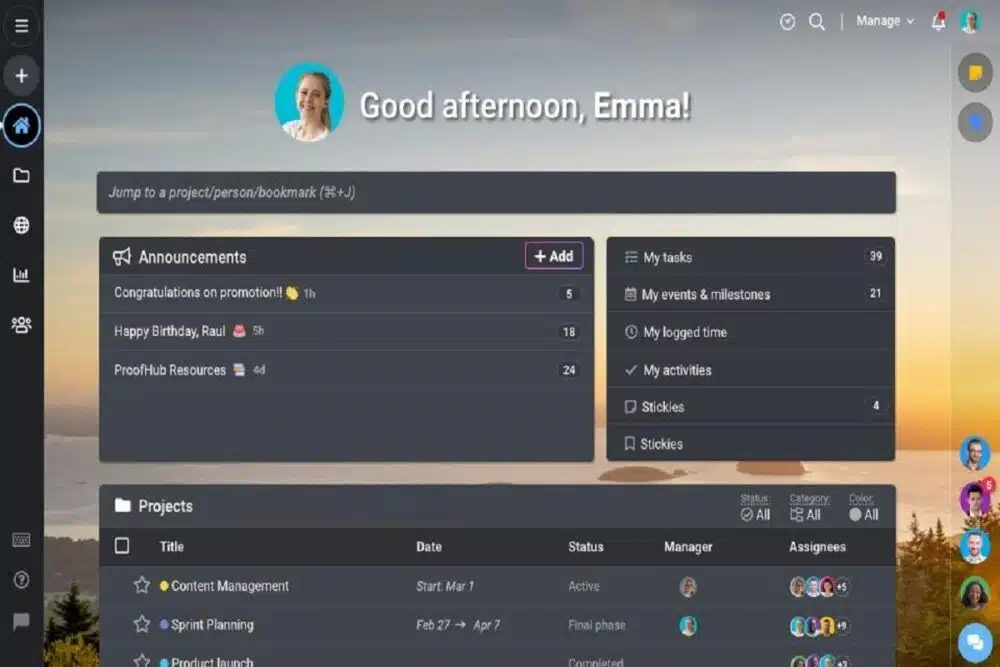
For all our users who have been wanting this for a while, we are thrilled to be able to announce dark mode for ProofHub! We understand that everyone has different preferences when it comes to their workspace, so we wanted to make sure that using our tool could accommodate those preferences as much as possible.
With dark mode, you can finally say goodbye to those annoying bright backgrounds that hurt your eyes and keep you from focusing on what’s really important: getting stuff done.
This new feature lets you easily switch between light and dark mode to create a more comfortable working environment that suits your needs.
Why is Dark Mode so important for your device?
Your eyes, my friend. Your eyes.
Here’s the thing: we stare at our devices for SO LONG. And those screens are bright—really bright. And that brightness can actually be pretty damaging to your eyes over time, especially if you have eye conditions like cataracts or macular degeneration.
Not to mention that all that harsh light and screen glare can cause headaches, eye strain, and fatigue, which means doing your work will be harder and take longer than it should.
The good news is there’s a better way: Dark Mode!
This makes your screen less bright and removes the glare of white light directly hitting your eyes, which relieves eye strain, helps prevent headaches and fatigue, and allows you to work more efficiently throughout the day.
Dark Mode: The Ultimate Power Saver
Your battery could outlast your coffee with Dark Mode.
How does it work? Whether you’re using your phone or your laptop, when things are white on the screen, more light is projected into your eyes. And that’s not good for the poor ol’ battery! But when things are dark on the screen, more energy is preserved and less light gets blasted into your eyeballs.
Dark Mode is the latest trend in digital design, and it has its fair share of benefits. In addition to saving your eyes from strain, it can save you from the hell of a dying phone at the end of your workday.
When Apple added Dark Mode to iOS 13, they also introduced a new way to save battery life: by utilizing OLED technology (which powers most newer smartphones) to turn off individual pixels when they are displaying black-colored pixels.
So basically, if you want to save some battery life while you’re working (or just want to give your peepers a break every once in a while!) just turn on Dark Mode in ProofHub.
How to Activate Dark Mode on Your ProofHub Account
To activate dark mode, simply click on your profile picture in the top right corner of your ProofHub account after logging into your account. Select your preferred color scheme (dark theme or light theme).
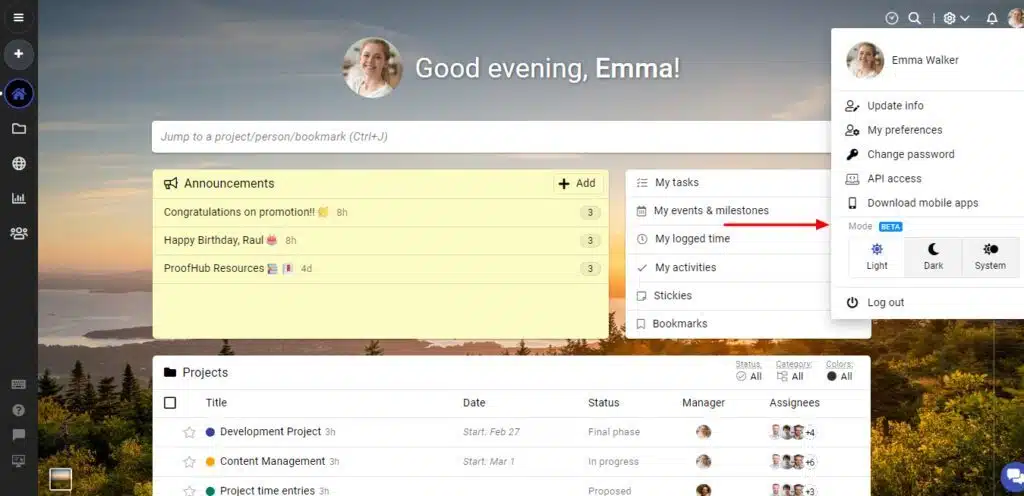
You can also switch between these two modes when you wish to change things up a bit. The best thing about this feature is that it adapts dynamically to the system’s configuration and works seamlessly with both the desktop app and web application.
On a final note
ProofHub Dark Mode is all about customization and enabling users to do everything from working better with a specific color scheme to simply having a unique custom theme.
You can switch between themes whenever you want, depending on what you are working on and where you are located to match your mood and your environment.
As a support platform catering to teams who work in their browser and don’t need other sophisticated tools that other platforms provide, this is a really useful addition.
There is absolutely no reason why you shouldn’t make every effort to enjoy your ProofHub experience as much as possible. Give Dark Mode a try today!


























