
Hey there, have you ever clicked on your website, only to find it down? It’s like showing up to a party, and the door’s locked. Frustrating, right? Website downtime can mess with your online business, chase away customers, and hurt your reputation.
Nobody wants that kind of headache.
Here’s a quick fact to chew on: downtime often comes from server issues, security breaches, or even simple human error. That’s a big deal for anyone running a site. But don’t worry, I’ve got your back.
In this post, we’ll walk through 7 easy ways to cut downtime and keep your website humming. From picking a solid web hosting provider to using monitoring tools, we’ll cover it all.
Stick around!
Key Takeaways
- Choose a dependable web host like Bluehost or SiteGround with a 99.99% uptime guarantee to prevent server downtime.
- Use monitoring tools like UptimeRobot, Pingdom, Datadog, and Site24x7 to quickly identify issues and maintain your site’s availability.
- Implement a Content Delivery Network (CDN) to manage traffic spikes and reduce website downtime.
- Keep in mind, server failure can cost large businesses up to $16,000 per minute, so prepare in advance.
- Arrange daily backups and set them to run automatically to safeguard your site from data loss and crashes.
Choose a Reliable Web Hosting Provider

Picking a solid web hosting provider is your first step to keeping website downtime at bay. Think of your host as the foundation of a house; if it’s shaky, everything else crumbles.
Go for a company that offers an uptime guarantee, like 99.99%, because every second counts. Poor hosting services can spike your risk of server downtime, and trust me, you don’t want that headache.
Did you know larger businesses can lose up to $16,000 per minute during server failure? That’s a scary number! So, dig into reviews and check out hosts known for reliability, like Bluehost or SiteGround.
Make sure they’ve got a strong data center setup and solid customer support. A good hosting server keeps your online business humming along, dodging those costly downtimes.
Implement Continuous Website Monitoring
Hey there, let’s chat about keeping your website up and running with constant checks. Continuous website monitoring is like having a watchful friend who never sleeps, always making sure your site stays online.
It spots issues fast, so you can fix them before visitors even notice a hiccup.
Think of it as setting up a guard dog for your online space. Tools like UptimeRobot, Pingdom, Datadog, and Site24x7 are awesome for this job. They track key stuff, such as uptime, loading speed, and response time.
With these helpers, you get alerts the moment something goes wrong, helping you dodge website downtime and keep your online business humming.
Use a Content Delivery Network (CDN)
Gotta keep your website speedy and online, right? Using a Content Delivery Network, or CDN, is like having a bunch of helpers scattered across the globe. These networks create multiple backups of your site in different spots worldwide.
So, if one server struggles, another jumps in to save the day. This setup cuts down on website downtime big time, keeping your visitors happy.
Think of a CDN as your traffic cop during crazy rushes. It handles surges in legitimate traffic that might overload a single hosting server. By spreading the load, it stops server failure before it starts.
Plus, it boosts website performance by delivering content from the closest location to your users. Stick with this trick, and watch your online business stay smooth and steady!
Perform Regular Maintenance and Updates
Hey there, let’s talk about keeping your website in tip-top shape. Regular care can save you from nasty surprises like crashes or downtime.
- First off, make it a habit to check your server every 1 to 2 months. This routine audit, as experts suggest, helps spot security gaps before they turn into big headaches. It’s like giving your car a quick tune-up to avoid a breakdown on the highway.
- Next, focus on hardware and software upkeep. Regular maintenance of these parts stops issues like slow loading or sudden failures. Think of it as oiling a squeaky door; a little effort goes a long way.
- Also, clear out the junk from your site often. Get rid of unused code, old caches, and temporary files to prevent crashes. It’s like tidying up your desk so you don’t trip over clutter.
- Don’t skip updates for your website software, plugins, and themes. Keeping them fresh avoids bugs or compatibility issues that cause downtime. Imagine updating your phone apps to dodge glitches; same idea here.
- Finally, use tools like Site24x7 to track how your site runs. These monitoring tools alert you to problems during maintenance, so you fix them fast. It’s like having a watchdog that barks when something’s off.
Strengthen Website Security Measures
Let’s talk about keeping your website safe. A secure website stops hackers and prevents data breaches that can hurt your online business. Think of your site as a house; you wouldn’t leave the doors unlocked, right? Start by avoiding logins from untrusted networks.
Public Wi-Fi might seem handy, but it’s a playground for cyber attacks.
Now, beef up your defenses against threats like DDoS attacks. These nasty tricks flood your server with traffic, causing crashes and server downtime. Use tools like two-factor authentication to block unauthorized access.
Also, run a malware scanner often to catch malicious code early. Stay sharp with website security, and keep those digital intruders out!
Prepare for Traffic Surges
Hey there, wanna keep your website from crashing when tons of visitors show up? Surges in legitimate traffic can overload servers, and trust me, that’s a headache you don’t want.
So, get ready to handle those unexpected traffic spikes with a solid plan.
Think of your site like a busy diner during lunch rush. You gotta manage the crowd, right? Use load balancing to spread visitors across multiple servers. Pair that with scalable hosting plans, like cloud hosting, to flex with demand.
This way, your online business stays smooth, dodging server overload and keeping website downtime at bay.
Schedule Routine Backups
Let’s talk about keeping your website safe from crashes. Scheduling routine backups is a key step to avoid data loss and minimize downtime.
- First, set up daily backups to protect your online business. Doing this means that if something goes wrong, like a server failure, you can restore your site fast. Think of it as a safety net, catching you if you fall.
- Next, automate those backups to save time and effort. Automated backups can send your data to secure offsite locations, keeping it away from local server issues. It’s like having a spare tire ready in your trunk.
- Make sure to test your backup process often. A backup is only good if it works when you need it. Imagine baking a cake but never tasting it; you’d hate to find out it’s bad at the party.
- Store backups in more than one place for extra safety. If one storage spot fails, another can save the day from total data loss. It’s like keeping cash in both your wallet and a hidden pocket.
- Keep an eye on backup logs to spot any hiccups early. If something fails during the process, you’ll know right away and can fix it. This is your early warning system, kinda like a smoke alarm.
- Use trusted tools to manage your backup tasks. Pick software that fits your website hosting needs and supports automated backups. It’s like choosing the right hammer for a nail; the job gets done better.
- Plan a backup schedule that matches your site’s updates. If you post new content often, back up more frequently to avoid losing fresh data. Consider it akin to safeguarding your game progress prior to a significant battle.
Optimize Website Performance
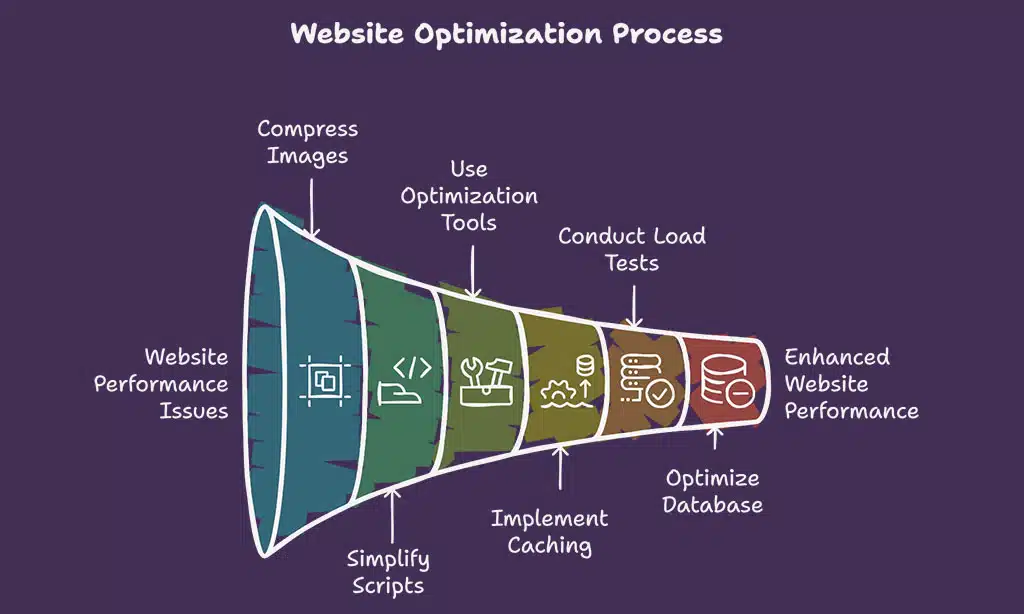
Hey there, let’s chat about making your website zip along like a race car. Keeping your site fast is key to avoiding pesky website downtime and boosting user happiness.
- First up, shrink those big image files to speed up loading times. Large pictures can drag your site down, making visitors wait too long. Use tools to compress them without losing quality, and watch your pages load in a snap.
- Next, cut down on fancy scripts that slow things. Too many animations or heavy code can choke your web performance. Stick to simple designs, and only use what you truly need for a smooth ride.
- Also, tap into a tool like NitroPack for top-notch website optimization. This handy helper can bundle your files and boost speed with just a few clicks. It’s like giving your site a turbo engine for better website reliability.
- Don’t skip caching tricks to store data for quicker access. When users visit, cached pages load fast since the server isn’t starting from scratch. Set this up, and you’ll dodge server overload during busy times.
- Make sure to run regular load tests to check your server capacity. These tests show how much traffic your hosting server can handle before it stumbles. Knowing this helps you plan ahead and prevent website downtime during traffic spikes.
- Tweak your database queries to keep things snappy as well. Slow requests to your databases can bottleneck everything. Clean up unused data, and optimize those calls to keep your site humming along.
- Lastly, use insights from tools like Google’s PageSpeed Insights for extra tips. This free resource points out what’s lagging on your landing pages. Fix those issues, and you’ll minimize downtime while improving search engine optimization (SEO).
Keep Software, Plugins, and Themes Updated
Let’s talk about keeping your website in top shape. Updating software, plugins, and themes is a key step to avoid nasty surprises like website downtime.
- First off, outdated plugins can mess up your CMS, causing crashes that kick your site offline. Think of them as old car parts; if they don’t fit right, the engine stalls. Regular updates fix bugs and patch security holes, keeping your online business humming.
- Next up, themes need fresh updates too, or they might break your site’s look and function. An old theme can clash with new software, leading to server issues or even a full-blown failure. Update them often to dodge these headaches.
- Also, software updates for your hosting server are a must to prevent compatibility issues. If your core system lags behind, it’s like using an old phone with a new app; nothing works right. Stay current to keep server downtime at bay.
- Don’t skip on checking for security vulnerabilities in old versions of anything on your site. Updates often come with fixes that block hackers from exploiting weak spots. This is huge for website security and uptime guarantee.
- Make it a habit to use reliable plugins and tools, as shaky ones can cause big problems. Go for trusted options to sidestep glitches and minimize downtime. Your website reliability depends on picking the good stuff.
- Set a schedule for routine maintenance to catch update needs early. Waiting until something breaks is like ignoring a leaky pipe; it only gets worse. Stay proactive to prevent website downtime.
- Finally, know that skipping updates can lead to bigger risks like DDoS attacks sneaking through old flaws. Keeping everything fresh is your shield against botnets and other threats. It’s a simple way to boost website performance.
Test and Monitor for DNS Issues
Hey there, folks, let’s chat about a sneaky little problem that can knock your website offline. DNS issues, like misspelled nameservers, can stop your site from loading, leaving visitors frustrated and your online business in a pickle.
Keep an eye on things by running regular checks for DNS functionality. These quick tests spot errors before they mess up your website reliability. Think of it as a health check for your site’s connection to the web.
Tools like Site24x7 can help track these glitches, so you stay ahead of server issues. Stick with consistent monitoring, and you’ll dodge a heap of downtime prevention headaches!
Create a Disaster Recovery Plan
Building a disaster recovery plan is like having a lifeboat ready before the ship starts sinking. Disasters, such as server crashes or security breaches, can strike your website at any moment.
You must spot these risks early to avoid long website downtime. A solid plan maps out clear recovery steps and assigns roles to your team. Think of it as a game plan for chaos, keeping your online business steady.
This way, server failure or a sneaky hack won’t catch you off guard. Have you ever lost hours of work due to a glitch? A good strategy stops that panic in its tracks.
Crafting this plan means setting up automated backups to save your data often. It’s like snapping a quick photo of your progress, just in case things go south. Make sure you know who handles what during a crisis, from fixing server issues to talking with users.
Include goals like recovery time objectives to get back online fast. Don’t let traffic spikes or a distributed denial of service attack ruin your day. With tools like Site24x7 for uptime monitoring, you can stay ahead of trouble.
Keep this blueprint handy, and test it now and then to dodge nasty surprises.
Limit Human Errors Through Best Practices
Hey there, let’s chat about dodging those pesky slip-ups that can mess with your website. Small mistakes, like a tiny misplaced comma in coding, can trigger big headaches and website downtime.
Here’s how to cut down on human error through smart habits:
- Start with clear rules for coding. Errors during coding or deployment often cause server failure. A tiny glitch, like misplaced code, can crash your site. So, set strict guidelines for how code gets written and checked before it goes live.
- Double-check every update before hitting publish. Whether it’s a new plugin or a fresh line of code, review it twice. This simple step can save you from major website performance issues down the road.
- Train your team on the latest tricks. Keep everyone in the loop about best practices for website maintenance. A sharp crew means fewer accidents and less risk of server issues sneaking up.
- Use tools to catch mistakes early. Automated systems can spot errors in coding or compatibility issues before they blow up. Think of them as your safety net for preventing website downtime.
- Limit who can make big changes. Not everyone needs full access to tweak your hosting server settings. Restrict permissions to avoid accidental blunders that could lead to server overload.
- Keep a log of every tweak you make. Track changes to your site, from small edits to major overhauls. This helps spot where human error might creep in and mess with online business uptime.
- Test everything in a safe space first. Before rolling out updates, try them in a sandbox environment. This cuts the odds of deployment flops causing unexpected site crashes or security risks.
Manage Traffic Load Effectively
Traffic spikes can hit your website like a tidal wave, folks. If you’re not ready, server overload might crash your site. So, let’s keep things steady. Invest in load balancing to spread visitors across multiple servers.
This stops any single hosting server from buckling under pressure. It’s like having extra lanes on a busy highway, keeping the flow smooth.
Scalable hosting plans are your best friend here. They let your site grow with demand, no sweat. Also, run regular load tests to check your server capacity. Think of it as a stress test for your online business.
By doing this, you dodge server downtime and keep website performance top-notch. Tools like Site24x7 can help track uptime and spot issues fast. Stay ahead of traffic surges, and your site stays online!
Monitor SSL Certificates and Domain Renewals
Hey there, let’s talk about keeping your website safe and active. Monitoring SSL certificates and domain renewals is a key step to avoid nasty surprises.
- First off, keep an eye on your SSL certificates to dodge security warnings that scare off visitors. These certificates prove your site is secure, and if they expire, browsers flash alerts that scream danger. Nobody wants that kind of drama, so mark your calendar or set reminders to renew them on time. This simple act builds trust with users and protects your online business from looking shady.
- Next up, set your domain renewals to automatic to prevent sudden expirations. Imagine waking up to find your website offline because the domain slipped through the cracks. It’s like forgetting to pay rent and getting locked out. Automation saves you from this mess and keeps your site running smoothly without a hitch.
- Also, check your SSL status regularly with tools like Site24x7 for uptime monitoring. These handy helpers alert you if something’s about to lapse, giving you a heads-up. It’s like having a buddy who nudges you before trouble hits, so use them to stay ahead of issues.
- Don’t forget, expired SSL certificates can hurt your website reliability and even mess with search engine optimization. Google and other engines frown on insecure sites, dropping your rankings faster than a hot potato. Stay on top of renewals to keep your spot in the search game.
- Finally, tie domain and SSL checks into your routine website maintenance plan. Make it a habit, like brushing your teeth, to peek at expiration dates monthly. Pair this with other tasks like backups to keep server downtime at bay and your site humming along nicely.
Use Trusted Tools for Uptime Tracking
Keeping your website online feels like a full-time job, doesn’t it? Let’s make it easier with trusted tools for uptime tracking. Tools like UptimeRobot, Pingdom, Datadog, and Site24x7 watch your site 24/7.
They check vital stats like uptime, loading speed, and response time. If something goes wrong, they alert you fast, so you can fix server issues before they hurt your online business.
Think of these monitoring tools as your website’s personal bodyguard. They stand guard against downtime prevention slip-ups. Pick one that fits your needs, set it up, and sleep better knowing your website performance is under watch.
With these helpers, you dodge the pain of website downtime and keep things running smooth.
Takeaways
Hey there, let’s wrap this up with a bang! Keeping your website online is like guarding a treasure chest, and these seven tips are your trusty map. Don’t let downtime steal your shine; act now with tools like Site24x7 for top-notch uptime tracking.
Stick to these steps, and watch your online business thrive. Got questions? Drop ‘em below, I’m all ears!
FAQs on Website Downtime Solutions
1. What’s the big deal with website downtime, and how can I dodge it?
Hey, website downtime is like a shop closing its doors; it hurts your online business bad. Use monitoring tools like Site24x7 for uptime monitoring, and lean on a solid hosting provider with an uptime guarantee to keep things running. Don’t let server downtime sneak up; stay ahead with regular website maintenance.
2. How can a content delivery network help my site stay online?
A content delivery network, or CDN, is your website’s best buddy for handling traffic spikes. It spreads your content across multiple servers, cutting down server overload and boosting website performance.
3. What’s the trick to handling traffic surges without crashing?
Traffic surges can knock your site offline faster than a bull in a china shop. Use load balancing to split the incoming crowd across servers, and consider CDNs or content delivery networks to ease the strain. Regular website optimization also keeps your web application ready for the rush.
4. How do I shield my site from nasty DDoS attacks?
DDoS protection is your digital bodyguard against cyber punks trying to cause server failure. Set up strong website security with SSL certificates, and run security audits to keep those operating systems patched. It’s like locking your doors before trouble knocks.
5. Can automated backups save my bacon during server issues?
Absolutely, automated backups are a lifesaver when server issues or human error strike. They align with your recovery point objective, letting you bounce back fast after hosting server glitches.