

Zoom Added Human Avatars to its Meeting App for More Flexible and Fun

Zoom Meeting App

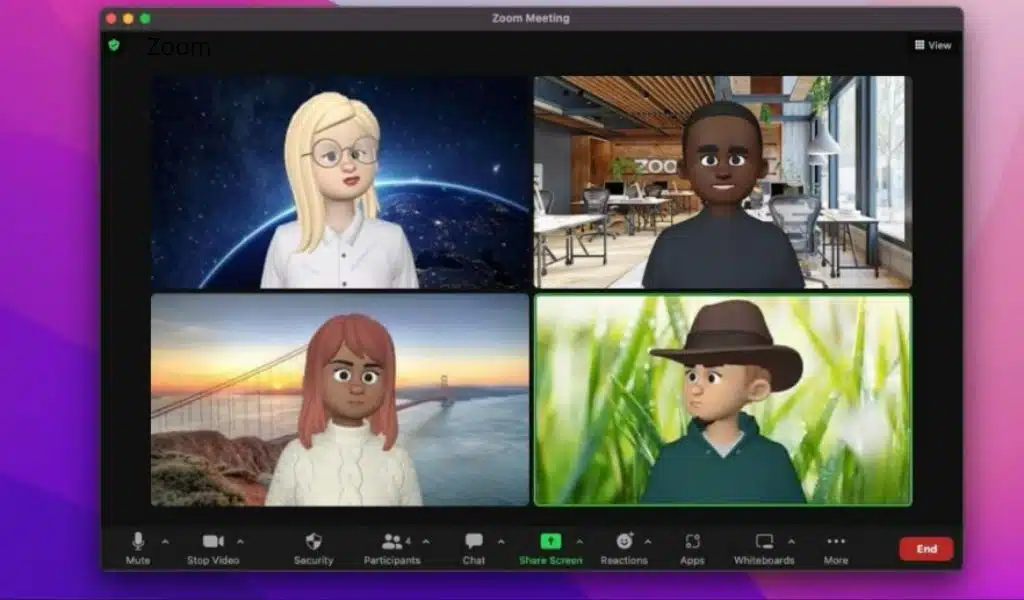
Zoom, a service for video conferencing, has added human avatars to its meeting app, which will let people look like cartoon versions of themselves. To make meetings more flexible and fun, the company added avatars to its list of filters.

“With so many ways to customize it, you can show off the “virtual you” in a creative and fun way! Avatars mirror your movements and facial expressions, so you can present yourself in a dynamic way without having to be on video. They are also a more interesting alternative to static profile pictures, which can add more fun and energy to your meetings “Zoom wrote on a blog.

Read More: Best Tools And Apps for Remote Work

At the moment, all Zoom users around the world can use avatars in beta. The company said that as they move forward in beta, they will keep adding more facial features, hairstyles, and ways to customize your human avatar.

Zoom also announced other features, such as meeting templates, threaded messages, a better way to chat during meetings, and Q&A in meetings. Users can now create, save, and choose from custom meeting templates that automatically set the right settings for their needs.

“Using Meeting Templates will help you feel confident that you’ve scheduled the right kind of meeting, so you can focus on the content and not waste time changing settings,” the blog post said. Also, to improve the in-meeting chat, the company will release threaded messages and reactions later this month. This will let meeting participants create message threads and group emoji responses in the in-meeting chat.

This feature will help organize the chat messages and make it clear to whom people are replying. Also, the Q&A feature will make it easier for meeting hosts to stay on top of things because they will only have to go to one place to see and answer questions.

Read Also: MacBook Pro with Touch Screen

From the Q&A pop-out, hosts and co-hosts can read, answer, or ignore queries, eliminating the need to comb through meeting chats to ensure all questions have been addressed. Zoom One Business, Zoom One Business Plus, Zoom Enterprise, and Zoom One Enterprise Plus accounts provide Q&A during meetings.



Subscribe to Our Newsletter

Related Articles

Top Trending

Remote Job Portfoli
Remote Job Portfolio Guide: Build Case Studies That Get Hired
Waste-to-Energy Technology
How Waste-to-Energy Technology Is Solving Two Problems At Once
Winning Upwork Proposal
Winning Upwork Proposal Strategy: From First Line to Final Reply
How to Enable Two-Factor Authentication
How to Enable Two-Factor Authentication on All Online Accounts
A Guide to a Minimalist Lifestyle in a Busy City

Fintech & Finance

HONOR 600 Pro vs HONOR 600 Lite 5G
HONOR 600 Pro vs HONOR 600 Lite 5G: Full Comparison with Expected India Pricing
How to Dispute a Credit Card Charge Successfully
How To Dispute A Credit Card Charge Successfully
How to Protect Yourself from Financial Scams
Financial Scam Prevention Tips to Protect Your Money
The Truth About Buy Now Pay Later Services
best UK current accounts 2026
9 Best UK Current Accounts with the Highest Interest and Best Perks in 2026

Sustainability & Living

Waste-to-Energy Technology
How Waste-to-Energy Technology Is Solving Two Problems At Once
A Guide to a Minimalist Lifestyle in a Busy City
Green Hydrogen Fuel
The Rise Of Green Hydrogen As A Clean Fuel Source
energy-efficient LED lights and appliances
Benefits of Using Energy-Efficient LED Lights and Appliances
Wind Power Global Energy Markets
How Wind Power Is Reshaping Global Energy Markets

GAMING

best gaming mice for every hand
The 11 Best Gaming Mice That Suits the Hands of All Sizes
Best Gaming Monitors Compared
9 Best Gaming Monitors Compared: Unlock Next Level Gaming
Custom Mechanical Keyboard
DIY: Build a Custom Mechanical Keyboard That Feels Like Yours
Best Indie Games Of Recent Years
The 7 Best Indie Games Of Recent Years You Should Not Miss
open-world games done right
The 9 Best Open-World Games Done Absolutely Right

Business & Marketing

The Truth About Buy Now Pay Later Services
Guest Posting In 2026
Guest Posting In 2026: Is It Worth It? And How To Do It Right
New Zealand social media marketing
13 Critical Facts About How New Zealand's Small Market Forces Brands to Be Creative on Social Media
Cold Email in 2026
Cold Email In 2026: What Works, Lands In Spam, And What Converts
Entrepreneurial Spirit Promotes Social Change

Technology & AI

How to Enable Two-Factor Authentication
How to Enable Two-Factor Authentication on All Online Accounts
Frehf
The Secrets of Frehf: Your Complete Guide to Understanding Frehf
AI Animation Styles Explained
AI Animation Styles Explained: The Smart Way to Make AI Videos Feel Professional
Check Your Real Internet Speed
How to Check Your Real Internet Speed and Detect ISP Throttling
Custom Mechanical Keyboard
DIY: Build a Custom Mechanical Keyboard That Feels Like Yours

Fitness & Wellness

resistance band routines
13 Resistance Band Routines to Build Strength at Home: Say Goodbye to Boring Workouts!
beginner home workouts
9 Beginner Home Workouts to Try for Real Results: Start Your Fitness Journey!
setting realistic fitness goals
Setting Realistic Fitness Goals: A Beginner’s Practical Guide That Actually Works
best home workouts guide
39 Home Workout Routines for Every Fitness Level to Get Fit Without a Gym
beginners fitness guide
Beginner’s Complete Fitness Guide: A Practical Beginners Fitness Guide for Real Life






















