Wondering why SpyDialer isn’t working for you? You’re not the only one. People use SpyDialer to search phone numbers, listen to voicemails, and find out who missed their call. But sometimes, it just doesn’t work.
Here’s why: SpyDialer allows up to 50 free searches each day.
This post will explain common problems with SpyDialer and how to solve them. We’ll give straightforward advice on preventing these issues in the future. Read on for helpful tips!
Key Takeaways
- SpyDialer needs an internet connection and only works with U.S. phone numbers. If a phone is off or the line is busy, it can’t access the voicemail.
- It won’t show information for numbers that are private, not in public records, or protected by privacy laws.
- To fix issues with SpyDialer: check your internet connection, clear your browser history, and make sure no software is blocking the site. There’s a daily limit of 50 searches.
- Keep SpyDialer safe by using strong passwords and regularly updating apps. Avoid clicking strange links.
- Details might not be available for some phone numbers on SpyDialer because they are private or unlisted.
Common Reasons Why SpyDialer May Not Work
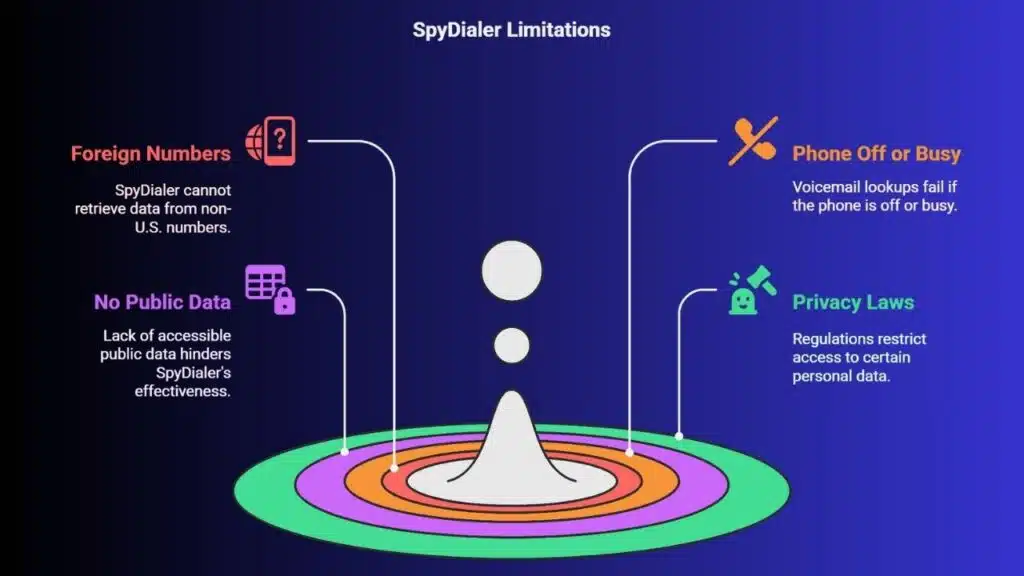
SpyDialer might not always work correctly. It only searches U.S. records, so foreign numbers won’t show up. Also, if a phone is off or has changed locations, or if the line is busy, voicemail lookups fail.
At times, this leads to no information being retrieved.
When there are no available phone numbers in public data for someone, SpyDialer is unable to assist. This service relies on accessible data from online directories and social media platforms like Facebook and LinkedIn.
However, it cannot access unshared numbers or those not found by advertisers or in traditional phone books. Privacy laws and regulations such as those surrounding online privacy and the national do not call registry restrict some information from being publicly accessible.
This restriction means SpyDialer faces limitations in what it can discover about personal data.
Troubleshooting Steps for SpyDialer Issues
To fix SpyDialer issues, follow these steps:
- First, ensure your web connection is stable.
- Clear the cache and cookies in your browser. This often solves glitches.
- If SpyDialer still doesn’t work, update your browser or switch to a different one. Outdated browsers can cause problems.
- Check if a firewall or antivirus software is blocking SpyDialer.
- For privacy concerns, go to the “Remove My Info” page on SpyDialer’s website.
- Double-check the phone number you’re researching. Mistakes can prevent results from showing up.
- Some numbers won’t have details available because they’re not listed in public databases.
- The voicemail lookup feature of SpyDialer bypasses the National Do Not Call Registry effectively.
- Keep an eye on how many searches you perform; there’s a daily limit of 50.
If these steps don’t help, reaching out to SpyDialer support might provide further assistance.
Tips to Prevent Future Malfunctions
Make your internet safer by using strong passwords for WiFi and devices. This prevents misuse of your network. Regularly update apps to fix issues and get new features.
Avoid clicking on unknown links in texts or emails to protect Spy Dialer and other apps from harm. If a message seems strange, don’t open it. Keep personal information safe to prevent identity theft.
These steps help keep Spy Dialer running smoothly.
Takeaways
Sometimes SpyDialer might not work right. We’ll show you how to fix these problems and prevent them in the future. Keeping SpyDialer running smoothly is important. It lets you search public data, listen to voice mails, and read text messages more effectively.
If SpyDialer gives you trouble, use our tips to solve it. Always update your tools for better results.
For more advanced solutions on scheduling tasks efficiently, consider exploring our detailed guide at RTI Scheduler Alpine.
FAQs
1. What is Spy Dialer and how does it work?
Spy Dialer is a service that uses public data from the internet to let you hear voice mail or send a text message anonymously. It’s popular on platforms like WhatsApp, Twitter, Telegram, and Pinterest.
2. Why might my Spy Dialer not be working?
There could be several reasons why your Spy Dialer isn’t functioning properly. Maybe there’s an issue with its compatibility with WCAG 2.1 compliance standards or perhaps there’s a problem with the public data it relies on.
3. Can I fix my malfunctioning Spy Dialer by myself?
Sometimes yes, sometimes no! If it’s about texting issues related to apps like WhatsApp or Twitter, checking app permissions can help. But for complex problems linked to WCAG 2.1 compliant issues or public data access, professional help may be needed.
4. Does using other communication tools affect how well Spy Dialer works?
It depends! While services like Telegram and Pinterest shouldn’t interfere directly with SpyDialer’s operation; if these apps are having connectivity issues due to internet problems then this could indirectly impact the functionality of your spy dialer too.