


Homeschool records have a habit of scattering. Worksheets collect in drawers, project photos stay on a parent’s phone, online course scores sit inside separate accounts, and tutor feedback disappears into email. By the end of the term, families may have plenty of evidence but no clear picture of what the learner has mastered, where support is still needed, or what should come next.
That is the real purpose of tracking homeschool progress digitally. A useful system should bring key information into one place without creating hours of extra administration. It should show what was studied, what the learner can now do, how independently the work was completed, and which skills need more attention.
For most families, the best setup is surprisingly simple: a short learning log, a selective digital portfolio, and a regular review. Used well, these tools support a broader homeschooling with technology plan while keeping the focus where it belongs: on the learner’s development rather than the software.
Finished Work and Real Progress Are Not the Same
A completed worksheet proves that a learner did an activity. It does not necessarily show that they understood it.
Consider the difference between these two notes:
Completed mathematics pages 34–38. Solved equivalent-fraction problems independently. Still needed a visual model when comparing unlike denominators. Review this before introducing fraction addition.
The second note takes only a little longer to write, yet it tells the parent what changed and what to teach next.
Useful progress records may capture:
- A skill demonstrated independently
- A concept that still needs explanation
- An error that keeps returning
- Feedback the learner applied successfully
- An accommodation that improved the work
- A task that required less support than before
- The next suitable challenge
Grades can belong in the record, especially for older learners. They should not become the entire record. A score of 72% is difficult to act on unless the family knows which skills caused the lost marks and whether the learner understood the corrections. Progress may also appear outside conventional assignments. A child who reads aloud more smoothly, asks for clarification without becoming upset, or plans a project with fewer prompts is making meaningful progress even when no percentage score captures it.
Decide What Is Worth Recording?
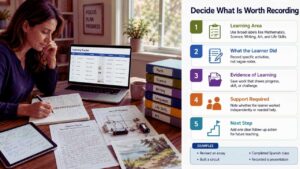
The amount of documentation a family needs will vary. A young child following a flexible, project-based program may need photographs, reading notes, brief parent observations, and a few dated work samples. A teenager preparing for examinations, school transfer, employment, college, or university will usually need more formal courses and assessment records.
Before choosing an app, decide what information the family must be able to find later.
The Learning Area
Use broad and consistent labels such as mathematics, language arts, science, social studies, art, music, physical activity, and life skills.
Avoid creating a new category for every unit. Fractions, percentages, and geometry can all sit under mathematics, with the specific topic included in the activity description.
What the Learner Did?
Keep this short enough that it can be entered without interrupting the day.
Examples include:
- Revised a persuasive essay using tutor feedback
- Compared grocery prices using unit rates
- Built and explained a simple electrical circuit
- Read three chapters and discussed the central conflict
- Completed a live Spanish conversation class
- Recorded a presentation about the water cycle
“Worked on science” will mean very little three months later.
Evidence of Learning
Evidence may be a document, photograph, video, audio explanation, quiz result, project file, tutor comment, or short parent observation. Not every activity needs an attachment. Save evidence when it shows something worth revisiting:
- A new skill
- Clear improvement
- A persistent difficulty
- A significant project
- Independent application
- A useful comparison with earlier work
A photograph of every completed workbook page creates clutter. A first essay draft beside its revised version tells a much clearer story.
The Support Required
A simple independence scale is often more informative than another grade:
- Independent
- One reminder
- Several prompts
- Direct teaching needed
- Not yet secure
This prevents heavily supported work from being mistaken for a skill the learner can already use alone.
The Next Step
A progress log should influence teaching rather than merely archive it.
A useful next step might be:
- Review multiplication facts before long division
- Rewrite the opening paragraph
- Repeat the experiment with one variable changed
- Move to a more demanding reading selection
- Ask the tutor to revisit verb endings
- Attempt the task without a visual prompt
When an entry will not help with planning, legal records, a portfolio, or future documentation, it probably does not need to be recorded.
A Practical System for Tracking Homeschool Progress
The strongest setup for most families has three parts: a learning log, an evidence folder, and a regular review. It does not require specialist homeschool software.
Start With a Short Spreadsheet
A spreadsheet is still the best default for most households. Google Sheets, Microsoft Excel, Apple Numbers, and similar tools can organise dates, subjects, resources, evidence links, grades, attendance, course hours, and next steps. Entries can be searched, sorted, filtered, exported, or printed.
A useful first version needs only six columns:
Date | Subject | Activity | Evidence Link | Independence | Next Step
A completed entry could look like this:
14 July | Mathematics
Solved 8 of 10 unit-rate problems. Needed one reminder to label the answers. Worksheet saved. Introduce percentage discounts next.
Another might say:
15 July | Writing
Revised a persuasive essay using tutor comments. Several prompts were needed to improve the topic sentences. Save both drafts and practice stronger paragraph openings.
Add time spent only when it serves a clear purpose, such as a local reporting requirement, a credit calculation, a tutor invoice, or a workload review. Do not begin with 20 columns, several color-coded tabs, automated charts, and complicated formulas. A tracker that takes five minutes to update after every lesson will not survive a busy month.
Working parents may prefer to update it twice a week rather than after every activity. An older learner can enter the task and evidence link, while the parent adds a progress note during review.
Keep Evidence Outside the Spreadsheet
The log records what happened. A separate folder holds the work. Create one main folder for each learner, then organize it by academic year and subject:
Learner Name
- 2026–2027
- Mathematics
- Writing
- Science
- Reading
- Projects
- Assessments
- External Classes
- Certificates
Use file names that remain understandable after they are removed from the original context.
Keep early and revised versions of important work. Progress is often easier to see in a comparison than in a final piece viewed alone. The folder should stay selective. If every spelling sheet, rough note, screenshot, and blurred photograph is saved, the strongest evidence becomes difficult to find.
Review the Record Once a Month
A tracking system becomes useful during review, not during data entry. Set aside 20 to 30 minutes once a month and look across the learner’s work.
Ask:
- Which skills are becoming secure?
- Which mistakes continue to appear?
- Is the learner working more independently?
- Has one subject received too little attention?
- Is the material too easy or too demanding?
- Which accommodations appear to help?
- Does the portfolio show development or merely volume?
- What needs to change next month?
Graphs and grade averages can support this review, but they should not replace judgment. A falling mathematics score could reflect a new and harder topic, rushed work, fatigue, poor instructions, or a genuine learning gap. The number cannot explain the reason on its own.
Which Digital Tool Is Worth Using?
Dedicated platforms are useful when they solve a problem that a spreadsheet and folder system cannot handle. They are less useful when the family adopts them simply because the dashboard looks organized.
A Spreadsheet Is Enough for Most Families
A spreadsheet is not visually exciting. That is part of its strength. It is familiar, flexible, easy to export, and less likely to trap the family inside one education platform. It works for one child or several and can grow from a basic learning log into a reading list, attendance record, course tracker, or high-school gradebook.
Its weak point is file storage. Do not embed dozens of large photographs or documents. Keep the files in cloud folders and place links in the relevant rows. Charts and formulas can be added when the family has consistent data worth analyzing. Building them first is usually wasted effort.
Google Classroom Helps With Assignment Management
Google Classroom can organise assignments, due dates, materials, grades, comments, and rubrics. Rubrics may be scored or unscored, and teachers can reuse them across assignments. Some rubric creation and grading work must be done from a computer rather than entirely through the mobile apps.
It makes the most sense for:
- Older learners managing several written assignments
- A parent coordinating work from multiple tutors
- Families already using Google Drive and Google Docs
- Homeschool groups with appropriate managed accounts
Account rules deserve attention. Google allows personal accounts to access Classroom, but children aged 13 and under should use it only through Google Workspace for Education or Workspace for Nonprofits accounts. Personal accounts also lack some functions available through managed education accounts.
That makes Google Classroom less convenient for independent families with younger children than many online recommendations suggest. A simple folder and spreadsheet may involve fewer login problems and less account administration.
Seesaw Is Better for Visual and Spoken Evidence
Seesaw is more useful when a learner shows knowledge through photographs, drawings, models, video, or spoken explanations. Its creative tools support images, audio, captions, uploaded files, and other multimedia work. Closed captions can be added to uploaded audio and video through a caption file, although caption support differs across Seesaw features and should not be mistaken for automatic transcription everywhere in the platform.
This can suit:
- Younger children
- Project-based homeschooling
- Learners who communicate more clearly through speech than long writing
- Art, music, practical science, and presentation work
- Families building a visual portfolio
Plan differences matter. Seesaw’s current subscriptions do not all include the same portfolio, privacy, reporting, and year-to-year features. Private folders, advanced reporting, gradebook functions, and portfolio continuity may require a paid school-oriented plan. Journal downloads may also depend on the role and settings available to the family or teacher account. Seesaw works best when the portfolio is curated. Posting every activity produces a busy feed rather than a clear record of growth.
Notion Is a Niche Choice, Not the Default
Notion can turn course records, reading lists, assignments, and projects into connected databases. The same information can be shown through table, list, board, gallery, calendar, or timeline views and organized through filters, sorting, and grouping. Access can also be controlled through sharing and permission settings.
It can work well for:
- A parent managing several learners
- A teenager coordinating long-term projects
- A family that already uses Notion
- Someone comfortable designing databases
It is a poor starting point for a parent who only needs to know what was taught and what should happen next. Notion invites tinkering. It is easy to spend an afternoon adjusting icons, properties, views, formulas, and templates without recording a single meaningful piece of learning.
For younger children, a parent-managed workspace is simpler than creating unnecessary accounts and permissions. Families should check the service’s current age and consent terms before inviting a child to use it directly.
Record the Support That Made the Work Possible
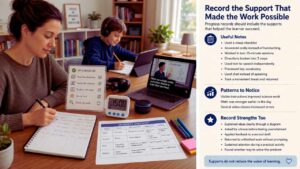
Progress records can become misleading when they ignore accommodations. A neurodivergent learner may use text-to-speech, visual instructions, captions, movement breaks, speech-to-text, reduced handwriting, or extra processing time. These supports affect how the task was completed, but they do not automatically reduce the value of the learning.
Useful notes might include:
- Used a visual checklist
- Answered orally instead of handwriting
- Completed the task in two 15-minute sessions
- Needed the directions divided into three steps
- Used text-to-speech independently
- Previewed key vocabulary before the lesson
- Participated through chat instead of speaking
- Took a movement break and returned to the task
Over several weeks, these notes may reveal patterns that scores miss.
A learner might understand science well when the instructions remain visible but struggle when several steps are delivered verbally. Another may complete accurate mathematics work early in the day and make avoidable mistakes after multiple video classes. Do not assume that every accommodation should eventually disappear. Independent learning can include selecting and using the right tool without adult help.
Record strengths too:
- Explained the concept clearly through a diagram
- Asked for a break before becoming overwhelmed
- Applied feedback to a second draft
- Returned to unfinished work without prompting
- Sustained attention during a practical activity
- Found another method for solving the problem
A tracker containing only missed tasks and difficult days will produce a distorted picture of the learner.
Keep Sensitive Information Out of General Planning Apps
Homeschool records may contain names, ages, photographs, academic results, recordings, teacher comments, and information about disability or support needs.
Before using a platform, check:
- What data it collects
- Whether the learner needs an account
- Who can view or comment on the work
- Whether pages or portfolios can be made public
- How shared links behave
- Whether records can be exported
- How uploaded files and accounts can be deleted
- What happens when a subscription ends
- Whether information is used for advertising or product development
In the United States, COPPA applies to covered online services directed to children under 13 and to other covered services that knowingly collect personal information online from children under 13. The rule was amended in April 2025, including changes involving targeted advertising, third-party disclosures, and data retention.
The GDPR applies to many organizations processing the personal data of people in the European Union. It generally does not apply when an individual processes information only for personal or household activities with no professional or commercial connection.
Families do not need to become privacy specialists. The practical response is to collect less sensitive information, keep pages private, review sharing permissions, and avoid placing full medical or diagnostic records in a general assignment tracker. For day-to-day planning, “written instructions helped” is usually more useful than uploading an entire assessment report.
Legal Recordkeeping Is Local
No app can determine what a family is legally required to keep. Homeschool rules may cover notification, attendance, instructional time, compulsory subjects, assessments, portfolios, teacher qualifications, or progress reports. Requirements differ across countries and often across states, provinces, territories, or local authorities.
In the United States, the rules vary by state. Missouri, for example, requires covered homeschooling parents to maintain a written record of subjects and activities, samples of academic work, and an evaluation of academic progress. That is a Missouri requirement, not a national standard.
England follows a different framework. Department for Education guidance says parents who choose elective home education take responsibility for providing a suitable education. Its national guidance applies to England and does not prescribe one mandatory digital tracking system for every family. Families should check current national and local guidance because policy and procedures can change.
Advice from a software company, social-media group, or family in another jurisdiction is not a substitute for official local information.
Older learners may also need records beyond the legal minimum:
- Course titles and descriptions
- Curriculum or resources used
- Start and completion dates
- Instructor information
- Credits or instructional hours
- Assessment methods
- Final grades
- Significant work samples
- External certificates
- Transcript notes
Create these records while the course is running. Reconstructing several years of high-school work from old emails, receipts, and browser bookmarks is difficult and often incomplete.
Export and Back Up the Records
A digital record should not exist only inside one platform. Once each term, export the spreadsheet, download portfolio files, and keep a copy outside the main service. PDF works well for records that should remain fixed. CSV or spreadsheet formats preserve data that may need further editing.
Keep at least two copies in different locations, such as:
- A cloud account and an external drive
- Two separate cloud services
- A computer and a protected offline backup
Open several exported files to confirm that they work. A download may preserve the main documents while losing comments, links, formatting, or other platform-specific details. Enable multi-factor authentication where it is available. CISA recommends MFA because it adds another verification step beyond a password. Its cybersecurity guidance also supports maintaining separate backups and testing whether important data can be restored.
Backup planning belongs in any long-term homeschooling with technology setup, especially when tutors, course providers, and several apps each hold different pieces of a learner’s record.
Small Mistakes That Create Big Recordkeeping Problems
Recording everything
More data does not automatically provide more insight. Keep what supports teaching, legal compliance, portfolios, transcripts, or future decisions.
Changing platforms repeatedly
Moving from a spreadsheet to a planner, then to a database, and later to a specialist app creates duplicate records and missing periods.
Tracking only grades
Scores may hide progress in independence, communication, persistence, revision, and problem-solving.
Saving evidence without context
A photograph of a model needs a date, subject, and short explanation of what it demonstrates.
Using vague file names
Science final new 2 will not help anyone next year.
Waiting until the end of the term
A few short weekly entries are more accurate than reconstructing several months from memory.
Leaving the only copy inside a course account
Access to tutoring portals, virtual classes, and learning platforms may change after enrolment ends.
Building a system the learner cannot use
Older students should be able to find assignments, upload evidence, and review progress without navigating a private maze that only the parent understands.
Set It Up in One Week
Start with one spreadsheet and one evidence folder.
Create these columns:
Date | Subject | Activity | Evidence Link | Independence | Next Step
Add one folder for each major subject. Save two or three representative pieces of work during the first week rather than every page.
At the end of the week, review the entries with the learner:
- What became easier?
- What still feels confusing?
- Which piece of work best shows new learning?
- What support helped?
- What should happen next?
Continue with the simple system for a month.
Only then decide whether the family has a genuine reason to add Google Classroom, Seesaw, Notion, a dedicated gradebook, or specialist homeschool software. Add a tool when the current setup has a clear weakness, not because another parent’s dashboard looks impressive.
Final Thoughts
Tracking homeschool progress should lead to better decisions, not create another layer of schoolwork for the parent. For most families, the right starting point is modest: one spreadsheet, clearly named folders, selected work samples, and a monthly review. Google Classroom is useful when assignments become difficult to coordinate.
Seesaw makes more sense for visual and spoken portfolios. Notion suits families that already work comfortably with databases. Keep the system simple enough to maintain during an untidy, interrupted week. A basic record used consistently will show more genuine progress than a sophisticated dashboard abandoned after a month.
Frequently Asked Questions (FAQs) About Tracking Homeschool Progress
How Often Should Homeschool Progress Be Updated?
For most families, once or twice a week is enough. The key is to review the records monthly so the information leads to better teaching decisions.
What Records Should Be Kept for a High-School Homeschooler?
Keep course titles, descriptions, grades, major work samples, assessment methods, certificates, and any required credits or instructional hours. Check local rules and future school or university requirements early.
Can Students Help With Tracking Homeschool Progress?
Yes. Older learners can log completed work, upload evidence, and add short reflections, while parents review accuracy and note the support required.
How Long Should Digital Homeschool Records Be Kept?
Keep records for as long as they may be needed for legal compliance, school transfer, transcripts, or university applications. Important high-school records should usually be preserved beyond graduation.
What If Different Courses Store Progress on Separate Platforms?
Use one central spreadsheet to list each course, provider, grade, completion date, and evidence link. Download important records before access to a course or tutoring platform expires.
























