RTasks by ResiDex is a software solution for healthcare providers to manage daily tasks and activities. It offers a variety of features such as ECharting, EMAR, Assessments, Incidents, Housing, Activity Management, Billing, and Accounts Receivable.
To access these features, you must log in to your account.
You can access your dashboard and view your daily tasks, schedules, and other important information after RTasks login. The software is suitable for both large multi-campus organizations and tiny group homes.
While RTasks by ResiDex offers a variety of benefits for healthcare providers, it’s essential to consider the merits and demerits of using the software. You might also have questions about the login process or need to reset your password.
Key Takeaways
- RTasks by ResiDex is a software solution for healthcare providers to manage daily tasks and activities.
- To avail of the features and services offered by RTasks by ResiDex, you must first log in to RTasks with your email address and password.
- While RTasks by ResiDex offers a variety of benefits for healthcare providers, it’s essential to consider the pluses and minuses of using the software.
Overview of RTasks
RTasks by ResiDex is a web-based Electronic Health Record (EHR) platform designed to provide healthcare professionals with a flexible and efficient way to manage their daily tasks.
RTasks is a versatile platform that can be used across multiple browsers and devices, making it an ideal solution for healthcare providers who need to access patient data on the go. The system is also highly customizable, allowing you to adjust the platform to your needs.
Long-Term Care Focus
RTasks is built for long-term care settings. It works well for nursing homes and assisted living centers. The platform keeps data safe in line with HIPAA rules.
It cuts down on extra work. For example, allergy entries fill in automatically on all related reports. This saves time and reduces mistakes.
Key Features and Services
RTasks by ResiDex offers a range of features and services that help healthcare professionals manage their daily tasks more efficiently. Some of the main elements of the platform include:
- ECharting: A comprehensive electronic charting system that allows healthcare providers to document patient care in real time.
- EMAR: An electronic medication administration record that allows healthcare providers to manage medication orders and administration more efficiently.
- Assessments: A suite of assessment tools designed to help healthcare providers evaluate patient needs and develop care plans.
- Incidents: A system for reporting and tracking incidents in the healthcare setting.
- Housing and Activity Management: A set of tools for managing housing and activity schedules for patients.
- Billing and Accounts Receivable: A comprehensive billing system that allows healthcare providers to manage patient accounts and payments.
With these features and more, RTasks by ResiDex offers healthcare professionals a powerful and flexible platform for managing their daily tasks and providing high-quality patient care. You can also read an article on Top Healthcare Industry Trends for 2023
Advanced Scheduling & Data Integration
RTasks uses smart scheduling to assign tasks. The system makes work smoother with AI help. It adjusts when delays occur and matches tasks to staff. This keeps care on track and lightens the load for caregivers.
Data moves fast in the system. When you record an assessment or diagnosis, the details show up in all reports right away. This cuts extra work and helps teams stay informed. Medication logs are kept safe with built-in tracking tools.
Getting Started with RTasks
RTasks is a web-based software that helps you manage your daily tasks efficiently. To get started with RTasks, you need to create an account, meet specific requirements, and log in to your account.
How to Create a New Account on RTasks
Creating a new account on RTasks is a simple process. You need to follow the steps below:
- Navigate to the RTasks login page by typing in the URL https://www.rtasks.net/Users/Login in your web browser.
- Click on the “Create New Account” button.
- Input your personal information, including your name, email address, and phone number.
- Pick a username and password for your account.
- Tap on the “Create Account” button to complete the process.
Requirements for RTasks Login
Before logging in to your RTasks account, you need to meet the following requirements:
- A stable internet connection.
- A web browser that supports HTML5.
- An up-to-date operating system and web browser.
- An active RTasks account with a valid username and password.
The RTasks Login Process
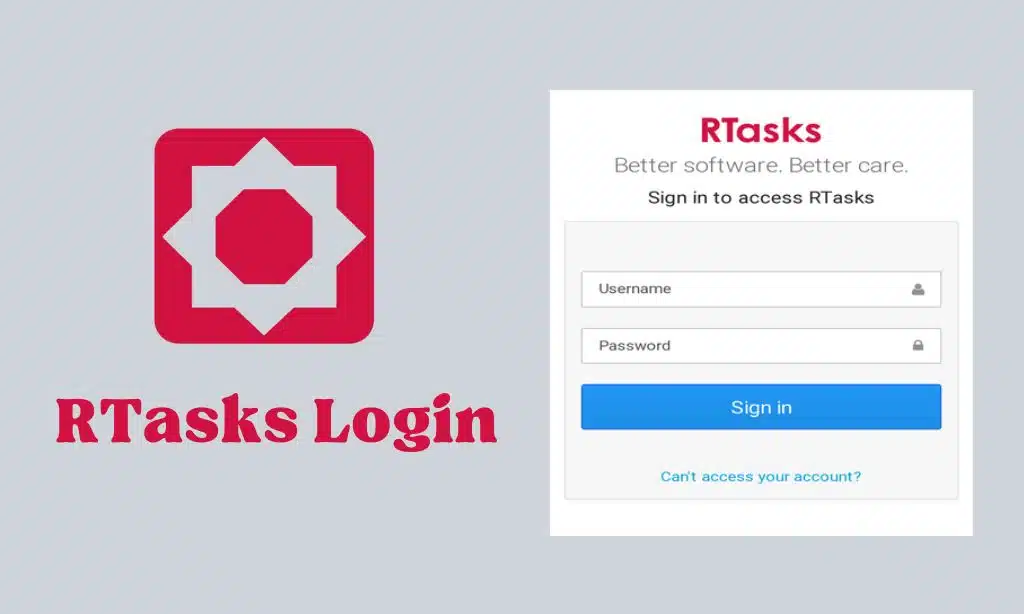
Logging in to RTasks.net is a simple process that requires a valid username and password. In this section, we will provide a step-by-step guide to logging in and troubleshooting common login issues.
Step-By-Step Guide to Logging in to RTasks
- Open your preferred browser and navigate to RTasks.net.
- Tap on the “Login” button located in the top right corner of the page.
- Enter your username and password in the provided fields.
- Click the “Sign In” button to access your RTasks account.
Troubleshooting Common RTasks Login Issues
- Double-check that you are using the correct username and password. If you have forgotten your password, click the “Can’t access your account?” link on the login page to reset it.
- Clear your web browser’s cache and cookies, then try logging in again.
- Make sure your web browser is up to date and compatible with RTasks.net. Supported browsers include Google Chrome, Mozilla Firefox, and Microsoft Edge.
- If you cannot log in, contact RTasks support for further assistance.
Enhanced Security and Compliance
The login process stays safe with extra checks. RTasks uses methods such as biometric scans and SMS codes to protect your account. Admins can set short idle times to lock accounts automatically, which helps stop unwanted access.
The platform meets strict HIPAA rules. Alerts may be sent if something unusual happens. These extra steps keep patient data safe and give staff peace of mind.
A recent case study from a large multi-campus organization shows that RTasks improved task tracking and communication. A small group home also saw enhanced efficiency. The platform includes an interactive demo and video guide to help you understand key steps.
How to Reset RTasks Password
If you forgot your RTasks password, chill. You can easily reset it by following the steps below:
- Go to the RTasks login page at https://www.rtasks.net/Users/Login.
- Tap on the “Forgot Password” link below the login button.
- Enter the email address associated with your RTasks account and click on the “Submit” button.
- You will get an email with instructions on how to reset your password.
- Follow the instructions in the email to complete the process.
If you are still waiting to receive the email within a few minutes, check your spam folder or contact RTasks support for help. The reset link is only valid for a limited time. If it expires, request a new one. When resetting your password, choose a strong one.
Use a mix of uppercase and lowercase letters, numbers, and symbols.
Features and Services Offered by RTasks
RTasks is a powerful platform for healthcare providers to manage and track patient care. It gives various features and services that make it a valuable tool for streamlining tasks and improving communication among team members. Below are some of the key features and services offered by RTasks.net:
Task Management
RTasks.net offers a comprehensive task management system that lets you create, assign, and track tasks related to patient care. This feature makes it easy to manage daily tasks, such as medication administration and personal care, and helps keep work on track.
Medication Tracking
With RTasks, healthcare providers can easily track medication administration and make sure patients get the right dosage at the right time. The platform also has a medication management system that lets you create and update medication lists, track inventory, and generate reports.
Assessment and Diagnosis Recording
RTasks offers a digital version of traditional assessments, making it easy for healthcare providers to record and track patient assessments and diagnoses.
Communication with Team Members
RTasks.net includes a messaging system that lets team members chat in real time. This helps share information quickly, ask questions, and work together on patient care plans.
Client Information Management
RTasks.net offers a comprehensive client information management system that lets you store and manage patient information, including demographic data, medical history, and care plans. This keeps all patient data in one spot and easy to reach for healthcare providers.
In summary, RTasks.net offers a variety of features and services that make it a valuable tool for healthcare providers. From task management to medication tracking to team communication, RTasks helps streamline patient care and improve outcomes.
Pros and Cons of Using RTasks
Though RTasks provides many useful services, it has some disadvantages as well. Let’s look into the advantages and disadvantages of RTasks.
Advantages of Using RTasks
RTasks is a web-based EHR or Health Record platform that provides a user-friendly and flexible solution for assisted living, group home, and adult day service locations. Here are some of the advantages of using RTasks:
- Accessibility: RTasks can be accessed from anywhere with an internet connection, making it convenient for caregivers to reach patient information and update records on the go.
- Customizable: RTasks can be adjusted to meet the specific needs of each facility, allowing for custom care plans and assessments.
- Secure: RTasks is HIPAA compliant and follows EHR best practices to keep patient information safe.
- Integration: RTasks can work with other systems, such as pharmacy and lab, to streamline workflows and boost efficiency.
- User-friendly: RTasks has a simple and clear interface that is easy to use, even for those who are not tech experts.
Potential Downsides or Limitations of RTasks
While RTasks has many benefits, there are also some possible downsides or limits to keep in mind:
- Cost: RTasks can be expensive for smaller facilities or individual caregivers, with fees based on the number of users and facilities.
- Training: While RTasks is user-friendly, new users still face a learning curve. Facilities may need to invest time and resources to teach staff how to use the system well.
- Technical issues: Like any software, technical problems can come up. Some facilities might need dedicated IT support to fix issues.
- Limited customization: Even though RTasks can be adjusted, there might be limits to what can be modified. Facilities may have to work with the set features of the software.
Flexible Pricing and Scalability
Pricing starts at $1000 a month. But you can talk with the sales team to get a plan that fits your needs. Larger facilities often get special rates, while smaller ones can ask for a better match to their budget.
You pay for what you use. This method helps keep costs in check. Plans can grow as your facility grows, which makes budget planning easier.
Takeaways
RTasks login page is an important gateway for smooth task management. With its simple interface and strong features, RTasks offers a smooth login experience. By following the steps outlined in credible sources, you can log in and get the most from this great platform.
You should have a high-speed and secure internet connection before logging in. You should also have your login credentials ready, including your username and password. If you hit any snags, you can contact RTasks support for help.
RTasks is a valuable tool for caregivers and other healthcare professionals. Its user-friendly interface and high-quality features make it easy to manage tasks and give better care to patients. Using RTasks can help speed up work and lift efficiency.
Frequently Asked Questions (FAQs) on RTasks Login
1. How do I troubleshoot RTasks login issues?
If you are having trouble logging into RTasks, there are a few things you can try. First, check that you are using the correct login details. Double-check your username and password to be sure they are right. If you still have trouble, try clearing your browser’s cache and cookies.
You can also try using a different browser or device to see if that fixes the issue.
2. What should I do if I forget my RTasks login credentials?
If you forget your RTasks login credentials, you can reset your password by clicking the “Forgot Password” link on the login page. You will be prompted to enter your username or email address tied to your account. Follow the instructions given to reset your password.
3. Can I download RTasks software on my computer?
RTasks is a web-based software and does not require any downloads or installations. You can access RTasks from any device with an internet connection and a web browser.
4. What is the difference between RTasks and ResiDex Software?
RTasks is a module of the ResiDex Software suite. ResiDex Software is a complete electronic health record (EHR) platform for assisted living and group home settings. RTasks is a web-based EHR platform used across multiple browsers and devices.
5. Is RTasks compatible with other scheduling software like Gusto or When I Work?
RTasks is built to be flexible and can work with other scheduling software. It is a good idea to contact RTasks support to talk about integration needs and make sure it fits.
Disclaimer: This content is for informational purposes only and does not replace professional advice. The information is based on industry best practices and HIPAA guidelines. No affiliate relationships or sponsorships affected this content. Methodology details are available upon request.