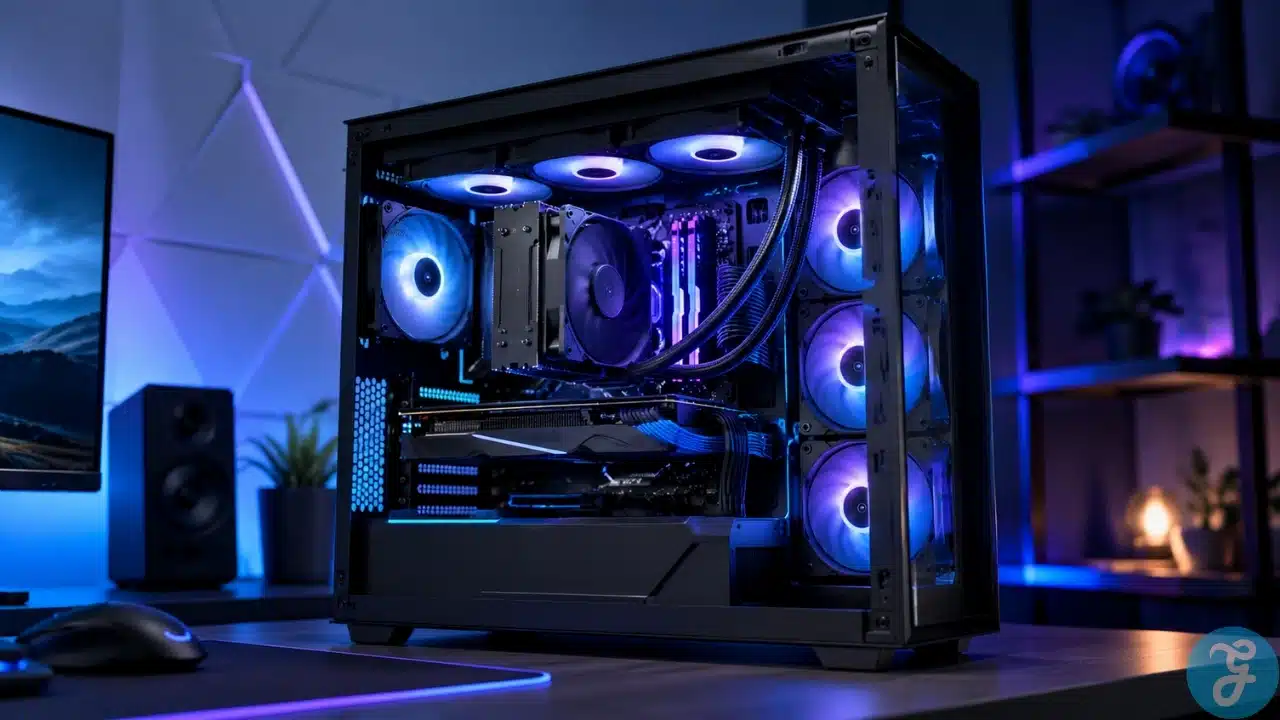
Gaming PCs push hardware to its limits, and heat is the hidden enemy. Overheating can quietly throttle performance, shorten component lifespan, or trigger unexpected crashes during intense sessions. Choosing the right cooling solution ensures your rig runs smoothly, stays quiet, and handles overclocking without surprises. Here’s a detailed look at the best cooling for gaming PCs, so you can pick the solution that fits your build and play style.
Our Selection Criteria
We focused on practical factors that matter for real gaming setups:
- Cooling Performance: Ability to keep CPUs/GPUs safe under heavy load.
- Noise Levels: Quiet fans and pumps for an immersive experience.
- Compatibility: Case, RAM clearance, and CPU socket fit.
- Ease of Installation: How beginner-friendly or advanced the setup is.
- Price-to-Performance: Realistic value for your budget.
Target Demography
This guide is aimed at gamers, PC builders, and enthusiasts who want reliable cooling without guessing which solution will actually work in their system.
7 Best Cooling for Gaming PCs Today
We’ve included air coolers, all-in-one (AIO) liquid coolers, and hybrid solutions suitable for different case sizes, budgets, and performance levels.
1. Noctua NH-D15
The NH-D15 remains a top-tier air cooler for serious PC builds. Its dual-tower design keeps even high-TDP CPUs in check during marathon gaming sessions.
Best for:
- Overclocked CPUs
- Quiet operation
Why We Chose It:
- Excellent heat dissipation for demanding workloads
- Near-silent performance under heavy loads
- Wide CPU socket compatibility
- Durable, well-built design
Things to consider:
- Large profile may block taller RAM modules
- Higher price compared to standard air coolers
2. Corsair iCUE H150i Elite Capellix
This 360mm liquid cooler balances performance and customizable lighting. Its large radiator is designed for maximum cooling in spacious cases.
Best for:
- Gamers with large cases
- Enthusiasts who want RGB customization
Why We Chose It:
- Strong thermal performance, even under sustained loads
- iCUE software allows precise fan and lighting control
- Reliable pump design for consistent cooling
- Clean design with integrated RGB
Things to consider:
- Requires a large case for proper fit
- Fans can get louder under extreme load
3. be quiet! Dark Rock Pro 4
A premium air cooler that keeps high-end CPUs cool while remaining whisper-quiet. Its dual heatsinks and Silent Wings fans deliver consistent results.
Best for:
- Silent high-performance builds
- Users with overclocked CPUs
Why We Chose It:
- Almost inaudible under gaming and rendering loads
- Excellent heat management
- Solid construction and reliability
- Maintains performance over time
Things to consider:
- Installation requires some patience
- Size can limit RAM compatibility
4. NZXT Kraken X73
This 360mm AIO cooler combines strong performance with a polished aesthetic. Its Infinity mirror pump adds a premium look without sacrificing efficiency.
Best for:
- RGB-focused builds
- Heavy gaming and streaming setups
Why We Chose It:
- Strong cooling across CPU-intensive tasks
- Software-controlled fans for precise tuning
- Clean, modern design
- Long-term reliability with quality components
Things to consider:
- Requires software for optimal performance
- Slightly higher noise at maximum fan speeds
5. Cooler Master Hyper 212 Black Edition
A compact and affordable air cooler suitable for mid-range CPUs. While it won’t compete with high-end dual-tower coolers, it provides reliable performance for most gamers.
Best for:
- Budget-conscious builds
- Mid-range CPUs
Why We Chose It:
- Affordable and widely compatible
- Easy to install
- Solid cooling for mainstream setups
- Compact design fits most cases
Things to consider:
- Struggles with overclocked high-TDP CPUs
- Single fan limits maximum airflow
6. Arctic Liquid Freezer II 280
A highly efficient AIO cooler with quiet operation. Its integrated VRM fan adds extra motherboard support, reducing the chance of thermal throttling.
Best for:
- Quiet, high-performance builds
- Gamers who prioritize efficiency
Why We Chose It:
- Effective cooling at low noise levels
- Extra VRM cooling improves overall stability
- Good 280mm radiator performance
- Affordable for its thermal capability
Things to consider:
- No RGB lighting for visual flair
- Case compatibility should be checked before purchase
7. Scythe Mugen 5 Rev. B
A mid-range air cooler that provides reliable performance without taking up too much space. Ideal for small to medium cases.
Best for:
- Compact gaming PCs
- Mid-range CPUs
Why We Chose It:
- Strong cooling in a single-tower design
- Quiet fan operation
- Broad compatibility with RAM and case sizes
- Excellent value for the price
Things to consider:
- Not intended for extreme overclocking
- Minimal aesthetic appeal
An Overview of the Best Cooling for Gaming PCs
Different setups demand different cooling strategies. Here’s a clear comparison to help match a cooler to your system requirements:
Overview Comparison
| Cooler | Type | Max CPU Compatibility | Noise Level | Price Range |
|---|---|---|---|---|
| Noctua NH-D15 | Air | High-end CPUs | Very low | $$$ |
| Corsair H150i Elite Capellix | AIO Liquid | Extreme | Medium | $$$$ |
| be quiet! Dark Rock Pro 4 | Air | High-end | Very low | $$$ |
| NZXT Kraken X73 | AIO Liquid | Extreme | Medium | $$$$ |
| Cooler Master Hyper 212 Black | Air | Mid-range | Low | $ |
| Arctic Liquid Freezer II 280 | AIO Liquid | High-end | Low | $$$ |
| Scythe Mugen 5 Rev. B | Air | Mid-range | Low | $$ |
Our Top 3 Picks and Why?
For extreme performance, the Noctua NH-D15 and Corsair H150i Elite Capellix deliver sustained cooling under heavy loads. For a quieter mid-range build, the be quiet! Dark Rock Pro 4 balances efficiency and near-silent operation.
How to Choose the Right Cooling System by Yourself
The Selection Framework:
- CPU/GPU heat output: Match cooler TDP with component heat generation
- Case size & compatibility: Confirm radiator or fan fits your case
- Noise preference: Decide if air or liquid best suits your noise tolerance
- Budget and aesthetics: Balance price with performance and visual preference
The Final Checklist:
- Confirm CPU socket compatibility
- Check RAM and case clearance
- Compare TDP ratings and airflow performance
- Evaluate noise levels under load
- Choose between air vs liquid cooling based on setup needs
Practical Guidance on Cooling Your Gaming PC
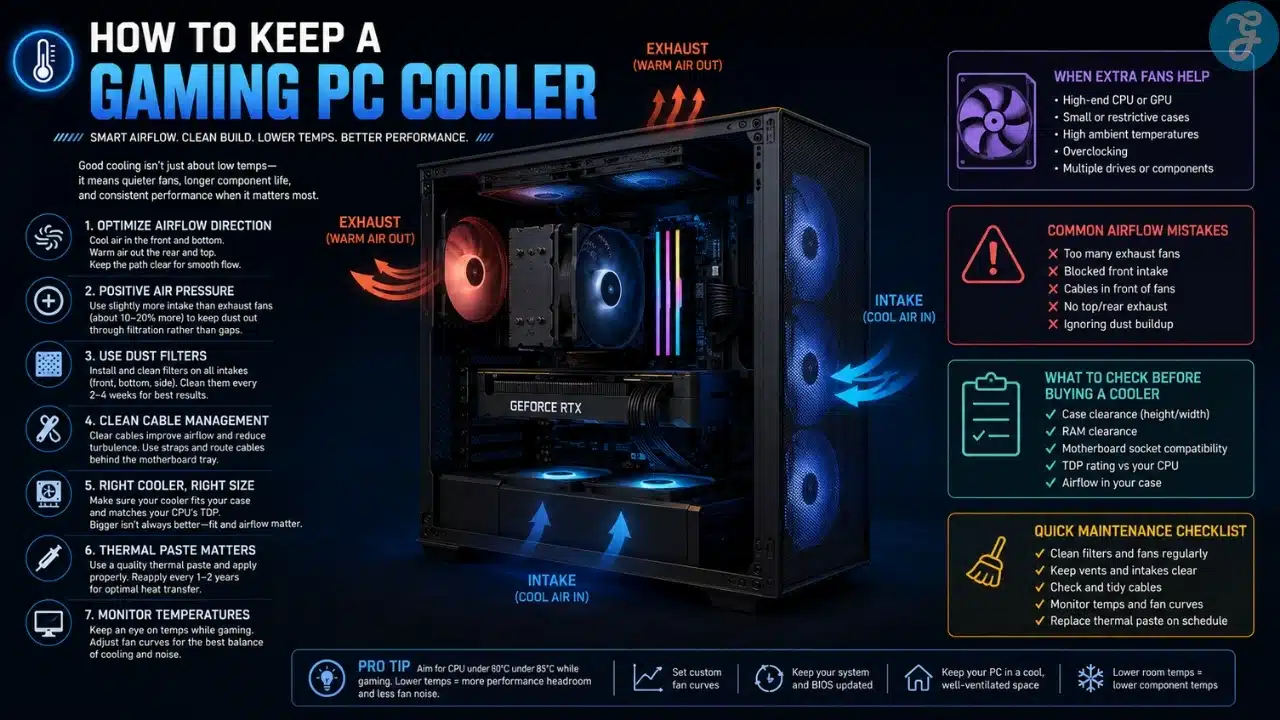
The best cooling for gaming PCs doesn’t just keep temperatures low; it prevents throttling and extends component life. Even if your case looks impressive, airflow and radiator placement are crucial. Quiet operation matters as much as raw performance; no one enjoys constant fan whine. Consider each cooler’s size, airflow, and maintenance needs carefully. A high-end cooler in the wrong case can underperform, so measure and plan before buying.
Frequently Asked Questions (FAQs) About Best Cooling for Gaming PCs
1. Do I need liquid cooling for gaming?
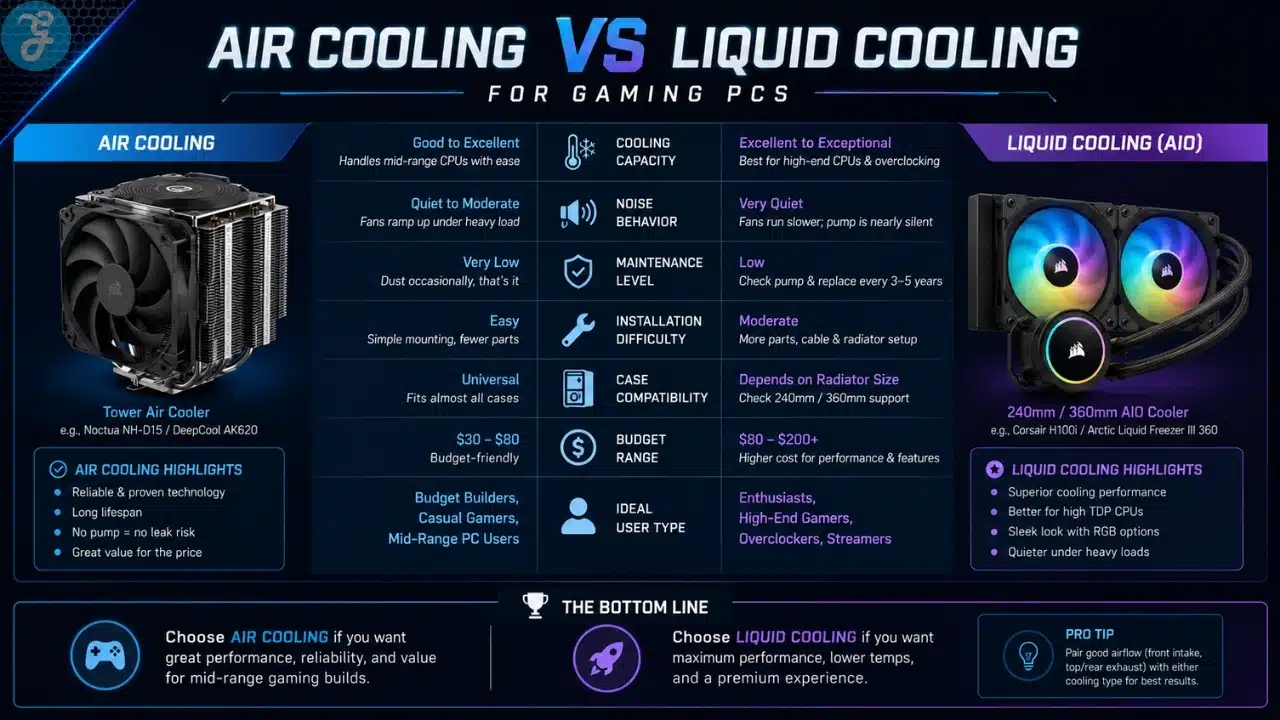
Answer: Many air coolers can handle high-end CPUs without issues. Liquid cooling is most useful for overclocked or heavily stressed builds.
2. Does a bigger radiator always mean better cooling?
Answer: Not necessarily. Case airflow, fan quality, and radiator placement all affect actual performance.
3. Are liquid coolers prone to leaking?
Answer: Modern AIOs are reliable. Choosing reputable brands and proper installation minimizes risk.
4. How often should I clean my cooler?
Answer: Dust reduces efficiency. Fans and radiators should be cleaned every 3–6 months depending on your environment.
5. Can I mix fan brands with a cooler?
Answer: Yes, as long as the airflow direction and connectors are compatible. Mixing fans can optimize noise and cooling performance.