

Microsoft is taking a bold step in reimagining how people use its Office apps. The company has officially launched what it calls “vibe working”—a new AI-powered way of creating and managing spreadsheets, documents, and presentations. At the heart of this shift are two innovations: Agent Mode in Excel and Word and the broader Office Agent in Copilot chat.
This launch signals Microsoft’s attempt to move beyond simple text suggestions and toward AI agents that can plan, reason, and execute complex tasks inside Office applications. It combines OpenAI’s GPT-5 models with Anthropic’s Claude models to deliver a more versatile AI experience across the Microsoft 365 ecosystem.
From “Vibe Coding” to “Vibe Working”
The phrase “vibe working” comes from the concept of vibe coding, where beginners can build apps by simply writing prompts for an AI to handle the coding process. Microsoft now wants to extend this simplicity to Office apps like Excel, Word, and PowerPoint.
Sumit Chauhan, corporate vice president of Microsoft’s Office Product Group, explained the vision:
“In the same way vibe coding has transformed software development, the latest reasoning models in Copilot unlock agentic productivity for Office artifacts.”
In other words, tasks that once required expert knowledge—such as building complex Excel models or drafting a board-ready report—can now be handled by AI agents that think through the process step by step.
What Is Agent Mode?
Agent Mode is Microsoft’s latest upgrade to the Copilot experience inside Excel and Word. Unlike the earlier Copilot features that mostly focused on writing assistance or summarization, Agent Mode introduces multi-step reasoning and execution.
Key Features of Agent Mode
- Step-by-step automation: The AI breaks down tasks into smaller sub-agents, executes them, and validates results. Users can follow each step in a sidebar, making the process transparent.
- Accuracy focus: Microsoft reports that Agent Mode achieved 57.2% accuracy in the SpreadsheetBench benchmark. That places it ahead of rivals like Shortcut.ai, ChatGPT’s .xlsx agents, and Claude Files Opus 4.1. However, it still trails human performance, which stands at 71.3%.
- Auditability and reliability: The feature is designed for business users who need auditable, refreshable, and verifiable outputs—important for financial modeling or regulatory documents.
Agent Mode in Excel: Making Complex Data Easier
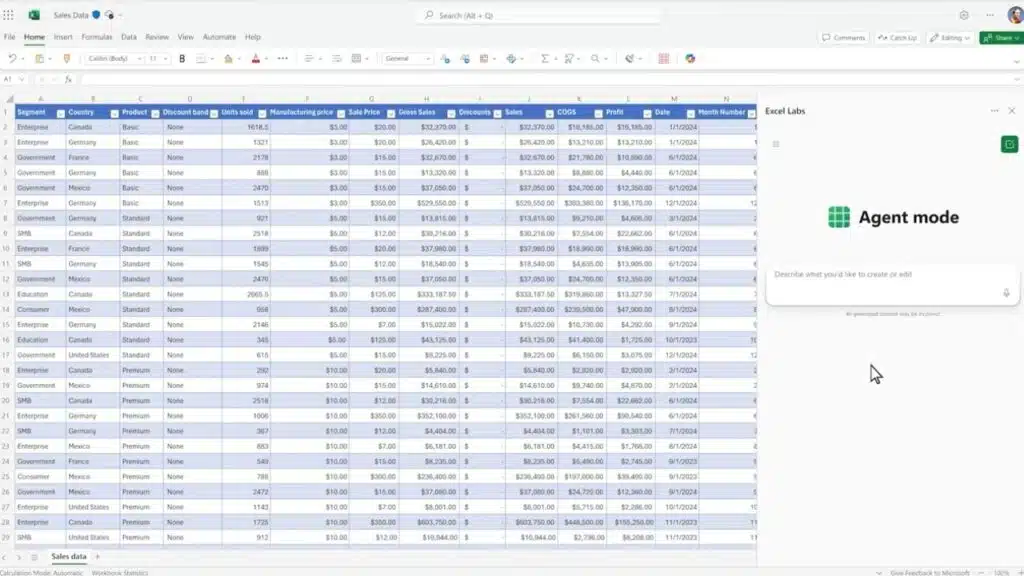
Excel has always been one of the most powerful yet intimidating Office tools. For non-experts, mastering formulas, pivot tables, and macros can take years. Agent Mode changes that.
- It can generate complex financial models, analysis dashboards, or monthly business reports using only a text prompt.
- Users can see the AI explain its reasoning process, ensuring transparency and reducing errors.
- Instead of copy-pasting formulas from online tutorials, employees can rely on AI agents to design error-checked spreadsheets.
This has the potential to save hours of work for analysts, consultants, and small businesses that lack dedicated Excel experts.
Agent Mode in Word: Turning Writing into a Dialogue
Word’s Agent Mode goes beyond simple drafting or summarization. It makes the act of writing interactive.
- Users can start with a broad prompt, such as “Write a monthly sales summary using last quarter’s reports.”
- The AI then drafts a structured report, adds highlights, compares changes, and asks clarifying questions to refine the final output.
- It feels less like typing into a word processor and more like having a conversation with an assistant.
This is what Microsoft calls “vibe writing.” Instead of staring at a blank page, users get a guided workflow that evolves through back-and-forth interaction.
Office Agent in Copilot Chat: Beyond Word and Excel
While Agent Mode works inside Word and Excel, Microsoft also unveiled Office Agent—a Copilot chat feature powered by Anthropic’s AI models.
- Office Agent can create full PowerPoint presentations with structured slides, graphics, and speaker notes.
- Unlike older AI slide generators, it performs web-based research during the process, ensuring up-to-date data and references.
- Users can preview slides in real time, making adjustments before finalizing.
This feature sets Microsoft apart from smaller AI startups trying to generate presentations, giving it an edge thanks to the integration with Microsoft 365 apps.
Why Microsoft Is Using Multiple AI Models
One of the most interesting aspects of this launch is Microsoft’s use of both OpenAI and Anthropic.
- OpenAI’s GPT-5 powers Agent Mode inside Office apps like Excel and Word.
- Anthropic’s Claude models power Office Agent inside Copilot chat, which runs on Amazon Web Services (AWS).
This signals Microsoft’s strategy to avoid depending entirely on one AI provider. While the company remains deeply tied to OpenAI, it is also testing Anthropic’s strengths in structured document creation and research.
Chauhan emphasized:
“We are committed to OpenAI, but we are starting to explore with the model family to understand the strength that different models bring and how we build the best composition for our products.”
Why This Matters for Productivity
1. Democratizing Expert Work
Tasks that once required advanced training—like building audit-ready financial sheets—are now accessible to everyday employees.
2. Improving Transparency
By showing each step in the process, Microsoft aims to build trust in AI outputs, which is crucial in fields like finance, healthcare, and law.
3. Differentiating Microsoft 365
In a crowded AI market with tools like Notion AI, Google Duet AI, and standalone slide generators, Microsoft is betting that deep integration with Office will give it an edge.
Availability and Limitations
- Who gets it now: Agent Mode and Office Agent are launching first in the Frontier preview program for Microsoft 365 Copilot enterprise customers and Microsoft 365 Personal/Family subscribers in the U.S.
- Where it works: Agent Mode is currently limited to web versions of Word and Excel. Desktop versions will receive support later.
- PowerPoint support: Office Agent can create PowerPoint slides via chat, but Agent Mode is not yet built into PowerPoint directly.
The Road Ahead
Microsoft is betting that “vibe working” will be as transformative as vibe coding was for software developers. If successful, this could change the daily work experience of millions:
- Accountants may no longer spend hours on financial models.
- Students could quickly produce structured research reports.
- Businesses could deliver board-ready presentations in minutes.
However, challenges remain: AI accuracy is not yet equal to human expertise, and businesses will need to balance efficiency with oversight.
Still, this launch shows Microsoft’s determination to remain at the forefront of AI-driven productivity software. As Chauhan put it:
“Productivity is our DNA. While others will try to replicate us, there is no substitute for the real thing.”
The Information is Collected from Microsoft and The Verge.






















