
Every term starts with the same delusion: you buy a pristine $40 leather planner, dust off a pack of pastel highlighters, and convince yourself that this is the term you become a hyper-disciplined academic machine.
By week three, the planner is buried under a pile of laundry, two syllabi have changed without warning, and you are panic-studying for midterms at 2:00 AM on a Tuesday.
The problem isn’t your willpower. The problem is that most advice on how to plan a semester treats academic planning like an art project instead of an operational risk assessment. Spending four hours color-coding a digital dashboard feels productive, but it yields zero actual defense against deadline pileups.
If you want a semester plan that survives contact with reality, you need to strip away the aesthetic nonsense and build a system in a single, focused sitting.
Essential vs. Optional Planning Steps
Before opening a single spreadsheet, throw out the idea that your schedule needs to look pretty. Here is what actually keeps your GPA and sanity intact versus what just wastes your time:
Genuinely Essential
-
The Master Deadline Dump: Extracting every exam, project, paper, and weight percentage from every syllabus into one chronologically sorted list.
-
Collision Spotting: Identifying “disaster weeks”: those brutal spans where three major projects and two exams land within 48 hours of each other.
-
Hard Stop Boundaries: Deciding in advance which days of the week you refuse to work, protecting you from continuous, low-grade burnout.
Entirely Optional
-
Hour-by-Hour Time Blocking: Trying to schedule your 2:00 PM study sessions for November back in August is a fantasy. Life happens; rigid daily blocks crumble immediately.
-
Color-Coded Micro-Categories: Assigning custom aesthetic hex codes to every subject adds zero organizational value and creates setup fatigue.
-
Buying Fancy Productivity Tools: A free digital calendar or a plain text document works infinitely better than a bloated, over-engineered app that takes three weeks to learn.
How to Execute the One-Sitting Semester Audit
Set aside two uninterrupted hours during the first week of classes. Turn off your phone, open all your course shells, and follow three functional steps.
| Planning Phase | Primary Objective | Output |
| 1. Extraction | Pull hard dates from all syllabi | Raw, unsorted deadline inventory |
| 2. Reconciliation | Identify overlapping obligations | Highlighted “disaster weeks” |
| 3. Mitigation | Back-date milestones for big tasks | Actionable buffer zones on calendar |
1. The Raw Data Extraction
Open every course syllabus side-by-side. Scroll past the boilerplate attendance policies and focus exclusively on the grade breakdown and course schedule.
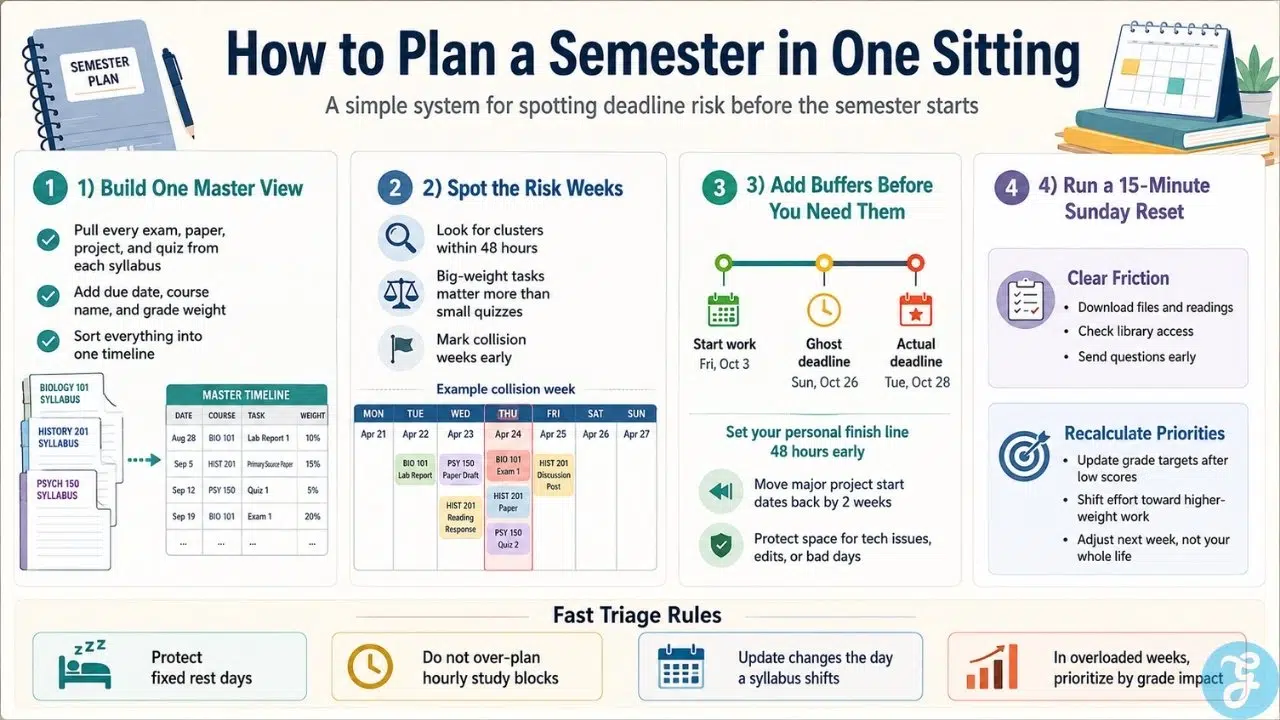
Transfer every single graded event into a single list sorted by date. Include the date, the course, the assignment name, and its overall percentage weight toward your final grade. A 1% weekly quiz does not deserve the same calendar real estate or cognitive panic as a 30% research paper.
2. Spotting the Collisions Early
Once your master list is sorted chronologically, look for cluster points. Professors rarely coordinate with other departments. Consequently, you will inevitably find weeks where three heavy assignments collide.
When you spot a collision week, do not pretend you will simply “work harder” when it arrives. You won’t. You’ll freeze up and turn in mediocre work. Instead, immediately move the start dates for those projects back by two weeks on your calendar. Treat the prep work for collision weeks as hard deadlines occurring a fortnight earlier.
3. Building Artificial Buffers
The biggest flaw in traditional planning is assuming you will operate at 100% capacity every day. You will get sick, hit creative blocks, or simply want a night off.
Build “ghost deadlines” into your system. If a major paper is due on Friday the 15th, log the hard deadline in your personal calendar for Wednesday the 13th. This gives you a 48-hour buffer for technical glitches, last-minute proofreading, or unexpected emergencies without falling behind.
The 15-Minute Sunday Triage
A static plan dies on contact with real life by week four. To keep your master timeline alive without spending hours on system maintenance, run a single, timed audit every Sunday evening.
1. Pre-Clearing Next Week’s Friction
Look strictly at the upcoming seven to ten days. Do not start doing the work yet; simply clear the operational bottlenecks. Download required datasets, verify library book availability, or send clarification emails to teaching assistants on Monday morning instead of Thursday night.
2. Recalculating Grade Minimums
If you score lower than expected on an early midterm, update your targets instantly. Recalculate what minimum percentage you need on remaining deliverables to maintain your target grade. Adjust where your daily effort goes based strictly on raw math rather than emotional panic.
Managing Syllabi Changes and Real-World Friction
No plan survives a full sixteen weeks unedited. Professors shift dates, cancel lectures, or add pop assignments based on class pacing.
When a syllabus changes, update your master timeline immediately. If you wait until Sunday night to review what changed during the week, you lose your lead time. A quick two-minute calendar adjustment when a professor mentions a shift in class saves hours of frantic catching up later.
Furthermore, accept that some weeks will simply be survival weeks. If you have three midterms in three days, your goal for that week isn’t deep personal enrichment or perfect work-life balance: it is triage. Prioritize tasks based strictly on their percentage weight to your final grade, execute them cleanly, and resume your normal rhythm the following week.
Emergency Protocol: What to Do When a Collision Hits
Even with buffers, illness or personal crises can push you into a high-density week unprepared. When three major deliverables hit at once and you run out of time, switch to tactical emergency protocols.
1. Asymmetrical Effort Allocation
Abandon equal effort. If you have an exam worth 30% and an essay worth 10% on the same morning, dump 85% of your remaining study hours into the exam. Protecting the higher-weighted grade minimizes total GPA damage.
2. Strategic Extension Requests
If you need an extension, ask 72 hours before the deadline: never 12 hours before. Frame your request around workload reconciliation, demonstrate that you have already completed a portion of the draft, and propose a specific alternate turn-in date. Professors almost always grant structured, early requests while denying last-minute excuses.
The Non-Negotiable Bottom Line
Learning how to plan a semester in one sitting comes down to ruthlessly identifying deadline collisions early, setting up artificial buffer dates, and ignoring the temptation to turn basic scheduling into an aesthetic hobby.
Frequently Asked Questions (FAQs) About How to Plan a Semester
How far in advance should I plan my semester?
Plan during syllabus week or the weekend right before classes start. You need access to all your course syllabi to extract real dates, so attempting to plan months ahead without actual data is a waste of effort. Two focused hours during week one is all it takes to build a durable master schedule.
What should I do if a professor does not provide exact due dates?
Treat undated major projects as operational risks and assign them a tentative “worst-case” week in the middle of the term. Flag these entries on your master calendar and assume they will land when your workload is highest. Once the professor officially announces the deadline, update your calendar in under two minutes.
Is color coding or visual planning completely useless?
Color coding is fine only if it takes under five minutes to set up and helps you instantly distinguish grade weight or course types. If you spend hours tweaking custom color palettes and layout graphics, you are procrastinating, not organizing. Functional deadline tracking always beats aesthetic design.
How do I stick to my plan when I inevitably fall behind?
Stop relying on rigid hour-by-hour schedules that break the moment real life happens. Use artificial 48-hour buffer dates for major deliverables so unexpected delays do not wreck your schedule. When friction occurs, run a quick Sunday triage to reallocate your effort based strictly on raw grade weight.
What is the single best app or tool for semester planning?
The best tool is whichever simple, low-friction app you already open every day, like Google Calendar or a plain text document. Avoid bloated, over-engineered productivity dashboards that take three weeks to customize. The simpler the system, the less time you waste managing software instead of executing work.