
Voice search is rapidly transforming how people interact with the internet. With the rise of virtual assistants like Google Assistant, Siri, and Alexa, optimizing your website for voice search is no longer optional—it’s essential.
If your website isn’t ready for voice search, you could be missing out on significant traffic and business opportunities.
Studies show that over 50% of internet users now use voice search, and this number is expected to grow as AI-powered voice assistants become more sophisticated. Voice search is not just about convenience—it’s about providing quick, precise, and accurate answers to user queries.
Businesses that adapt to this shift will gain a competitive edge by attracting more traffic and increasing conversions.
In this comprehensive guide, we’ll explore how to make your website voice search friendly. You’ll learn actionable steps to enhance your site’s SEO, improve user experience, and stay ahead of the competition in the era of voice-activated search.
What is Voice Search?
Voice search allows users to perform online searches by speaking into a device instead of typing. These searches often take the form of natural, conversational queries.
For example, instead of typing “best Italian restaurants near me,” a user might ask, “What’s the best Italian restaurant nearby?”
The technology behind voice search uses automatic speech recognition (ASR) and natural language processing (NLP) to understand spoken queries and provide relevant results.
With the rapid advancements in AI and machine learning, voice search accuracy has improved significantly, making it a preferred option for many users.
Why Voice Search Matters for SEO in 2025
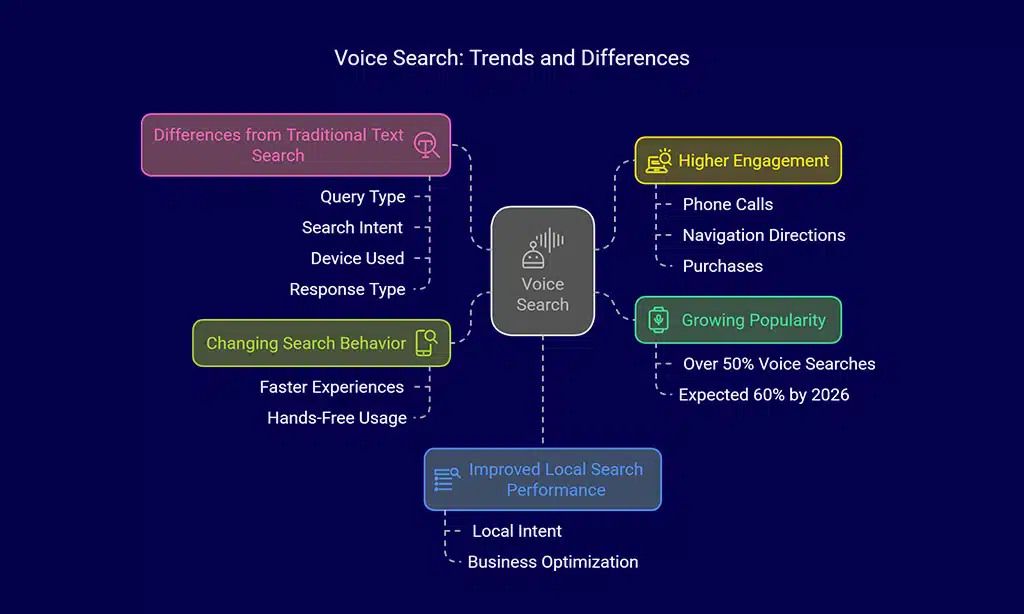
- Growing Popularity: Over 50% of all searches are now voice-based, and by 2026, this is expected to surpass 60%.
- Changing Search Behavior: Users prefer faster, hands-free search experiences, especially when multitasking or driving.
- Higher Engagement: Voice search results often lead to immediate actions, such as phone calls, navigation directions, or purchases.
- Improved Local Search Performance: A significant percentage of voice searches have local intent, making it crucial for businesses to optimize for local SEO.
How Voice Search Differs from Traditional Text Search
| Aspect | Traditional Text Search | Voice Search |
| Query Type | Short keywords (e.g., “best pizza NYC”) | Conversational (e.g., “Where can I find the best pizza in NYC?”) |
| Search Intent | General information | Direct answers & actions |
| Device Used | Desktop & mobile | Smartphones, smart speakers, IoT devices |
| Response Type | List of search results | Direct spoken answers |
Key Factors That Influence Voice Search Optimization
Voice search relies on several critical factors to function effectively. Understanding these elements will help you optimize your website better and ensure it aligns with how users search for information via voice commands.
1. The Role of Natural Language Processing (NLP)
Voice assistants rely on NLP to understand user queries. This means your content should be written in a natural, conversational tone that aligns with how people speak.
NLP analyzes syntax, semantics, and context, making it vital to optimize your content for clarity and intent.
2. Long-Tail and Conversational Keywords in Voice Search
Since voice searches are typically longer and more detailed, targeting long-tail keywords is crucial. Examples include:
- “How do I optimize my website for voice search?”
- “What are the best strategies for voice search SEO?”
- “Which businesses benefit the most from voice search optimization?”
| Keyword Type | Example |
| Short-Tail | “Voice search SEO” |
| Long-Tail | “How do I improve my website’s voice search ranking?” |
| Conversational | “What’s the best way to make a website voice search friendly?” |
3. Impact of Featured Snippets and Position Zero
Many voice search results are pulled from featured snippets. To increase your chances of ranking, structure your content with concise, informative answers at the beginning of your paragraphs.
| Element | Importance for Voice Search |
| Featured Snippets | Provide direct answers to queries |
| FAQ Sections | Help answer common voice search questions |
| Structured Data | Helps search engines understand content better |
4. Mobile and Local SEO’s Role in Voice Search Success
With a majority of voice searches happening on mobile devices, optimizing for mobile-first indexing is critical.
Additionally, a significant portion of voice searches has local intent (e.g., “near me” queries). Businesses should focus on local SEO elements such as:
- Google My Business optimization
- Localized keyword usage
- NAP (Name, Address, Phone number) consistency across directories
Steps to Make Your Website Voice Search Friendly
Optimizing your website for voice search requires a strategic approach that aligns with how users phrase their queries.
Since voice searches are more conversational and question-based, your website must be structured to provide quick, relevant, and well-organized responses. Here are key steps to ensure your site is fully voice search-friendly.
Step 1: Optimize for Conversational and Question-Based Queries
1. Use structured FAQ sections to answer common questions in a conversational manner.
These should cover commonly asked questions relevant to your industry, written in a way that mirrors natural speech patterns.
2. Implement schema markup to help search engines understand your content better and improve rankings in voice search results.
This helps Google and other search engines pull direct answers from your content, increasing the chances of appearing in voice search results.
3. Include direct, concise answers within your content to improve visibility in voice search queries. Structure answers using bullet points or tables where appropriate to enhance readability and clarity.
Step 2: Improve Page Speed and Mobile Usability

1. Compress images and enable lazy loading to speed up your site. Large image files can slow down your website, increasing page load time and negatively affecting user experience.
Using modern image formats such as WebP and optimizing images through compression tools like TinyPNG can significantly reduce file sizes without compromising quality.
2. Use a responsive design to ensure mobile compatibility across different screen sizes. With the increasing reliance on mobile devices, ensuring that your website adapts seamlessly to different screen dimensions is crucial.
A responsive design improves readability, enhances navigation, and provides an optimal browsing experience across all devices.
3. Leverage AMP (Accelerated Mobile Pages) to enhance loading speed. AMP technology helps create lightweight, fast-loading web pages that significantly improve performance on mobile devices.
By removing unnecessary scripts and optimizing HTML, AMP enhances site speed and ensures a seamless browsing experience for mobile users, which is essential for voice search optimization.
Step 3: Leverage Structured Data Markup for Rich Results
1. Add Schema.org structured data to help search engines display rich snippets and improve search visibility. Structured data helps search engines understand the context of your content, increasing the chances of appearing in featured snippets and voice search results.
Ensure that you use the appropriate schema types such as FAQ, HowTo, and Speakable to make your content more accessible to voice assistants.
2. Use JSON-LD format to enhance visibility in voice search results. JSON-LD is the recommended format by Google for structured data implementation, making it easier to maintain and scale across your website.
By incorporating JSON-LD, you provide search engines with machine-readable metadata that helps in delivering direct answers to users’ voice search queries.
Step 4: Optimize for Local Voice Search Queries
1. Claim and optimize your Google My Business profile with accurate details. Ensure that your business name, address, phone number (NAP), and other essential information are consistent across all directories and platforms. Add relevant categories, business hours, and a well-written business description to enhance your visibility in voice search results.
2. Use location-based keywords like “best coffee shop in New York.” Incorporate these keywords naturally into your website’s content, meta descriptions, and headings to improve your ranking for local voice search queries.
Additionally, optimizing for “near me” searches by including local landmarks and neighborhood names can further enhance visibility.
3. Encourage positive customer reviews to enhance credibility and ranking. Reviews play a crucial role in local SEO and voice search optimization. Ask satisfied customers to leave detailed reviews, respond to all feedback professionally, and highlight positive testimonials on your website.
Higher ratings and more reviews increase the likelihood of your business being recommended in voice search results.
Takeaways
Voice search is not just a trend—it’s the future of search. If you want to stay ahead, you must optimize your website for voice search now. By following the steps in this guide, you’ll improve your site’s visibility, user experience, and ultimately, its rankings.
Next Steps to Keep Your Website Voice Search Ready:
Implement structured data markup. Optimize for long-tail and conversational keywords. Improve mobile-friendliness and page speed. Continuously monitor voice search analytics and adjust strategies accordingly.
By making your website voice search friendly, you’ll not only enhance its SEO performance but also attract a broader audience in an increasingly voice-driven digital landscape.