


Buying an email list may give you thousands of contacts quickly, but it does not give you an audience that knows or trusts your business.
If you want to grow email list organically, focus on earning permission. Give people a clear reason to subscribe, make signup easy, and send useful emails they actually want to receive.
That takes more time than buying a database, but it builds a stronger and more valuable email list.
Why a Bought List Is Usually a Poor Shortcut
A person who subscribes after reading your articles has context.
So does someone who registers for your webinar, joins a product waitlist, downloads a useful template, or asks to receive a weekly industry briefing.
Someone whose email address came from a broker usually does not.
That missing context becomes a problem as soon as the campaign reaches the inbox. The recipient may not recognize the sender. They may ignore the message, unsubscribe immediately, or report it as spam.
There is also a platform issue. Mailchimp currently prohibits purchased, rented, scraped, and many other third-party lists under its policies. Other email-service providers maintain their own rules, so moving to another platform is not a reliable way around the underlying problem.
Publicly available email addresses deserve similar caution. An address appearing on a company website, directory, or social profile should not be treated as blanket permission for unrelated promotional email. In the UK, regulatory guidance specifically distinguishes publication of contact details from consent to receive electronic marketing.
The practical lesson is simple: an accessible email address and a willing subscriber are not the same thing.
To Grow Email List Organically, Fix the Offer Before the Form
A surprising amount of list-building advice starts with form placement, popup software, button colors, or conversion-rate tools.
Those things matter later.
First, give people a specific reason to subscribe.
“Join our newsletter” is not much of an offer because it says nothing about what will arrive.
Compare it with:
Get one practical SaaS onboarding experiment every Tuesday.
Or:
Receive monthly tax deadlines and cash-flow reminders for small businesses.
A content creator might promise a Friday breakdown of the workflow behind that week’s videos. An ecommerce business may offer restock alerts, useful buying advice, early access to new products, or a first-order incentive.
The strongest signup offer depends on why the visitor came to you in the first place.
A downloadable ebook is not automatically better than a simple email series, template, calculator, checklist, or recurring newsletter. Long lead magnets are often overrated because businesses spend days creating material that subscribers barely use.
A two-page worksheet that solves a real problem can be far more valuable.
Before building anything, try to finish this sentence:
Subscribe and you will receive ________ to help you ________.
If the answer is vague, changing the form design will not fix it.
Put the Signup Where the Reader Has Already Shown Interest
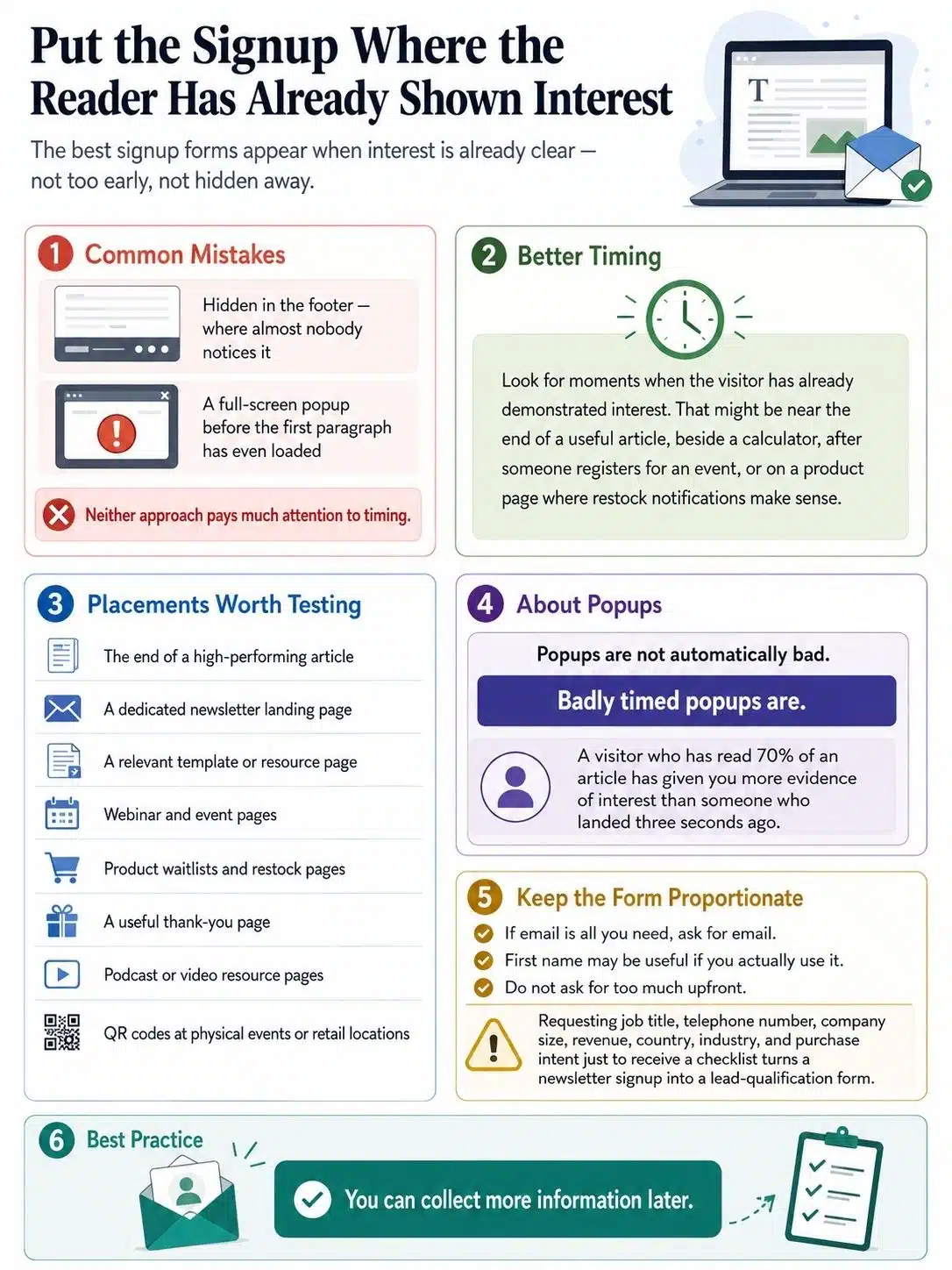
Many websites make one of two mistakes.
They hide the newsletter form in the footer, where almost nobody notices it, or they throw a full-screen popup at a visitor before the first paragraph has even loaded.
Neither approach pays much attention to timing.
Look instead for moments when the visitor has already demonstrated interest. That might be near the end of a useful article, beside a calculator, after someone registers for an event, or on a product page where restock notifications make sense.
A few placements worth testing include:
- The end of a high-performing article
- A dedicated newsletter landing page
- A relevant template or resource page
- Webinar and event pages
- Product waitlists and restock pages
- A useful thank-you page
- Podcast or video resource pages
- QR codes at physical events or retail locations
Popups are not automatically bad. Badly timed popups are.
A visitor who has read 70% of an article has given you more evidence of interest than someone who landed three seconds ago.
Keep the form itself proportionate. If email is all you need, ask for email. First name may be useful if you actually use it. Requiring job title, telephone number, company size, revenue, country, industry, and purchase intent just to receive a checklist turns a newsletter signup into a lead-qualification form.
You can collect more information later.
A Relevant Lead Magnet Usually Beats a Bigger One
One generic lead magnet across the entire site is easy to manage, but it often ignores what brought individual readers there.
Someone reading about customer acquisition cost may want a CAC calculator.
A reader working through a project-planning article may prefer a kickoff template.
Someone researching product photography might find a shot list useful.
The value comes from continuity. The free resource should feel like the next step in the problem the person is already trying to solve.
This is especially useful for websites that already have search traffic. Instead of creating a completely new acquisition channel, you improve the path from existing content to email subscription.
Do not build separate downloads for every page, though. That creates maintenance work quickly.
Start with the pages that already attract meaningful traffic or commercial interest. If five articles cover closely related problems, one well-designed resource may work across all five.
Use the Audience You Already Have
Organic list growth does not have to begin with strangers.
A business may already have readers, customers, trial users, YouTube viewers, podcast listeners, webinar attendees, event visitors, or social followers. The opportunity is to give those people a clear way to choose email as the next channel.
A YouTube video can link to a supporting worksheet.
A podcast episode can point listeners toward a newsletter with deeper examples.
A consultant can invite webinar attendees to subscribe to a separate industry briefing.
A retail store can use a QR code for product updates or restock alerts.
A SaaS company can offer educational emails alongside product communications, provided the signup and marketing choices are handled appropriately.
What businesses should avoid is treating every email address they already possess as marketing permission.
An address collected for a receipt, account, booking, support request, or transaction does not automatically provide unlimited marketing rights in every jurisdiction.
UK rules provide a useful example. A business may sometimes rely on the products-and-services soft opt-in for certain existing customers or people involved in sales negotiations, but conditions apply. The details must have been collected directly, the marketing must concern similar products or services, and an opt-out must have been offered when the details were collected and in later messages.
“Existing customer” is not a universal exemption.
Build Two or Three Acquisition Channels You Can Actually Maintain
You do not need every list-building tactic at once.
For most small businesses, two or three reliable sources are more useful than ten half-maintained campaigns.
Search Content Can Compound Over Time
Search visitors arrive because they are already looking for an answer. That makes the next offer easier to match.
An article about customer churn can lead to a retention worksheet.
A guide to landing-page conversion can offer a short teardown checklist.
A tutorial on email onboarding can point to a sequence template.
The mistake is sending every reader to the same generic newsletter page regardless of topic.
Search traffic becomes particularly useful when an article continues attracting visitors months after publication. A well-matched signup offer can keep producing subscribers without needing a new campaign every week.
Social Media Works Better When the Email Has a Clear Extension
Repeatedly posting “Join our newsletter” gives followers very little reason to leave the platform.
A stronger approach connects the subscription to something specific.
For example:
We reviewed 20 SaaS onboarding flows this month and found five problems that kept appearing. Friday’s email breaks down the fixes with examples.
The social post still needs to be useful on its own. Email should feel like the deeper version, not a paywall around basic information.
Partnerships Are Valuable When the Audiences Actually Match
A co-hosted webinar, research project, podcast appearance, guest newsletter, or joint resource can put your signup offer in front of people who already care about the subject.
Audience fit matters more than audience size.
A small webinar with 300 relevant operations managers may be more valuable to a B2B workflow company than appearing in front of 30,000 people with no connection to the problem it solves.
Keep consent clear. If two companies host something together, explain who will contact registrants. Do not casually swap subscriber files after the event.
Webinars Work Best When the Topic Is Narrow
“Marketing Masterclass” is easy to promote and difficult to position.
“How to Build the First Five Emails in a SaaS Onboarding Sequence” tells people exactly what they are registering for.
That specificity may reduce registrations. It can also improve the relevance of the people who do register.
For list growth, a smaller group of interested subscribers is usually more useful than a large group attracted by a vague topic.
Referral Programs Should Reward Recommendation, Not Gaming
Referral systems can work well once the newsletter itself is good enough to recommend.
The reward can be modest: a template, resource pack, bonus issue, mini-course, private session, or early access.
Expensive prizes deserve more caution. If the incentive becomes more desirable than the newsletter, people may start chasing referral numbers rather than introducing genuinely interested readers.
At that point, the program is optimizing the wrong behavior.
Do Not Let the Welcome Email Become an Afterthought
The period immediately after signup is when the subscriber is most likely to remember why they joined.
Use it.
If you promised a template, deliver it promptly. If someone subscribed to a weekly briefing, explain what it covers and when they should expect it.
A welcome sequence does not need seven carefully choreographed emails.
For many businesses, three are enough:
First email: Deliver what was promised.
Second email: Point the reader toward one genuinely useful article, video, tool, or resource.
Third email: Ask what they are trying to solve.
That last message can improve segmentation without making the signup form cumbersome.
A marketing newsletter might ask whether the reader is most focused on traffic, lead conversion, retention, or email performance. A software company might ask whether the subscriber is evaluating the product, already using it, or simply researching the problem.
The useful information comes after the relationship has started.
Single Opt-In or Double Opt-In?
With single opt-in, a person submits the signup form and is added to the audience without an additional confirmation step.
Double opt-in asks the person to confirm through a follow-up email before the subscription is completed.
Mailchimp currently supports both approaches for its signup forms.
Double opt-in adds friction. Some people who submit the form will not complete the confirmation step.
That is not always a bad thing.
If list quality, address verification, or stronger evidence of the subscription process matters more than maximizing raw signup numbers, the additional confirmation can be useful.
Get the Technical Basics Right Before Volume Forces You To
Businesses often think about authentication only after messages start landing in spam.
That is late.
Google’s current sender requirements for personal Gmail accounts require email authentication. For all senders, SPF or DKIM is required, along with other technical standards. Domains that send around 5,000 or more messages to personal Gmail accounts within 24 hours are treated as bulk senders and face additional requirements, including SPF and DKIM, DMARC, alignment, and one-click unsubscribe for applicable marketing or subscription email.
Google also states that once a sender has been classified as a bulk sender, that classification does not simply disappear because sending volume later drops.
Enforcement has become stricter as well. Google expanded enforcement against non-compliant traffic during 2025 and 2026, making these requirements more than a theoretical checklist.
Yahoo follows a similar direction. Its current guidance expects authentication for senders and additional measures for bulk senders, including DMARC and easy unsubscribe. Yahoo also advises bulk senders to keep spam complaint rates below 0.3%, although it does not publish a fixed message-volume threshold for bulk-sender classification.
Google’s requirement uses specific email headers following the relevant standard. Most small businesses should not try to build this themselves. A better question is whether their email-service provider supports the current Gmail and Yahoo sender requirements and has been configured correctly.
Check before sending volume grows.
Subscriber Count Is a Weak Success Metric on Its Own
A list can become larger and less valuable at the same time.
Track where subscribers came from.
Then compare those sources against what happens later.
Useful measurements can include:
- New subscribers
- Confirmation completion for double opt-in
- Invalid addresses and bounces
- Unsubscribes
- Spam complaints
- Email clicks
- Replies
- Trial registrations
- Qualified leads
- Purchases or bookings
Suppose a giveaway produces 2,000 subscribers while a technical webinar produces 250.
The giveaway appears to win if signup count is the only number being reviewed.
But if most giveaway subscribers disappear after the prize is awarded while webinar attendees continue reading, requesting demonstrations, or becoming customers, the smaller source may be much more valuable.
This is one reason list giveaways are often overrated. They can create impressive acquisition numbers without creating much lasting audience value.
Measure beyond the signup.
Mistakes That Quietly Damage Organic Growth
Some list-building problems are easy to spot. Others simply make every campaign a little weaker.
Asking before providing value. A popup appearing instantly may produce subscriptions, but it is asking visitors to trust a site they have barely seen.
Using the same offer everywhere. A general newsletter CTA is convenient for the business, not necessarily relevant to the reader.
Turning a signup form into a sales form. Collect only information you have a clear reason to use.
Going silent after subscription. If the first meaningful email arrives a month later, recognition will be lower.
Changing the promise. Someone subscribing for one educational email a week did not necessarily agree to several promotional messages a day.
Treating transactions as automatic marketing consent. Rules vary, and existing relationships have limits.
Keeping bad addresses because the list looks bigger. An unreachable contact is not an audience asset.
Optimizing only for the signup conversion rate. More form submissions do not automatically mean better subscribers.
The common thread is relevance. The healthiest email programs tend to make the subscription useful before trying to make it large.
A Sensible Starting Setup
A small business does not need an elaborate lead-generation system on day one.
Start with one clear email promise.
Create a dedicated signup page that explains it properly.
Place the offer in three or four parts of the site where readers already show intent.
Build one useful lead magnet only if it improves the offer.
Set up the welcome email.
Make sure SPF, DKIM, unsubscribe handling, and the other basics are configured correctly through your email provider.
Then track where subscribers come from and which groups continue to engage.
Only after one path is working should you add another.
That sequence is less exciting than installing five popup tools and producing a library of downloadable PDFs. It is also easier to maintain and far more informative because you can see what is actually generating useful subscribers.
Final Thoughts
The most reliable way to grow email list organically is to stop treating the email address as the end product.
Build something worth subscribing to. Put the invitation where readers already have a reason to care. Give new subscribers what they were promised quickly, and pay attention to where the best subscribers come from rather than chasing the largest number.
For most businesses, that means starting smaller than they expect: one strong newsletter offer, one useful signup page, a few well-chosen placements, and a properly configured sending setup.
A purchased database may give you a bigger number tomorrow.
A permission-based list gives you something more useful over time: people who know why you are emailing them and have chosen to keep the conversation going.























