


I spend a significant amount of time analyzing digital content, but when it comes to the apps we let children use, the stakes feel entirely different. If you’ve ever browsed the “Kids” tab on the Google Play Store, you’ve inevitably seen that reassuring little blue “Teacher Approved” badge. It looks great, but my natural skepticism recently kicked in. I had to know: is Google Play Teacher Approved badge just a clever marketing label, or is someone actually doing the homework?
After taking a deep dive into the policies and frameworks behind the program, I discovered that the badge is surprisingly rigorous, but it doesn’t always mean exactly what most people assume it means.
Here is what I found out about what that badge actually verifies, and how it changes the way we should look at screen time.
The Human Element: Who Are the “Teachers”?
My first assumption was that “Teacher Approved” was just an automated algorithm scanning for keywords. I was wrong.
Google actually consults with academic experts to develop a rating framework, and the day-to-day verification is conducted by a panel of specially trained teachers and children’s education and media specialists. For an app to even be considered, developers have to first meet the strict technical requirements of Google’s Families policies. Only then does it get into the queue for a real human to evaluate it.
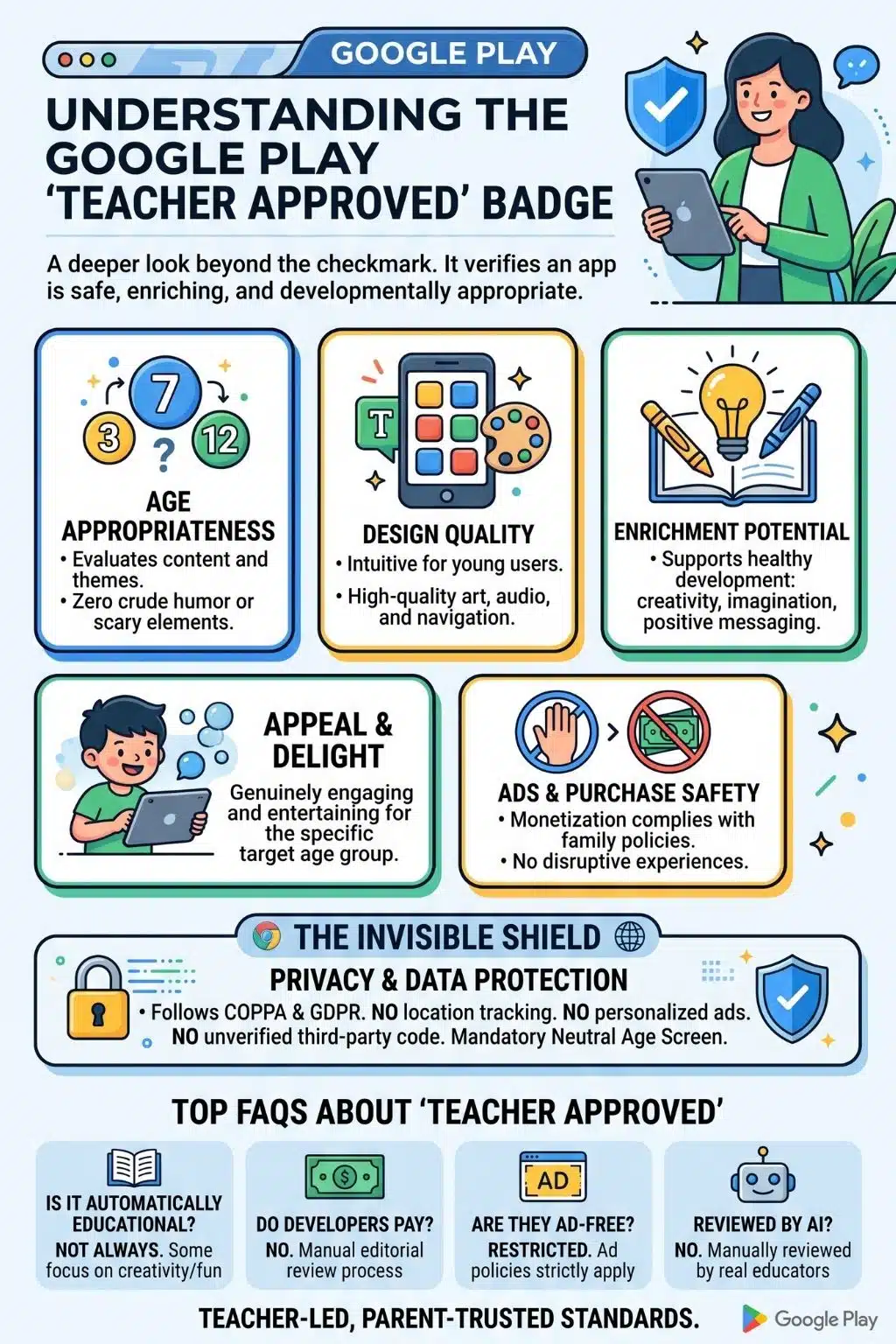
The 5 Pillars of Verification
When these specialists boot up an app, they aren’t just making sure it isn’t malicious. They are evaluating the experience against a strict rubric. I found that the badge essentially verifies that an app meets high standards across five specific pillars:
1. Age Appropriateness
The app’s content, themes, and mechanics must be strictly suitable for its youngest target demographic. Evaluators verify the complete absence of crude humor, scary content, or inappropriate messaging.
2. Design Quality
It isn’t enough for an app to just work; it has to be intuitive for little fingers. The teachers verify that the user interface, buttons, and navigation make sense for the target age group. They also ensure that the art, voiceovers, and audio are high-quality.
3. Enrichment Potential
The app needs to support healthy development. This doesn’t strictly mean academics; it can mean fostering creativity, imagination, or promoting positive messages.
4. Appeal and Delight
A boring app is a deleted app. The evaluators check if the app is genuinely engaging and entertaining for the specific age bracket it targets.
5. Ad and Purchase Safety
If an app has ads or in-app purchases, they must comply strictly with family monetization policies. The reviewers verify that these elements do not degrade the overall quality of the child’s experience or manipulate them into accidental spending.
Our Teacher approved kid’s learning app, 123 Magic Number Fun: Math Kid on Google Play.
The Biggest Myth: Educational vs Enriching
If there is one major takeaway I want to share from this research, it’s a crucial misconception I held myself: “Teacher Approved” does not automatically mean “Academically Educational.”
When we see the word “teacher,” we instinctively think of reading, writing, and math. But the badge is actually a marker of developmental appropriateness and high-quality enrichment.
An app might earn the badge simply because it is a beautifully designed, ad-safe virtual coloring book that sparks creativity. It verifies that an app is a safe, high-quality way for a child to spend screen time, but it does not guarantee specific, measurable academic learning outcomes. If you are looking for strict skill-building, you still need to look beyond the badge to evaluate the app’s actual curriculum.
The Invisible Shield: Privacy and Data Protection
Beyond what happens on the screen, I was most impressed by the technical safeguards happening behind the scenes. The “Teacher Approved” badge and the broader Designed for Families program legally bind developers to strict privacy standards like COPPA in the US and GDPR in Europe.
These apps are prohibited from tracking a child’s precise location and cannot harvest specific persistent device identifiers from children. Furthermore, personalized advertising, where ads follow a user around based on their browsing history, is strictly banned for child users.
I also discovered that apps cannot earn this badge if they use unverified third-party code. Every analytics tool or ad network (SDK) integrated into the app must be explicitly certified for child-directed services. Additionally, if an app is designed for a “mixed audience” of kids and adults, Google requires a “neutral age screen”. This means the age-gate cannot hint at the “right” answer to bypass safety filters, ensuring younger users are automatically routed to the safest, non-personalized version of the app.
Finally, the standards are actively updated. For example, recently, Google expanded its Child Safety Standards and Families Policy to strictly prohibit developers of anonymous and random chat apps from targeting children. This showed me that the badge represents a living, actively enforced safety standard.
Final Thoughts
Digging into this program gave me a lot of peace of mind. While no system is perfect, knowing there is a human-led, criteria-based wall between my younger family members and the wild west of the app store is a massive relief. The badge won’t turn a tablet into a substitute teacher, but it absolutely verifies that the app is a safe, well-crafted environment that respects a child’s digital privacy.
Frequently Asked Questions About Google Play Teacher Approved badge
1. Does the badge mean my child will learn math or reading?
Not necessarily. While many educational apps have the badge, it primarily verifies that an app is enriching, developmentally appropriate, and high-quality. An engaging digital puzzle or a creative music-maker can earn the badge without teaching traditional school subjects.
2. Can developers just pay to get the “Teacher Approved” badge?
No. It is a strict editorial review process. Developers cannot buy the badge; they must opt into the Designed for Families program, meet technical privacy policies, and then have their app manually reviewed and approved by the teacher panel.
3. Are these apps completely free of ads and in-app purchases?
Not always. “Teacher Approved” apps can include ads and purchases, but they are heavily restricted. Evaluators ensure that any monetization doesn’t disrupt the gameplay, use manipulative tactics, or show inappropriate content, and personalized tracking ads are completely banned.
4. Are the apps reviewed by AI or real people?
Real people. Google uses a panel of specially trained teachers and children’s media specialists across the US to physically review and rate the apps based on their established framework.
5. How do I know why a specific app was approved?
One of the best features of the program is transparency. If you click on a “Teacher Approved” app in the Play Store, there is a dedicated section on the app’s detail page explaining exactly what makes it stand out, such as “Great for creativity” or “High-quality design.”

























