Most children’s apps are designed to look educational. Bright letters, cheerful characters, number games, and phrases such as “learning through play” are everywhere. Those features tell parents very little about whether an app suits their child or deserves regular screen time.
For this list of the best teacher-approved apps, I started with one clear requirement: every app had to display Google Play’s Teacher Approved badge when I checked it. I then looked at what children actually do inside the app, which ages the activities suit, what the free download includes, and whether parents should know about advertisements, subscriptions, data collection, or device restrictions.
The ten choices cover phonics, reading, counting, early math, emotional regulation, logic, coding, creativity, and imaginative play. They are not interchangeable, and no family needs all of them. The useful question is much simpler: what does this particular child need help practising right now?
What Does “Teacher Approved” Mean on Google Play?
Google developed the Teacher Approved program with teachers and children’s education and media specialists. Reviewers consider an app’s design, appeal, enrichment, age appropriateness, advertising, in-app purchases, and cross-promotion.
Apps that qualify can display the Teacher Approved badge and appear in the Kids section of Google Play.
I consider the badge a useful screening signal, not a guarantee of educational effectiveness. It does not mean an app has been shown through independent research to improve learning outcomes. Approved apps may still contain advertisements, sell additional content, collect data, or suit only part of their stated age range.
That is why the badge was the starting point for this list rather than the only selection criterion.
10 Best Teacher-Approved Apps for Ages 2–6
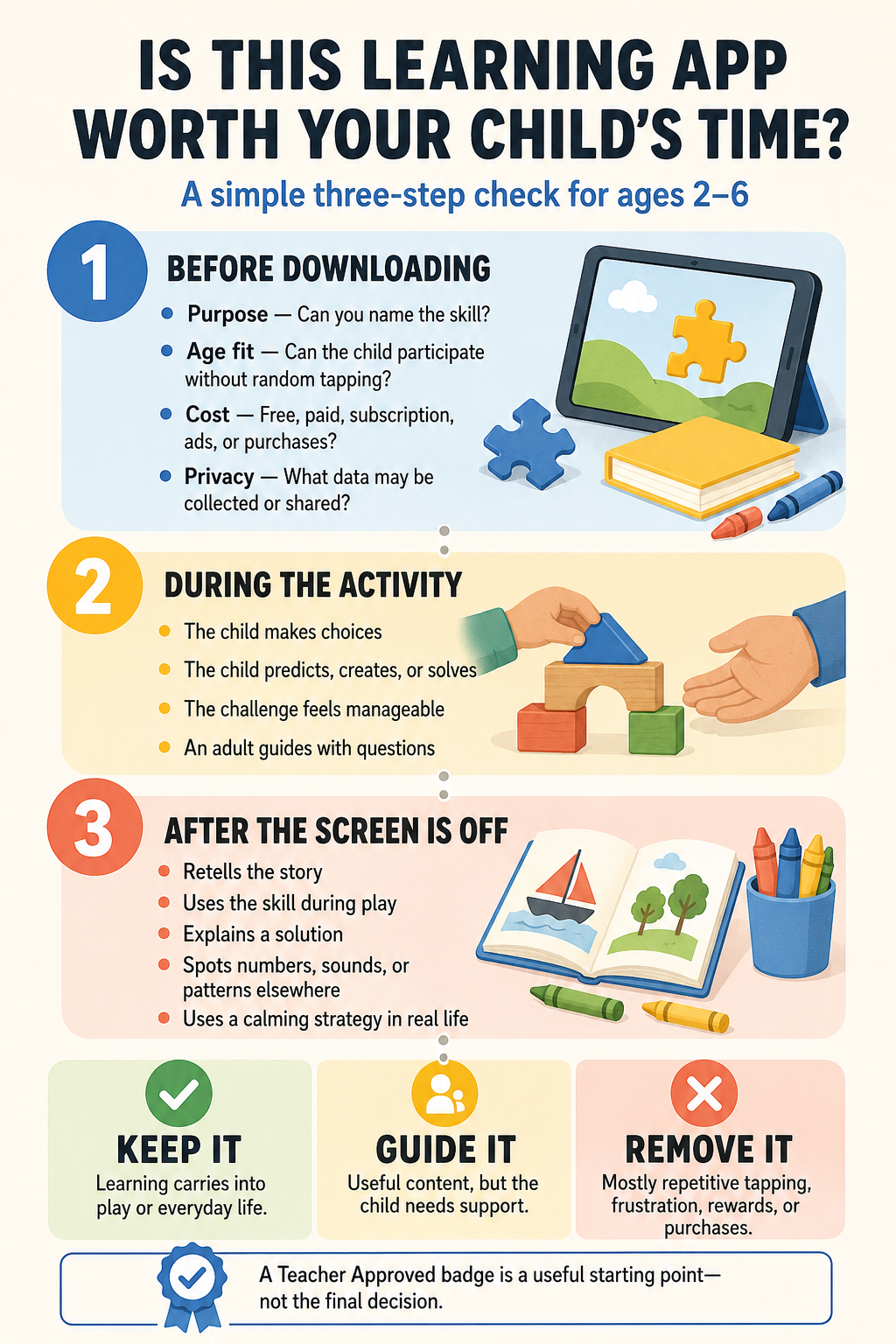
The right app depends on the child, the skill being practised, and how much support an adult can provide. I would begin with one app that addresses a current need instead of building a large collection.
1. Khan Academy Kids: Best Overall Free Learning App
Best fit: Ages 2–6
Access: Completely free, with no advertisements or subscriptions
Khan Academy Kids is the easiest overall recommendation because it covers several areas of early learning without placing most of its useful content behind a payment.
Its library contains more than 5,000 activities for children ages two through eight. Younger children can explore sounds, counting, shapes, stories, drawing, and matching. Older preschoolers and early elementary learners can move into phonics, writing, addition, sight words, and problem-solving.
There is enough content here to support different children in the same household, but the size of the library requires some direction. A child can move rapidly between activities without staying with any one skill for long. Choosing two or three relevant activities before the session usually makes more sense than handing over the app and hoping the right learning happens.
The app also offers teacher tools for assigning activities and following progress. Selected books and games can be downloaded for offline use, and read-aloud books are available in English and Spanish.
Khan Academy Kids is the best starting point for families seeking broad educational value without another subscription. Its Google Play disclosure says no data is shared with third parties, although personal information and app activity may be collected.
2. PBS KIDS Games: Best for Curriculum-Based Variety
Best fit: Ages 2–6
Access: Free
PBS KIDS Games contains more than 280 free games connected to programs such as Daniel Tiger’s Neighborhood, Wild Kratts, Alma’s Way, Rosie’s Rules, and Work It Out Wombats!.
The familiar characters help children enter the activities, but the range is what makes the app useful. The games touch on early reading, mathematics, science, art, routines, emotions, creativity, and problem-solving. More than 50 games are available for Spanish-speaking children, with some content playable in either English or Spanish.
This variety works particularly well in a household with children at different developmental stages. A younger child might choose a simple matching or routine-based activity, while an older child can manage a science puzzle or more involved mathematics game.
The drawback is predictable: children tend to choose their favourite character, not the activity that best fits what they need to practise. A quick adult decision before the session can solve that. “Today we are choosing one counting game” is more useful than scrolling through hundreds of options.
Offline play has returned to the current Android listing, although downloaded content can change with later updates. The Google Play Data safety section currently states that the app does not collect or share data.
3. Teach Your Monster to Read: Best for Structured Phonics
Best fit: Ages 3–6
Access: US$8.99 on Google Play at the time of writing
Teach Your Monster to Read has something many preschool apps lack: a clear learning sequence.
Children create a monster and guide it through three reading stages. The first introduces letters and sounds. The later stages move into letter combinations, words, short sentences, and simple books. That progression gives the activities a sense of direction rather than making them feel like unrelated phonics games.
The app was developed in collaboration with academics from the University of Roehampton and is designed to work alongside different phonics programs. After the upfront purchase, the current listing states that there are no in-game advertisements, in-app purchases, or hidden charges.
Choosing the right starting stage is important. A child who is still developing listening skills may find some phonics tasks frustrating. Starting too low can be equally unhelpful for a child who already reads short sentences.
I would use the app as structured phonics practice while keeping real books, rhymes, storytelling, and adult conversation at the centre of reading development. No digital reading program can replace the back-and-forth interaction that happens when a child reads with someone.
4. Moose Math: Best for Foundational Math Practice
Best fit: Ages 3–6
Access: Free
Moose Math teaches counting, quantities, patterns, shapes, measurement, addition, and subtraction through five themed activities.
Children count ingredients while making smoothies, match pets by quantity, complete number patterns, sort shapes and colours, and solve problems in a bingo-style game. The activities help connect written numbers with actual amounts, an essential idea that can be missed when children only memorise a counting sequence.
Not every part of Moose Math is suitable for every three-year-old. The app progresses into counting to 100 and addition and subtraction up to 20. Younger preschoolers will get more from the basic counting, matching, sorting, and shape activities. The more formal number work suits older preschoolers and kindergarten-aged children.
A report-card area allows adults to see which skills have been practised. The content was developed with an early elementary educator and is aligned with US kindergarten and first-grade Common Core standards.
Moose Math makes the most sense when a child needs more focused number work than a broad app such as Khan Academy Kids provides. Its Google Play listing does not currently flag advertisements or in-app purchases, although the Data safety section says app activity and device identifiers may be collected.
5. Breathe, Think, Do with Sesame: Best for Emotional Regulation
Best fit: Ages 2–5
Access: Free
Breathe, Think, Do with Sesame stands out because it addresses a part of early development that many “educational” lists ignore.
Children help a Sesame Street monster respond to five everyday challenges. They practise taking a breath, thinking of possible plans, and choosing what to do next. Along the way, the app introduces emotional vocabulary, calming techniques, and simple problem-solving.
Its usefulness depends heavily on adult involvement. Sesame Workshop describes the app as an experience for parents or caregivers to use with children ages two to five. A two-year-old is unlikely to transfer the strategy independently after tapping through the activity.
Used together, however, the language can carry into real situations. An adult can later ask, “Can we breathe first?” or “What could we try next?” when a toy breaks, waiting becomes difficult, or a task causes frustration. That transfer beyond the screen is where the app earns its place.
The current Data safety disclosure says the app may collect location and app-activity data. Information is encrypted in transit, but the listing says it cannot be deleted. Parents who are cautious about data collection should consider that before installing it.
6. Thinkrolls 1: Best for Logic and Physics Puzzles
Best fit: Ages 3–6
Access: US$5.99 on Google Play at the time of writing
Thinkrolls 1 asks children to guide small characters through a series of mazes. To clear a path, they experiment with crates, balloons, rocks, jelly, fire, and other objects that behave in different ways.
There are 207 levels, split between an easier mode for ages three to five and a harder mode for ages five to eight. The puzzles gradually introduce ideas related to gravity, heat, friction, elasticity, spatial reasoning, and cause and effect.
Written instructions are not central to the experience, so prereaders can participate. Children are also allowed unlimited attempts without losing points. They can move something, observe the result, and revise their plan. That kind of trial and error is more useful than a puzzle that quickly reveals the answer.
Younger children may still need help when several objects interact. The adult’s role is best kept to questions: “What is blocking the path?” or “Where could the rock fall?” Solving the puzzle for the child removes most of its value.
Thinkrolls 1 is a one-time purchase with no third-party advertisements or in-app purchases. Its current Google Play disclosure says no data is collected or shared.
7. 123 Magic Number Fun: Best for Varied Number Activities
Best fit: Ages 3–6, with selected activities suitable from age two
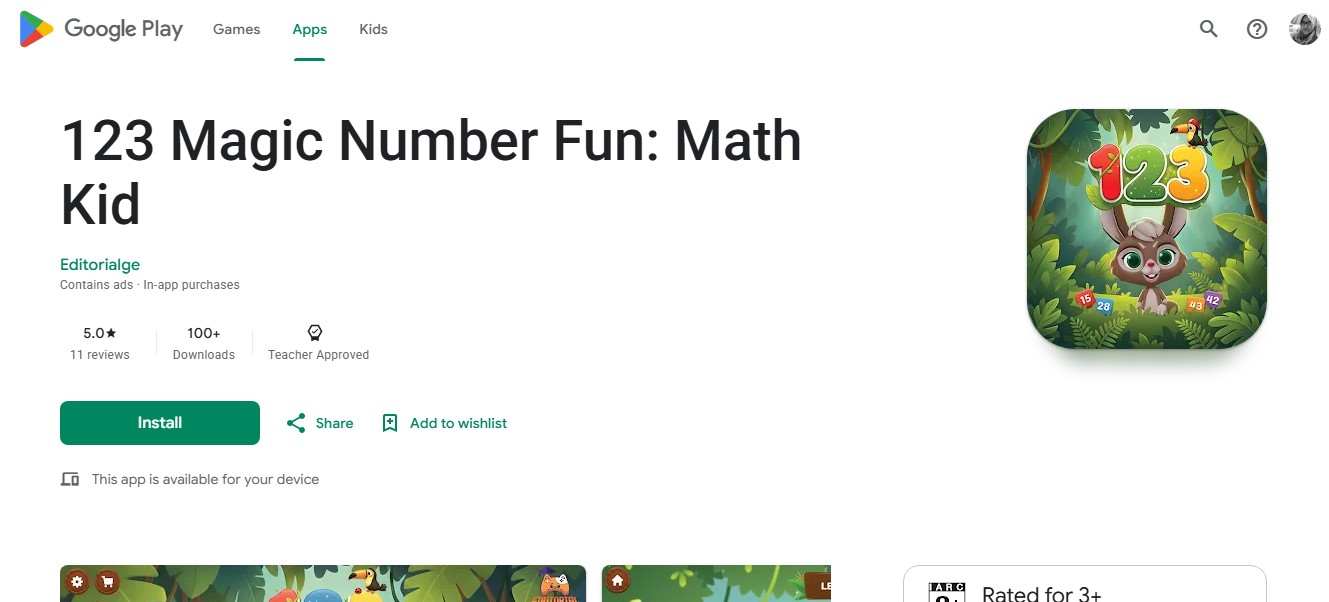
Access: Free to download; contains advertisements and in-app purchases
123 Magic Number Fun combines 12 number activities in one app. Children can trace numbers, identify spoken numbers, count objects, match number tiles, complete sequences, create dot-to-dot pictures, and try basic arithmetic challenges.
The range gives children several ways to work with numbers. Tracing focuses on formation and fine motor control, while listening and matching can help connect spoken number words with written symbols. Moving between activity types may also hold attention better than repeating the same tracing task.
The difficulty range needs adult supervision. Number recognition, basic counting, matching, and simple tracing are the realistic choices for younger children. Multiplication, division, missing-number equations, and timed arithmetic races are clearly beyond what most toddlers and younger preschoolers need.
A two- or three-year-old does not gain anything from being pushed into formal equations simply because the activity appears in an app labelled for ages two through eight. Parents should choose the mode according to the child’s actual ability.
The app currently carries Google Play’s Teacher Approved badge, but it also contains advertisements and in-app purchases. Its Data safety disclosure says device identifiers may be collected, data is encrypted in transit, and deletion is unavailable.
This is a practical choice for families who want several forms of number practice together, as long as adults stay involved in selecting the appropriate activities.
8. ScratchJr: Best for Creative Coding
Best fit: Ages 5–6 within this list
Access: Free
ScratchJr gives children a blank space and a set of visual programming blocks. Instead of choosing answers from a quiz, they decide what they want a character or story to do.
Blocks can make characters move, jump, speak, dance, or respond to events. Children can draw their own characters, change backgrounds, record sounds, and connect actions in sequence. A small project can involve storytelling, design, planning, debugging, and explanation at the same time.
That makes ScratchJr one of the more creative uses of a screen in this list. It does, however, belong at the older end of the age range. The app is intended for children ages five and above, and many five-year-olds will still need an introduction to the interface.
The Android version has two practical limitations. It works only on tablets with screens of at least seven inches, and the Google Play listing shows that the app was last updated in November 2023. Its current Data safety section also says some information may be collected and shared and that deletion is unavailable.
ScratchJr remains a strong option for five- and six-year-olds who are ready to create rather than simply complete activities. Asking a child to sketch a story first or explain the finished project can make the experience even richer.
9. LEGO DUPLO World: Best for Open-Ended Creative Play
Best fit: Ages 3–6
Access: Free sample content with individual purchases or subscription access
LEGO DUPLO World centres on construction, exploration, and imaginative play. Children can build with digital blocks and explore themes involving vehicles, animals, farms, homes, music, space, food, and other familiar settings.
The learning is less direct than it is in a phonics or counting app. Children are making choices, arranging objects, experimenting with space, and creating simple stories. Those activities still have value, particularly for children who learn through building and pretend play.
Multi-touch support allows two people to interact with the screen at once. A child and adult, or two children, can build together and talk about what is happening. That shared use is more interesting than treating the app as an individual digital worksheet.
Cost is the part to examine carefully. The free download contains sample material. Wider access requires individual content purchases or a subscription, and purchases made through the free app cannot be shared through Google Play Family Library. The developer says the app contains no third-party advertising and that downloaded content can be played offline.
Before paying, I would spend time with the free material and see whether the child actually uses the building and storytelling elements. Digital construction can also become a starting point for physical blocks, drawing, or a longer story away from the device.
10. Sago Mini School: Best Subscription App for Preschool Readiness
Best fit: Ages 2–5
Access: Seven-day trial followed by a recurring subscription
Sago Mini School offers more than 300 activities across over 30 topics. Its library includes phonics, read-aloud stories, numbers, tracing, drawing, puzzles, mindfulness, STEM ideas, and everyday life skills.
The content is organised around playful themes rather than one strict curriculum. That makes the app approachable, although the amount of choice can become a problem in its own right. A preschooler may move from one colourful activity to another without spending enough time on any particular idea.
I would treat it as a library to curate. Choose a topic that connects with what the child is learning, stay nearby for the first activity, and follow it with something tangible. Letter tracing can lead to crayons and paper. A nature activity can continue outside. A story can become a drawing or conversation.
The current listing advertises a seven-day trial that renews into a subscription unless cancelled. Prices vary by plan and country. The developer describes the children’s experience as ad-free, but Google Play labels the app as containing ads and in-app purchases. Parents should therefore check the current purchase screen and cancellation terms rather than relying on a general description.
Its Data safety disclosure says the app may collect several types of information and may share personal information and device identifiers with third parties. Data is encrypted in transit, and deletion can be requested.
Sago Mini School offers substantial variety, but the subscription makes sense only when a family expects to use that variety regularly.
Final Thoughts
The best teacher-approved apps give children a meaningful role. They ask them to listen, count, solve, create, build, manage an emotion, or make a decision.
Start with one app connected to a real need. Explore it with the child, then pay attention to what carries into conversation, play, reading, drawing, or everyday problem-solving. That will tell you more than the badge, the download count, or the score displayed on the screen.
Frequently Asked Questions on The Best Teacher-Approved Apps
1. Are all Teacher Approved apps free and ad-free?
No. Google Play’s Teacher Approved badge does not mean an app is free or without advertisements, purchases, or subscriptions.
Teach Your Monster to Read and Thinkrolls 1 require an upfront payment. LEGO DUPLO World sells wider access through purchases or a subscription. Sago Mini School uses a subscription model, while 123 Magic Number Fun contains advertisements and in-app purchases.
2. Can an educational app replace preschool or adult teaching?
An app can introduce or reinforce a skill, but it cannot reproduce the relationships, conversation, movement, shared play, and individual support children receive from adults and other children.
Preschool learning also happens through stories, art, construction, music, outdoor exploration, pretend play, daily routines, and ordinary conversation. Apps should remain one part of that wider experience.
3. How can parents tell whether an app is helping?
Look beyond digital rewards and completed levels. Notice whether the child can explain what happened, use the skill elsewhere, solve a similar problem, or apply new language during play.
If a child has mainly learned where to tap or how to collect rewards, the educational value may be limited.