


Every day, workers add free tools to their web browsers to finish tasks faster. They install ad blockers, grammar checkers, PDF converters, and artificial intelligence helpers. These tools seem harmless and helpful. However, IT leaders must understand the severe data risks for installing free browser extensions on company computers.
A web browser is no longer just a tool to read websites. It is the main workspace where employees log into email, cloud storage, customer databases, and financial accounts. When a worker adds a free tool to their browser, they often invite an unknown software creator directly into this private workspace.
Critical Data Risks for Installing Free Browser Extensions
Understanding the exact ways free tools take information will help you protect your business. Below are the nine biggest threats your company faces when staff members add unverified tools to their browsers.
1. Excessive Permission Requests and Full Page Access
When employees look at the data risks for installing free browser extensions, permission abuse is the most common problem. To work properly, an extension has to ask the browser for specific rights. Many simple tools ask for the right to read and change all data on every website you visit. Research by Spin.AI across 300,000 browser tools found that 51 percent of them ask for way too much access.
If a simple calculator or color picker has full access to every web page, it can read your emails, see your customer lists, and change numbers on your screen without your knowledge.
2. Session Cookie Theft and Bypassing Login Security
Most companies use multi-factor authentication to keep hackers out of their accounts. However, one of the worst data risks for installing free browser extensions is session hijacking. When an employee logs into a cloud site like Microsoft 365, Google Workspace, or Salesforce, the website saves a small file called a session cookie in the browser. This cookie tells the website that the user is already logged in.
A bad extension with cookie permissions can copy this file and send it to a hacker. The hacker puts that cookie into their own browser and gets instant access to the employee’s account. They do not need the password, and they do not need the security code on the employee’s phone.
3. Silent Malicious Updates and Abandoned Tools
A browser tool that is safe today might become dangerous tomorrow. Evaluators who study the data risks for installing free browser extensions point to silent updates as a top threat. Building and maintaining a free software tool takes time and money. Often, the original creator gets tired of working for free. Hackers and shady companies offer to buy these popular, abandoned tools for cash.
Once the new owner takes over, they write bad code and release a software update. Because browsers update extensions automatically in the background, millions of workers get infected with spyware at the exact same time without clicking a single button.
4. Supply Chain Attacks on Honest Developers
Even tools made by trusted companies can turn into weapons. A major factor in the data risks for installing free browser extensions is the targeting of software creators through phishing emails. For example, in the massive Cyberhaven incident and its wider fallout, hackers sent fake Google support emails to extension builders.
When the builders clicked the link, they accidentally gave hackers access to their Chrome Web Store accounts. The hackers then added secret data stealing code to 40 legitimate extensions, putting 3.7 million users in danger. In late 2025, another tool called Phantom Shuttle was updated with secret code to steal cloud keys from software developers.
5. Keystroke Logging and Clipboard Snooping
Everything an employee types or copies inside a browser is open to attack. Among the most direct data risks for installing free browser extensions is hidden keystroke logging. A tool that promises to check spelling or fix grammar has to read every word the user types. A dishonest tool will record all keystrokes, including passwords, bank account numbers, Social Security numbers, and private messages.
Many tools also ask for permission to read the computer clipboard. When an employee copies a password from a secure password manager to paste it into a website, the bad extension grabs that password right off the clipboard.
6. Unapproved AI Training and Corporate Data Leaks
Many workers use free artificial intelligence tools to summarize long articles, write emails, or check computer code. These tools create huge data risks for installing free browser extensions in a business setting. Running artificial intelligence servers is expensive. To pay the bills, many free AI extensions save the text they read on your screen.
When an employee uses a free AI helper to summarize a private legal contract, medical record, or secret company plan, that text is sent to an outside server. The company behind the free tool may store that private text and use it to train their public AI models, leaking your company secrets to the world.
7. Shadow IT and Security Blind Spots
Shadow IT happens when workers use software that the IT department does not know about. This lack of visibility increases the data risks for installing free browser extensions. Traditional computer security programs, like antivirus tools and network firewalls, are built to find bad files saved on a computer hard drive. Browser extensions live inside the web browser and use normal web code like JavaScript.
When a bad extension steals company data, it sends the information out through normal encrypted web traffic. To a firewall or antivirus program, this theft looks just like normal web browsing, leaving your security team completely blind.
8. Browsing History Sales and Employee Profiling
When a software product is free, the user is normally the product. Selling user habits to data brokers is one of the quietest data risks for installing free browser extensions. Many free tools track every single web link an employee clicks, every search term they type, and when they are active online. The tool creators bundle this information and sell it to marketing firms or criminal groups.
Even if the data is sold as anonymous, outside analysts can easily look at an employee’s internal company links and search habits to figure out exactly who they are. Criminals then use this profile to write believable, targeted scam emails to that specific worker.
9. Screen Capturing and Visual Data Scraping
Some companies try to protect their data by blocking workers from downloading files or copying text from cloud databases. Yet, visual scraping remains one of the sneakiest data risks for installing free browser extensions. Browsers have a built-in feature called PageCapture that lets an extension take pictures of the open window.
A bad extension can use this feature to take silent screenshots of an employee’s screen every few seconds. Even if your database blocks file downloads, the extension simply takes a picture of the customer list or financial chart on the screen and sends the image file straight to the attacker.
High Risk Browser Permissions to Watch
Security teams can spot dangerous tools by checking the exact rights an extension asks for before it runs.
| Permission Name | What It Allows the Extension to Do | The Business Risk |
| Host Permissions (All URLs) | Read and change data on every website the employee visits. | Total data theft, changing bank transfer numbers, and injecting fake login boxes. |
| Cookies | Read, change, and save browser login cookies. | Session hijacking that lets hackers bypass passwords and two-factor checks. |
| PageCapture | Take silent pictures of the active browser tab at any time. | Stealing visual data from charts, private messages, and protected documents. |
| WebRequest | Watch and change data traffic moving between the browser and the internet. | Spying on private transfers and stealing credit card or login details in transit. |
| ClipboardRead | Read whatever text or image the user has copied to their clipboard. | Stealing complex passwords copied from company password managers. |
How to Protect Your Company from Extension Threats
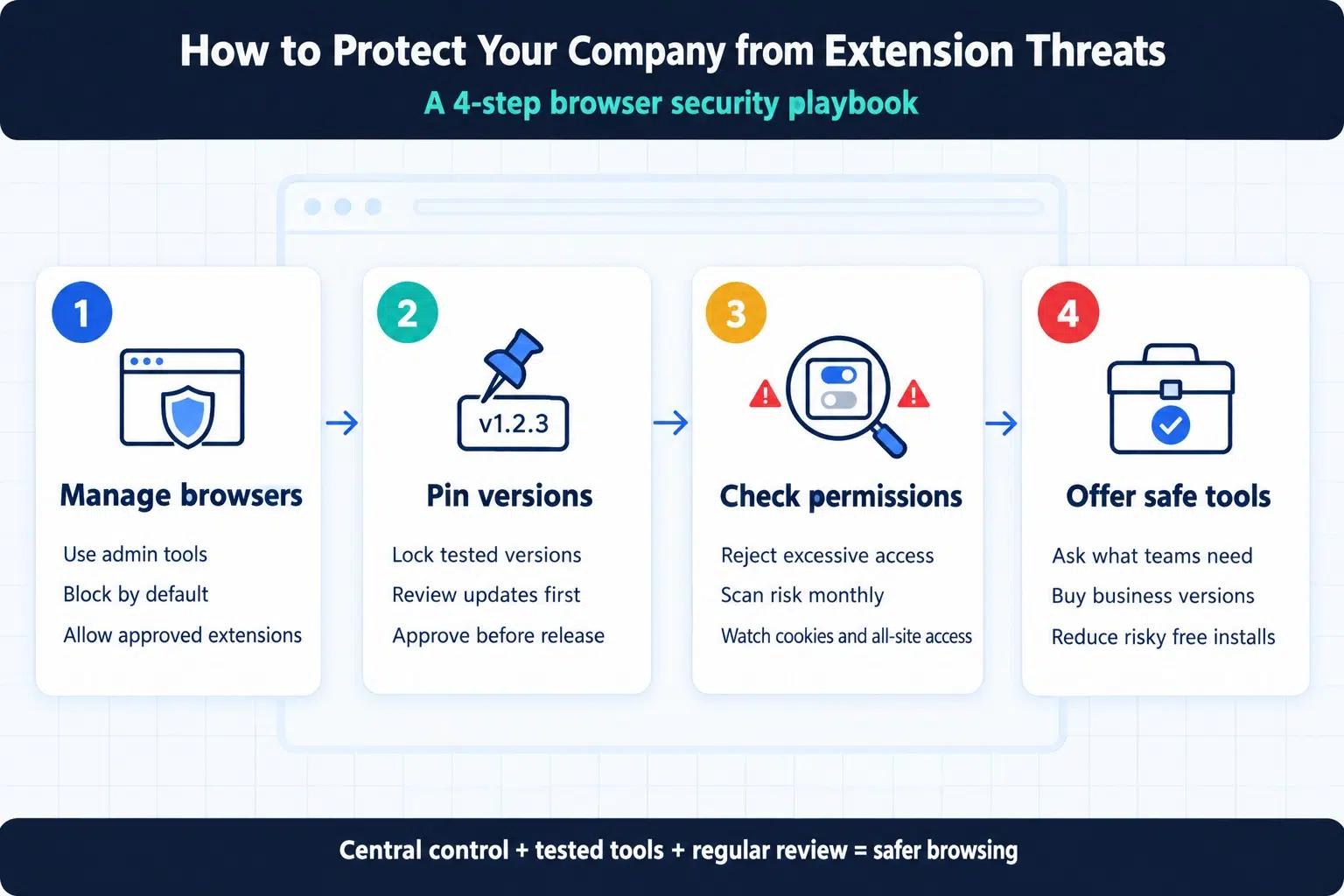
You do not need to ban all browser tools to stay safe. You just need clear rules and technical controls to reduce the data risks for installing free browser extensions.
Step 1: Turn on Browser Management and Allowlists
Do not let employees install whatever they want. Use tools like Google Workspace Admin, Microsoft Intune, or group policies to manage all company web browsers. Block all extensions by default. Create a safe list, known as an allowlist, of tested and approved tools that employees are allowed to add.
Step 2: Use Version Pinning for Approved Tools
Because safe extensions can turn bad after an automatic update, you must control when updates happen. Use version pinning in your browser settings. This locks an approved extension to the exact version your IT team tested. The tool will not update to a newer version until your security team checks the new code and approves it.
Step 3: Check Extension Permissions Regularly
Before adding any tool to your company allowlist, check what permissions it wants. If a simple PDF viewer asks for access to read cookies or view all websites, reject it. Use automated browser security scanners like Spin.AI or CRXcavator to grade the risk score of your extensions every month.
Step 4: Provide Safe Company Paid Alternatives
Workers install free tools because they want to get their jobs done faster. Ask your staff what tools they need. If they need a writing helper, a password manager, or an AI assistant, buy an official business version that comes with a strong privacy contract. When you give workers safe tools, they stop looking for risky, free ones.
Frequently Asked Questions (FAQs)
Are extensions from the official Chrome Web Store or Microsoft Edge Add-ons store completely safe?
No. While Google and Microsoft run automated scans to catch obvious viruses, bad tools slip through all the time. According to threat reports from Red Canary and Spin AI, over 200 dangerous extensions were found inside official stores in a single year. Hackers hide bad code inside clean updates days or months after the tool passes the first store review.
Can a free browser extension steal passwords even if we use two factor authentication?
Yes. Extensions do not need to steal your password to break into your account. Once an employee logs in using their password and two factor code, the website creates an active session cookie. A bad extension can steal that cookie and give hackers direct access to the open account.
Does Google Chrome Manifest V3 stop malicious browser extensions?
No. Manifest V3 is an update to how browser extensions are built, and it limits some ways tools can load outside code. However, it does not stop extensions from asking for wide permissions, reading web page text, logging keystrokes, or stealing session cookies.
How can IT teams see what browser extensions employees have installed?
Standard antivirus software cannot see browser extensions well. IT teams should turn on cloud browser management, such as Chrome Enterprise Core or Microsoft Edge management. These free administrative tools give IT leaders a full dashboard showing every extension installed on every work computer.
Final Words
Web browsers are the front door to your company’s most valuable cloud accounts and private files. Leaving that door open to unverified software is a gamble no business should take. By teaching your team about the data risks for installing free browser extensions and setting up simple allowlists, you can stop data leaks before they start.
Take thirty minutes this week to audit the browsers across your company, remove unused tools, and lock down your browser settings to keep your business safe.






















