
Have you ever felt like your website is a bit like a cluttered closet? You keep adding new things, but you never throw anything away. Eventually, you can’t find your favorite shirt because it’s buried under a pile of clothes you haven’t worn in years. Your website works the same way. Old, outdated posts can act like weeds in a garden. They take up space and stop your good pages from growing.
I recently read a case study from Seer Interactive that really stuck with me. They found that after removing about 14,000 low-quality pages, their client saw a 23% increase in organic traffic. That isn’t magic; it’s just good maintenance.
In this post, I’m going to walk you through exactly how to do this for your own site. Let’s get your site cleaned up together.
What is Content Pruning?
Content pruning is the process of reviewing your website and removing or updating low-quality content. Think of it like pruning a rose bush. You cut away the dead stems so the plant can focus its energy on the beautiful blooms.
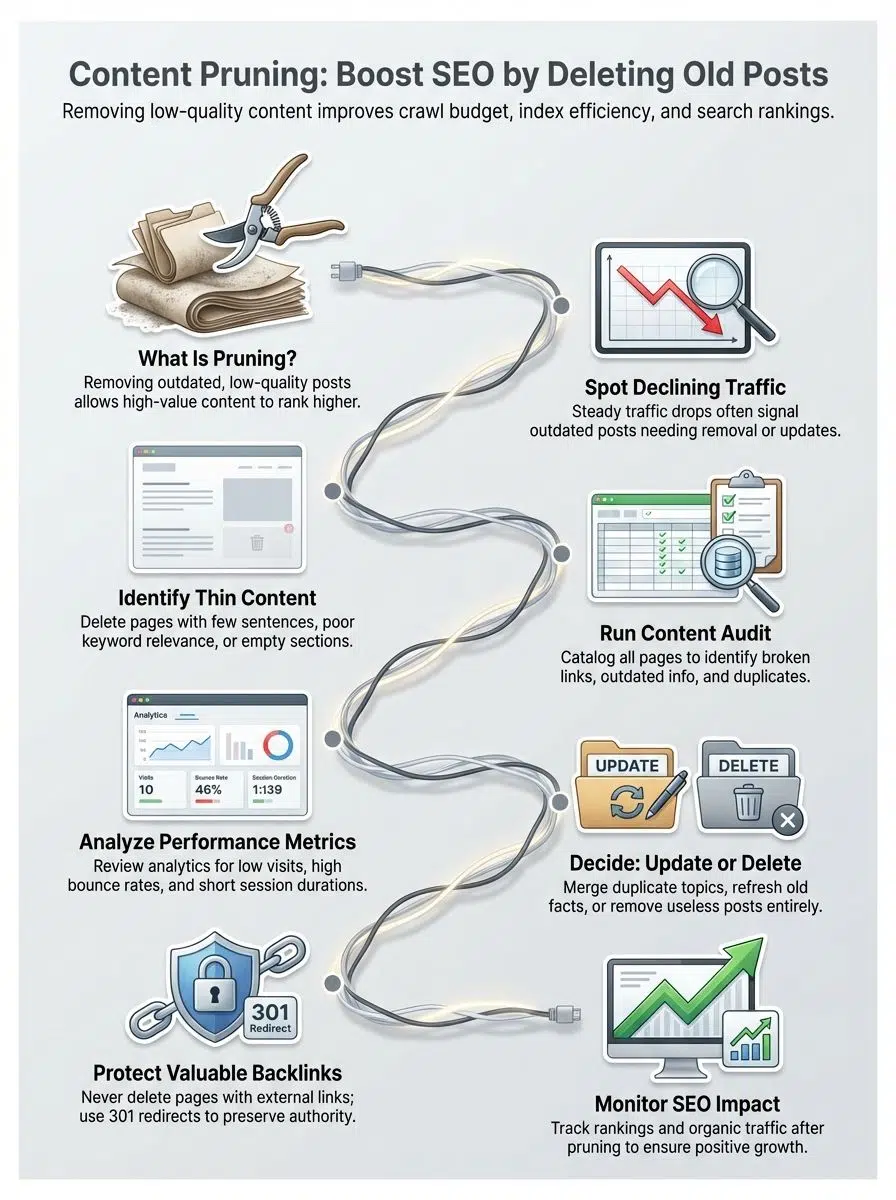
In the world of SEO, “dead stems” are pages that offer no value. These might be old news updates from 2018, thin blog posts with fewer than 300 words, or duplicate pages targeting the same topic.
When you prune these away, you aren’t just deleting files. You are telling search engines, “Hey, look over here at my best work.” This helps Google focus on your strong posts, which can lift your page ranking and improve user engagement. Pruning keeps your site neat, fast, and easy to navigate.
Why is Content Pruning Important for SEO?
You might think, “The more pages, the better, right?” Not exactly. Quality beats quantity every time. Removing dead weight gives your site a fresh start and helps it shine in search results.
Improves Crawlability and Indexation
Search engines like Google use bots (often called “spiders”) to crawl your website. These bots have a limit on how much time they can spend on your site, known as crawl budget.
If you have thousands of low-quality pages, Googlebot wastes its time crawling them instead of your new, high-value guides. According to Google’s documentation, managing crawl budget is critical for larger sites (10,000+ pages), but even smaller sites benefit from efficiency.
By removing these “Zombie Pages”, pages that get zero traffic, you ensure Google spends its time indexing the content that actually drives sales.
Reduces Index Bloat
Index bloat happens when your site has more pages in Google’s index than unique, valuable content. This confuses search algorithms. They struggle to find the “good stuff” amidst the clutter.
For example, if you run an e-commerce site, you might have separate pages for every color of a t-shirt. If these pages don’t have unique descriptions, they look like low-quality duplicates to Google.
Pruning these helps search engines understand exactly what your site is about. A cleaner index means your valuable articles get ranked faster.
Prevents Keyword Cannibalization
Keyword cannibalization is like having two of your own players fighting for the same ball. If you have three different blog posts all about “best running shoes,” Google won’t know which one to rank.

When multiple pages compete for the same keyword, they split the authority, often resulting in none of them ranking on page one.
Tools like Ahrefs or Semrush have specific “Cannibalization Reports” that can show you exactly where this is happening. Pruning allows you to merge these competing posts into one “Super Guide,” making your SEO strategy much stronger.
Signs It’s Time to Prune Your Content
How do you know if your site needs a trim? There are usually clear warning signs. If you notice any of the following, it is time to take action.
Declining Organic Traffic
A steady drop in organic traffic is a major red flag. If your total traffic is sliding despite publishing new content, your old posts might be dragging you down.
Check your data. Are there posts that haven’t received a single visitor in the last 12 months? These are prime candidates for pruning. Google’s algorithms prioritize fresh, helpful content. If a huge chunk of your site looks abandoned, your overall site authority can suffer.
Thin or Outdated Pages
“Thin content” usually refers to pages with very little text or value—often under 300 words. These might be old “weekly roundups” or event announcements from years ago.
Outdated information is just as bad. Imagine a visitor landing on a post titled “Best SEO Tactics for 2015.” They will leave immediately. This outdated content hurts your credibility and signals to Google that your site isn’t current.
Low User Engagement
User engagement metrics tell a story. Look for high bounce rates or very short “time on page” numbers. If visitors land on a page and leave within 10 seconds, it means they didn’t find what they needed.
This often happens with pages that have broken formatting, missing images, or walls of text. Pruning or improving these pages helps keep visitors happy and on your site longer.
The Content Pruning Process
Cleaning up your site can feel overwhelming, but if you break it down, it is manageable. I like to use a simple five-step process to keep things organized.
Step 1: Conduct a Content Inventory
First, you need a list of everything on your site. You can’t clean what you can’t see.
I recommend using a tool like Screaming Frog SEO Spider. It can crawl your entire site and export a list of every URL. Once you have the crawl data, export it to Excel or Google Sheets. You will want to include these columns in your spreadsheet:
- URL
- Page Title
- Word Count (helps identify thin content)
- Status Code (200, 301, 404)
- Publish Date
Step 2: Perform a Detailed Content Audit
Now, add performance data to your inventory. You need to know which pages are actually working. Connect Google Analytics 4 (GA4) and Google Search Console to your spreadsheet. Look for pages with:
- Zero organic sessions in the last 12 months.
- Zero backlinks (tools like Ahrefs or Moz are great for this).
- High bounce rates compared to your site’s average.
Step 3: Analyze Metrics to Identify Low-Performing Content
This is where you play detective. Look at the data you collected. A page with low traffic isn’t always “bad.” For example, a “Contact Us” or “Privacy Policy” page won’t get much search traffic, but you definitely need to keep it.
Focus on blog posts and informational pages. If a post about “2018 Holiday Trends” has zero traffic and zero links, it is offering no value to your business or your readers.
Step 4: Decide Whether to Update, Consolidate, or Delete
Once you identify the weak pages, you have three choices. Here is a simple framework I use to decide:

| Action | When to Use It | How to Do It |
|---|---|---|
| Update | The topic is still relevant, but the info is old, or the ranking has dropped. | Rewrite the content with new data/examples. Keep the same URL. |
| Consolidate | You have multiple short posts about the same topic (Cannibalization). | Combine them into one strong guide. Redirect (301) the old URLs to the new one. |
| Delete | The content is irrelevant, has no backlinks, and no traffic. | Remove the page. Serve a 410 (Gone) or 404 status. |
Step 5: Monitor and Measure the Impact
After you prune, watch your site closely. Use the “Comparison” feature in Google Search Console to track your performance before and after the cleanup.
You should eventually see an uptick in crawl stats and potentially a boost in rankings for your remaining pages. If you see a sudden drop, double-check that you didn’t accidentally delete a page with high traffic or strong backlinks.
Best Practices for Effective Content Pruning
To get the best results without hurting your site, follow these golden rules. They act as your safety net during the process.
Use Tools to Track and Evaluate Performance
Don’t guess. Use data. Google Analytics 4 is essential for seeing traffic trends over time. For a deeper look, Google Search Console’s “Pages” report will show you which pages aren’t getting indexed or have mobile usability issues.
These tools give you the evidence you need to make smart decisions. If you see a page that has driven $0 in revenue and 0 leads in two years, the decision becomes easy.
Avoid Deleting Content with Valuable Backlinks
This is the most critical rule. A page might have zero traffic, but if a high-authority site (like the New York Times or a major industry blog) links to it, that page is passing “link juice” to your whole domain.
Do not delete these pages. Instead, update the content to make it relevant again, or 301 redirect it to a very similar page. If you delete it, you lose that authority forever.
Ensure Proper Redirects for Deleted Pages
When you remove a page, you don’t want visitors to hit a “Page Not Found” error.
- Use a 301 Redirect if you are moving the content to a new location or merging posts. This tells Google “The content has moved here permanently.”
- Use a 410 Gone status if you are deleting the content and there is no replacement. This tells Google, “This page is gone forever, stop crawling it.”
Common Mistakes to Avoid
I’ve seen many site owners get excited about cleaning up and accidentally hurt their SEO. Here are the traps to watch out for.
Over-Relying on Traffic as the Sole Metric
Traffic isn’t everything. As I mentioned earlier, some pages are vital for conversion or legal reasons even if they don’t get search hits. A “Pricing” page might only get 50 visits a month, but if 20 of those people buy your product, that is a high-value page.
Always check conversions and assisted conversions in Google Analytics before hitting delete.
Pruning Without Stakeholder Alignment
Imagine deleting a blog post only to find out the sales team uses it every day to close deals. It happens more often than you think.
Before you finalize your “kill list,” share it with your sales, support, and marketing teams. A simple Google Sheet shared with the team can save you a lot of headaches later.
Failing to Track Baseline Performance
You need to know where you started to see if your efforts worked. Take a screenshot of your organic traffic and keyword rankings before you start pruning.
Without this baseline, you won’t know if a traffic drop is due to pruning or a seasonal trend. Benchmarking gives you peace of mind.
How Often Should You Prune Your Content?
Content pruning isn’t a “one and done” task. It’s like weeding; if you stop, the weeds grow back.
For most websites, a quarterly audit (every three months) is ideal. This keeps things manageable. If you have a massive site with thousands of pages, you might need to do a mini-prune every month.
Many experts, including teams at HubSpot, recommend an “End of Year” deep clean. This prepares your site for the new year’s trends and removes any expired offers from the holiday season.
How to Make Content Pruning a Regular Practice
Consistency is key. Here is how to make this a painless part of your routine.
Schedule Periodic Audits
Put it on the calendar. Literally, set a recurring event for “Content Audit” every 3 or 6 months. Treat it like a mandatory meeting.
Regular audits prevent the task from becoming a massive project. Checking 50 pages is a lot easier than checking 5,000.
Create a Content Database for Tracking
Maintain a “Master Content Sheet.” This can be a simple spreadsheet where you track every URL, its main keyword, and its last update date.
When you have this data ready, you don’t have to start from scratch every time. You can simply filter by “Last Updated” and see which posts are over a year old.
Align Pruning with SEO and Marketing Goals
Your pruning strategy should match your business goals. If you are pivoting to focus on “Email Marketing Software,” it makes sense to prune or deprioritize old posts about “Social Media Tips.”
By aligning your content with your current services, you ensure that every visitor lands on a page that is relevant to what you sell today.
Wrapping Up
Content pruning is like giving your website a fresh haircut. It might feel scary to cut things away, but it makes the whole look sharper and healthier.
By removing the dead weight, you help Google find your best content, you save your crawl budget for pages that matter, and you give your visitors a better experience.
Remember to use data, protect your backlinks, and talk to your team before deleting anything. Start small, maybe with just 10 old posts, and see how it goes.