


Launching a new website is an exciting milestone for any business, but attracting organic traffic from search engines takes strategic planning. Many site owners spend months perfecting visual design and branding, only to realize weeks after launch that Google is barely indexing their pages.
Early-stage search optimization requires a balance between technical health, content quality, and user experience. Understanding common SEO mistakes to avoid early on prevents costly redesigns, lost traffic, and months of stagnant growth. Below are 10 critical errors new websites make and practical steps to fix them.
10 Common SEO Mistakes to Avoid on New Websites
1. Accidental Blocking via Robots.txt or Noindex Tags
During development, web designers routinely hide staging sites from search engines using no index directives or restrictive robots.txt rules.
-
The Mistake: Forgetting to remove these directives when pushing the site live, completely preventing search crawlers from discovering or indexing your pages.
-
The Fix: Audit your site’s robots.txt file immediately after launch and test page URLs using Google Search Console’s URL Inspection Tool to verify indexability.
2. Target Keyword Misalignment and Ignoring Search Intent
New websites often target extremely high-competition, broad search terms (like “marketing agency” or “fitness tips”) that established sites have dominated for years.
-
The Mistake: Choosing keywords purely by search volume while ignoring domain authority and user intent (whether the searcher wants to buy, learn, or find a specific brand).
-
The Fix: Focus on low-competition, long-tail keywords that align directly with specific buyer problems. Build relevance before competing for high-volume terms.
3. Neglecting Site Speed and Mobile Performance
Google uses mobile-first indexing and Core Web Vitals to evaluate user experience. Heavy images and slow code negatively impact both rankings and conversion rates.
-
The Mistake: Publishing uncompressed high-resolution images, bloated scripts, or layouts that break on mobile screens.
-
The Fix: Compress images into modern formats (like WebP), use lightweight themes, enable page caching, and run regular checks through Google PageSpeed Insights.
4. Publishing Thin, Low-Value, or Duplicate Content
Search engines prioritize comprehensive, original content that thoroughly answers user queries.
-
The Mistake: Creating short 300-word blog posts filled with generic advice, or duplicating manufacturer product descriptions across multiple pages.
-
The Fix: Focus on depth and original insights. Address the user’s core problem completely, incorporate structured subheadings, and eliminate duplicate copy across product or service pages.
5. Poor Internal Linking Architecture
Internal links act as roadmaps for search crawlers, distributing domain authority and showing how pages relate to one another.
-
The Mistake: Publishing standalone pages without linking them to relevant articles, or using vague anchor text like “click here” instead of descriptive keywords.
-
The Fix: Build a logical site hierarchy. Link new blog posts to core pillar pages using descriptive, context-rich anchor text.
6. Skipping Basic On-Page SEO Elements
On-page tags give search engine bots quick context about your content hierarchy and primary topic focus.
-
The Mistake: Leaving meta titles blank, using multiple H1 tags on a single page, or forgetting image alt text altogether.
-
The Fix: Craft a single unique H1 tag per page, draft custom meta titles and descriptions under character limits, and add descriptive alt text to every essential image.
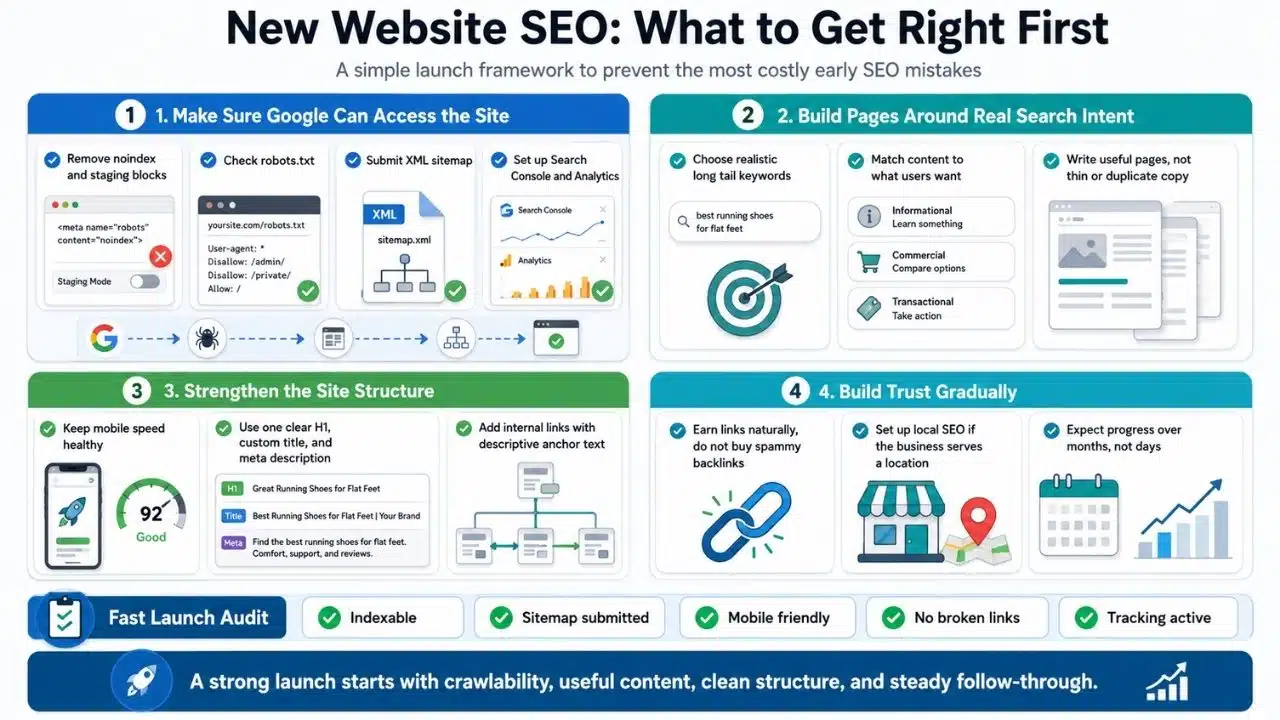
7. Failing to Set Up Analytics and Google Search Console
You cannot optimize what you do not measure. Operating without analytics data leaves you blind to indexing errors and user behavior.
-
The Mistake: Launching a site without configuring tracking tools, delaying detection of broken pages or crawl bugs.
-
The Fix: Connect Google Search Console and Google Analytics (or a privacy-focused alternative) on day one. Submit your XML sitemap to accelerate indexing.
8. Purchasing Low-Quality or Spammy Backlinks
Backlinks remain a primary ranking factor, but acquiring links through black-hat tactics carries severe search engine penalties.
-
The Mistake: Buying cheap backlink packages from unreliable marketplaces or participating in link schemes to boost domain authority quickly.
-
The Fix: Focus on earning authority naturally through high-value content, original research, strategic guest posting, and digital public relations.
9. Ignoring Local SEO Setup (For Location-Based Businesses)
Local businesses often miss out on immediate, high-converting traffic by overlooking regional optimization signals.
-
The Mistake: Failing to claim a Google Business Profile or maintaining inconsistent Name, Address, and Phone (NAP) details across web directories.
-
The Fix: Complete your Google Business Profile, collect verified customer reviews, and embed consistent NAP details in your website’s footer and contact pages.
10. Expecting Instant Results and Abandoning Strategy Early
SEO is a long-term investment. New websites enter a sandbox phase where search engines evaluate site stability and trust.
-
The Mistake: Switching strategies every few weeks or stopping content production because organic traffic hasn’t spiked in month one.
-
The Fix: Establish realistic timelines. Commit to a consistent 6 to 12-month strategy focused on technical health and publishing quality content before making drastic directional pivots.
Case Study: Fixing Technical Indexing and Content Intent
To illustrate how addressing these common SEO mistakes to avoid changes performance, consider an early-stage B2B software site that experienced flatlined organic traffic for three months post-launch.
The Initial Diagnostic:
-
Technical Error: The development team left a disallow rule in robots.txt covering all sub-directories.
-
Content Error: The site published short 400-word articles targeting broad, high-difficulty terms like “software solutions.”
The Turnaround Strategy:
-
Indexation Fix: Updated robots.txt and resubmitted the XML sitemap via Google Search Console.
-
Intent Realignment: Rewrote existing content into comprehensive guides targeting specific long-tail keywords (e.g., “automated workflow tools for small teams”).
-
Internal Structure: Linked all support articles back to main product landing pages using keyword-rich anchor text.
The Result: Within 60 days of resolving technical crawl blocks and realigning content intent, impressions grew by over 300%, leading to its first consistent stream of inbound organic leads.
A Checklist for Launch-Ready SEO Health
Before publishing new pages or launching a site redesign, run through this baseline checklist to catch mistakes early:
| SEO Area | Verification Check | Status |
| Indexing | Check robots.txt and ensure core pages do not contain noindex tags. | [ ] Pass |
| Sitemap | Generate and submit an updated sitemap.xml to Google Search Console. | [ ] Pass |
| Speed | Verify PageSpeed score is above 80 on both mobile and desktop views. | [ ] Pass |
| On-Page | Confirm each page has one unique H1, unique title tag, and meta description. | [ ] Pass |
| Links | Audit internal links to ensure there are no 404 broken URLs. | [ ] Pass |
Limitations & Trade-Offs
While eliminating SEO errors sets a strong foundation, site owners should keep real-world constraints in mind:
-
Perfect Technical SEO Is Not Enough: Having zero technical errors will not compensate for poorly written or uninformative content.
-
Resource Allocation: Over-analyzing minor technical details (like micro-optimizing small code snippets) can distract small teams from creating core business assets and content.
-
Algorithm Fluctuations: Search algorithms update frequently; strategies that work today require periodic auditing and updates over time.
Build a Solid Technical and Content Foundation
Avoiding common SEO mistakes to avoid early in your website’s lifecycle saves time, protects your budget, and accelerates organic growth. By focusing on indexability, targeting realistic keywords, and maintaining technical site health, you create a sustainable pipeline for long-term search visibility.
Frequently Asked Questions (FAQs) on Common SEO Mistakes to Avoid
How long does it take for a new website to rank on Google?
For brand-new domains, noticeable organic traffic typically takes between 3 to 6 months. High-competition niches may require 9 to 12 months of consistent content and authority building.
What is the single worst technical SEO mistake for new websites?
Accidentally leaving a noindex tag or restrictive robots.txt file active on a live site is the most damaging error, as it completely prevents search engines from indexing your content.
Is SEO better than paid advertising for new websites?
Both serve different purposes. Paid advertising delivers immediate traffic and conversion data, while SEO builds long-term, compounding organic traffic that lowers customer acquisition costs over time.
























