OpenAI has unveiled ChatGPT Pulse, a proactive feature that delivers personalized morning briefs to users while they sleep. Unlike the traditional ChatGPT experience — where users ask questions and receive responses — Pulse is designed to anticipate needs and prepare content in advance.
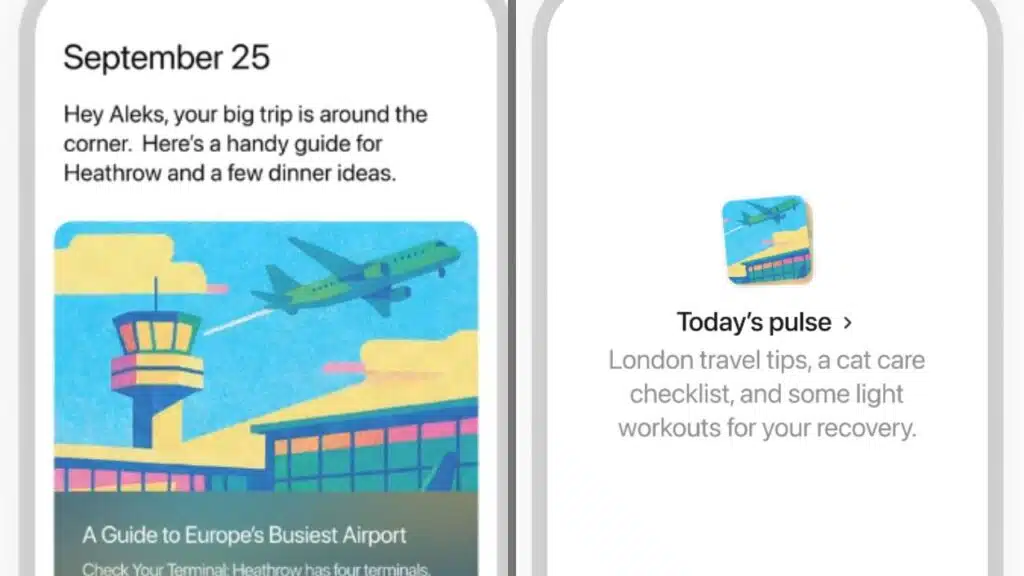
When you open the ChatGPT app in the morning, Pulse shows you five to ten AI-generated “cards” that summarize the most relevant information for your day. These can range from news roundups on topics you care about, to calendar reminders, email highlights, or even personalized suggestions such as recipes, travel tips, or family activity ideas.
The release marks a philosophical shift for OpenAI: ChatGPT is no longer just a reactive chatbot but is moving toward becoming a true digital assistant.
How Pulse Works Behind the Scenes
Built on Context and Connections
Pulse combines information from several sources:
- Your ChatGPT memory (if turned on) — It recalls past conversations, preferences, and context.
- Connected apps like Google Calendar or Gmail — With user permission, Pulse can scan schedules, emails, and events to highlight the most important items.
- Web search & knowledge synthesis — It can pull updates from across the internet, much like ChatGPT Search, but delivers them proactively.
- User feedback — Each card can be refined by telling ChatGPT what was useful, what wasn’t, and what you’d like to see next.
For example, if you’ve previously discussed a passion for running, Pulse may prepare a morning brief with recommended jogging routes near your upcoming travel destination. If you’re a pescatarian, it can even scan through dinner reservations on your calendar and suggest menu options aligned with your diet.
Visual, Digestible, and Finite
Each report is presented as a visual card, complete with AI-generated images and concise summaries. You can click into the card for more details or ask ChatGPT follow-up questions. Importantly, Pulse is designed to stop after delivering a handful of cards.
This design choice is deliberate. Unlike social media feeds optimized for endless scrolling, Pulse intentionally limits itself with a message: “Great, that’s it for today.” According to OpenAI product lead Adam Fry, this ensures users get value without information overload.
Why OpenAI Is Building Pulse
From Chatbot to Personal Assistant
For years, ChatGPT has been celebrated as the world’s most advanced conversational AI. But it has always been reactive — waiting for the user to initiate interaction. Pulse is OpenAI’s attempt to make the AI proactive, much like a human assistant who prepares a briefing folder before your morning starts.
The company envisions Pulse becoming a daily habit — something you check in the morning the way people currently open social media, email, or news apps.
Accessibility and Ambition
OpenAI’s new CEO of Applications, Fidji Simo (formerly of Instacart and Meta), emphasized that Pulse is part of a larger goal: making personalized, high-end assistance available to everyone, not just the wealthy.
“We’re building AI that lets us take the level of support that only the wealthiest have been able to afford and make it available to everyone over time,” she said in a blog post announcing Pulse.
This vision, however, comes with technical and financial constraints. As CEO Sam Altman has recently noted, features like Pulse are “compute-intensive” — meaning they require large amounts of server power and are costly to run.
Who Can Use Pulse Today?
Pro Users First
Pulse is debuting exclusively for ChatGPT Pro subscribers, a $200-per-month plan. It appears as a new tab in the mobile ChatGPT app starting Thursday.
This early rollout is intentionally limited. OpenAI says it wants to refine Pulse and make it more efficient before expanding it to Plus subscribers ($20/month) and eventually to the broader free user base.
Mobile-Only at Launch
At present, Pulse is only available on iOS and Android mobile apps, not on desktop or web. The company expects to expand availability once early testing provides enough feedback and optimizations.
Real-World Examples of Pulse in Action
In demonstrations to journalists, OpenAI showcased several types of reports Pulse can generate:
- A news digest about British soccer team Arsenal.
- Halloween costume ideas tailored to a user’s family.
- A child-friendly travel plan for a trip to Sedona, Arizona.
- A daily agenda generated directly from the user’s Google Calendar.
- Email prioritization, surfacing the most important messages overnight.
In another example, Christina Wadsworth Kaplan, OpenAI’s head of personalization, shared how Pulse automatically created a London travel itinerary with running routes after learning about her hobby.
Potential Impact on Media and News
One of the most notable aspects of Pulse is its overlap with existing news products. By automatically compiling news summaries with source links, Pulse could become a competitor to:
- Apple News
- Google Discover
- Paid newsletters
- Traditional news websites
However, Adam Fry clarified that Pulse is not meant to replace news media. Instead, it aims to be an aggregator and personalized entry point, always linking back to the original sources.
This positioning is crucial: while Pulse offers convenience, OpenAI must tread carefully to avoid undermining journalism, which remains the source of much of the content Pulse summarizes.
Challenges and Open Questions
1. Computational Cost
Pulse varies in efficiency: some briefs require minimal effort, while others demand heavy web searches and synthesis, consuming significant computing resources. This is a major reason for limiting access to Pro users initially.
2. Privacy Concerns
Because Pulse can scan emails, calendars, and memory history, it raises privacy and trust issues. OpenAI insists that:
- Pulse content remains private to the user.
- Data is not used to train models for others.
- Users can opt out at any time by disabling memory or disconnecting apps.
Still, the idea of an AI “reading” your inbox overnight may make some users uneasy.
3. User Trust and Accuracy
For Pulse to succeed, it must be reliable, relevant, and accurate. If it delivers irrelevant or wrong briefs, users may lose trust. OpenAI acknowledges this and is relying heavily on user feedback loops in the preview phase.
4. Competition with Social Media and News Apps
Pulse is designed to be a healthier alternative to attention-driven feeds, but OpenAI will have to prove that users actually prefer this finite, assistant-style experience to the dopamine-fueled scroll of TikTok, X, or Instagram.
The Road Ahead: From Briefs to Full Agentic AI
Pulse is only the first step in OpenAI’s vision of agentic AI assistants.
In the future, OpenAI hopes Pulse will evolve to:
- Make restaurant reservations automatically.
- Draft and send emails with user approval.
- Handle travel bookings and itinerary planning end-to-end.
- Manage complex workflows across multiple apps without manual prompts.
For now, these remain ambitions. OpenAI admits that trust and reliability need to improve before users will feel comfortable delegating such decisions to AI.
A Glimpse Into the Future of AI Assistance
With Pulse, OpenAI is testing whether users want AI to proactively organize their lives. The feature blends news aggregation, productivity tools, and personal context into a morning routine designed to save time and deliver value.
Its launch signals a clear direction: ChatGPT is becoming less of a chatbot and more of a full digital assistant.
Yet big questions remain:
- Will users embrace an AI that decides what information is most important each morning?
- Can OpenAI balance privacy, cost, and trust while scaling Pulse to millions of users?
- How will the media industry react if Pulse becomes a go-to source for daily news?
For now, Pulse is limited to a small audience of Pro users. But if it succeeds, it may change how millions of people start their day — with AI, not apps, setting the agenda.