

Most conversations about Canva features for marketers begin with templates, Background Remover, or Magic Design. I use those tools too. But after working with Canva across content creation, localization, reporting, publishing, brand review, and paid campaigns, I have found that its quieter features often remove more work than its flashiest ones.
These features are not secret. They are simply easy to miss when Canva is treated as a place to create one asset, download it, and leave.
The real value now extends beyond visual design. Canva can help marketers produce campaign variations, connect performance data, manage approvals, schedule content, measure engagement, and even build interactive experiences.
Not every feature is included with every subscription. Availability can also differ by account, region, and product rollout.
Canva is not the only tool in my creative workflow. I also use ImagineLab Art, our in-house platform, to explore original visual concepts and generate creative assets. I can then bring selected visuals into Canva for resizing, brand consistency, collaboration, scheduling, and campaign distribution. Using ImagineLab and Canva this way has helped me see Canva less as a simple design tool and more as a practical marketing workspace.
Disclosure: ImagineLab Art is our in-house built software of Editorialge Media LLC.
Overlooked Canva Features at a Glance
| Feature | Where It Helps Most | What to Watch |
| Bulk Create | Campaign variations at scale | Every generated design needs checking |
| Canva Sheets Data Connectors | Visual reports and data-led content | Some connectors require higher plans |
| Magic Switch and Translate | Multichannel and multilingual campaigns | Automatic translation needs human review |
| Brand Controls | Brand consistency and approvals | Mainly designed for team accounts |
| Content Planner | Organic social scheduling | Publishing limits differ by platform |
| Design Analytics | Shared-content engagement | It is not a complete analytics platform |
| Dynamic QR Codes | Print-to-digital campaigns | Advanced insights require eligible plans |
| Canva Code | Interactive marketing experiences | Every interaction must be tested |
| Canva Grow | Paid-ad creation and analysis | It cannot fix weak strategy or targeting |
| Accessibility Checker | More inclusive content | It does not guarantee full compliance |
1. Bulk Create Turns One Design Into an Entire Campaign
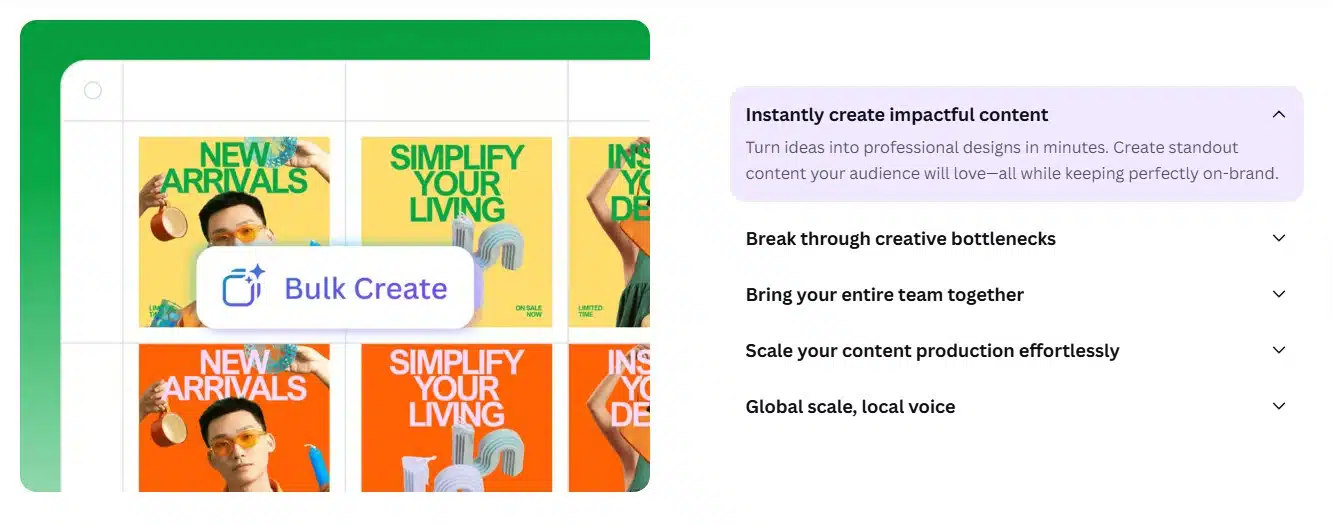
Bulk Create is one of the first features I use when a marketing task involves the same layout with changing information.
Instead of copying a design repeatedly, I can prepare one template and connect its text boxes or image frames to structured data. Canva then uses each row of that data to create another page or individual design.
The information can come from Canva Sheets, an Excel or CSV file, manual entry, or a supported data app. Canva can also attempt to match each data field to the appropriate design element automatically.
Bulk Create is particularly useful for:
- Product catalog graphics
- Location-specific promotions
- Event speaker cards
- Customer or employee spotlights
- Real estate listings
- Coupon-code variations
- Social posts built around different statistics
- Campaign assets for several markets
The template still needs to be prepared carefully. Every changing item should have its own text box or image placeholder, while the data columns need clear and consistent labels.
I never assume the generated batch is ready to publish. A long product name can disrupt a layout. An image may crop badly, or an automatically matched field may appear in the wrong place.
Previewing the designs is therefore part of the process, not an optional final glance. Bulk Create saves repetitive work, but it does not remove quality control.
The feature is currently available on Canva Pro and eligible organizational plans. It is primarily a desktop workflow.
2. Canva Sheets Connects Marketing Data With Visual Content
Canva Sheets became more useful to me when I stopped viewing it as a replacement for Excel or Google Sheets.
Its main advantage is how closely it works with the rest of Canva. Data can move from a sheet into a chart, report, presentation, campaign asset, or Bulk Create workflow without being rebuilt in a separate design application.
Supported Data Connectors can import information from platforms such as Google Analytics and HubSpot. A marketing team can use that information to create website reports, campaign dashboards, CRM summaries, or stakeholder presentations.
Google Analytics information can be refreshed when a report needs updating. HubSpot data can appear in tables or be converted into charts.
These are one-way connections. Editing the imported information in Canva does not alter the original data in Google Analytics or HubSpot. I treat Canva as the visual communication layer, not the authoritative database.
Practical marketing uses include:
- Monthly website-performance reports
- Campaign result presentations
- CRM segment summaries
- Sales and marketing dashboards
- Visual reports for non-technical stakeholders
- Data-led content variations
Some of Canva’s most valuable Data Connectors require Business or Enterprise access. Teams should also review permissions carefully because people with access to the design may be able to see its imported data.
3. Magic Switch Does Much More Than Resize Posts
Magic Switch is often described as a resizing tool. That description is correct, but incomplete.
It can adapt one design to several channel-specific formats. A campaign can be converted into an Instagram post, Story, LinkedIn graphic, presentation, or another supported size without rebuilding every layout from the beginning.
Automatic resizing still requires judgment. A square design does not always become an effective vertical design. Text hierarchy, image cropping, spacing, and calls to action may need to be adjusted for each platform.
The more overlooked function is content transformation. Magic Switch can turn a presentation into a summary, email draft, document, or blog-style piece.
That gives me a useful starting point when one campaign idea needs to appear in several formats. I still revise the copy because changing the format does not automatically produce the right tone or level of detail.
Translate extends the workflow further. Canva currently supports 134 languages and can process multi-page designs.
I treat every automated translation as a draft. It can reduce setup work, but it cannot reliably judge regional expressions, cultural context, brand tone, or whether a phrase sounds natural to a local reader.
Translated text can also become longer or shorter. Every version needs another visual review, especially when the target language uses different line lengths, characters, or writing directions.
4. Brand Controls Go Further Than a Brand Kit
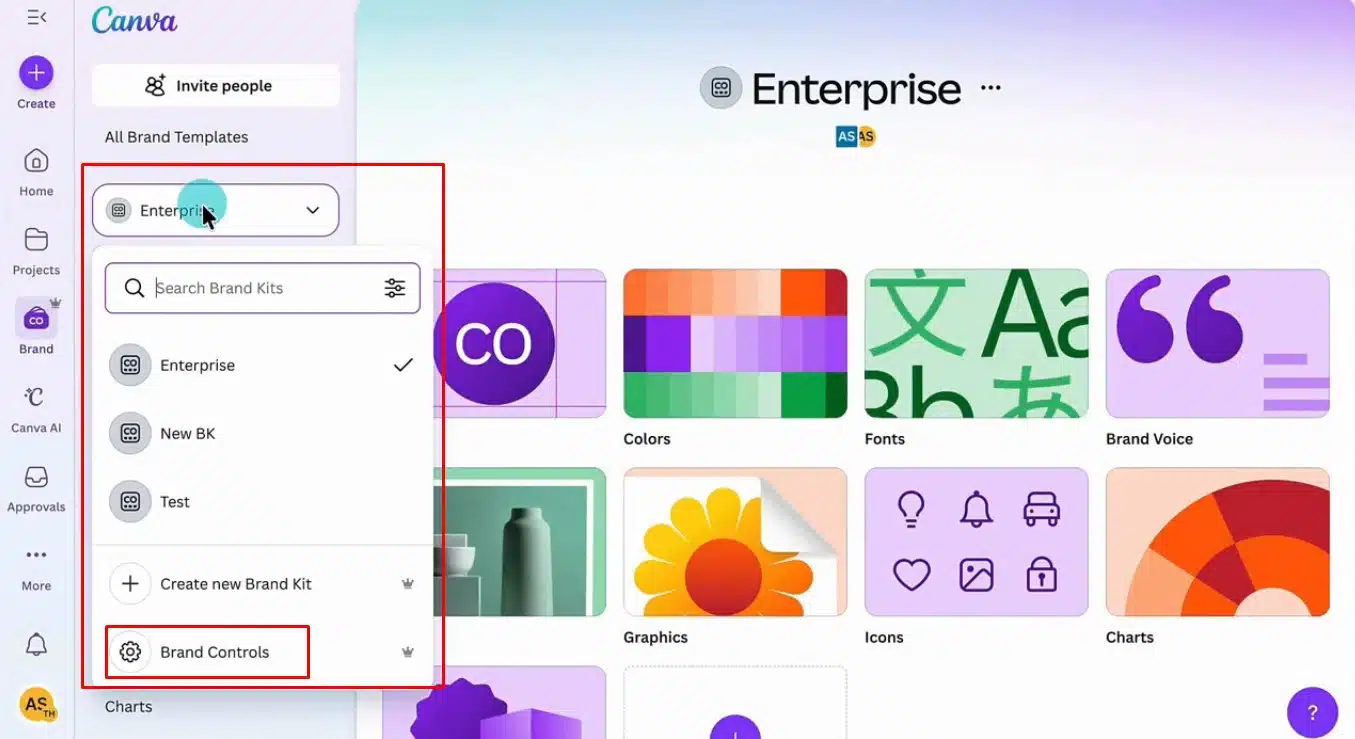
A Brand Kit makes approved logos, colors, fonts, images, and other assets easier to find. Brand Controls determine how team members are allowed to use them. That distinction matters.
A company may have the correct brand colors saved in Canva while team members continue using unapproved shades or fonts. Someone may move a logo, change a protected layout, or publish a design before the appropriate person has reviewed it.
Brand Controls can restrict users to approved colors and fonts. Administrators can also require designs to be submitted for approval before publication.
This is valuable for:
- Agencies managing several client brands
- Regional marketing teams
- Franchise operations
- Companies with non-designers producing content
- Campaigns requiring legal or compliance review
- Organizations going through a rebrand
Canva Business and eligible team administrators can configure these controls. Enterprise accounts receive more detailed options for creating approval rules around particular groups or users.
My main takeaway is that brand consistency should not depend entirely on people remembering a guideline document. Good guardrails make the correct choice easier before an error reaches the review stage.
5. Content Planner Connects Design and Organic Publishing
A common Canva workflow remains unnecessarily fragmented. A marketer creates a post, downloads it, moves to another scheduling platform, uploads the file, rewrites the caption, and then searches for the original asset if something needs changing.
Content Planner reduces those handoffs. It provides a calendar where marketers can schedule and publish designs to supported platforms, including Facebook Pages, Instagram Business accounts, LinkedIn, X, and Pinterest.
It can also display post-performance information such as impressions, clicks, likes, and comments when the connected platform supports those metrics.
I do not see Content Planner as a replacement for every specialist social media platform. Its main value is keeping creation, approval, scheduling, and basic performance review closer together.
There are several limitations to remember:
- Scheduling is a premium capability.
- A design can only be scheduled to one platform at a time.
- Publishing from multi-design documents remains limited.
- Instagram scheduling must currently be completed through a desktop browser.
- Available options can change when social networks update their integrations.
A larger social team may still need dedicated software for listening, community management, advanced reporting, and complex approval systems. For a smaller operation, however, Canva’s built-in planner may remove several unnecessary steps.
6. Design Analytics Shows What Happens After Sharing
A design is not automatically successful because it has been downloaded or shared. Design Analytics helps reveal what happens next.
Depending on the design and sharing method, Canva can show:
- Total and unique visitors
- Repeat visits
- Average time spent on the design
- Time spent on individual pages
- Pages viewed most frequently
- Where viewers stopped reading
- Poll or quiz responses
- Social impressions, clicks, reactions, and engagement
This is useful for pitch decks, proposals, reports, media kits, campaign presentations, and lead magnets.
Public view links make the feature more practical. Separate links can be created for different channels or audiences. The same report could be shared through a newsletter and LinkedIn using two links, allowing engagement to be compared without duplicating the design.
I do not use Design Analytics as a replacement for Google Analytics or a full attribution system. It answers a narrower set of questions: Did people open the design? How far did they go? Which pages held their attention?
Those answers can still guide meaningful edits. If viewers repeatedly leave at the same point, the content may be too long, poorly organized, unclear, or simply less relevant than expected.
7. Dynamic QR Codes Make Print Campaigns More Flexible
A static QR code permanently stores one destination. If that page changes after a poster, package, menu, or brochure has been printed, the code cannot be updated. Dynamic QR codes solve that problem.
The visible code can stay the same while its destination changes inside Canva. An event code could point to a registration page before the event and redirect to a recording or feedback form afterward.
This flexibility works well for:
- Product packaging
- Event materials
- Restaurant menus
- Retail displays
- Business cards
- Property signs
- Printed lead-generation campaigns
- Time-limited promotions
Eligible Business, Enterprise, and Nonprofit accounts can also access scan information, including total scans, unique scans, locations, and device types. Other advanced options can include expiry dates, custom logos, collaborator editing, and post-expiry redirects.
The choice between static and dynamic must be made before printing. Canva does not convert one type into the other later.
I also test every finished code on more than one device. A QR code that is too small, low-contrast, heavily decorated, or crowded by other elements may be difficult to scan even when the link itself is correct.
8. Canva Code Creates Interactive Marketing Experiences
Canva Code expands the platform beyond static designs. A marketer can describe an interactive experience in ordinary language, and Canva can generate a responsive landing page, calculator, quiz, form, product selector, or small web-based tool.
The result remains editable inside Canva. Brand colors, fonts, uploaded images, and library assets can be applied before the experience is published using a Canva address or eligible custom-domain option.
Useful marketing applications include:
- ROI calculators
- Product recommendation quizzes
- Event microsites
- Interactive lead magnets
- Campaign games
- Feedback forms
- Resource hubs
- Interactive sales presentations
Canva Code is available across Canva’s main plans, although AI usage limits vary.
I would not treat it as a substitute for professional development when a project involves payments, confidential information, complex integrations, or critical business functions. Every button, calculation, form, and mobile layout still needs to be tested.
Privacy matters too. If an experience collects personal information, the campaign needs clear consent language, an appropriate privacy notice, and a responsible process for storing and using those responses.
9. Canva Grow Connects Paid Ads With Creative Analysis
Content Planner and Canva Grow serve different purposes. Content Planner focuses on organic social publishing. Canva Grow is designed around paid advertising.
It can help marketers create ads, publish them in bulk, manage live campaigns, and compare performance across Meta, TikTok, and LinkedIn. Its tools include a launch dashboard, custom reporting, automated ad tagging, and analysis of the creative elements associated with performance.
That can help answer questions such as:
- Which headlines appear in the stronger ads?
- Are videos and static creatives producing different results?
- Which calls to action keep appearing in successful variations?
- Is a particular visual approach losing effectiveness?
- What should be tested in the next creative batch?
Canva Grow is available across Canva’s main plans, although connected-account limits and advanced capabilities vary.
I read its recommendations as useful signals, not final conclusions. Advertising performance can also be affected by targeting, placement, budget, bidding, tracking quality, landing pages, seasonality, and the offer itself.
No design platform can repair a weak strategy. Canva Grow’s real value is reducing the distance between campaign performance and the next creative decision.
10. Accessibility Checker Should Be Part of the Final Review
Accessibility Checker may be the least glamorous feature on this list, but it is one of the most responsible.
Canva can identify common issues such as poor color contrast and certain typography problems. Its accessibility tools also support alternative text, decorative-image labels, heading structure, and reading order for accessible PDF exports.
These details matter for:
- Reports and downloadable guides
- Presentations
- Campaign pages
- Event materials
- Social graphics
- Branded PDFs
Accessibility problems can be easy to miss while concentrating on visual polish. A muted color palette may look attractive but make important text difficult to read. An image-heavy report may communicate clearly to a sighted reader while offering very little information to someone using a screen reader.
Canva is clear that its checker does not guarantee compliance with every accessibility standard. Automated checks cannot confirm that a design works with every assistive technology or meets every legal requirement.
I use it as an important review layer, not the final authority. High-impact materials may still need keyboard testing, screen-reader review, caption checking, and an external accessibility audit.
Accessibility should not be treated only as a legal obligation. It affects whether more people can read, understand, and act on a campaign.
Canva Is More Than a Design Tool
Canva becomes far more useful when I stop treating it as a place to make one graphic. Its deeper strength lies in connecting the wider content process: data, creation, variation, approval, publishing, measurement, and revision.
The features that attract the most attention are not always the ones that improve daily marketing work. Often, it is the quieter tools that make the process more consistent, measurable, and manageable.
Frequently Asked Questions on Canva Features for Marketers
1. Are all Canva features for marketers free?
No. Canva Code and basic versions of some other tools are available on the Free plan. Bulk Create, Magic Switch, Content Planner, advanced analytics, Brand Controls, Data Connectors, and Dynamic QR insights may require Pro, Business, Enterprise, or another eligible plan.
Bulk Create, Magic Switch, Content Planner, Design Analytics, Translate, and Canva’s video-caption tools are particularly useful. Together, they support production, resizing, localization, scheduling, and basic performance review.
3. What is the difference between Content Planner and Canva Grow?
Content Planner is primarily used to schedule and analyze organic social posts. Canva Grow focuses on paid advertising, including ad creation, campaign publishing, performance reporting, and creative iteration across supported advertising platforms.
4. Can Canva Translate replace a professional translator?
Not for important published material. It can produce a useful first draft, but a fluent human should review accuracy, terminology, tone, cultural context, and layout before publication.
5. Can Canva replace dedicated marketing software?
Canva can simplify or replace parts of a marketing workflow, particularly for individuals and smaller teams. It does not remove the need for specialist analytics, customer relationship management, social listening, advertising strategy, professional development, or accessibility testing when a project requires them.