

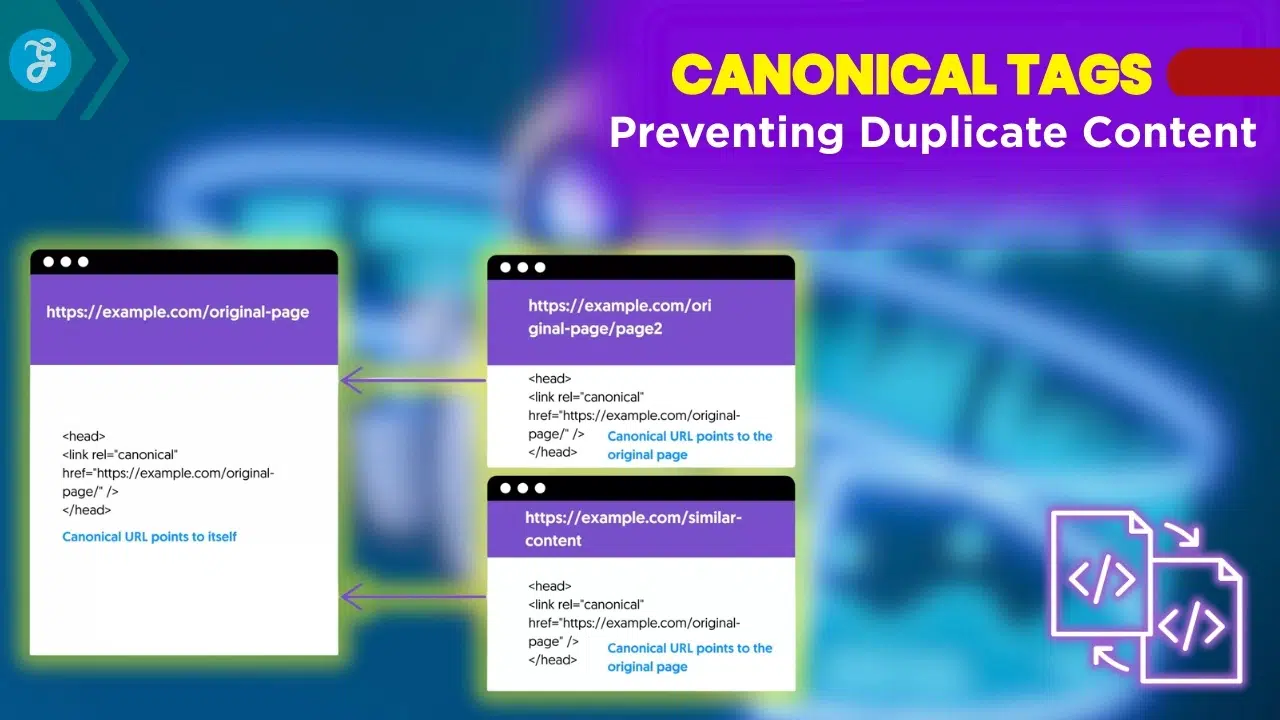
Have you ever noticed the exact same page appearing under two different links on a website? This situation can leave visitors confused and may also cause search engines to struggle when deciding which version to rank. Duplicate pages can quietly reduce a site’s search engine performance, often without an obvious warning. When multiple URLs contain the same content, search engines may split ranking signals or choose the wrong page to display.
A simple solution exists: the canonical tag. This tool tells Google and other search engines which version of a page should be treated as the primary one.
This guide explores Canonical Tags: Preventing Duplicate Content from start to finish. It explains how canonical tags work, why they matter for SEO health, and the practical steps needed to fix duplicate content issues. With the right approach, managing duplicate pages becomes much easier and helps maintain a clear, consistent presence in search results.
What is a Canonical Tag?

A canonical tag acts like a signpost for search engines, pointing out which webpage version should lead the parade. People sometimes call it a “rel=canonical” or simply, the main URL’s flag bearer. According to 2026 Google Search Central guidelines, this tag acts as a “hint” rather than a strict directive for web crawlers.
Definition and purpose
A canonical tag is a small piece of HTML code that tells search engines which version of a web page is the original, master copy. Search engines like Google use this information to know which URL matters most. This ensures your site does not show up as different pages with the exact same content.
This simple step avoids confusion and keeps your SEO strong. Websites often have duplicate pages, especially if you manage lots of URLs or run a large online store.
Canonical tags help prevent problems by pointing search engines to your chosen main page. This stops them from picking another, less important version for you.
They also make web crawling much more efficient. Here are a few ways they help:
- They protect your crawl budget: Bots will not waste time indexing duplicate pages.
- They are easy to automate: Popular plugins like Yoast SEO and All in One SEO (AIOSEO) automatically add these tags to your WordPress site, saving you hours of manual coding.
- They consolidate your link equity: All your scattered SEO signals combine into one powerful URL.
Synonyms for canonical tag
People also call the canonical tag things like “rel=canonical,” “canonical URL,” or “preferred URL.” Some website owners say “reference link” or just talk about choosing a main version of a web page.
SEO experts often use words such as “URL Canonicalization” or mention it as a core part of their content strategy. Google, Bing, and other search engines look at these tags to figure out which page they should index and rank higher.
These different terms all point back to the same goal. They stop duplicate content from hurting your rankings or making search bots waste time crawling extra pages.
Why are Canonical Tags Important for SEO?
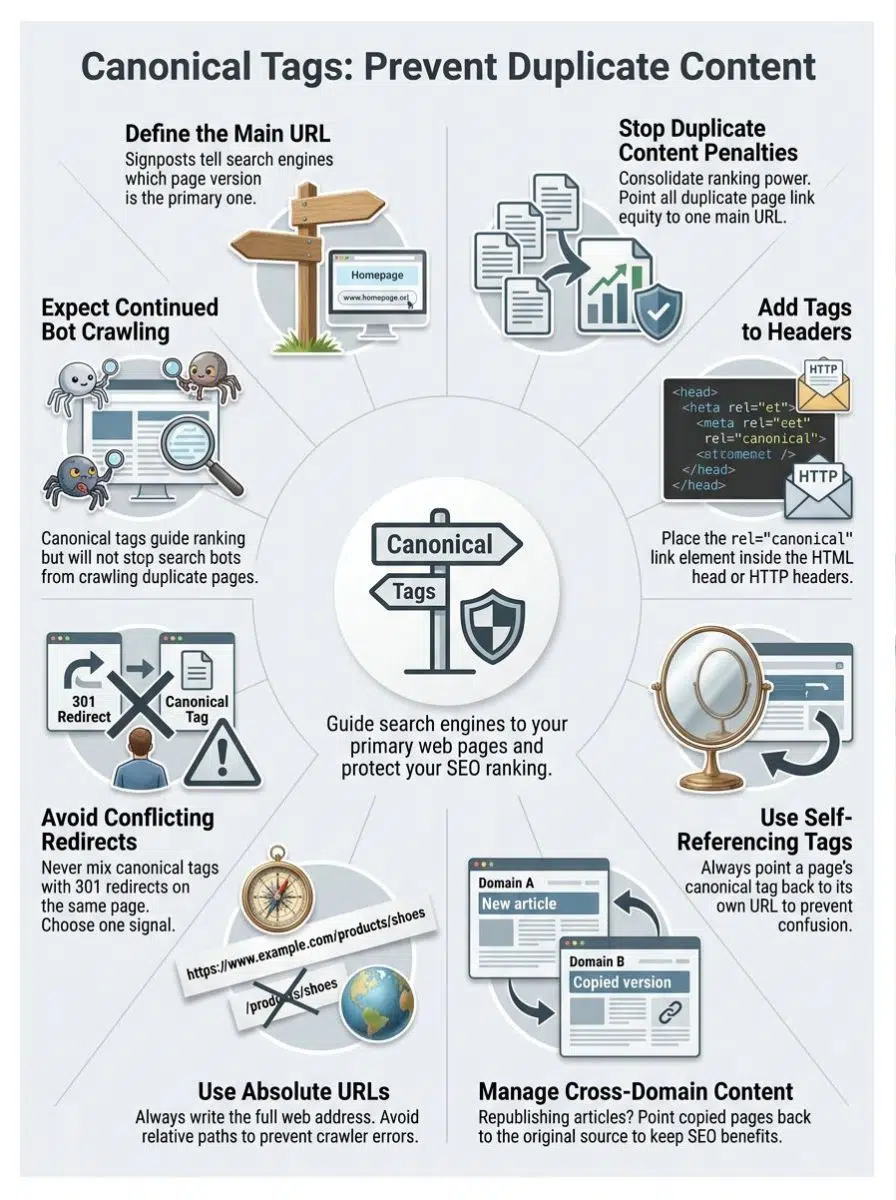
Search engines get easily confused when the exact same content appears on different web pages. Canonical tags show them which page should stand out, making your site easier to find and helping it rank much higher.
Preventing duplicate content penalties
A recent 2025 industry analysis found that up to 29% of all websites face duplicate content issues without even realizing it.
Duplicate content can seriously hurt your SEO Search Engine Optimization efforts. If your site has the same text on different URLs, Google might pick just one to rank, and it might be the wrong one. That means other valuable copies could disappear from search results entirely.
Using canonical tags is the best way to fix this problem. These little lines of code tell search engines which page version counts as the main one.
Canonicalization helps keep your link signals strong. It guides crawlers to index the right pages while dodging those pesky penalties that punish content duplication across web pages or even across domains. Especially with Google’s recent Helpful Content Updates (HCUs), cleaning up these signals protects your site from being flagged as having “thin” or unoriginal content.
Consolidating link equity
Link equity acts like a powerful vote of trust from one page to another. Many sites accidentally create similar pages with copied or thin content using different URLs.
Canonical tags help Google and other search engines focus all that voting power on the version you actually want to rank. A well-known Backlinko study found that the number one search result in Google has 3.8 times more links than positions two through ten. You need every link to count!
Imagine having five different pages about red sneakers. Here is what happens when you use these tags:
- No scattered power: Each page does not get half-hearted attention.
- Combined authority: They all point their power directly to your main sneaker page.
- Better rankings: More link authority goes straight to that single URL.
Adding rel=”canonical” tells Google which page matters most. You prevent confusion and boost your site’s chances in search results by telling crawlers exactly where the real action happens.
How to Create and Implement a Canonical Tag
Adding a canonical tag is like putting up a sign that says, “Hey Google, this is the main page.” You can set it up in just a few quick steps, and soon your site will be much easier for search engines to understand.
Using the rel=”canonical” link element
Use the rel=”canonical” link element in your page’s HTML to tell search engines which URL is the main version of your content. Place this tag inside the head section. For example, a page at www.example.com/shoes?color=red should use rel=”canonical” to point to www.example.com/shoes if both URLs have near-identical content.
Google first introduced canonical tags back in 2009. Their goal was simple: help webmasters guide crawlers toward preferred pages and prevent duplicate content headaches.
Using canonical tags does more than ward off duplicates. It also gathers all those scattered SEO signals, like shares and backlinks, and channels them into one primary URL for better ranking power.
- If you use WordPress: Popular plugins like Rank Math SEO or Yoast SEO make this process entirely code-free. Simply scroll down to the plugin’s meta box, click the “Advanced” tab, and paste your preferred URL into the Canonical URL field.
- If you run an e-commerce site: Platforms like Shopify handle basic canonicalization automatically, but you should always verify them using a tool like Google Search Console.
Specifying a canonical in HTTP headers
Specifying a canonical URL in HTTP headers tells search engines which page is the main version, even if the page does not have standard HTML code. Content delivered through files like PDFs or non-HTML resources often needs this exact approach.
Web servers can add a “Link” header with rel=”canonical” to point search engines in the right direction. This method helps stop duplicate content issues across different file types and URLs.
Google and Bing both support recognizing canonical signals from HTTP headers since 2011. For example, an image, PDF document, or script loaded on your site can send this signal without extra code changes on each file.
A popular 2025 tip among SEO pros is to use tools like Cloudflare Workers to add these HTTP headers instantly. This lets you attach a canonical link to a PDF without ever touching your actual server configuration.
Search engine crawlers then know which web pages should count for SEO ranking and link consolidation.
Adding canonical URLs to XML sitemaps
Adding canonical URLs to XML sitemaps signals to search engines which web pages should take precedence in page ranking. Search engines like Google use these hints to pick the preferred version of each URL, preventing duplicate content from affecting your SEO performance.
For example, if both www.site.com/page and www.site.com/page?ref=123 exist, listing only the main one as canonical in your sitemap keeps things perfectly clean.
This step helps streamline crawls for bots and makes sure thin or repeat pages do not get extra airtime in indexes. Content management systems often let you auto-add canonical tags right inside sitemaps, so you do not have to worry about every detail by hand.
Better signaling through XML boosts consolidated rankings and improves your web optimization results without much fuss.
When to Use a Canonical Tag
Sometimes, picking the right page is like choosing your favorite ice cream flavor. It is important if you want search engines to notice what matters most. Knowing when to add a canonical tag can help keep your site neat and easy for bots to follow.
Canonical referencing the same page
Websites often set the canonical tag to reference the very page it sits on. This is called a “self-referencing canonical,” and SEO experts strongly recommend using it on every single indexable page.
By placing a rel=”canonical” tag pointing to itself, each URL boldly states, “I am the preferred version.” For example, https://www.site.com/page.html includes a canonical tag linking back to https://www.site.com/page.html.
Google’s John Mueller recently confirmed that self-referencing canonicals make your preferred URLs crystal clear to search engines. This step helps avoid confusion caused by small differences in URLs, like someone adding a tracking code when sharing your link on social media.
Self-referencing protects against duplicate content issues if tracking codes or sorting filters pop up in page URLs across your site. Think of it as insurance for your SEO efforts. Clear signals help boost ranking and keep unnecessary duplicates out of search results.
Canonical referencing a different page
Sometimes, two pages have almost the same content but live at different URLs. In this case, one page should point to the main or preferred version using a canonical tag.
You add rel=”canonical” in the head of the duplicate page’s HTML and set it to the URL you want search engines like Google to index. For example, if /product-shoes and /shoes?ref=summer both show red sneakers, pick your main page as the canonical one.
A 2026 SEO playbook from SeekLab recommends that for e-commerce sites with “faceted navigation” (like size or color filters), you should canonicalize those low-intent filter URLs back to the main category page.
This helps search engines avoid confusion about duplicate content, boosts ranking power for your important pages, and stops link equity from splitting up across copies. Such steps make sure only one copy shows up high in search results while reducing thin or unnecessary pages being indexed.
Handling separate desktop and mobile pages
Search engines need a clear signal about which version of your site is the main one. If you have both desktop and mobile pages, use canonical tags to point each version to the preferred URL.
For example, let Google know if “example.com” or “m.example.com” is your main page by using rel=”canonical” in your HTML head. Duplicate content can confuse crawlers and impact search engine ranking in 2026 and beyond.
To keep SEO strong, always include a canonical tag on both desktop and mobile pages, signaling which page should rank higher. This step consolidates link equity for all versions under one primary URL, making sure you do not lose valuable traffic or authority due to split signals across device types.
Cross-domain canonical tags help you manage duplicate content across different websites. Imagine posting a great article on two domains. If both have the same text, search engines get confused and might choose one at random to rank.
Using a cross-domain canonical tag, you can point from the copied page to the original source with rel=”canonical”. This step tells Google or Bing exactly which site should carry all SEO benefits, like link equity and improved ranking.
Many news outlets use this trick every day when they republish stories on partner networks or press releases across several business sites. It keeps your preferred URL in control no matter how far your content travels online.
Here are a few quick tips to keep in mind:
- For News Syndication: Google still actively recommends cross-domain canonicals to point back to the original publisher.
- For Regular Blogs: Recent Google Search Central updates suggest that partner sites should also use a “noindex” tag alongside the canonical to be completely safe.
- Keep them Indexable: Always pick only indexable pages as canonicals and make sure both sites work together smoothly.
Best Practices for Using Canonical Tags
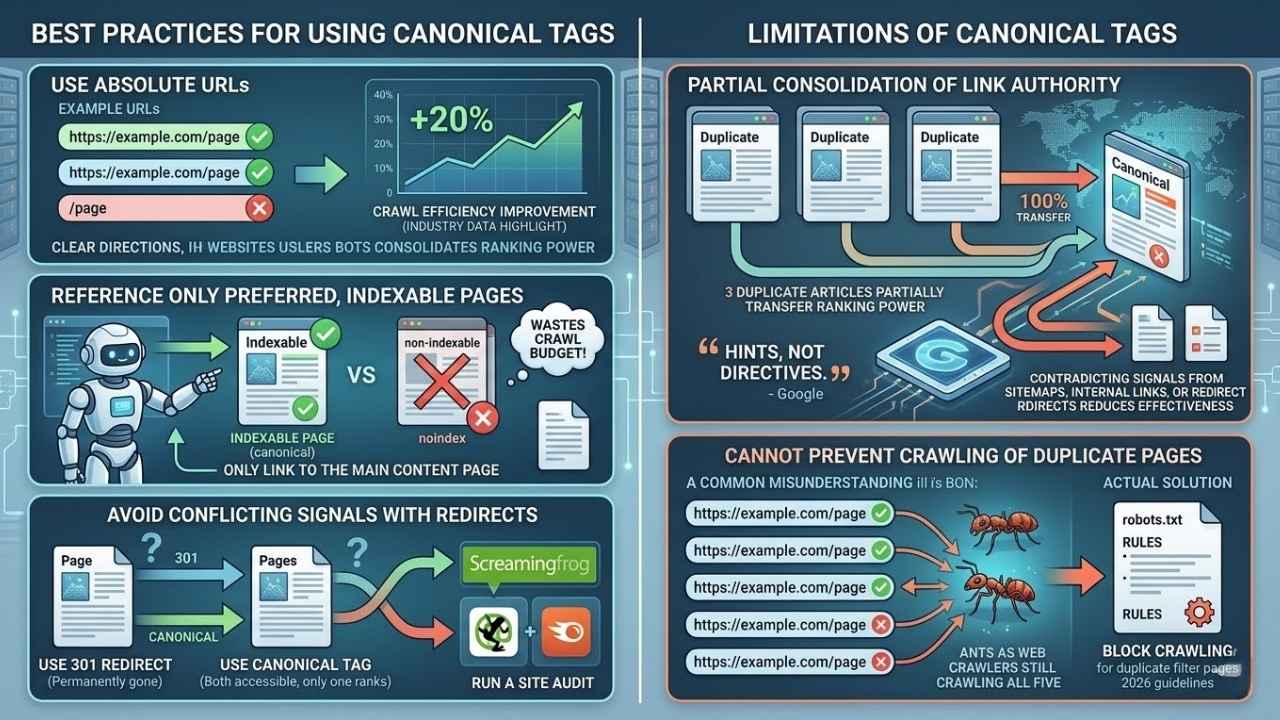
Simple steps keep your site neat as a pin and search engines happy. Small tweaks can make a whale of a difference in how your pages show up online.
Use absolute URLs
Search engines like Google prefer clear instructions, just like teachers grading your homework. Always write out the full URL in your canonical tags.
Use “https://example.com/page” instead of a relative path like “/page.” This removes any doubt about which web page is the main one and helps search engines prevent duplicate content headaches.
According to industry data highlighted by SEO experts, websites that properly implement absolute canonical tags experience an average of a 20% improvement in crawl efficiency.
A site using absolute URLs in its rel=”canonical” tag signals to crawlers exactly where to go, even if you have mobile pages or set up redirects. For example, including “https://www.yoursite.com/article-1” leaves no room for guessing.
Clear directions strengthen SEO efforts by making it easier for bots to consolidate ranking power and manage metadata across web pages with different addresses.
Reference only preferred, indexable pages
Set canonical tags to point only to your preferred, indexable pages. Pointing a canonical tag at a non-indexable page wastes crawl budget and confuses search engines like Google.
For example, do not use canonicals for pages blocked by your robots.txt file or marked with a “noindex” tag. Combining a canonical tag with a noindex tag creates a logical contradiction that Google has to sort out, which often results in them ignoring your instructions entirely.
Only link to the most important page you want ranked for that topic. Always use the absolute URL of your main content page as the canonical reference.
The right setup makes it easier for Googlebot and other web crawlers to see what matters most on your site. This boosts SEO performance while keeping things neat and tidy.
Avoid conflicting signals with redirects
Search engines get confused if a page has both a rel=”canonical” tag and a redirect pointing somewhere else. This sends mixed messages, almost like telling someone to go left and right at the same time.
Google might ignore your canonical tags or pick its own path, risking duplicate content issues.
A good example is setting up a 301 redirect for an old product URL while also marking it with a canonical tag that points to another page. Stick to one clear signal per page.
- Use a 301 Redirect: When the old page is permanently gone and you want users to go to the new page.
- Use a Canonical Tag: When you want both pages to remain accessible to users, but only want one to rank.
- Run a Site Audit: Use tools like Screaming Frog or the Semrush Site Audit tool to regularly check your website for these conflicting signals.
Cleaning up these signals helps streamline crawls and stops unnecessary pages from getting indexed under several URLs. The goal is simple: make sure search engines know which web page matters most for ranking and SEO performance.
Limitations of Canonical Tags
Canonical tags can guide search engines, but they cannot always pass all page authority through. They also will not stop bots from crawling extra copies of your web pages.
Search engines use canonical tags to combine link signals from similar pages. Only part of the link value gets passed on, though; it is almost never a full 100% transfer.
For example, if two or three copies of the same article exist and all point to one main page with a rel=”canonical” tag, not every single ounce of their ranking power moves over.
Google has officially stated that these tags are “hints, not directives.” This means Google takes your preference into account, but they can completely ignore your canonical tag if your other SEO signals contradict it.
- Sitemaps: Ensure the URL in your sitemap matches your canonical tag.
- Internal Links: Always link to the canonical version of a page, not the duplicate.
- Redirects: Make sure no canonical tags point to a page that redirects somewhere else.
Sometimes incoming links split up among several URLs, especially if duplicate content issues linger for too long without being fixed. Making sure your internal links match your canonical tags is vital to tackle duplicate content early for stronger SEO performance.
Cannot prevent crawling of duplicate pages
Canonical tags signal to search engines which page should rank, but they absolutely do not block crawlers from visiting duplicate content. This is a very common misunderstanding.
For example, if your site has five URLs showing the same article or product, adding a canonical URL tells Google the main version for ranking. Yet, all five copies can still get crawled. Crawlers follow links across web pages like ants sniffing out crumbs; they do not always listen to your hints.
According to 2026 technical SEO guidelines from Boulder SEO Marketing, if you want to actually stop Google from wasting its “crawl budget” on duplicate filter pages, you must use your robots.txt file.
While canonical tags help prevent SEO penalties for duplicate content and focus link equity toward one preferred source, they do not stop bots from accessing every copy available on the server.
To fully control what gets crawled and protect your site’s technical performance, skilled webmasters use a combination of robots.txt rules and canonical tags together for better site management.
Final Thoughts
Keeping web pages organized with canonical tags helps search engines avoid confusion caused by duplicate content. Adding these simple tags can save time, protect search rankings, and improve a site’s SEO with minimal effort. The process involves selecting the main page to highlight and directing search engines to that preferred version. It works much like placing a signpost on a busy street, guiding traffic to the correct destination.
Using Canonical Tags: Preventing Duplicate Content effectively can strengthen a website’s visibility and prevent issues caused by repeated or similar pages. This ensures that the value of the content and SEO efforts stays focused on the right page.
For additional tips, exploring trusted SEO blogs or connecting with other website owners can provide helpful insights. Search engine optimization continues to evolve, and staying informed makes it easier to maintain strong performance. Even small mistakes in canonical tags can affect rankings, which is why careful attention to these details helps keep a website running smoothly.























