

Managing money is hard enough without having to manually type in every single latte, gas station run, and subscription charge. In 2026, the best budgeting tools don’t just track your spending—they automate it. The era of hoarding receipts and wrestling with spreadsheets is over. Today, you need budget apps that sync with your bank in real-time, categorizing your life so you can actually live it.
Whether you are trying to crush debt, manage wealth with a partner, or just figure out where your paycheck vanishes every month, automation is the key to consistency. We have tested and ranked the top 10 apps that seamlessly connect to your financial institutions to give you a crystal-clear picture of your money.
Why Automatic Bank Syncing is Non-Negotiable
Before we jump into the rankings, let’s talk about why “syncing” is the feature that makes or breaks a budget.
-
Real-Time Accountability: You see the impact of that impulse buy immediately, not two weeks later when you finally update your ledger.
-
Reduced Friction: The harder a budget is to maintain, the more likely you are to quit. Automatic syncing removes the work.
-
Fraud Detection: When every transaction pops up on your phone, you spot unauthorized charges instantly.
Top 10 Best Budget Apps That Sync With Your Bank
Here they are:
1. YNAB (You Need A Budget)
Best Overall for changing Habits
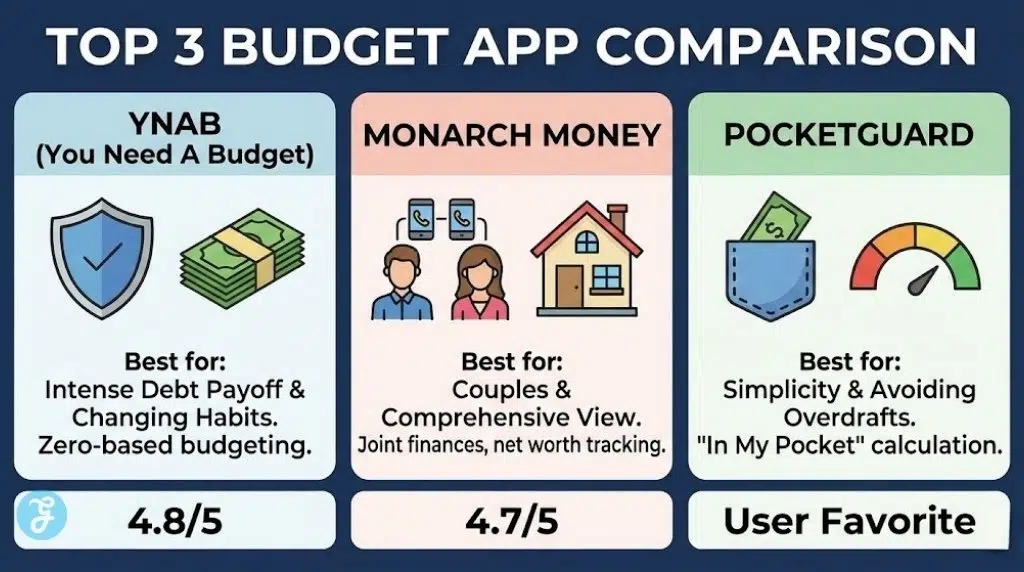
YNAB isn’t just an app; it’s a cult, and for good reason. It forces you to stop looking at your bank balance and start looking at your budget. It uses a “zero-based” system where every dollar is given a job. In 2026, its bank syncing tech (powered by Plaid and MX) is faster than ever.
It’s not passive. You still have to “approve” transactions, which forces you to be aware of your spending, but the heavy lifting of importing data is done for you. It is the gold standard for anyone serious about getting out of debt.
| Feature | Spec / Rating |
| Sync Reliability | High (Multiple aggregators) |
| Pricing | $14.99/mo or $109/yr |
| Best For | Debt Payoff & Strict Budgeting |
| Review Signal | App Store: 4.8/5 (Fanatical User Base) |
2. Monarch Money
Best for Couples & Former Mint Users
When Mint shut down, Monarch Money rose from the ashes as the premium replacement. It is beautifully designed and arguably the most flexible of the budget apps that sync with your bank. You can invite your partner to your account for free, giving you a shared view of your household finances without sharing logins.
It handles investments, net worth, and recurring bills effortlessly. If you want a dashboard that looks like the cockpit of a spaceship for your money, this is it.
| Feature | Spec / Rating |
| Sync Reliability | Excellent (Custom sync options) |
| Pricing | $14.99/mo or $99/yr |
| Best For | Couples & High Net Worth Trackers |
| Review Signal | Google Play: 4.7/5 (Praised for UI) |
3. Copilot Money
Best for iPhone & Mac Users
Copilot is arguably the smartest app on this list, thanks to its “Copilot Intelligence” AI. It learns your spending habits incredibly fast. If you buy coffee at the same spot twice, Copilot knows how to categorize it forever.
It is exclusive to the Apple ecosystem (iOS/Mac) and leverages that native integration perfectly. The interface is stunning, fast, and makes checking your finances feel less like a chore and more like checking your Instagram.
| Feature | Spec / Rating |
| Sync Reliability | High (Uses Plaid) |
| Pricing | $13/mo or $95/yr |
| Best For | Tech-Savvy Apple Users |
| Review Signal | Design Award: Apple App Store Editors’ Choice |
4. Quicken Simplifi
Best for Cash Flow Snapshots
Backed by the veteran finance giant Quicken, Simplifi is designed for people who don’t want to obsess over every penny but want to know “Can I afford this?”. It generates a “Spending Plan” that automatically subtracts your bills and savings goals from your income, showing you exactly how much “safe-to-spend” money you have left.
It’s one of the most affordable premium budget apps that sync with your bank, offering robust features without the triple-digit annual price tag of competitors.
| Feature | Spec / Rating |
| Sync Reliability | Very High (Quicken’s infrastructure) |
| Pricing | ~$3-4/mo (billed annually) |
| Best For | General Overview & “Safe to Spend” Calc |
| Review Signal | Value: Best “Bang for Buck” 2026 |
5. PocketGuard
Best for Simplicity (“In My Pocket”)
PocketGuard answers one question: “How much money do I have right now?” It calculates your income, subtracts upcoming bills and goals, and gives you a single number: “In My Pocket.”
It’s fantastic for preventing overspending. The bank sync is aggressive, often updating pending transactions faster than other apps. If you tend to overdraw your account, PocketGuard is the guardrail you need.
| Feature | Spec / Rating |
| Sync Reliability | Good |
| Pricing | Free (Limited) / $75/yr Premium |
| Best For | Avoiding Overdrafts |
| Review Signal | User Sentiment: “Easiest to Understand” |
6. Empower (Formerly Personal Capital)
Best Free Option for Investors
If you care more about your net worth and investment portfolio than your grocery budget, Empower is the king. It is technically a wealth management tool, but its budgeting features are surprisingly robust and—crucially—completely free.
It syncs with everything from your checking account to your 401k. The budgeting is less granular than YNAB (it’s more about cash flow tracking), but for a free tool, the dashboard is unbeatable.
| Feature | Spec / Rating |
| Sync Reliability | Moderate (Security focused) |
| Pricing | Free |
| Best For | Tracking Net Worth & Investments |
| Review Signal | Trust: 4.7/5 (Industry Veteran) |
7. Rocket Money
Best for Managing Subscriptions
We all have subscriptions we forgot about. Rocket Money (formerly Truebill) made its name by finding and canceling them for you. Beyond that, it has evolved into a full-fledged budgeting app.
It syncs with your bank to identify recurring charges and allows you to set simple spending caps. It’s not as deep as Monarch, but its ability to negotiate lower bills and cancel services makes it the only app on this list that can actually make you money.
| Feature | Spec / Rating |
| Sync Reliability | Good |
| Pricing | Free (Basic) / “Pay What You Want” Premium |
| Best For | Subscription Hunting & Bill Negotiation |
| Review Signal | Popularity: #1 Finance App frequently |
8. EveryDollar (Premium)
Best for Dave Ramsey Fans
If you follow the “Baby Steps,” this is your app. EveryDollar is built for zero-based budgeting. The free version is manual, but the Premium version unlocks bank syncing.
It is simpler than YNAB and easier to pick up for beginners. It doesn’t clutter the screen with investment charts or net worth graphs; it focuses purely on the current month’s budget.
| Feature | Spec / Rating |
| Sync Reliability | High (Premium Only) |
| Pricing | $79.99/yr (for Sync features) |
| Best For | Zero-Based Budgeting Beginners |
| Review Signal | Ease of Use: 5/5 for simplicity |
9. Tiller
Best for Spreadsheet Lovers
Some people just love Excel. Tiller is the bridge between the old world and the new. It automatically pulls your daily transactions from your bank and dumps them into a Google Sheet or Excel workbook.
From there, you can do anything. Use their pre-made templates or build your own complex financial models. It’s the ultimate “DIY” tool for control freaks who want raw data without the manual data entry.
| Feature | Spec / Rating |
| Sync Reliability | High (Daily auto-feeds) |
| Pricing | $79/yr |
| Best For | Custom Spreadsheets & Data Nerds |
| Review Signal | Niche Favorite: Top rated by accountants |
10. Honeydue
Best Free App for Couples
Most “couple” apps require a paid subscription. Honeydue is free. It allows you and your partner to sync your individual bank accounts and choose what to share. You can see a joint “household” budget while keeping your personal “fun money” account private if you wish.
It includes a chat feature to discuss specific transactions (“What is this $50 Amazon charge?”), preventing money arguments before they start.
| Feature | Spec / Rating |
| Sync Reliability | Moderate |
| Pricing | Free |
| Best For | Couples on a Budget |
| Review Signal | Utility: Best Free Joint Budget Tool |
How We Ranked These Apps?
We selected these budget apps that sync with your bank based on four strict criteria:
-
Sync Success Rate: Does the app actually stay connected, or does it ask you to re-login every two days? (We favored apps using multiple aggregators like Plaid, MX, and Finicity).
-
Categorization Intelligence: How much manual work is required? Good apps learn that “Shell” is always “Gas.”
-
Security: All listed apps use bank-level 256-bit encryption and read-only access (they can’t move your money).
-
Value: Does the potential savings justify the monthly subscription cost?
Final Thoughts
The “best” app is simply the one you will actually use.
-
If you need a strict digital financial coach to scream at you about overspending, get YNAB.
-
If you want a modern, automated dashboard to manage a household, Monarch Money is the top choice for 2026.
-
If you just want to know if you can afford dinner tonight without doing math, PocketGuard or Simplifi will save your sanity.
Choose one, sync your accounts, and stop wondering where your money went.






















