

In 2026, the traditional metal key is officially becoming a relic of the past. The latest wave of home security technology, showcased at CES 2026, has shifted from simple “connected gadgets” to robust, high-security infrastructure. With the universal adoption of the Matter protocol and the lightning-fast response times of Thread networking, smart locks are now more reliable and easier to install than ever before.
Whether you are a tech-savvy homeowner looking for the latest 3D facial recognition or a renter needing a non-permanent solution, this guide breaks down the absolute best smart doorlocks for keyless entry available today.
Quick Picks: Our Top 3 Smart Lock Recommendations
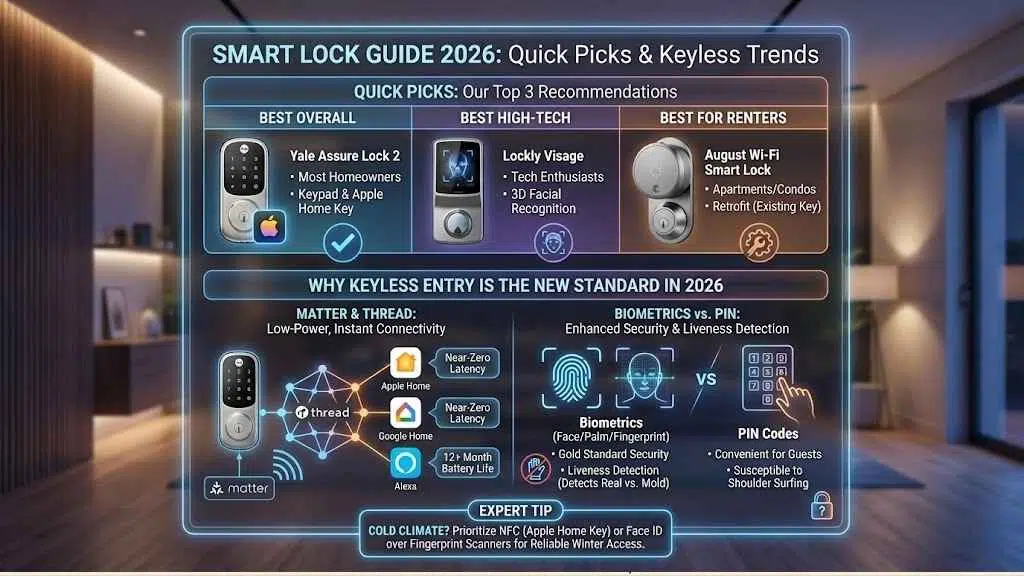
| Category | Product | Best For | Primary Unlock Method |
| Best Overall | Yale Assure Lock 2 | Most Homeowners | Keypad & Apple Home Key |
| Best High-Tech | Lockly Visage | Tech Enthusiasts | 3D Facial Recognition |
| Best for Renters | August Wi-Fi Smart Lock | Apartments/Condos | Retrofit (Existing Key) |
Why Keyless Entry is the New Standard in 2026
The smart lock market has matured. We are no longer just talking about “remote unlocking”; we are talking about frictionless entry.
The Rise of Matter and Thread Protocols
In the past, smart locks were notorious for draining batteries because they stayed connected to power-hungry Wi-Fi. In 2026, the Matter-over-Thread standard has solved this. Thread is a low-power mesh network that allows your lock to talk to your Apple Home, Google Home, or Alexa hub instantly without a dedicated bridge. This means 12+ month battery life and near-zero latency.
Biometrics vs. PIN Codes: Which is More Secure?
While PIN codes are convenient for guests, biometrics (fingerprints, palm veins, and facial scans) have become the gold standard. Modern scanners now use “liveness detection,” meaning they can tell the difference between a real finger and a 3D-printed mold.
Expert Tip: If you live in a cold climate, prioritize locks with NFC (Apple Home Key) or Face ID over fingerprint scanners, as physical sensors can struggle with very dry skin or gloves.
10 Best Smart Doorlocks of 2026
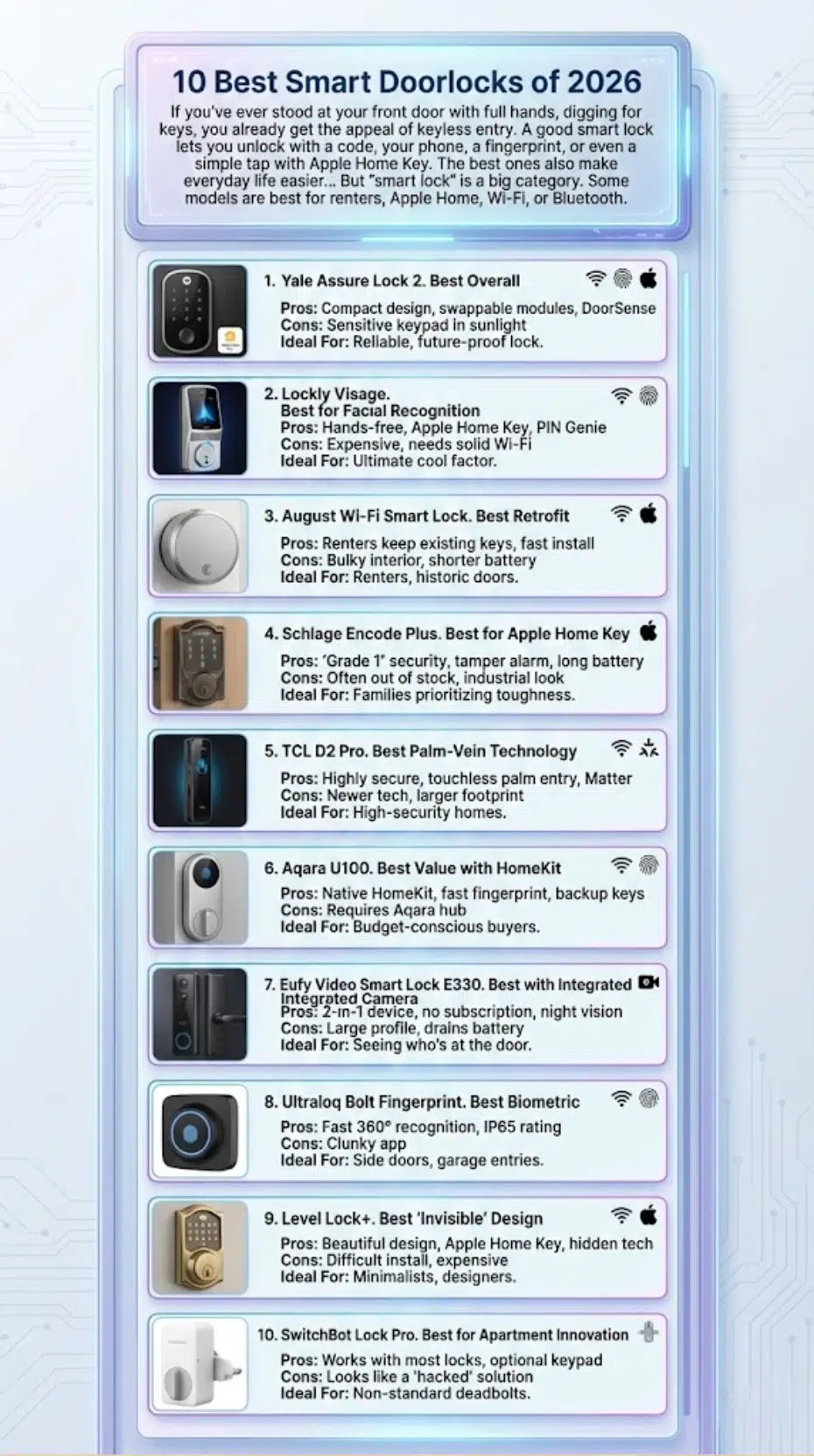
If you’ve ever stood at your front door with full hands, digging for keys, you already get the appeal of keyless entry. A good smart lock lets you unlock with a code, your phone, a fingerprint, or even a simple tap with Apple Home Key. The best ones also make everyday life easier: you can create guest codes for family, cleaners, or deliveries, set auto-lock so you never second-guess yourself, and check lock activity from anywhere.
But “smart lock” is a big category. Some models are best for renters because they keep your existing keys. Some are best for Apple Home. Some have built-in Wi-Fi, while others use Bluetooth or Thread to save battery. And some “features” look great online but become annoying in real life.
1. Yale Assure Lock 2 (Best Overall)
The Yale Assure Lock 2 remains the champion for most users due to its modularity. You can buy the base Bluetooth version and later upgrade it with a Matter Smart Module if you change your smart home ecosystem.
- Pros: Compact design, swappable modules, excellent DoorSense technology (tells you if the door is actually closed, not just locked).
- Cons: The keypad can be sensitive to direct sunlight.
- Ideal For: Homeowners who want a reliable, future-proof lock from a trusted brand.
2. Lockly Visage (Best for Facial Recognition)
This is the “iPhone of smart locks.” The Visage uses dual 2MP sensors to recognize your face as you approach, unlocking the door before you even reach for the handle.
- Pros: Truly hands-free, includes Apple Home Key support, and features Lockly’s famous “PIN Genie” rotating keypad.
- Cons: Expensive; requires a solid Wi-Fi or Thread connection for the best experience.
- Ideal For: Users who want the ultimate “cool factor” and hands-free convenience.
3. August Wi-Fi Smart Lock (4th Gen) (Best Retrofit)
August hasn’t changed their winning formula: a lock that fits onto the inside of your existing deadbolt. From the outside, your door looks exactly the same.
- Pros: Renters don’t need to change keys; 10-minute installation.
- Cons: Bulky interior unit; battery life is shorter (3–6 months) than non-retrofit models.
- Ideal For: Renters or those with historic doors who cannot change their exterior hardware.
4. Schlage Encode Plus (Best for Apple Home Key)
Schlage is known for “Grade 1” security—the highest residential rating. The Encode Plus is a beast of a lock that supports Apple Home Key, allowing you to tap your iPhone or Apple Watch to enter.
- Pros: Extremely rugged, built-in tamper alarm, incredible battery life (12+ months).
- Cons: Often out of stock due to high demand; industrial aesthetic isn’t for everyone.
- Ideal For: Families in the Apple ecosystem who prioritize physical toughness.
5. TCL D2 Pro (Best Palm-Vein Technology)
Unveiled at CES 2026, the TCL D2 Pro uses infrared light to map the unique vein patterns under your skin. It is even more secure than a fingerprint and works even if your hands are dirty or wet.
- Pros: Highly secure, touchless “palm” entry, supports Matter.
- Cons: Newer technology with a slightly larger footprint.
- Ideal For: High-security homes or users who find fingerprint scanners unreliable.
6. Aqara U100 (Best Value with HomeKit)
Aqara has disrupted the market by offering premium features—like a fingerprint reader and Apple Home Key—at a fraction of the cost of Yale or Schlage.
- Pros: Native HomeKit support, fast fingerprint sensor, includes physical backup keys.
- Cons: Requires an Aqara hub for the best remote features.
- Ideal For: Budget-conscious buyers who don’t want to sacrifice high-end tech.
7. Eufy Video Smart Lock E330 (Best with Integrated Camera)
Why buy a doorbell camera and a smart lock separately? The E330 combines a 2K resolution camera with a fast fingerprint scanner.
- Pros: 2-in-1 device, no monthly subscription for video storage (local storage), clear night vision.
- Cons: Large vertical profile; video streaming drains the battery faster.
- Ideal For: People who want to see who is at the door while they unlock it.
8. Ultraloq Bolt Fingerprint (Best Biometric)
The Ultraloq Bolt is famous for its 360° fingerprint sensor that works from any angle. It’s fast, sleek, and supports Matter-over-Thread for 2026.
- Pros: Incredibly fast recognition (0.3 seconds), IP65 weather rating.
- Cons: The app can be a bit clunky compared to Yale.
- Ideal For: Side doors or garage entries where quick biometric access is needed.
9. Level Lock+ (Best “Invisible” Design)
The Level Lock+ is the only smart lock that hides all the technology inside the door itself. It looks like a standard, high-end designer deadbolt.
- Pros: Beautiful design, Apple Home Key support, no bulky “smart” look.
- Cons: Difficult to install if your door isn’t perfectly aligned; expensive for the features.
- Ideal For: Minimalists and interior designers.
10. SwitchBot Lock Pro (Best for Apartment Innovation)
SwitchBot uses a motorized “grabber” that physically turns your existing thumbturn. It is the most versatile retrofit lock for oddly shaped European or older American locks.
- Pros: Works with almost any lock type, optional keypad with fingerprint sensor.
- Cons: Looks like a “hacked” solution rather than a finished product.
- Ideal For: People with non-standard deadbolts or complex multi-point locks.
Buyer’s Guide: How to Choose Your Smart Lock
1. Check Your ANSI Grade
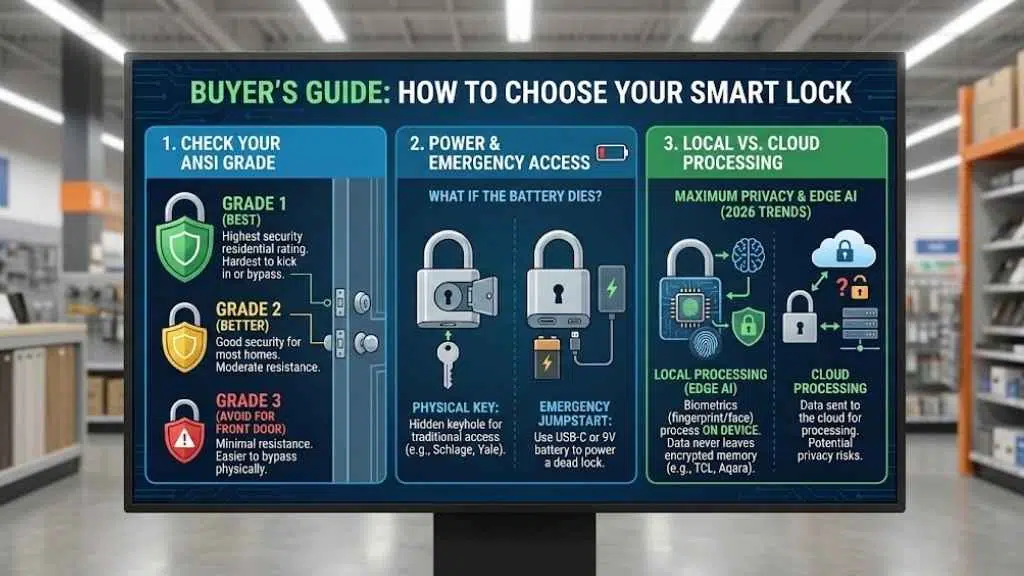
Security isn’t just about software. Look for ANSI Grade 1 (Best) or Grade 2 (Better). Avoid Grade 3 for your main front door if possible, as it is easier to kick in or bypass physically.
2. Power & Emergency Access
Always ask: What happens if the battery dies?
- Physical Key: Many locks (like Schlage and Yale) still include a traditional key hole hidden behind a cover.
- Emergency Jumpstart: Look for locks with a USB-C port or 9V battery terminals on the bottom. This allows you to “jump” the lock if it’s dead so you can enter your code.
3. Local vs. Cloud Processing
For maximum privacy, choose locks that process biometrics locally (on the device). In 2026, brands like TCL and Aqara prioritize edge AI, meaning your fingerprint or face data never leaves the lock’s encrypted memory.
Final Thoughts
The “best” lock depends on your door and your phone. If you have an iPhone, the Schlage Encode Plus or Yale Assure 2 with Home Key is life-changing. If you want the most futuristic experience, the palm-vein scanning of the TCL D2 Pro is the clear winner for 2026.






















