Most business card makers promise the world to their users. Beautiful designs, ease of use, tons of printing customizations possible, high-quality printing – they claim to have it all.
But does that really hold true? Or will you be stuck with cookie-cutter layouts and a tool that is difficult to maneuver?
That’s what we are finding out for you today. We evaluated the top tools in the market to find which ones truly help modern brands create standout cards. Check the results below!
How We Scored the Tools
Each business card maker was evaluated based on what modern businesses actually need.
| Criteria | Points | What We Evaluated |
| Design Quality | 25 | How is the visual quality of the design? |
| Design Quantity | 20 | How many options will you get? |
| Speed | 15 | How fast can you search, edit, and create a card? |
| Editing Features | 15 | How easy is it to use? How flexible is the customization? |
| Printing | 15 | How much can you customize the print of your card? How is the quality of the print? |
| Overall Design Ecosystem | 10 | What else can you do on the platform? |
Top Business Card Maker Tools (Results Breakdown)
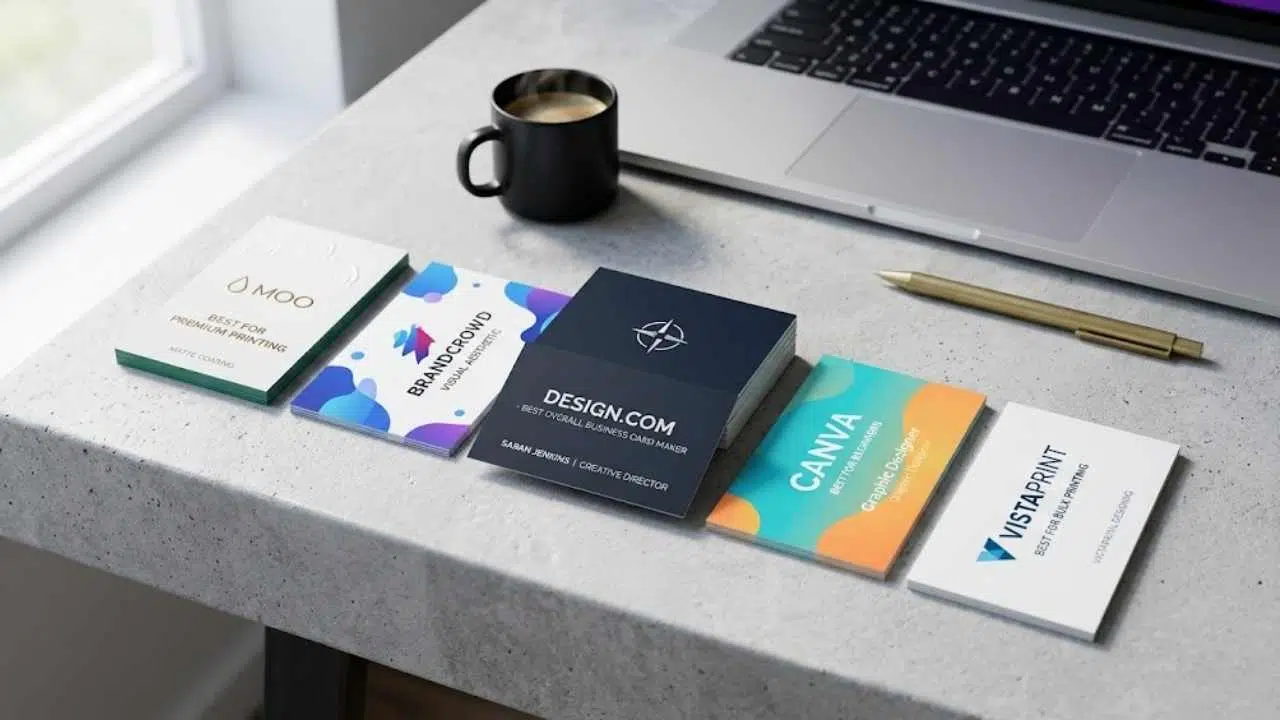
After testing the tools, we came with the top five. Here are their scores:
| Tool | Quality | Quantity | Speed | Editing Features | Printing | Ecosystem | Total Score |
| Design.com | 25 | 20 | 15 | 13 | 12 | 10 | 95 |
| BrandCrowd | 23 | 19 | 13 | 13 | 12 | 10 | 90 |
| Canva | 20 | 16 | 13 | 11 | 10 | 8 | 78 |
| Moo | 20 | 15 | 11 | 10 | 15 | 6 | 77 |
| VistaPrint | 19 | 15 | 12 | 10 | 14 | 6 | 76 |
Now let’s see the deep dive of each tool to see how the scores came to be:
Design.com – Best Overall Business Card Maker
Design.com’s business card maker ranks #1 on our list for actually doing it all: combining great design quality and variety, beginner-friendly controls, and print customization options with a powerful branding ecosystem.
- Design Quality – Exceptionally high. All cards look premium and well-crafted even with minimal editing. They also look less “template” and more like designers actually handcrafted it to your brand. We also liked that we see a lot of variety in terms of industry. We can see cards that would work well for SaaS, real estate, coffee shops, and so on:
- Design Quantity – Massive, around 20,000+ designs. It’s a huge jump compared to other sites that have a thousand at most.
- Speed – Extremely fast. It only takes a few seconds to search for a design, then a few minutes to edit.
- Editing Features – Very flexible. You get full control over fonts, colors, shapes, and layout. You can even do granular changes like changing the angle of your text shadow, the color of your logo icon, or the shape of your QR code.
- Printing – Great. Users can adjust quantities, finishes, corner styles, and opt for single/double-sided printing. You also get a wide range of file exports should you wish to print it yourself (or use it digitally).
- Overall Ecosystem – The best. You get 50+ design tools aside from the business card maker, plus some AI design tools. What’s more is that once you create a card on the site, you can instantly get matching logos, website, social media graphics, and more without having to design from scratch.
Overall: Design.com stands out as the most complete platform by combining quality, speed, and scale in a way competitors don’t match.
BrandCrowd – Best for Visual Aesthetic
BrandCrowd’s business card generator is our #2. Its strength lies in the quality and polish of its templates, making it especially appealing for brands that prioritize strong visual identity from the start.
- Design Quality – Very high. We love the look of the cards they offer. It’s a huge step up from the boring, generic designs that you usually get from template sites.
- Design Quantity – High. Offers a wide range of design variations, though slightly fewer diverse directions than Design.com.
- Speed – Good, it is fast and easy to use.
- Editing Features – BrandCrowd is totally beginner-friendly. It’s a simple drag and drop, no complex controls needed. Users can also fully customize the design.
- Printing – Very solid. They offer a good range of print finishes and styles.
- Overall Ecosystem – Great. They have a wide range of design tools aside from business cards, so you can create all your marketing assets (like posters, presentations, email signatures) without having to jump to another platform.
Overall: Excellent for visually appealing designs. However Design.com edges ahead with more template options and their bigger range of AI tools (which are helpful in streamlining the editing process). Still, these two are way ahead of the competition.
Canva – Best for Beginners
Canva is a widely used design tool known for its simplicity.
- Design Quality – Good, but more template-driven. Cards can feel generic unless heavily customized. We also saw less industry-specific cards compared to Design.com.
- Design Quantity – Large template library, but less than Design.com.
- Speed – Good, it’s easy to search and edit.
- Editing Features – Very easy to use, but most of their great editing tools are locked behind Canva Pro.
- Printing – Basic to moderate print options, less specialized control compared to Moo or VistaPrint.
- Overall Ecosystem – Good, Canva offers a full suite of design tools across many platforms.
Overall: Great for beginners, but lacks the depth and professional polish of Design.com.
Moo – Best for Premium Printing
Moo is a print-first platform known for high-quality materials and finishes. It’s less focused on design creation and more on producing premium physical cards.
- Design Quality – Good designs but limited in variety and creative flexibility.
- Design Quantity – It’s way less compared to Design.com. It’s probably max a thousand.
- Speed – Slow. It’s hard to find a design as you have to manually browse their selection. You can try filtering the search (ex. “Food and Beverage”), but you can’t make a more detailed search (like “Cafe” or “Apple Pie”). Editing is ok but not especially fast.
- Editing Features – Too rigid compared to Design.com. You have to stick to the preset options that your layout has available. And you can change basic things, but no granular changes (ex. you can change font size, but not spacing or line height).
- Printing – Very high as this is their main focus. You get a wide range of paper, thickness, corner, embossing, finish, and size to choose from.
- Overall Ecosystem – Minimal. Primarily a printing service.
Overall: Very strong in the print department, but far behind Design.com in design quality and editing flexibility. Price can also be an issue as premium printing = high costs.
VistaPrint – Best for Bulk Printing
Vistaprint is another print-focused tool that is known for their affordable, high-volume printing.
- Design Quality – Decent, but some designs can look too dated.
- Design Quantity – Less than Design.com. From what we saw it’s only around 500-700.
- Speed – OK, as their search function is better than Moo. But for some reason their templates take a while to load.
- Editing Features – Good, you can make more edits to your design. However their library of elements is lacking compared to Design.com. So you won’t be able to jazz up your card that much from its initial look.
- Printing – Very strong. Wide range of custom card options, papers, sizes, and styles available.
- Overall Ecosystem – Limited as they are primarily focused on print products.
Overall: Reliable for printing and bulk orders, but lacks the design sophistication of Design.com.
Final Verdict
While each platform has its strengths, Design.com clearly stands above the rest.
It delivers better designs than Canva and offers more design flexibility than print-focused tools like Moo and VistaPrint. It’s also the only platform that offers both AI tools and a full branding ecosystem. So if you want more than a business card, Design.com is the clear winner.