


A teenager can have a phone full of productivity apps and still miss Friday’s assignment. The problem is rarely a lack of tools. Schoolwork may be scattered across classroom portals, messages, notebooks, shared documents, downloads, and screenshots. Revision becomes rereading. Group projects turn into long chat threads. A focus timer gets installed, used twice, and forgotten.
The best apps teens can use should solve one clear problem. They should make a subject easier to understand, put deadlines in one place, improve recall, simplify collaboration, or support a genuine interest such as coding, design, reading, or language learning.
No app does all of those jobs well. Khan Academy is useful when the subject itself is unclear. OneNote handles notes and research. Todoist is stronger for deadlines and next actions. Quizlet helps students retrieve facts from memory, while Google Docs remains one of the most dependable choices for writing and group assignments.
Families comparing tools for younger learners can also consult Best Educational Apps for Kids by Age.
How We Chose the Best Apps Teens Can Use?
A large feature list did not guarantee a high position. Each app needed to handle at least one important teenage responsibility well:
- Understanding a difficult academic topic
- Recording and finding subject notes
- Managing deadlines and longer assignments
- Revising through active recall
- Writing, editing, and receiving feedback
- Collaborating without producing several conflicting files
- Creating visual or coding projects
- Practising another language regularly
- Reducing avoidable phone distraction
- Accessing ebooks and audiobooks
The free version also needed to provide a workable starting point. An app that becomes frustrating after one session without payment offers less value than a simpler tool with a complete basic workflow. Curriculum fit matters most for academic courses. A US Grade 9 maths sequence may not match Year 10 in England or Class 9 under an Indian board. Topic-based platforms are usually easier to use across countries than courses organised around one fixed school system.
Quick Comparison of the 10 Best Apps for Teens
The comparison below shows the main reason to consider each app. Exact subscription prices are not included because they may vary by country, platform, tax, school agreement, and promotion.
| App | Strongest Use | Access Model | Main Limitation |
| Khan Academy | Academic explanations and practice | Free | Students must choose the right course or topic |
| Microsoft OneNote | Notes, research, and subject organisation | Free core app | Unstructured notebooks become cluttered |
| Todoist | Tasks, deadlines, and project planning | Useful free plan with paid upgrades | Planning can become procrastination |
| Quizlet | Flashcards and factual revision | Free tier with paid features | Public sets may contain errors |
| Google Docs | Writing, feedback, and collaboration | Free personal access or school account | Sharing permissions need attention |
| Canva | Visual assignments and presentations | Free plan or Education access | Design can distract from weak content |
| Duolingo | Short, regular language practice | Free tier with subscriptions | Cannot replace conversation |
| Scratch | Beginner creative coding | Free | Students may eventually outgrow block coding |
| Forest | Timed focus and app blocking | Free tier with optional upgrades | Built-in phone settings may be enough |
| Sora | School and library ebooks and audiobooks | Free through participating institutions | Families cannot always register independently |
Most teenagers need three or four apps at most. School-required platforms count toward that total.
The Productivity Trap That Looks Like Work
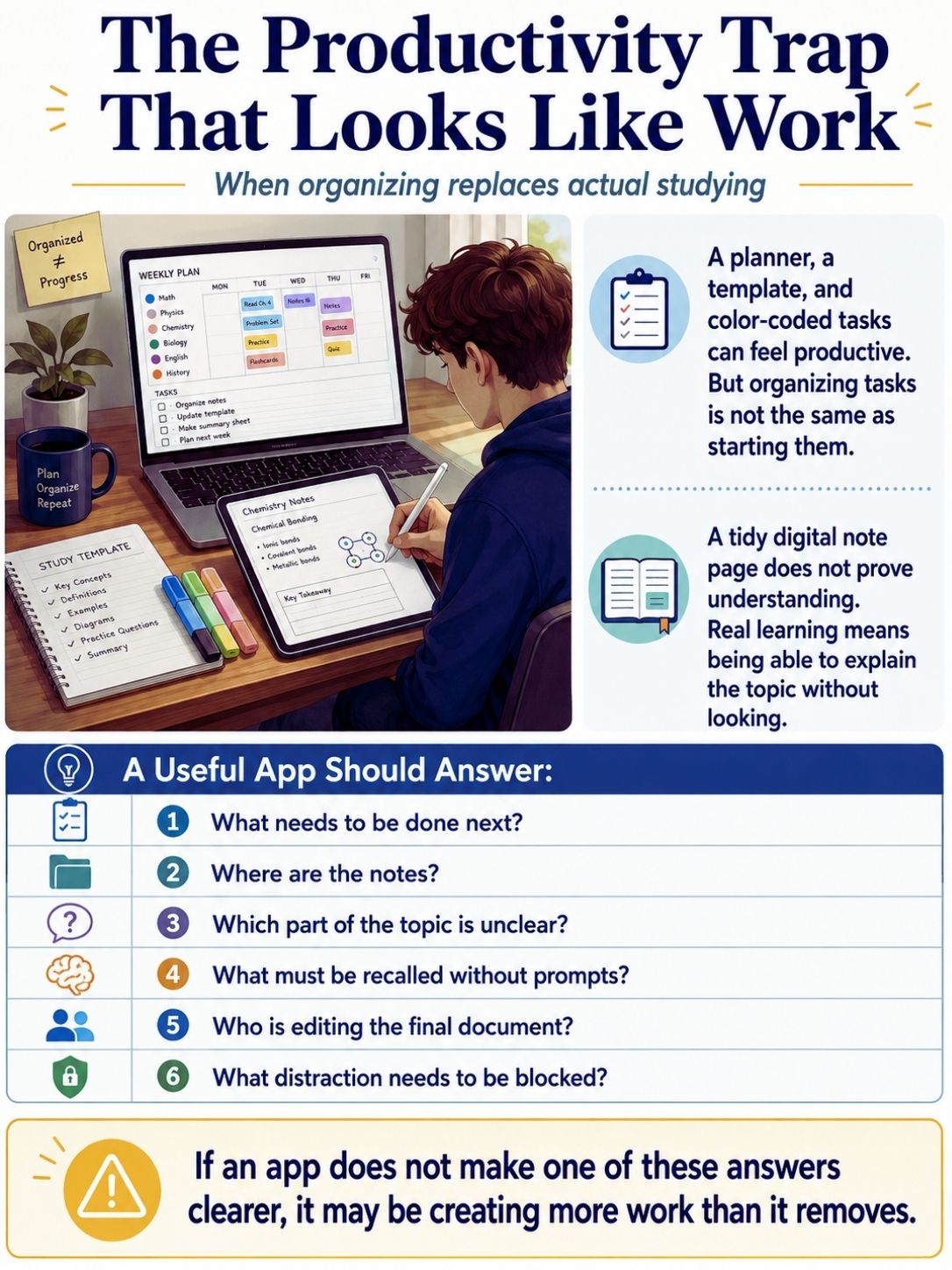
A teenager downloads a planner, imports a study template, creates a colour for every subject, and spends the evening organising tasks that have not started. Digital notes can create the same illusion. Copying a textbook chapter into OneNote produces a tidy page. It does not reveal whether the student could explain the chapter without looking.
A useful app should answer a practical question:
- What needs to be done next?
- Where are the notes?
- Which part of the topic is unclear?
- What must be recalled without prompts?
- Who is editing the final document?
- What distraction needs to be blocked?
When an app does not make one of those answers clearer, it may be creating more work than it removes.
1. Khan Academy
Khan Academy is the strongest general recommendation because it explains difficult material and provides practice without charging for courses. Its teenage-level subjects include maths, biology, chemistry, physics, computing, economics, history, grammar, financial literacy, and test preparation. Courses combine videos, written explanations, exercises, quizzes, and unit tests.
The platform is most effective when the student has a specific gap. A teenager who has missed the lesson on simultaneous equations does not need to restart algebra. They can review that topic, attempt several questions, identify the step that keeps going wrong, and return to the school assignment.
Vague instructions are less helpful. “Study maths on Khan Academy” can lead to easy exercises, unrelated videos, or passive watching.
A better task would be:
- Review one lesson on quadratic equations
- Complete ten questions on percentages
- Retry only the questions missed in the chemistry unit
- Watch the introduction to cellular respiration before class
- Stop when the first repeated mistake becomes clear
The official mobile apps are free, with no subscriptions or in-app purchases. Some course, teacher, test-preparation, and computing functions remain easier to use through the website. Khan Academy India provides Grade 1 to 12 material aligned with Indian curricula in English and several Indian languages. UK students may need to match individual topics manually to their exam board or school sequence.
This ranks first because it addresses understanding rather than simply helping a student finish the page. It is less useful when the real problem is organisation, weak routines, or missed deadlines.
2. Microsoft OneNote
OneNote is a sensible choice for teenagers whose notes, files, screenshots, and research are spread across too many places. A student can create one notebook for school, divide it into subjects, and add typed notes, handwriting, diagrams, audio, links, images, PDFs, and checklists. The same notebook can sync across supported computers, phones, tablets, and the web. The structure should remain plain.
A biology section might contain:
- Current Lessons
- Practical Work
- Homework
- Revision
- Feedback
- Questions for the Teacher
A page titled “Biology Notes” will eventually become difficult to use. “Cell Division, 13 July” is easier to find later. OneNote also includes Immersive Reader, which can read text aloud and adjust spacing, display, translation, and other reading settings. These features may help students who find dense pages difficult to process, including some learners with dyslexia or dysgraphia.
Windows users should check which version they have installed. OneNote for Windows 10 reached the end of support on October 14, 2025, and moved to read-only mode. The current OneNote app should be used for creating, editing, and syncing notebooks. The common failure is treating OneNote as a digital storage cupboard. Unnamed screenshots, copied paragraphs, and unfinished pages accumulate until the student stops opening it. Every page needs a clear title, date, and reason to exist.
3. Todoist
Todoist is useful for teenagers who know what the homework is but repeatedly underestimate the number of steps or forget the deadline. Its free plan currently supports five personal projects, due dates, priorities, subtasks, reminders, list and board views, three filters, integrations, and a limited activity history. More advanced calendar and reporting tools belong to paid plans.
Five projects are enough for a straightforward student setup:
- School
- Exams
- Long-Term Projects
- Activities
- Personal
Creating a separate project for every subject usually adds maintenance without adding much clarity. The larger improvement comes from rewriting vague tasks.
“Finish history presentation” is not an action. A better breakdown is:
- Confirm the topic
- Find three reliable sources
- Save the publication details
- Write research notes
- Draft the main argument
- Build the slides
- Check quotations and citations
- Practise once
- Submit
Todoist works because it makes the next action visible. It becomes counterproductive when a teenager spends more time adding labels, priorities, repeated routines, and distant goals than completing the work due tomorrow. The free plan is enough for many students. Paying for additional views will not repair unclear tasks or unrealistic schedules.
4. Quizlet
Quizlet is strongest when revision needs to move beyond rereading.
It works well for:
- Scientific terms
- Historical dates
- Spellings
- Geography
- Language vocabulary
- Formulas
- Definitions
- Short quotations
- Key people and events
Students can create flashcard sets and turn them into tests and other study activities. Some advanced tools require payment, but the free tier still supports the central flashcard workflow. The useful work often begins while the cards are being made. Turning a chapter into 15 or 20 questions forces the student to decide which ideas matter, shorten long explanations, check spelling, and notice where their notes are incomplete.
Public sets are convenient but unreliable. They may contain material from another country, textbook, exam board, or school year. Some contain straightforward mistakes. A safer process is to begin with the teacher’s revision list, create a small set, verify every answer, and practise in both directions. Recognising the definition of “mitosis” is easier than seeing the word and explaining it accurately without prompts.
Flashcards also have limits. Memorising twenty definitions does not prepare a student to compare arguments, analyse a source, or write a structured essay. Quizlet deserves a high position because it makes active recall easy to organise. It remains a revision tool, not a complete method for every subject.
5. Google Docs

Google Docs remains one of the most useful high school apps because writing, feedback, and collaboration appear in almost every subject. Students can work in the same document, see changes in real time, leave comments, suggest edits, assign action points, and review earlier versions. Version history reduces the need for files named “final,” “final-new,” and “final-actual.”
Group work still needs a process. Several students typing into the same page without assigned roles can create confusion faster than collaboration.
A better workflow is:
- Agree on the argument and structure
- Assign sections
- Use comments for questions
- Use Suggesting mode for edits
- Give one person responsibility for tone and formatting
- Complete a final source and fact check
Offline editing is available, but it must be enabled before the connection disappears. Students should make important documents available offline before travelling or working somewhere with unreliable internet. Sharing settings deserve attention. “Anyone with the link” may be convenient, but it can expose a document more widely than intended. Schoolwork should usually be restricted to named users or the school domain unless public access is required.
Google Docs does not teach the subject. It gives students a reliable place to draft, revise, receive feedback, and collaborate without passing multiple files back and forth.
6. Canva
Canva becomes useful after the student understands the assignment. It can be used for presentations, reports, diagrams, timelines, infographics, videos, portfolios, posters, whiteboards, and group projects. Canva for Education is available free through eligible schools and teachers.
A teenager might create:
- A history timeline
- A science process diagram
- A campaign poster
- A book presentation
- A short video explanation
- A design portfolio
- A visual comparison of two theories
The common mistake is opening a template before deciding what the work needs to say. Students can lose an hour comparing fonts, stock images, animations, colours, and transitions. The result may look polished while the research remains weak.
A better order is:
- Decide the main point
- Gather and verify the information
- Plan the sequence
- Add visuals that explain something
- Remove decoration that competes with the message
Canva’s AI-powered features are intended for users aged 13 and older unless they are accessed within Canva for Education under teacher supervision. School rules may be stricter. Generated wording and images still require checking. Fluent text and realistic visuals can be inaccurate, generic, or unsuitable for the assignment.
Canva ranks below Google Docs because most projects need sound content before visual presentation. Used at the right stage, it is one of the strongest apps for creative schoolwork.
7. Duolingo
Duolingo makes language practice easy to begin and easy to repeat. Its short lessons cover vocabulary, reading, listening, translation, and pronunciation. The central learning path remains available through a free tier, while subscriptions add convenience and other features. For teenagers, the main value is frequency. Ten minutes of French, Spanish, German, Hindi, or another language several times a week is easier to maintain than one ambitious session that keeps being postponed.
The streak system needs perspective. A long streak proves that the app was opened. It does not show that the student can understand natural speech, write an accurate paragraph, or hold a conversation. Some learners protect a streak by repeating familiar material that adds little.
The lesson becomes more useful when the student does something away from the app:
- Write three sentences using the new vocabulary
- Record a spoken response
- Read a short article or story
- Listen for familiar phrases in a video
- Practise a brief conversation
- Review errors instead of repeating the easiest exercise
Duolingo is a practice companion. It cannot provide enough conversation, extended listening, cultural context, or detailed correction to replace a full course.
8. Scratch
Scratch remains a useful starting point for teenagers who are interested in coding but not yet ready for a text-heavy programming language. Students can build games, animations, simulations, quizzes, interactive stories, and digital art using visual programming blocks. Projects introduce loops, variables, events, conditions, coordinates, logic, and debugging without requiring accurate syntax from the first day.
A first project should be small enough to finish:
- A quiz with score tracking
- A one-level platform game
- An interactive story
- A scientific simulation
- A model showing how two variables interact
Scratch is free through the web. Its official download options include Windows, macOS, ChromeOS, and Android. A dedicated iPhone or iPad app is not currently listed. The public community allows users to share, comment, and remix projects. Teenagers should avoid publishing identifying information and understand how to credit work they have adapted.
Scratch becomes limiting when a student wants to build larger software, publish a conventional mobile app, or work directly in Python, JavaScript, or another text-based language. That is not a weakness in the learning path. It means the student may be ready for the next tool.
9. Forest
Forest addresses one narrow but common problem: staying with a task long enough to make progress. The app turns a focus session into a growing virtual tree. Completed sessions build a visible forest, while stricter controls can block distracting apps and penalise the user for leaving the session early.
The free tier includes the core timer and selected focus tools. Optional upgrades add more advanced statistics and controls, with prices varying by platform and region. Forest supports major mobile platforms and browser extensions. Some functions work offline, while syncing, events, group sessions, and other connected features require internet access.
The app is most useful when the task is defined before the timer begins:
- Read one chapter
- Draft 300 words
- Complete one problem set
- Review 20 flashcards
- Edit one section of a presentation
“Study for two hours” is too vague. The tree cannot decide what work matters. Forest is unnecessary for teenagers who already use Focus mode, Do Not Disturb, a website blocker, or simply leave the phone outside the room. It earns a place because some students respond well to a visible record of completed focus sessions.
10. Sora
Sora can be an excellent reading app when the student’s school or library participates. It provides ebooks, audiobooks, magazines, and comics through connected institutions. Students can use it through a browser or official mobile apps, and supported titles can be downloaded for offline use.
Useful features include:
- Notes and highlights
- Definitions
- Holds and loans
- Reading lists
- Reading goals
- Audiobook controls
- Adjustable reading settings
- Offline downloads
Students usually find their school, enter a setup code if required, and sign in with school credentials. Some accounts can also connect to a participating public library. The catalogue is the main limitation. Sora does not offer the same titles to every teenager. The collection depends on the school, district, account type, and connected library.
Before paying for a separate reading subscription, ask:
- Does the school provide Sora?
- Can the account connect to a public library?
- Are audiobooks included?
- Can titles be downloaded?
- Does access continue during school holidays?
Sora ranks last only because families cannot always adopt it independently. When suitable access exists, it may offer more practical value than a separate paid reading service.
How to Build a Teen App Setup That Stays Useful?
The best apps teens use consistently form a small system.
A workable setup might include:
- Khan Academy for academic explanations
- OneNote for subject notes and research
- Todoist for tasks and deadlines
- Quizlet for factual revision
- Google Docs for writing and collaboration
- One specialist app for design, language learning, coding, focus, or reading
Avoid installing several tools for the same purpose. Todoist, Google Tasks, Microsoft To Do, Notion, and a paper planner used together create five places to check.
A teenager should be able to answer three questions quickly:
- Where do assignments go?
- Where do subject notes go?
- What is the next action?
When those answers are unclear, another app will usually make the system worse. For recommendations suited to younger students and other learning stages, see Best Educational Apps for Kids by Age.
Final Thoughts
The best apps teens can use should remove one real obstacle. Choose Khan Academy when a subject does not make sense. Use OneNote when notes and files are scattered. Set up Todoist when deadlines are being missed. Use Quizlet when revision consists mainly of rereading. Add a specialist app only when the need is clear. Canva can improve a visual assignment. Duolingo can maintain regular language contact. Scratch can provide an accessible start in coding. Forest can create a defined focus window. Sora can open access to books the student might otherwise miss.
Introduce one tool at a time and review it after two or three weeks. Keep it when the student becomes more organised, understands more, creates stronger work, reads more often, or loses less time to distraction. Remove it when the main result is another subscription, another streak, or another system that takes longer to manage than the schoolwork itself. Families planning across several age groups can use [Best Educational Apps for Kids by Age] to choose tools suited to each learner’s stage and level of independence.
Frequently Asked Questions (FAQs) About Best Apps for Teens
Do These Apps Match US, UK, and Indian Curricula?
Not equally. Khan Academy provides dedicated Indian curriculum material. Its wider courses can be searched by topic, but they may not follow the same order as a UK exam board or local school scheme.
OneNote, Todoist, Quizlet, Google Docs, Canva, Duolingo, Scratch, Forest, and Sora are less tied to a fixed curriculum. Their usefulness still depends on the content added by the student, teacher, school, or library. Before paying for a grade-based course, compare the topic sequence with current classwork.
Should Teenagers Use Personal or School Accounts?
School accounts may provide paid features, safer defaults, teacher collaboration, and easier assignment sharing. They may also be controlled by administrators and closed when the student leaves the institution.
Important personal writing, artwork, and long-term projects should not exist only inside a school account. Students should export or copy work where school policy allows it.
Should Teens Use AI Features for Homework?
AI tools can help explain, compare, organise, or question work the student has already started. They become harmful when they produce an answer, essay, presentation, image, or calculation the student cannot explain. The work may appear complete while the intended skill remains unpractised.
A practical standard is simple: The teenager should understand and be able to defend every sentence, image, calculation, and source submitted.
How Can Parents Tell Whether an App Is Helping?
Look for a result outside the app. A maths platform is helping when the student can solve a similar problem without prompts. A task manager is helping when fewer deadlines are missed. Quizlet is helping when answers can be recalled without choices. Scratch is helping when the student can explain and finish a project.
Time spent, streaks, badges, dashboards, and completed screens are weak measures on their own.






















