Apple’s digital ID initiative is growing—but only slowly. Here’s what we know about the next states that may join the list.
Apple Wallet, which first introduced support for digital state IDs and driver’s licenses back in 2022, is preparing to expand its reach. While the feature is still limited to a small number of states, new developments suggest that three more U.S. states—Arkansas, Montana, and West Virginia—are likely to be added soon.
This news comes after Google Wallet announced its plan to roll out support for digital IDs in these same states, highlighting a coordinated trend in digital identity adoption across both major mobile platforms. If confirmed, this will bring Apple Wallet’s total to 13 supported U.S. jurisdictions, signaling slow but steady growth in digital identification integration.
What States Currently Support Digital IDs in Apple Wallet?
As of April 2025, Apple Wallet supports digital driver’s licenses and state IDs in the following 10 U.S. states and territories:
- Arizona
- California
- Colorado
- Georgia
- Hawaii
- Iowa
- Maryland
- New Mexico
- Ohio
- Puerto Rico
These states have already worked with Apple to integrate digital ID functionality through their DMVs, allowing residents to securely store and present identification using an iPhone or Apple Watch.
Why Arkansas, Montana, and West Virginia Are Likely Next
Earlier this week, Google officially confirmed that digital IDs would be coming to Google Wallet users in Arkansas, Montana, and West Virginia. Because state governments usually roll out digital ID support for both Android and iOS devices simultaneously, it’s highly likely that Apple users in these states will also soon be able to add their ID to Apple Wallet.
This dual rollout model helps states ensure accessibility and equal convenience for both iPhone and Android users. Previous state launches for Apple and Google Wallet—including Arizona, Colorado, and Maryland—also followed this pattern, where the states released digital ID support for both platforms within weeks or even days of each other.
Why Digital IDs Matter: Benefits and Use Cases
Digital IDs stored in Apple Wallet can be used in several ways:
- Airport security checks: TSA has already approved digital IDs in select airports where Apple Wallet is accepted.
- Proof of age and identity: Many locations now accept digital IDs for age verification at liquor stores, nightclubs, or even pharmacies.
- Enhanced security and convenience: Unlike physical IDs, digital IDs in Apple Wallet are encrypted, require Face ID or Touch ID, and can’t be misplaced or stolen in the same way as a wallet.
Apple emphasizes user privacy and control. According to apple’s official support page, digital IDs are only shared with your permission, and the Wallet app displays exactly what information will be shared before you approve it.
A Closer Look: Google Wallet and Apple Wallet’s Collaboration with States
Both Google Wallet and Apple Wallet work with individual states to ensure compliance with security and verification standards. This includes biometric authentication, encrypted data storage, and adherence to state-level DMV requirements.
The Department of Homeland Security (DHS) has also encouraged digital identity adoption, particularly as part of the REAL ID Act, which enforces stricter ID standards for domestic air travel and access to federal buildings. The deadline for REAL ID enforcement is currently set for May 7, 2025, which has incentivized states to modernize their ID infrastructure.
The growing collaboration between tech companies and state governments is laying the groundwork for broader, nationwide digital ID adoption. Still, as of 2025, only about 20% of U.S. states have implemented these programs, despite the potential benefits.
How to Add a Digital ID to Apple Wallet?
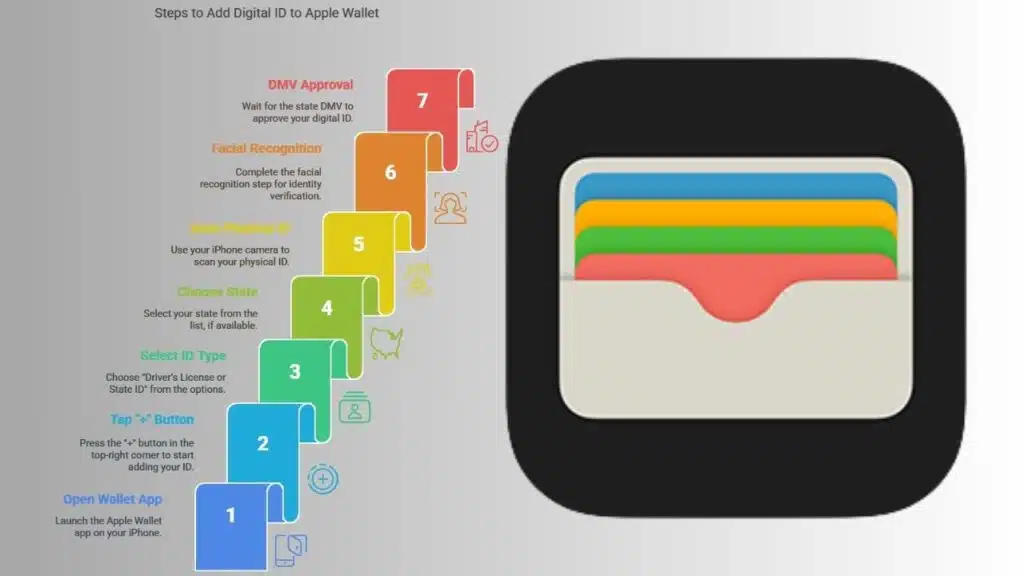
If you live in a supported state, adding your ID to Apple Wallet is simple:
- Open the Wallet app on your iPhone.
- Tap the “+” button in the top-right corner.
- Select “Driver’s License or State ID”.
- Choose your state, if available.
- Scan your physical ID using the iPhone camera.
- Complete the facial recognition step for identity verification.
- Wait for state DMV approval, which usually takes a few minutes to a few hours.
Apple recommends updating your iPhone to the latest version of iOS to ensure compatibility.
What’s Holding Back Nationwide Digital ID Rollout?
Despite the clear utility and security of digital IDs, adoption across all 50 states remains slow. Several factors contribute to this delay:
- Technical challenges: States need to modernize DMV systems and establish secure data protocols.
- Privacy concerns: Some lawmakers and citizens are wary of digital surveillance and data misuse.
- Budget constraints: Rolling out digital ID systems can be expensive for state governments.
- Lack of federal mandate: While the REAL ID Act sets federal standards, it doesn’t require states to adopt digital ID programs.
Still, momentum is building. With tech giants like Apple and Google backing these systems and the REAL ID deadline approaching, many expect a broader wave of state adoptions in the near future.
What’s Next? The Future of Digital Identification in the U.S.
If Arkansas, Montana, and West Virginia are confirmed, Apple Wallet will support digital IDs in 13 regions, bringing it closer to broader national coverage. Experts believe this trend will accelerate in the second half of 2025 and into 2026 as both public demand and government interest continue to grow.
The convenience of digital IDs—combined with advanced encryption and authentication features—offers a compelling case for their expansion. With Apple and Google at the helm, a future where plastic IDs are optional might not be far off.
Are You Ready for a Digital ID?
Would you feel comfortable replacing your physical driver’s license with a digital version in your Apple Wallet? Have you tried using one at an airport or venue yet?
The Information is Collected from Techcrunch and Yahoo.