

Ever feel like Upwork is a full-time job before you even land the actual job? You spend hours writing cover letters, hunting for gigs, scheduling calls, and answering client messages. Your inbox overflows. Your calendar turns into a mess. Meanwhile, your competitors seem to handle everything with ease. They respond faster, land more clients, and earn more money. The gap keeps growing.
Here is the good news: over 1,000 job postings on Upwork show that clients actively want automation help. They need lead generation, workflow management, and client outreach solutions. And they will pay well for freelancers who know AI automation tools.
This is your chance to stand out and boost your income.
In this guide, I’ll walk you through 10 top AI automation tools for Upwork freelancers. You’ll see how each one saves time, cuts repetitive tasks, and helps you win more jobs. We’ll cover GigRadar for lead generation, Zapier for workflow automation, ChatGPT for proposals, Calendly for scheduling, and even LangChain for building custom AI agents.
Grab a coffee, and let’s go through it together.
The Importance of AI Automation Tools For Upwork Freelancers
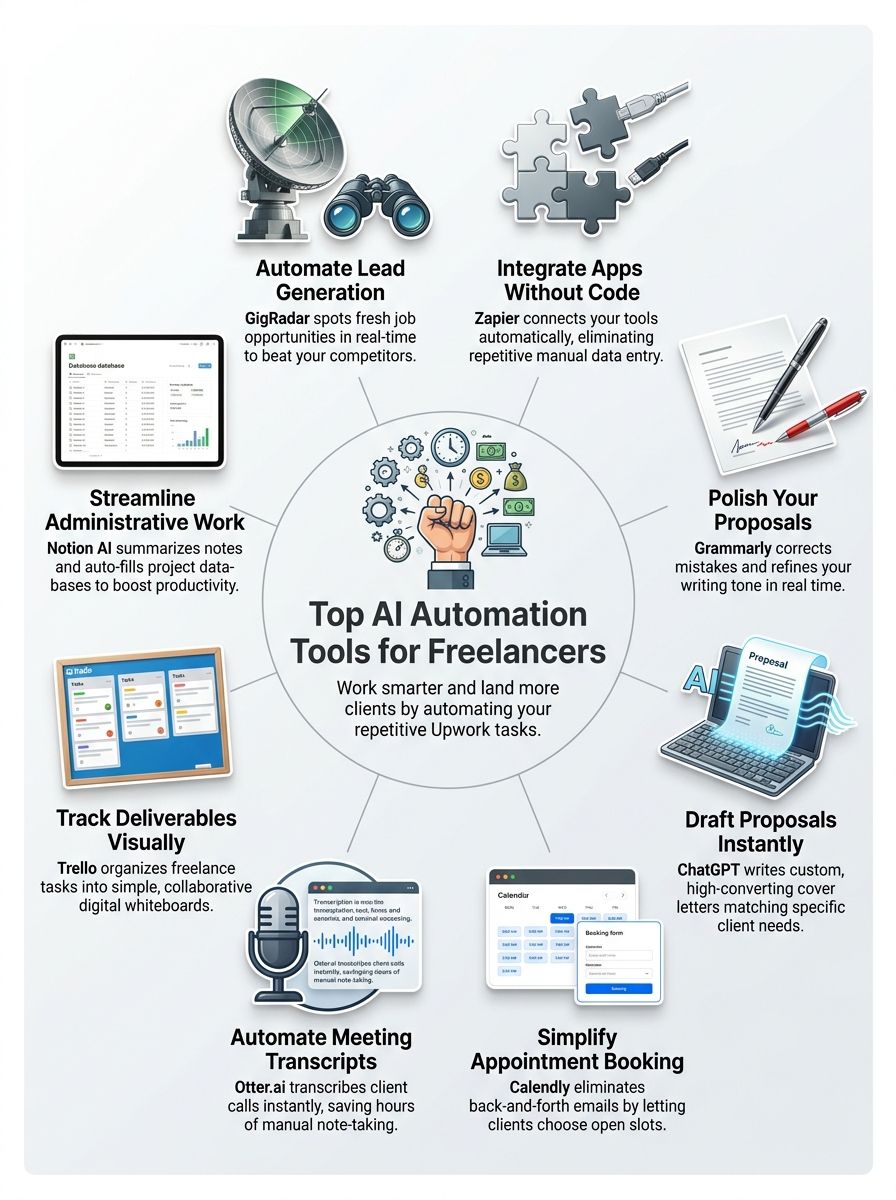 Upwork freelancers face a tough reality. The marketplace demands constant hustle, endless bidding, and repetitive tasks that drain your energy fast. AI automation tools cut through this noise by handling the work that eats your time.
You spend less energy on job applications and more time on actual client work. Tools like GigRadar, Zapier, and ChatGPT tackle the pain points that slow you down. They generate personalized cover letters, scrape relevant opportunities, and automate repetitive follow-ups in real time.
The result? You reclaim hours each week for higher-paying projects or building your profile visibility.
The numbers tell a compelling story too:
- Python ranks as the highest ROI skill for AI automation work.
- Most freelancers become proficient in these tools within 50 to 100 hours of learning.
- You don’t need a computer science degree or advanced machine learning knowledge to benefit.
Practical applications matter most on the platform. AI-powered solutions help you qualify potential clients faster, extract job descriptions that match your niche, and integrate data across multiple platforms without manual work.
Since AI could potentially replace 30 percent of the US job market, freelancers who adopt AI early gain a real advantage. You automate the tedious stuff, save time on qualification, and focus on what actually generates income.
GigRadar: Improves Lead Generation for Upwork Freelancers
GigRadar spots fresh job opportunities on Upwork before most freelancers even know they exist. This tool sends real-time notifications straight to your device, so you catch high-paying gigs while competition stays low.
Many freelancers struggle with lead generation and feel overwhelmed by the constant job search grind. GigRadar solves this by filtering jobs that match your skills and experience level. You get alerts for positions that fit your profile, not random postings that waste your time.
Here’s why speed matters so much. According to a Q1 2026 Upwork algorithm report by GigRadar, based on an analysis of over 133,000 proposals, the platform’s average reply rate sits at just 7.45%. But proposals submitted within 60 minutes of a job posting get a 5 to 10 point reply boost. In other words, being fast can roughly double your chances of hearing back.

One freelancer tested an alert-first approach over four weeks with a feed of 850 job posts. Automated alerts flagged 72 matching leads, while manual search turned up 210. Reviewing flagged leads first, the freelancer sent 28 targeted proposals and got 6 interview invites. After switching back to manual search for four weeks, 34 proposals earned only 3 invites. The alert-first approach cut screening time by roughly 60 percent and doubled the interview rate.
GigRadar also tracks analytics and stats about which job types convert best for your profile. Freelancers who understand their own performance data see better results, and this tool makes that analysis simple.
The software works like a personal scout, hunting for clients who need exactly what you offer. You can set preferences for project size, budget range, and industry focus, then let the algorithm do the heavy lifting.
Lead generation ranks among the top ten in-demand skills for AI automation freelancers, and GigRadar automates this entire process. Your job becomes simpler: review the best leads, craft strong proposals, and land more clients.
Zapier: Optimizes Workflow Productivity
Zapier stands out as a no-code automation platform that connects your favorite apps without a single line of code. It acts as a bridge between software applications, letting data flow from one system to another automatically.
Freelancers on Upwork use Zapier to eliminate repetitive tasks that drain their time. You can automate lead generation, client follow-ups, and data entry across multiple platforms. For example, connect your email inbox to your CRM system, and new client inquiries automatically populate your contact database.
Here’s something worth knowing: an analysis of over 1,000 Upwork job posts found that no-code integrations like Zapier rank among the most requested solutions. Clients actively search for freelancers who can connect GPT to CRM systems and automate entire workflows without touching code.
The setup is simple. You create a workflow called a “Zap,” which has two parts:
- Trigger: Something happens in one app, like receiving a new lead.
- Action: Zapier instantly performs a task in another app, like creating a task in your project management tool.
This automation frees up hours each week that you can spend on actual client work and growing your freelance business.
Zapier also stands among the top 10 skills for making money with AI automation, according to industry analysis. Freelancers who master workflow automation command higher rates and attract clients seeking scalable solutions. Your Zaps can handle complex sequences too, connecting multiple apps in a single workflow to transform how you manage client relationships and project delivery.
Grammarly: Helps Improve Writing and Communication Skills
Grammarly acts as your personal writing coach, catching grammar mistakes, spelling errors, and tone issues before you hit send. Upwork freelancers use this AI tool to polish proposals, cover letters, and client messages that make strong first impressions.
The software checks your work in real time, offering suggestions that improve clarity and professionalism. You write faster when the system catches what you miss. This matters because clients judge your skills partly through your communication. Strong writing sets you apart from other freelancers competing for the same gigs.
Communication tasks eat up serious time for most freelancers, but Grammarly streamlines the whole process. The AI credits system lets you access advanced features without breaking your budget. And the payoff is real: according to a 2026 Master Blogging statistics report on productivity tools, professionals using Grammarly’s premium tools cut their editing time by 50%, saving an average of 20 days per year.
Twenty days. That’s nearly a month of billable time back in your pocket.
Your proposals sound more confident, your emails read more clearly, and your message lands better with clients. Freelancers automating their communication with this AI tool report higher response rates from potential clients.
The built-in AI learns your style over time, making suggestions that feel natural rather than robotic. Better writing means better client relationships, and better client relationships mean more work on your freelance journey.
ChatGPT: Assists in Creating Proposals and Cover Letters
ChatGPT transforms proposal writing from a grinding task into a fast, smart process. This AI agent helps Upwork freelancers generate cover letters that land jobs and proposals that win clients.

- ChatGPT drafts personalized cover letters in seconds, saving hours on repetitive writing work.
- The tool creates job-specific proposals by analyzing client needs, then matching your skills to their exact requirements.
- You can feed ChatGPT your past successful proposals, and it learns your voice to generate similar winning formats.
- Generated cover letters include strong opening hooks that grab client attention faster than generic templates.
- ChatGPT suggests power words and phrases that boost your credibility against other Upwork freelancers bidding on the same gigs.
- The AI agent integrates with your workflow, pulling project details so proposals feel custom-built rather than mass-produced.
- It crafts professional follow-up messages that feel genuine, not robotic or pushy.
- You save time on initial outreach, freeing your energy for actual client work that generates real income.
- The tool adapts your messaging across different platforms, whether you’re pitching on Upwork or LinkedIn.
- ChatGPT reduces writer’s block by offering multiple proposal angles, so you pick the strongest version for each pitch.
One important warning before you go all in. According to a June 2026 analysis of Upwork’s AI Policy by GetMany, Upwork permits AI-assisted proposal writing but strictly prohibits fully automated submissions. The platform uses five detection layers to identify and suspend violating accounts. So use ChatGPT as your drafting partner, but always review, personalize, and submit proposals yourself. Your account is your livelihood, so protect it.
Calendly: Simplify Appointment Scheduling
Calendly cuts through the back-and-forth email chaos that eats up your time. You share your availability once, clients pick their slots, and the system sends reminders automatically.
No more “Is Tuesday at 2 PM good?” messages.
Freelancers on Upwork deal with constant scheduling overwhelm, and Calendly solves this pain point by letting clients book time without the endless followup dance. Your calendar syncs with Google Calendar or Outlook, so double bookings never happen. The tool also integrates with Zapier, which means you can trigger other automations when someone books a call.
Scheduling appointments shouldn’t drain your energy, yet many freelancers lose real productivity to this repetitive task. Calendly hands control back to you by automating everything from booking to confirmation. Clients appreciate the simplicity, you appreciate the time saved, and your Upwork profile benefits from faster response rates.
You stay in charge of your schedule with features like these:
- Set buffer time between calls so you never feel rushed.
- Block off lunch breaks and personal time automatically.
- Customize how far in advance people can book.
- Manage everything from any device, whether you work from a coffee shop or a home office.
Otter.ai: For Transcription and Note-Taking
Otter.ai transforms how Upwork freelancers capture and organize client conversations. This AI tool saves hours by converting speech into text automatically, letting you focus on actual work instead of typing notes.

- Otter.ai records meetings and interviews, then transcribes them into searchable text files within minutes.
- You search through transcripts instantly using keywords, finding details from past client calls without scrolling through hours of audio.
- The platform integrates with Zoom, Google Meet, and Microsoft Teams, so recordings start automatically when you join virtual meetings.
- Otter.ai handles large datasets of conversation data, extracting key information from 10,000 rows of customer feedback or interview notes that would take days to parse manually.
- Real-time transcription displays text as clients speak, letting you catch details live and ask clarifying questions on the spot.
- You export transcripts as PDFs or documents, sharing polished notes with clients or storing them in a tool like Trello for easy reference.
- Otter.ai identifies speakers automatically, labeling who said what in multi-person conversations.
- The speaker notes feature lets you add your own comments and highlights directly into transcripts, creating records that match your workflow.
- Data extraction and parsing rank among the top 10 skills for AI automation freelancers and Otter.ai handles this heavy lifting so you can bill more hours to clients.
- The time savings are real. Based on a 2026 user productivity study by Otter.ai, 62% of users report saving at least four hours per week, which adds up to over one month of work saved per year.
Trello: Supports Effective Project Management for Freelancers
Trello acts like a digital whiteboard for your freelance work. You organize tasks into columns, move cards across boards, and watch your projects flow from start to finish. Freelancers juggle multiple tasks constantly, and Trello makes this manageable by letting you see everything at once.
Cards hold all your project details, deadlines, and client notes in one spot. You add checklists, attach files, set due dates, and leave comments right on each card. Your team members or clients can jump in anytime to check progress.
The visual layout keeps your brain from overloading. You don’t need to send endless emails asking for updates. Everyone knows what’s happening because the board shows the truth.
Keep Your Workflow Simple and Connected
Trello integrates with the apps you already use, so your workflow stays smooth. Automation features move cards automatically when certain things happen, saving you from repetitive clicking. Many freelancers on Upwork use Trello to manage client projects, track deliverables, and hit deadlines without stress.
Its simplicity makes it powerful for solo freelancers and small agencies alike. You create separate boards for different clients or projects, keeping everything organized. Columns might read “To Do,” “In Progress,” “Review,” and “Done,” giving you a clear path forward.
Freelancers automating their Upwork workflows find Trello pairs well with other tools through integrations and API connections:
- Connect Trello to your email, calendar apps, and communication platforms.
- Let updates happen automatically without lifting a finger.
- Manage projects from anywhere with the mobile app.
Trello’s free version works great for most freelancers starting out, and paid plans add more power as your business grows. The platform helps you organize work, communicate with clients, and deliver projects on time.
Notion AI: Boosting Task Management Efficiency
Notion AI transforms how freelancers on Upwork manage their workload by automating repetitive tasks that eat up your day. This artificial intelligence tool creates summaries from your notes, generates action items from scattered thoughts, and turns messy ideas into clear, organized content.
You can ask Notion AI to draft emails, outline project plans, or break complex tasks into smaller steps. The system learns your work style and adapts to how you operate. Freelancers stop wasting hours on administrative work and start focusing on billable tasks that actually pay the bills.
Notion AI fits into your existing workflow without requiring Python coding skills or complex developer setup. The autofill feature populates your databases with relevant information, saving you from manual data entry that drains your energy.
You can also build custom automations within Notion itself, connecting your client outreach and follow-up management directly into your task dashboard. Many Upwork freelancers use Notion AI alongside tools like HubSpot or Pipedrive to track client interactions and automate reminders.
The result? More work done in less time, with better organization and stronger client relationships.
LangChain and Large Language Models: For Building Custom Automations
LangChain lets you build custom automations that fit your Upwork workflow like a glove, turning large language models into your personal work machine. And this skill is in serious demand right now. According to LangChain’s June 2026 “State of Agent Engineering” report, 57% of organizations already have AI agents running in production environments, well past the experimental phase.
You can code Python scripts or JavaScript solutions that handle repetitive tasks, so you spend less time on grunt work and more time landing clients.
How does LangChain enable custom automation for freelancers?
LangChain gives freelancers the power to build automations that fit their exact needs. This framework connects large language models, like Gemini, to real-world tasks that matter to your business.
You can create workflows that handle repetitive work without writing complex code. Freelancers on Upwork use LangChain to tackle client requests that standard tools cannot solve. The framework lets you chain together multiple steps, so your automation grows smarter with each task.
Python developers find LangChain especially helpful because it works with their existing code. Companies prefer private, local large language models for their automation tasks, and LangChain makes this possible. You skip the time-consuming setup that normally comes with custom solutions.
Real freelancers are already seeing results. One automated client proposal written by combining LangChain with a private language model. Another used it to generate personalized cover letters that matched each job posting. You could build a system that reads client emails, extracts key information, and creates project summaries.
Developers on GitHub share LangChain templates that address common Upwork challenges. The tool works with JavaScript and Python, so you pick what you know best. Startups use it to handle customer support tasks that would normally require extra staff. Your automation addresses specific client needs that generic tools miss, saving hours each week.
What are practical use cases of LangChain on Upwork?
LangChain helps Upwork freelancers build smart automation that saves time and money. These practical applications transform how you land jobs and manage client work.
- Create auto-bidding systems that scan Upwork job posts and flag proposals matching your skills.
- Generate personalized cover letters using large language models, so each proposal feels custom-written rather than generic.
- Build proposal templates that adapt based on job descriptions, pulling relevant details from your portfolio.
- Automate client outreach follow-ups by tracking communication history and sending timely reminders when clients go quiet.
- Extract key project requirements from job posts and organize them into structured data for faster analysis before bidding.
- Monitor RSS feeds for finance firms seeking specialized freelancers, aggregating customized news and job opportunities in one dashboard.
- Create chatbots that answer common client questions about your services, rates, and availability.
- Build workflows that flag high-paying jobs matching your expertise, sending instant notifications to your phone or email.
- Generate project summaries and scope documents from client emails, cutting time spent on admin tasks.
- Automate portfolio updates by pulling completed project details from your files and formatting them for Upwork profiles.

One developer built a simple LangChain pipeline to auto-generate personalized cover letters from job postings and a portfolio database. The pipeline ran on 120 recent job descriptions, extracted 3 key requirement phrases per posting, matched them to 5 portfolio snippets, and produced 120 draft cover letters. Average generation time per letter was 4.2 seconds. In a manual audit of 30 drafts, 24 needed only minor edits to tone and pricing, while 6 needed structural changes. The pipeline turned hours of repetitive drafting into minutes, leaving human edits for final tailoring.
A quick heads-up: LinkedIn actively blocks third-party AI automation. Scraping LinkedIn without the official API results in account suspension, so focus your LangChain work on Upwork data instead.
HubSpot: Automates Client Outreach and Follow-Ups
HubSpot transforms client outreach into a streamlined machine that works while you sleep. This platform handles follow-ups automatically, so you focus on delivering quality work.

- Set up automated email sequences that trigger when prospects join your contact list, saving hours on manual outreach each week.
- Create personalized follow-up workflows based on client behavior, so prospects hear from you at the right moment.
- Use HubSpot’s lead scoring system to identify hot prospects automatically, letting you prioritize serious buyers first.
- Tag and filter leads through auto-reply bots, a skill clients pay for on Upwork, keeping your pipeline organized without manual sorting.
- Connect HubSpot with Google Sheets CRM integration for WhatsApp GPT lead qualification, matching the automation demand clients actively fund.
- Schedule bulk email campaigns that segment your Upwork prospects by project type, industry, or budget range.
- Automate task creation when leads reach specific pipeline stages, so nothing falls through the cracks.
- Deploy chatbots on your freelance profile or website to capture initial client information and qualify leads before direct contact.
- Sync HubSpot with your calendar tools like Calendly to send automatic meeting reminders, reducing no-shows.
- Build cold outreach automation sequences that mimic personal touches, matching the top freelancer skills clients seek on platforms like Upwork.
Final Words
You now have ten powerful AI automation tools for Upwork freelancers at your fingertips. GigRadar finds clients who need your skills, Zapier connects your apps without coding, and Grammarly polishes every word you send.
ChatGPT writes proposals faster, Calendly books your meetings, and Otter.ai captures every detail. Trello keeps projects on track, Notion AI organizes your tasks, and LangChain builds custom solutions that set you apart.
Together, these tools save you hours each week.
That means more time for what matters most: delivering great work and earning more money. Start with one tool today, master it, then add another to your workflow tomorrow.