

Open-source productivity apps are tools for notes, documents, tasks, projects, calendars, files, and team collaboration whose licenses allow people to use, inspect, modify, and redistribute the source code.
In practical terms, users are not entirely dependent on one company to decide how the software works or where it can run. They may be able to keep data on their own devices, choose a hosting provider, connect the app to other systems, or maintain it after the original developer changes direction.
That control is the real appeal. It is also where the conversation often becomes inaccurate. Open source does not automatically mean free, private, secure, simple, or self-hosted. Some tools provide several of those benefits. Others bring subscription fees, setup work, limited support, or maintenance that the user must handle.
I would not ask whether open source is generally better. I would ask whether the extra control solves a problem that matters in the way I work.
What Makes a Productivity App Open Source?
A public code repository is not enough. A genuine open-source license gives people meaningful rights to use, study, modify, and share the software. If the code is visible but the license places major restrictions on modification, redistribution, or commercial use, the product may be source available rather than open source.
The distinction is more than a technicality. Someone may see code on GitHub and assume they can adapt or host the product independently. The license may say otherwise. Before accepting any open-source claim, check the license attached to the edition you intend to use.
Open-source tools now cover most everyday productivity work. LibreOffice handles documents and spreadsheets. Thunderbird covers email and calendars. Joplin and Logseq serve different styles of note-taking and knowledge management. Super Productivity focuses on personal tasks and time management. Vikunja and OpenProject support project work, while Nextcloud and CryptPad offer options for files and collaboration.
These apps are not one type of product. What connects them is the way their software is licensed and developed.
Open Source, Free, Private, and Self-Hosted Are Different Things
These terms are often treated as synonyms, which creates unrealistic expectations.
- Free of charge describes price: Open-source software can still charge for hosting, storage, support, or commercial features.
- Privacy-focused: It describes how data is collected, stored, protected, and shared. An open license alone cannot guarantee any of that.
- Local-first: It generally means the data on a user’s device is a primary copy and the app can often work offline. Local-first products can be open source or proprietary.
- Self-hosted: It means the user or organization operates the server. Some open-source apps support it, but many people use open-source software without running a server.
- Open core: It usually means the core product is open source while some features use a commercial license.
The privacy claim deserves particular care. Open code makes independent inspection possible, but it does not prove that a qualified person has reviewed it or that a particular deployment is safe. Privacy also depends on the sync service, account system, extensions, analytics, backups, and device security.
If a recommendation moves directly from “the code is open” to “your data is private,” it is skipping most of the evidence that would make the claim trustworthy.
Why People Choose Open-Source Productivity Apps
For most users, the benefits come down to data, independence, and flexibility.
Data control and a clearer way out
A writer may want notes stored locally. A business may need files to remain in a particular country or on infrastructure it controls. A school or nonprofit may care about retaining records in usable formats.
Open-source software can support those needs, especially when it offers complete exports, open formats, and more than one hosting option. Yet source access and data portability are not the same. Most people will never change an app’s code; many will eventually need to move their data.
I would test the export before studying the source repository. Can the app export attachments, comments, tags, dates, and other useful metadata, or only the visible text? Can that export be restored? A theoretical right to leave is not much help if leaving means rebuilding years of work by hand.
Less dependence on a single vendor
With a proprietary service, customers have limited options when the provider raises prices, removes a feature, or closes the product. An open-source codebase gives a community, another service provider, or an internal team the possibility of maintaining it.
Possibility is the important word. The license does not guarantee a healthy project. A small app maintained by one overworked developer may be a riskier choice than a well-supported commercial service. Recent releases, security practices, documentation, contributor activity, and available support tell you more about day-to-day reliability.
Freedom to adapt, and responsibility for the result
Developers can connect an open-source app to internal systems, change a workflow, add a missing feature, or inspect how a function behaves. That flexibility is valuable when standard software cannot accommodate an important process.
It also creates maintenance work. Private changes can break when the main project updates. For most organizations, an app that can be configured or extended without maintaining a permanent private version is the safer option.
Open source may also separate the software from the company operating it. A team might use a community edition, pay the original developer for hosting, or hire another provider. That choice is useful only when credible providers, clear documentation, and a dependable support route actually exist.
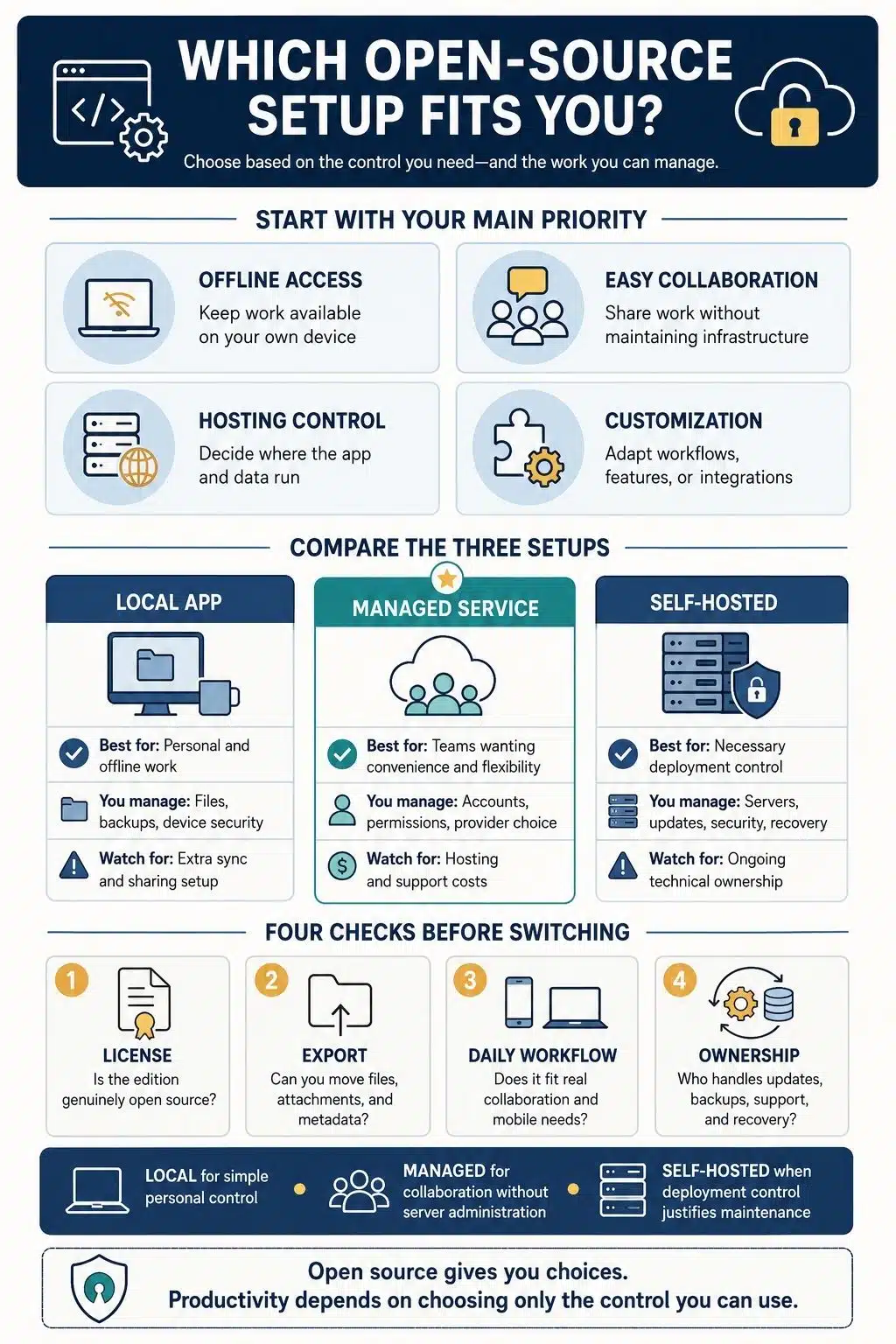
Local, Managed, or Self-Hosted?
Open-source productivity software can usually be used in one of three ways.
| Setup | Best suited to | What to watch |
| Local app | Individuals who want offline access and control over local files | Backup, sync, and sharing may require separate arrangements |
| Managed service | Teams that want open-source software without server administration | It usually costs money and still requires trust in the provider |
| Self-hosted service | Organizations with a real need to control infrastructure or data location | Updates, monitoring, security, backups, and recovery become their responsibility |
Managed hosting is the overlooked middle ground. It can provide the convenience of a hosted product with better deployment choices and a clearer exit path. A small team does not need to become its own hosting company merely to use open-source software.
Self-hosting makes sense when the control is necessary and someone is responsible for the system. Installing the software is rarely the hard part. Keeping it patched, backed up, monitored, and recoverable is the ongoing commitment.
Who Are Open-Source Productivity Apps For?
They are not only for developers. The more useful dividing line is how much control a person needs and how much friction they are prepared to accept.
An individual may be a good fit if local files, offline access, or dependable exports matter more than seamless integration with every popular service. Writers, researchers, students, and freelancers often have straightforward workflows that a well-designed desktop app can handle. Mobile sync still needs testing before years of notes are moved.
Privacy-conscious users can also benefit, provided they define privacy in practical terms. “I want more privacy” is difficult to evaluate. “I need local storage,” “I do not want an account,” or “I require end-to-end encrypted sync” gives a reviewer something concrete to verify.
Developers and technical power users are more likely to use plugins, automations, custom integrations, or the code itself. Even then, technical freedom should not become unpaid maintenance. A tool that constantly needs repair is not productive simply because it can be repaired.
For small businesses and distributed teams, managed open-source services may offer the best balance. They provide a familiar hosted experience without forcing the team to run infrastructure, while preserving more room for exports, migration, and future deployment changes.
Larger organizations may have stronger reasons to consider open source. Schools, nonprofits, public institutions, regulated businesses, and enterprises can face requirements around data location, retention, authentication, or software customization. In those settings, the license is only the foundation. Procurement, security review, support, and clear operational ownership decide whether the deployment succeeds.
When Switching Is More Trouble Than It Is Worth
Open source is a weak choice when the only goal is to eliminate a subscription. Hosting, storage, migration, training, administration, and downtime can cost more than the plan being replaced.
People who want the least possible setup may also be happier with a mature hosted product. Some open-source apps are polished; others still have rough interfaces, thinner mobile support, or documentation written for technical users.
Compatibility can be another stopping point. Teams built around Microsoft 365 or Google Workspace should test real files and collaboration habits, not assume that support for a file format means identical behavior. Complex layouts, formulas, comments, permissions, calendars, and client workflows can expose gaps that a simple demo will not.
The biggest warning applies to self-hosting without an owner. If nobody is accountable for updates, backups, security, and recovery, the organization does not have control. It has an unattended system.
A community forum is not a replacement for formal support either. Organizations that need response-time commitments, security documentation, or migration assistance should confirm that a suitable commercial provider exists before adopting the app.
A Four-Control Test Before You Choose
I would use four questions to decide whether an open-source option offers useful control or merely creates more work.
1. Will code control matter?
Will anyone realistically inspect, modify, integrate, or redeploy the software? If not, an open license can still reduce vendor dependence, but source access should not outweigh usability and reliability.
2. Can the data leave intact?
Check whether you can export records, attachments, metadata, and account information in a usable form. Then confirm that the data can be restored or moved elsewhere. For most users, this is the most practical form of ownership.
3. Which deployment model solves the real problem?
Local use, managed hosting, and self-hosting answer different needs. Choose the simplest one that meets the requirement. The option to run a server is not a reason to run one.
4. Who owns the operation?
Someone must handle updates, accounts, backups, monitoring, incidents, and recovery. That may be the user, an internal team, or a managed provider. If the answer is unclear, choose a simpler local tool or a managed service.
Not every user needs equal control in all four areas. A freelancer may care mainly about local files and exports. A regulated organization may care much more about deployment and operations. The questions are meant to reveal the trade-off, not produce a universal winner.
How to Switch Without Disrupting Your Work
Start with one workflow rather than replacing your whole software stack. Moving a note-taking system is easier to evaluate than changing email, documents, calendars, chat, and project management at the same time.
Verify the license for the edition and features you need. Then test the exit before committing: create a sample workspace, export it, and inspect the result. Reproduce ordinary work rather than a clean demo. Use a shared document, an active project, a recurring task, a complex spreadsheet, or a mobile workflow that matters.
Project health deserves a separate check. Look for recent releases, usable documentation, a clear way to report security problems, and a realistic support route. Count migration, hosting, administration, training, backups, and recovery when comparing costs.
Finally, run a limited pilot and keep the current system available. The new app should survive normal use, collaboration, and at least one export or restore test before it becomes the only copy of important work.
Choose Control Only Where It Helps
Open-source productivity apps are worthwhile when their freedoms solve a specific problem: keeping data local, preserving a credible exit route, meeting a deployment rule, reducing dependence on one provider, or adapting software to important work.
For an individual, the right answer may be a simple local app with reliable exports. For a small team, it may be a managed open-source service. Self-hosting can be justified for an organization with strict requirements, but only when the people and processes needed to operate it are already part of the decision.
I would not switch simply because a tool is open source, and I would not reject one because it lacks the polish of a market leader. I would ask which control matters, who will maintain it, and whether the everyday workflow becomes better or merely more complicated.
That is the honest value of open-source productivity apps: not freedom from every cost or compromise, but more choice over which trade-offs you are willing to own.
Frequently Asked Questions on Open-Source Productivity Apps
1. Are open-source productivity apps completely free?
Many are free to download and use, but the total cost may include cloud hosting, storage, technical support, maintenance, or paid enterprise features. Always compare the full operating cost, not just the subscription price.
2. Are open-source productivity apps safer than proprietary software?
Not automatically. Publicly available code allows independent inspection, but security still depends on active maintenance, timely updates, secure configuration, and responsible hosting.
3. Do I need technical knowledge to use open-source productivity tools?
Not necessarily. Many desktop apps and managed services are straightforward to use. Technical knowledge becomes more important when you want to self-host, customize the code, or manage your own backups and servers.
4. Can open-source productivity apps work for teams?
Yes. Open-source tools can support shared documents, project management, file storage, calendars, and team collaboration. Before switching, test permissions, mobile access, integrations, file compatibility, and support options with a real project.
5. Do I have to self-host an open-source app?
No. You can use an app locally, subscribe to a managed hosting service, or run it on your own infrastructure. For most teams without dedicated technical staff, managed hosting offers the best balance of control and convenience.























