


YouTube has become one of the most popular platforms for streaming and enjoying a wide range of videos, including music. However, there are times when you may want to save the audio from a YouTube video as an MP3 file to listen to it offline or on your preferred audio player. In this article, we will review the 5 best YouTube to MP3 converters that allow you to extract audio from YouTube videos and convert them into MP3 format.
Part 1. 5 Best YouTube to MP3 Converters
1. Any Video Converter Free
Any Video Converter Free is a versatile tool that not only supports YouTube video downloading but also allows you to convert those videos into MP3 files. It offers a user-friendly interface and lets you download and convert videos in various formats, including MP3. The converter also provides options for adjusting audio quality and bitrate.
Moreover, it comes with rich video editing features, which allows you to trim and merge video clips effortlessly, remove unwanted borders, and add a new angle to your action. You are also allowed to customize brightness, contrast, saturation, and resolution for the perfect effect. Plus, adding subtitles, watermarks, and so much more are all supported.
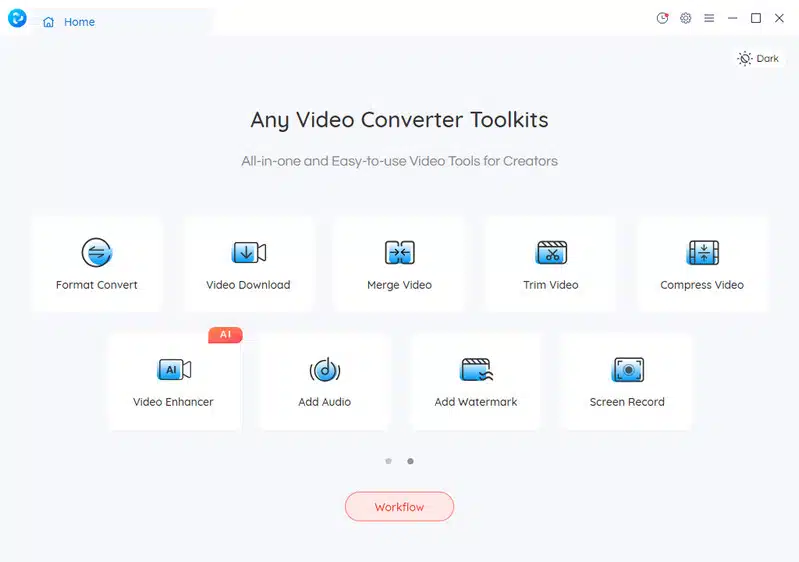
Convert YouTube Video to MP3 through Any Video Converter Free
Step 1. Download and Run Any Video Converter
Download and install Any Video Converter on your computer, then launch it.
Step 2. Select the Video Downloader Tool, and Paste the YouTube Video Links
On the main interface, select Video Downloader under Single Tools section.
Visit the YouTube site and find the video you need to convert to MP3, then copy and paste the URL(s) into the search box. You can convert multiple YouTube videos to MP3 at once. After pasting the URL(s) , click the Analyse button, the program will begins its analysis.
Step 3. Configure Converting Settings
Now, click the drop-down menu of Download Setting and select Audio only.
You can click Manual tab to customize Audio Format (MP3, M4A, and OPUS) and Audio Bitrate.
Step 4. Start Converting YouTube to MP3
Once all the settings are done, click the Start button to convert YouTube to MP3.
___________________________________________________________
Pros
- Simple user interface
- Support batch conversion of multiple YouTube videos
- Free download videos from YouTube, Facebook, Vimeo, Twitter, Dailymotion and more
- Available for both Windows and Mac platforms
- Offer additional video editing features
Cons
- File conversion cannot be paused, only canceled
2. NoteBurner YouTube Video Downloader
NoteBurner YouTube Video Downloader is a dedicated tool designed specifically for downloading and converting YouTube videos to MP3 format. It supports high-quality downloads and offers fast conversion speeds. The converter also allows you to customize the output format, bitrate, and other audio settings.
Convert YouTube Video to MP3 Using NoteBurner YouTube Video Downloader
Step 1. Run NoteBurner YouTube Video Downloader and enter the video link or name.
Step 2. Click the setting window to choose format or go to the Advanced Download window by clicking the icon next to the Download icon.
Step 3. If you are trying to download an audio file, you need to choose options in the Audio columns. Make sure that you don’t choose any option in the Video column.
Step 4. Click the Download icon to start downloading MP3 audio.
___________________________________________________________
Pros
- Intuitive interface
- Support downloading and converting YouTube playlists
- Offer options for organizing downloaded files
Cons
- Lack of video editing features
3. VidiCable All-in-One Recorder
Vidcable is an all-in-one platform that allows you to convert YouTube videos to MP3 format easily. It supports various audio formats, including MP3, AAC, and more. Vidcable also provides options for adjusting audio quality and bitrate, ensuring you get the desired output.
Convert YouTube Video to MP3 by VidiCable
Step 1. Open VidiCable and select YouTube from the supported download list.
Step 2. Copy & paste video link to the search box.
Step 3. Go to the Advanced Download window by clicking the icon next to the Download icon, and select the audio format you need from the Audio columns.
Step 4. Select Audio from the Download As list, and then click the Download button to start downloading audio.
___________________________________________________________
Pros
- Fast and efficient conversion process
- No ads or add-on, easy to use
- Keep audio tracks (including 5.1 audio), subtitles in many language
Cons
- Rely on internet connectivity for conversions
4. EaseUS Video Downloader
EaseUS Video Downloader is a comprehensive tool that not only allows you to download YouTube videos but also convert them into MP3 format. This YouTube to MP3 Converter also supports downloading high-definition video and concerting at a fast speeds. Additionally, it provides options for selecting audio quality, bitrate, and more.
Convert YouTube Video to MP3 via EaseUS Video Downloader
Step 1. Launch EaseUS Video Downloader, copy and paste a YouTube video URL into the bar at the start page. Click ” Search” to proceed.
Step 2. A built-in video play page with a download option will open. Click “Download” button to save the video.
Step 3. Choose “Audio (MP3)” as the format for the downloaded video and then click “Download” to download YouTube mp3 file.
___________________________________________________________
Pros
- User-friendly interface
- Supports downloading videos from various websites, including YouTube
- Offer multiple output formats, including MP3
Cons
- Free version includes limitations on video downloads
- Some advanced features require a paid subscription
5. 4K YouTube to MP3
4K YouTube to MP3 is a popular converter known for its simplicity and efficiency. This tool lets you extract audio from YouTube videos and save it as high-quality MP3 files. It supports batch downloading and conversions, allowing you to save time when processing multiple videos.
Convert YouTube Video to MP3 via 4K YouTube to MP3
Step 1. Copy and paste the URL of the video that you want to convert to 4K YouTube to MP3 .
Step 2. The application will convert the video and will begin downloading the MP3 file.
___________________________________________________________
Pros
- Straightforward and easy-to-use interface
- Supports high-quality audio extraction
- Fast conversion speeds
Cons
- Limited customization options for audio settings
- Free version includes advertisements
Part 2. Comparison and Recommendations
When comparing the features and effectiveness of the 5 YouTube to MP3 converters, each has its own strengths and weaknesses. Any Video Converter Free stands out for its versatility and additional features. NoteBurner YouTube Video Downloader impresses with its dedicated focus on YouTube downloading and conversion. Vidcable offers a solution with fast conversions. EaseUS Video Downloader provides a comprehensive tool for both downloading and converting videos. 4K YouTube to MP3 is known for its simplicity and efficiency.
Ultimately, the best converter for you will depend on your specific needs and preferences. It is recommended to try these different converters and find the one that suits your requirements the best.
Conclusion
In this article, we have reviewed the 5 best YouTube to MP3 converters that allow you to extract audio from YouTube videos and convert them into MP3 format. Whether you need to save music for offline listening or want to create a personalized audio collection, these converters offer convenient and efficient solutions. Give them a try and enjoy your favorite YouTube music.
























