

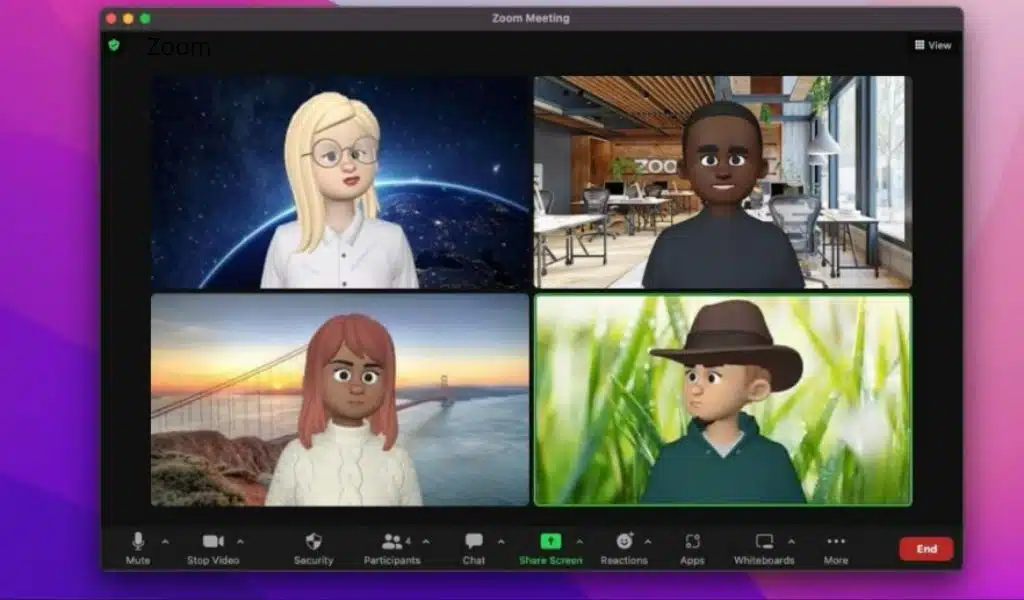
Zoom Added Human Avatars to its Meeting App for More Flexible and Fun

Zoom Meeting App

Zoom, a service for video conferencing, has added human avatars to its meeting app, which will let people look like cartoon versions of themselves. To make meetings more flexible and fun, the company added avatars to its list of filters.

“With so many ways to customize it, you can show off the “virtual you” in a creative and fun way! Avatars mirror your movements and facial expressions, so you can present yourself in a dynamic way without having to be on video. They are also a more interesting alternative to static profile pictures, which can add more fun and energy to your meetings “Zoom wrote on a blog.

Read More: Best Tools And Apps for Remote Work

At the moment, all Zoom users around the world can use avatars in beta. The company said that as they move forward in beta, they will keep adding more facial features, hairstyles, and ways to customize your human avatar.

Zoom also announced other features, such as meeting templates, threaded messages, a better way to chat during meetings, and Q&A in meetings. Users can now create, save, and choose from custom meeting templates that automatically set the right settings for their needs.

“Using Meeting Templates will help you feel confident that you’ve scheduled the right kind of meeting, so you can focus on the content and not waste time changing settings,” the blog post said. Also, to improve the in-meeting chat, the company will release threaded messages and reactions later this month. This will let meeting participants create message threads and group emoji responses in the in-meeting chat.

This feature will help organize the chat messages and make it clear to whom people are replying. Also, the Q&A feature will make it easier for meeting hosts to stay on top of things because they will only have to go to one place to see and answer questions.

Read Also: MacBook Pro with Touch Screen

From the Q&A pop-out, hosts and co-hosts can read, answer, or ignore queries, eliminating the need to comb through meeting chats to ensure all questions have been addressed. Zoom One Business, Zoom One Business Plus, Zoom Enterprise, and Zoom One Enterprise Plus accounts provide Q&A during meetings.



Subscribe to Our Newsletter

Related Articles

Top Trending

Technology for struggling readers
How to Support a Struggling Reader With Technology
Content Optimization for SEO
20 Proven Tactics for Effective Content Optimization for SEO
A security infographic on a laptop screen listing specific 'phishing red flags' and warning icons, contrasting standard and suspicious emails
10 Phishing Red Flags Everyone Should Memorize
Version control for non-code projects
How to Apply Version-Control Thinking to Non-Code Projects
Tubi Free Movies Worth it or Not
Is Tubi a Good Place to Watch Free Movies Online

Technology & AI

Technology for struggling readers
How to Support a Struggling Reader With Technology
A security infographic on a laptop screen listing specific 'phishing red flags' and warning icons, contrasting standard and suspicious emails
10 Phishing Red Flags Everyone Should Memorize
Version control for non-code projects
How to Apply Version-Control Thinking to Non-Code Projects
Best AI newsletters and podcasts
10 Best AI Newsletters and Podcasts for Staying Updated
Common Machine Learning Mistakes: illustration of a beginner working on an ML project with unreliable data, data leakage, overfitting, and poor model metrics.
10 Common Machine Learning Mistakes Beginners Should Avoid

GAMING

Online Color Game Philippines
Online Color Game Philippines: What Every Beginner Should Know Before Playing
Ways to Reduce Game Development Costs
12 Ways Studios Cut Game Development Costs
NFT game development cost
How Much Does NFT Game Development Cost? A Realistic Budget Breakdown
Reasons Why You No Longer Need the Best Roblox AI Scripter
Forget Best Roblox AI Scripter: 10 Reasons Why You No Longer Need It
Blockchain Platforms for Game Development
The 9 Best Blockchain Platforms for Game Development

Business & Marketing

saas seed round fundraising
SaaS Seed Round Fundraising: A Practical Guide for Founders
A collection of colorful tech icons representing free SaaS tools for founders and developers surrounds a laptop on a glowing background
15 Best Free SaaS Tools for Founders and Developers
marketing budget for small business
How to Set a Marketing Budget for Small Business Growth
Merchant Credit Card Processing Services
Merchant Credit Card Processing Services: A Complete Guide
Raising Seed Capital for SaaS
Raising Seed Capital for SaaS: A Practical Founder’s Blueprint

EdTech & E-Learning

Digital Divide in EdTech
How the Digital Divide Shapes Who Benefits From EdTech
Why EdTech Pilots Fail
Why EdTech Pilots Fail: Lessons From Real School Rollouts
calendar activities for early learners
7 Calendar Activities for Early Learners to Build Time Sense
Global Disparities in AI Learning
Global Disparities in AI Learning: Why Some Students Are Left Behind
How Long Does It Take a Child to Learn the Alphabet
How Long Does It Take a Child to Learn the Alphabet? A Real Timeline

Software & Apps

App safety checks for parents shown through a mother guiding her child on a tablet, helping viewers understand safe and supervised app use at home.
How to Audit Mobile Software: 9 App Safety Checks for Parents
Why Canva Became the Default Design Tool
Why Canva Became the Default Design Tool for Marketers
TikTok Story Viewer
TikTok Story Viewer: 10 Best Tools To View TikTok Stories Privately
Best Browser Based Tools that Replace Desktop Apps
10 Best Browser-Based Tools that Replace Desktop Apps
How to Convert OST to PST Free Online
How to Convert OST to PST Free Online?






















