The best tablet for a child is not simply the cheapest model with the thickest case. It needs usable parental controls, reliable performance, the right apps, practical protection, and a useful life longer than one school year.
After comparing current U.S. prices, hardware, parental controls, app access, accessories, recurring costs, and software support, the Samsung Galaxy Tab A11+ Kids Edition is the best tablet for kids overall. It combines a proper Android experience with a durable case, an included pen, expandable storage, and unusually long update support.
Amazon’s Kids Tablet 11 is easier to set up as a complete child-focused bundle. The 11-inch iPad with A16 is a stronger long-term buy for an older child, while the rugged Fire HD 8 Kids offers better value for a preschooler’s first device. Age, intended use, and the cost of extras matter more than the logo on the box.
The best tablets for kids compared
| Rank | Tablet | Best for | Price checked in October 2026 | Main drawback |
| 1 | Samsung Galaxy Tab A11+ Kids Edition | Best overall | $349.99 | $100 more than the standard version |
| 2 | Amazon Kids Tablet 11 | Best complete kids bundle | From $329.99 | No microSD slot; only a one-year warranty |
| 3 | Apple iPad 11-inch (A16) | Best tablet to grow with a child | From $449 | Case and Pencil cost extra |
| 4 | Amazon Kids Tablet 8 | Best compact full-Android option | From $229.99 | Screen is basic for the price |
| 5 | Amazon Fire HD 8 Kids | Best affordable rugged tablet | About $149.99 | Limited Fire OS app selection |
| 6 | Amazon Fire HD 10 Kids Pro | Best budget big-screen model | Originally $189.99 | Older hardware; no native Google Play |
| 7 | Apple iPad mini (A17 Pro) | Best premium travel tablet | From $599 | Expensive once protected |
| 8 | Lenovo Idea Tab | Best homework value with a pen | From $149.99; preferred bundle about 250–275 | Configurations vary |
| 9 | AT&T amiGO Jr. Tab 2 | Best kids tablet with cellular service | $239.99 plus service | Monthly plan raises the total cost |
| 10 | OnePlus Pad Go 2 | Best battery life and large display | $399.99 | Needs a separate case |
| 11 | Apple iPad Air (M4) | Best for serious creative work | From $749 | Excessive for most children |
| 12 | LeapFrog LeapPad Academy | Best learning-first preschool tablet | $99.99 | Limited hardware and room to grow |
These age and use recommendations are guidelines, not rules. A careful eight-year-old may be ready for an iPad. A younger child who drops everything may be better served by a Fire Kids model with a replacement guarantee.
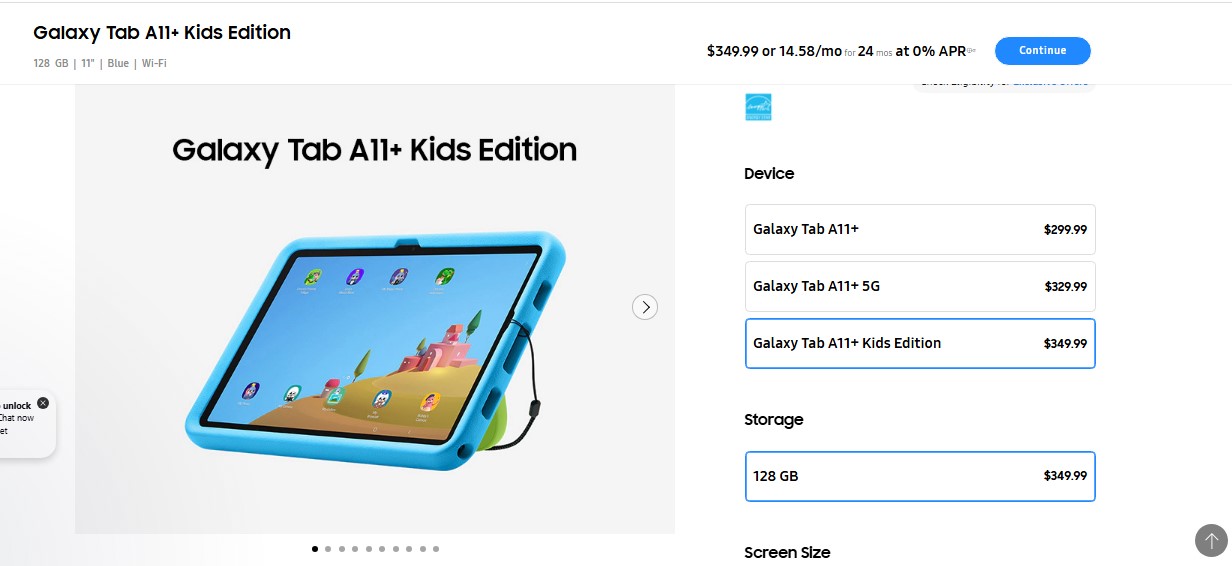
1. Samsung Galaxy Tab A11+ Kids Edition: Best overall
The Galaxy Tab A11+ Kids Edition is the strongest all-round choice for families that want a genuine Android tablet with the kid-friendly essentials already in the box.
Its 11-inch 1920 × 1200 display refreshes at up to 90Hz. The bundle has 128GB of storage, microSD expansion up to 2TB, a shock-absorbing case, and a tethered Crayo-Pen. Samsung promises seven generations of Android and One UI upgrades, plus long-term security support.
Samsung Kids supports up to six profiles, schedules, bedtimes, activity reports, approved apps and contacts, and controlled browsing. It requires initial setup and a parent PIN but no ongoing subscription.
It can begin as a protected kids tablet and become a normal Android device as the child gains independence. That flexibility puts it at number one.
At $349.99, it costs $100 more than the standard Galaxy Tab A11+. Families are paying for the protection, pen, tether, and convenience, and Samsung’s 25W charger is still separate. For cartoons and simple games, the Fire HD 8 Kids is enough for far less.
Best for: Ages 5–12, shared use, drawing, school apps, and families that want several years from one device.
2. Amazon Kids Tablet 11: Best complete ready-to-use bundle
The Kids Tablet 11 is Amazon’s most interesting children’s tablet in years. Unlike the older Fire range, it runs Android and provides parent-managed access to Google Play. That removes the biggest app limitation associated with Fire OS.
Starting at $329.99, it includes an 11-inch 2560 × 1600 display, 8GB of RAM, 64GB or 128GB of storage, a case, one year of Amazon Kids+, and Parent Dashboard. Parents can manage four profiles, time limits, learning goals, browsing, Google Play approvals, activity, and remote pausing.
The younger-child version has a soft bumper; the version for ages six and older uses a slimmer hard case.
There is no microSD slot. A stylus is supported but not included. After the first year, Kids+ starts at $7.99 per month for Prime members and $8.99 for non-members. Its one-year warranty also falls short of the two-year worry-free guarantee on Fire Kids tablets.
This first-generation product arrived in October 2026, so its durability and update record remain unproven. It ranks highly because full Android apps, capable hardware, curated content, and simple controls form an unusually complete package.
Best for: Ages 6–12 and parents who value easy setup, managed Google Play access, and curated content.
3. Apple iPad 11-inch (A16): Best tablet to grow with a child
The standard iPad is the sensible Apple choice for most families. It starts at $449 with 128GB of storage, and the A16 chip has ample power for school apps, games, drawing, and video calls.
Its 11-inch display has a 2360 × 1640 resolution. Apple claims up to 10 hours of web use or video, and independent testing has exceeded 11 hours. Two Apple Pencil models are supported, but the Pencil and case cost extra.
Screen Time and Family Sharing cover purchases, apps, websites, schedules, communication, content ratings, and browsing requests. Setup is less immediate than Amazon’s child environment but capable once configured.
iPadOS still lacks the simple local user profiles found on many Android tablets, so an iPad works best when assigned to one child. Add a rugged case before handing it over.
Best for: Ages 8 and up, especially children who need one device for entertainment, schoolwork, creativity, and calls.
4. Amazon Kids Tablet 8: Best compact full-Android kids tablet
Amazon’s Kids Tablet 8 brings the same Android approach to a smaller device. It starts at $229.99 with 4GB of RAM, 64GB or 128GB of storage, a case, one year of Kids+, and Parent Dashboard.
The 8.7-inch size suits smaller hands and travel. Amazon claims up to 14 hours of video. Buyers can choose a soft bumper for ages three and up or a slimmer hard case for ages six and older.
The 1340 × 800 display is adequate rather than sharp, and there is no microSD slot. Downloaded shows and large games can fill the 64GB version quickly.
The larger Kids Tablet 11 costs $100 more but provides a much better screen and twice the RAM. Buy the 8-inch model because portability matters, not because it wins on specifications.
Best for: Ages 3–9, frequent travel, smaller hands, and families that want Android apps in a protected compact tablet.
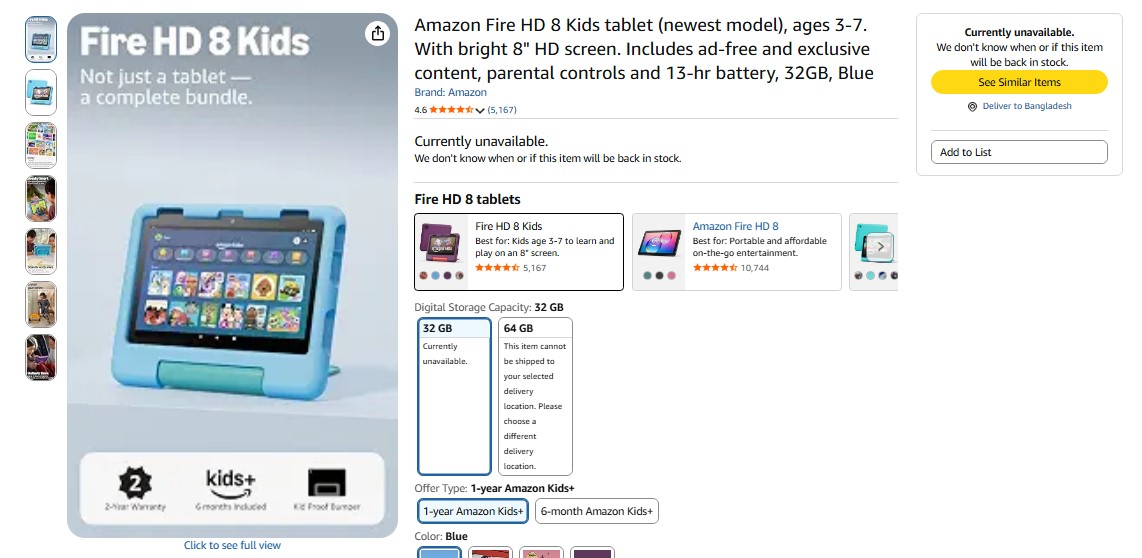
5. Amazon Fire HD 8 Kids: Best affordable rugged tablet
The Fire HD 8 Kids is inexpensive, properly protected, and backed by a two-year worry-free guarantee. Those qualities matter more than benchmark scores when the owner is four.
The 2024 base model has an 8-inch 1280 × 800 screen, 3GB of RAM, 32GB of storage, microSD expansion up to 1TB, and a claimed 13-hour battery life. The bundle adds a thick case, parental controls, and an introductory Kids+ term.
Fire OS is the compromise. It does not include native Google Play access, and Amazon’s app store lacks some school, communication, and popular game apps. The included Kids+ period can also vary by offer, so check the exact bundle before buying.
For reading, downloaded video, simple games, and curated content, it delivers a lot for about $149.99. For specific classroom apps or a child who will soon want a broader ecosystem, spend more on a standard Android tablet or iPad.
Best for: Ages 3–7, first-time users, and homes where durability matters more than app choice.
6. Amazon Fire HD 10 Kids Pro: Best budget big-screen tablet
The Fire HD 10 Kids Pro gives school-age children a less childish case and a 10.1-inch 1920 × 1200 screen that suits reading, video, comics, and basic homework.
Hardware is modest: 3GB of RAM, 32GB or 64GB of storage, and microSD expansion up to 1TB. One web-browsing test recorded 14 hours and 12 minutes, and Amazon includes its two-year worry-free guarantee.
Its original price was $189.99, but stock and seller prices now vary. It is worthwhile at a clear discount, not near the $329.99 Kids Tablet 11.
Older children are also more likely to notice Fire OS restrictions. There is no native Google Play Store, so confirm every essential school and communication app before ordering.
Best for: Ages 6–12 who mainly read, stream, play casual games, and already use services available through Amazon.
The iPad mini’s 8.3-inch laminated, antireflective display is sharp and colorful. At 0.65 pounds, it is easier for a child to hold than a full-size iPad.
Its A17 Pro chip, 128GB base storage, and Apple Pencil Pro support make it excellent for reading, drawing, gaming, and travel.
The problem is value. It starts at $599 before a case or Pencil, and the small screen is less comfortable for long homework sessions or split-screen work.
Choose it when compact size is the priority and the budget is comfortable. A child does not otherwise need this much performance in an 8-inch device.
Best for: Careful children around age 7 and up, frequent travelers, readers, and young artists.
8. Lenovo Idea Tab: Best homework value with a pen
Lenovo’s Idea Tab can be an excellent student bargain, but configurations vary. The base model starts near $149.99. A better long-term bundle has 8GB of RAM, 256GB of storage, an 11-inch 2.5K 90Hz display, a Tab Pen, and a folio case for about 250–275 before discounts.
Those specifications are generous for note-taking, PDFs, reading, and video. Android supports separate users, while Family Link handles app approval, limits, downtime, filters, permissions, and location.
Hands-on evaluations praise the screen, speakers, metal build, and pen but note occasional sluggishness and awkward software. It is a strong value device, not a discounted iPad in every respect.
Check the model number, memory, storage, and box contents before paying. Some listings omit the pen or folio. The 8GB version is a safer buy than the 4GB model if the tablet needs to last through several school years.
Best for: Ages 9 and up who need an affordable device for homework, notes, PDFs, and media.
9. AT&T amiGO Jr. Tab 2: Best kids tablet with cellular service
The amiGO Jr. Tab 2 is for families that need a younger child’s tablet connected away from Wi-Fi. It costs $239.99 before service and includes 5G, an 8.7-inch matte display, 4GB of RAM, 64GB of storage, microSD expansion up to 2TB, a bumper, and a stylus. The parent app manages time, apps, websites, communication, and location.
The matte screen and pen suit drawing and early handwriting, and the default child experience does not put generative AI front and center.
Family testing found that the bumper can peel at the edges and the untethered stylus is easy to lose. More important, cellular service adds a recurring bill. This is good value only when the connection will be used.
Best for: Ages 4–10, road trips, separated households, and existing AT&T customers who need location and mobile-data features.
10. OnePlus Pad Go 2: Best battery life and large display
The OnePlus Pad Go 2 is a general Android tablet, which can suit an older child or teen. Its 12.1-inch 2800 × 1980 display has a productivity-friendly 7:5 shape and a refresh rate up to 120Hz. The $399.99 base model includes 8GB of RAM and 128GB of storage.
OnePlus claims up to 15 hours of video, and a standardized web test measured 16 hours and 39 minutes. A full recharge took a little over two hours.
Google Family Link supplies parental controls, but the tablet needs a sturdy third-party case before it goes into a school bag. The compatible Stylo is normally sold separately. OnePlus also includes Gemini and other AI tools, so parents should review account settings and decide what fits the child’s age and school rules.
Best for: Ages 10 and up, long trips, media, reading, and students who want a roomy Android screen.
11. Apple iPad Air (M4): Best for serious creative work
The 11-inch iPad Air starts at $749. Its M4 processor and 12GB of unified memory far exceed the needs of cartoons, ordinary games, and basic homework. That is why an excellent tablet ranks near the bottom here.
It earns a place for older students doing advanced illustration, music production, video editing, or heavy multitasking. Its laminated, antireflective display supports Apple Pencil Pro.
The complete setup is expensive because a Pencil, keyboard, and case all cost extra. For most families, the A16 iPad provides the important apps for $300 less.
Buy the Air only when the child already has a clear academic or creative need for it. “Future-proofing” alone is not a strong reason to overspend.
Best for: Teenagers doing serious art, music, editing, or advanced schoolwork.
12. LeapFrog LeapPad Academy: Best learning-first preschool tablet
The LeapPad Academy is more of an educational toy than a general-purpose tablet. For $99.99, it includes a 7-inch shatter-resistant screen, a bumper and kickstand, a stylus, 16GB of storage, 20 educator-approved apps, time controls, and a restricted browser. Its three-month Academy trial unlocks more than 2,000 activities; continued access costs $5.99 per month.
The 1024 × 600 screen, limited storage, and narrow app catalog show the hardware’s age. A curious child may outgrow it quickly.
Choose it when a deliberately limited learning environment is the goal. At a similar sale price, a Fire Kids tablet is usually the more flexible purchase.
Best for: Ages 3–6 who need guided learning activities more than a broad app library.
Parental controls compared
| Platform | What parents can manage | Best use | Main limitation |
| Amazon Parent Dashboard on 2026 Kids Tablets | Time, activity, goals, browsing, app approval, remote pause, and up to four profiles | Quick setup with curated content and Google Play | Kids+ becomes paid; hardware is new |
| Samsung Kids | Up to six profiles, activity, time, bedtime, allowed apps and contacts, and controlled browsing | Shared devices and gradual independence | Requires deliberate setup |
| Apple Screen Time and Family Sharing | Purchases, apps, websites, schedules, communication, ratings, and privacy | One iPad assigned to one child | No simple household multi-user mode |
| Google Family Link | App approval, limits, downtime, school time, filters, permissions, and location | Standard Android tablets | Experience varies by manufacturer |
| AT&T amiGO | Time, communication, location, apps, and websites | Connected use away from Wi-Fi | Service adds a monthly cost |
| LeapFrog controls | Time and approved apps or sites | Simple preschool use | Limited ecosystem and growth path |
No parental-control platform replaces initial setup. Give the child a supervised account rather than an adult login. Lock the parent profile with a strong PIN, require purchase approval, disable unwanted in-app spending, review browser access, and recheck the settings after major software updates.
Final Thoughts
For most families, three models stand above the rest. The Samsung Galaxy Tab A11+ Kids Edition offers the best mix of controls, apps, accessories, storage, and longevity. The Amazon Kids Tablet 11 is the most complete ready-to-use bundle, provided parents accept its unproven track record and future Kids+ fee. The A16 iPad is the best long-term choice for an older child who will use the same device through several school years.
Spend less when the tablet will mainly play downloaded video. Spend more when better software support, school compatibility, or serious creative work will extend its useful life. The wrong purchase is not necessarily the cheapest or most expensive model. It is the one bought without checking the case, controls, required apps, and costs that arrive after the box is opened.
Frequently asked questions on The Best Tablet for Kids
What is the best tablet for kids overall?
The Samsung Galaxy Tab A11+ Kids Edition is the best-balanced option for most families. It includes a protective case and pen, runs full Android apps, supports several child profiles, offers expandable storage, and comes with a strong update commitment.
Is an iPad or Android tablet better for a child?
Choose an iPad when polished creative apps, performance, and a long useful life matter most. Android is often better for multiple profiles, expandable storage, lower prices, and hardware choice. School app requirements and the devices already used at home should break the tie.
How much storage does a kids tablet need?
For a new general-use tablet, 64GB is the practical minimum. Choose 128GB for large games, offline video, or creative apps. A microSD slot is useful for photos and downloads, but some apps cannot be moved to the card.
Can a kids tablet work without Wi-Fi?
Yes. Download books, lessons, games, music, and video before leaving home. Streaming, new downloads, cloud tools, location updates, and some subscription checks still need a connection. A cellular model such as the amiGO Jr. Tab 2 is only worth the extra bill when regular access away from Wi-Fi is essential.
What age should a child get a tablet?
There is no universal starting age. Readiness depends on the purpose, the child’s habits, and how actively an adult will supervise. A shared family tablet used for defined tasks is often a better first step than an unrestricted personal device.