You spend real money on a skin, unlock a character, or buy virtual currency, then find the item tied to one game account. Who owns in-game items in that situation? Usually, the player gets permission to use the item under the game’s rules, while the publisher or its licensors retain the intellectual property behind it.
That distinction matters if you want to transfer an item, sell an account, request a refund, or keep using a purchase after a game changes. The terms can limit access, but they do not necessarily erase consumer rights. The answer depends on the game, the transaction, and the law where you live.
Who owns in-game items?
Game companies commonly describe virtual items as licensed content. A license grants permission to use something under stated conditions; it does not usually transfer copyright or give the player unrestricted ownership.
Epic Games’ terms say its in-game content is licensed, not sold, and that Epic and its licensors retain intellectual-property rights. Steam’s Subscriber Agreement describes access to games and other content as subscriptions, with extra terms potentially applying to specific games or features. These examples show why the word “buy” in a store is not the whole story: who owns in-game items also depends on the applicable agreement.
A skin in your inventory does not normally give you the right to use its artwork outside the game. The character design, textures, animation, and name may remain protected by the developer’s or a licensor’s rights. What you receive is generally an account-based right to use the item within the service, subject to its rules.
What did your payment buy?
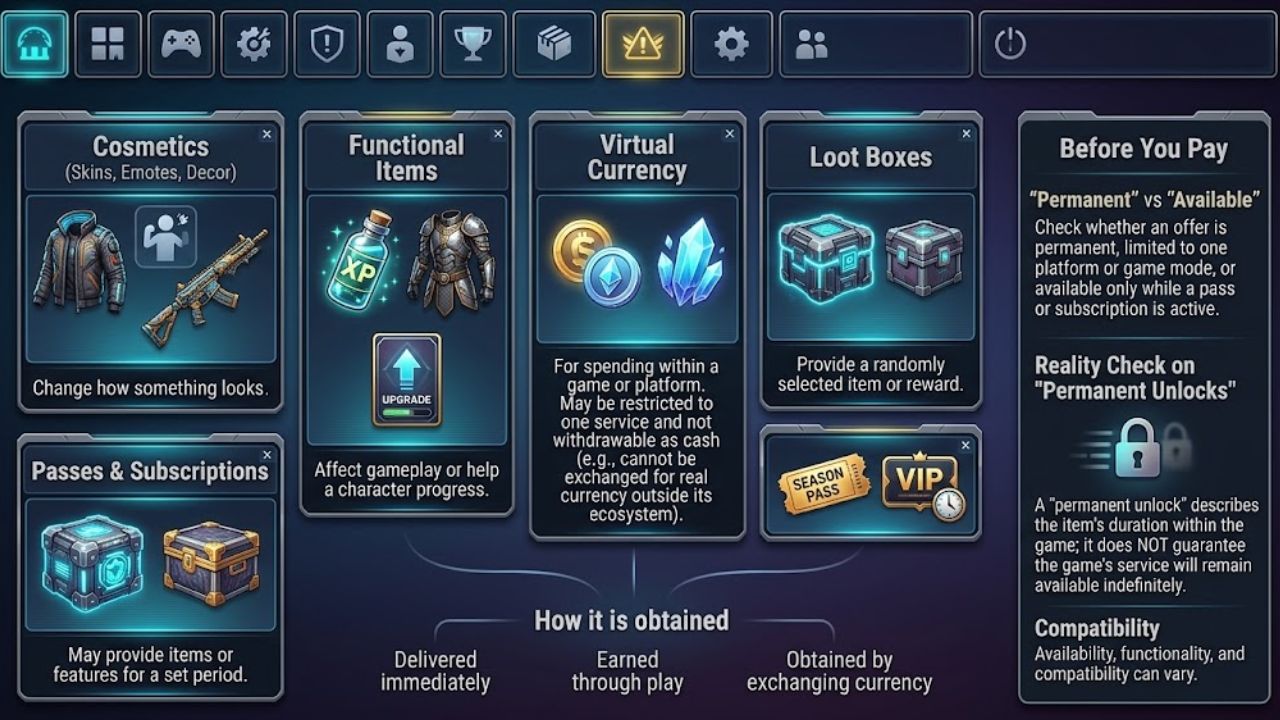
“In-game purchase” covers several different things:
- Cosmetics, such as skins, emotes, and decorations, change how something looks.
- Functional items can affect gameplay or help a character progress.
- Virtual currency is generally intended for spending within a game or platform.
- Loot boxes provide a randomly selected item or reward.
- Passes and subscriptions may provide items or features for a set period.
An item may be delivered immediately, earned through play, or obtained by exchanging currency. Currency may be restricted to one service and may not be withdrawable as cash. Epic’s terms, for example, state that its credits are not cash and cannot be exchanged for real currency or items outside its ecosystem. They also say availability, functionality, and compatibility can vary.
Before paying, check whether an offer is permanent, limited to one platform or game mode, or available only while a pass or subscription is active. A “permanent unlock” can describe the item’s duration within the game; it does not necessarily guarantee that the game’s service will remain available indefinitely.
Can a game remove an item?
A game’s terms may allow the company to modify or remove content in certain situations, such as a balance update, suspected fraud, or an account sanction. The rules differ by service, so one publisher’s policy should not be treated as a standard for the whole industry.
Account access is a separate risk. Epic’s terms prohibit selling or transferring an Epic account and say violations may lead to suspension or termination. They also state that refunds after termination are generally unavailable unless required by law. That is Epic’s stated policy; other games and local consumer laws may treat a dispute differently.
Online items also rely on the service that displays them. If an item needs a game’s servers, a change to those servers can affect whether it remains usable. That possibility does not settle whether a company has met its legal obligations, but it does make a server-dependent item different from a physical product you can keep using independently.
Does a license leave players without rights?
No. A company’s terms matter, but consumer protections may still apply. The rules vary by country and can depend on who sold the content, what was promised, and what went wrong.
In the European Union, the Digital Content Directive sets out remedies when paid digital content or services are not supplied or do not conform to the contract. Depending on the circumstances, remedies can include bringing the content into conformity, reducing the price, or ending the contract. These rules do not create a general right to resell skins; they do show that licensed content can still come with consumer protections.
In the United States, the Federal Trade Commission (FTC) announced a 2025 settlement with the maker of Genshin Impact over allegations involving loot-box costs and odds, as well as purchases by children. The settlement required disclosures and other changes. It addressed specific consumer-protection and children’s privacy allegations; it did not establish a general rule about who owns in-game items.
These examples are not a full account of the law in every region. If a significant purchase or loss is disputed, check the consumer-protection agency or legal resources for your location. A store’s refund policy and a player’s legal rights may overlap, but they are not necessarily the same.
Can you sell or transfer items?
Only where the game or platform allows it. Some services have built-in trading or marketplaces for selected items. Others lock purchases to the original account or prohibit account sales and off-platform trades.
Steam’s agreement describes marketplace features through which users may acquire or dispose of certain subscription rights, including virtual items. That does not mean every Steam item is transferable or can be sold for cash outside Steam. Check the specific item’s trading status and the game’s rules before making a deal.
Unofficial marketplaces add risks: scams, stolen accounts, chargebacks, or penalties for breaking game rules. If a deal happens outside the official system, the platform may not help recover the money or item. And a listing price is not guaranteed resale value. Trading rules can change, and a company may restrict an item even when players have treated it as valuable.
What happens to unused currency?
Virtual currency can make spending harder to track because real money is converted into an in-game balance. A player might buy a bundle, spend most of it, and be left with too little for another purchase. That leftover balance may not be refundable under the platform’s ordinary policy.
Before buying a bundle, look for restrictions on expiry, transfers, refunds, and use across games or platforms. Also check how many exchanges are required to reach the item you want. The FTC’s 2025 Genshin Impact settlement addressed allegations about confusing, multi-step currency exchanges and required clearer disclosures about exchange rates and loot-box odds.
For a child’s account, purchase controls can help prevent accidental or unapproved spending. The FTC recommends checking available controls, which may include blocking purchases, requiring a password, or setting a spending limit. The settings depend on the device and game, so check the manufacturer’s or publisher’s instructions.
What should you check first?
Before paying, take a moment to confirm what the offer actually provides:
- Read the item description: Is it cosmetic, consumable, time-limited, or a permanent unlock within the game?
- Check compatibility: The item may be limited to one platform, mode, region, or account.
- Review the currency rules: Find out what happens to unused balance and whether currency can be transferred or refunded.
- Look for trading restrictions: Do not assume an item or account can be sold.
- Check the refund process: The store and game may have separate policies.
- Keep the receipt: Save the transaction record and note which account and platform you used.
If an item disappears, first confirm you are on the correct account and platform. Check your purchase history, then contact official support with the receipt. Avoid paying someone who promises to restore an item or recover an account outside the company’s support process.
Final Thoughts
The practical answer to who owns in-game items is usually that the publisher or its licensors retain the intellectual property, while the player receives permission to use an item through an account and service. That permission can have limits, but it does not automatically leave players without consumer protections.
Before spending, check where an item works and what the terms say about transfers, refunds, and service changes. If a purchase was misrepresented or access was removed, keep the receipt and look into the rules where you live. Treat virtual items as access tied to a platform, not as property you can necessarily use or sell forever.
Frequently Asked Questions (FAQs) About
Do I own a skin after I buy it?
Usually, you receive permission to use it under the game’s rules. You generally do not gain the intellectual property rights to its artwork or an unrestricted right to transfer it.
Can a game ban me and remove my items?
A suspension can block access to items attached to the account. What the company can do in a specific case depends on its terms, the reason for the action, and applicable consumer protections.
Can I sell my game account or skins?
Only if the game or platform allows it. Some services support limited official trading; others prohibit account sales or off-platform transactions.
Can I get a refund for virtual currency?
Possibly. The answer depends on the seller’s policy, the circumstances of the purchase, and local law. Keep the receipt and check the refund process for the platform where you paid.