
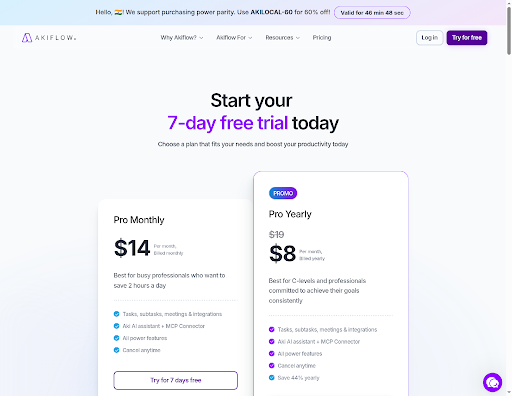
Akiflow’s own pricing page no longer shows the $19 monthly rate that most comparison articles still quote; it renders $14 per month or $8 per month billed yearly as of November 2026. That single change is the reason to re-run the comparison. The nine tools below are ranked by what they replace, and every price was read off the vendor’s own pricing page on 11 November 2026.
What Akiflow Actually Costs Now, and Why Rival Numbers Are Stale
Akiflow is a command center: it pulls tasks from Gmail, Slack, Notion, and similar tools into one inbox, then you drag them onto a calendar as time blocks. The pitch has not changed. The price has.
Akiflow’s live page, showing the $19 headline already struck through in favor of $14 monthly. akiflow.com/pricing, 11 November 2026.
In November 2026, the company’s pricing page shows two plans. Pro Monthly lists $14 per month. Pro Yearly lists $8 per month billed yearly, against a struck-through $19 that used to be the headline. There is no free tier — only a seven-day trial that asks for a card.
The stale numbers are easy to explain. Akiflow ran a $19 monthly and $34 per-seat-monthly structure for most of 2025, and comparison posts written then were never updated. A reader who budgets from those posts overpays on paper by more than double. It is worth checking the vendor page before you decide anything, because the gap between the quoted price and the live price is now large enough to change the ranking.
One more thing that no comparison table mentions: the page serves a purchasing-power-parity banner to Indian visitors, offering a code worth 60 percent off. If you are buying from India, the effective floor is lower than any figure in this article.
How the Billing Model Decides Your Bill Before You Demo Anything
Price per user tells you almost nothing on its own. What matters is whether the vendor charges a flat rate per person or per seat that scales with features.
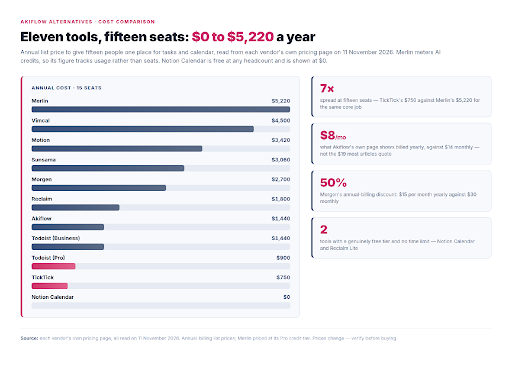
Annual cost for fifteen seats across the tools in this comparison. Compiled from each vendor’s own pricing page, read on 11 November 2026.
For a solo planner, the difference is invisible. Motion at $19 per user per month, Morgen at $15, and Sunsama at $17 all land within a few dollars of each other for one person. Nothing separates them.
Team size separates them fast. Running the annual numbers for fifteen seats produces a spread from $749 to $5,220 for what is functionally the same job — holding tasks and calendar in one place. TickTick sits at the bottom because it charges one flat annual fee regardless of headcount. Merlin sits at the top because it meters AI credits and the credit allowance has to grow with the team.
That arithmetic is the whole decision. Pick the billing shape that matches your headcount first, then compare features inside that group. Teams under five seats can ignore most of the price differences below; teams over ten cannot.
| Tool | Solo per year | 5 seats per year | 15 seats per year |
|---|---|---|---|
| TickTick | $49.99 | $249.95 | $749.85 |
| Todoist (Pro) | $60 | $300 | $900 |
| Akiflow | $96 | $480 | $1,440 |
| Todoist (Business) | — | $480 | $1,440 |
| Reclaim | $0 | $600 | $1,800 |
| Morgen | $180 | $900 | $2,700 |
| Sunsama | $204 | $1,020 | $3,060 |
| Motion | $228 | $1,140 | $3,420 |
| Vimcal | $300 | $1,500 | $4,500 |
| Merlin | $348 | $1,740 | $5,220 |
| Notion Calendar | $0 | $0 | $0 |
All figures are annual-billing list prices read from each vendor’s own page on 11 November 2026. Merlin is credit-metered, so its figure assumes the Pro tier; heavier AI use pushes it higher.
1. Sunsama — the daily-shutdown ritual, done properly
Sunsama is the closest like-for-like swap if what you liked about Akiflow was the daily planning session rather than the drag-and-drop.
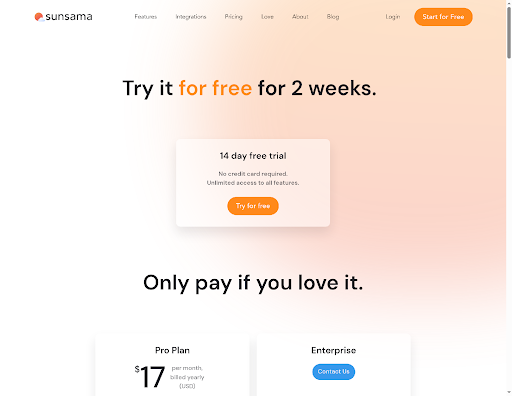
Two weeks of full access, no card required, then $17 per month on the yearly rate. Sunsama, sunsama.com/pricing, 11 November 2026.
The product is built around two rituals: a morning planning pass where you commit tasks to the day, and an evening shutdown where unfinished work gets explicitly moved. It deliberately resists the always-on backlog view that most task apps push. For people who abandoned Akiflow because the inbox never felt finished, that restraint is the whole point.
Pricing is $17 per month billed yearly, or $22 month-to-month. The annual gap of $60 is the largest monthly-versus-yearly penalty in this list, so commit for the year if you stay. The fourteen-day trial needs no card and unlocks everything, which makes it the easiest of the nine to test properly.
The limitation is teamwork. Sunsama is a personal planner with calendar sync, not a shared workspace. Its Enterprise tier is contact-only, so there is no published per-seat price to plan against.
2. Motion — when you want the AI to place the work, not suggest it
Akiflow asks you to decide where a task goes. Motion decides for you, and that inversion is why people switch.
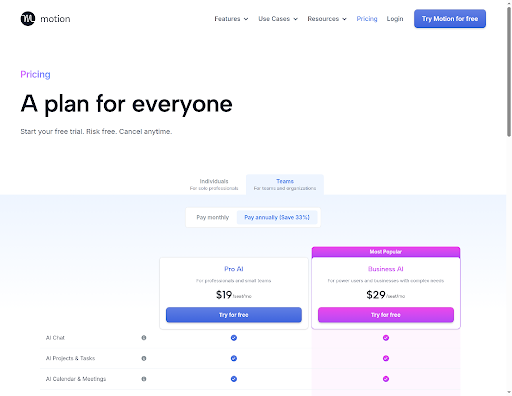
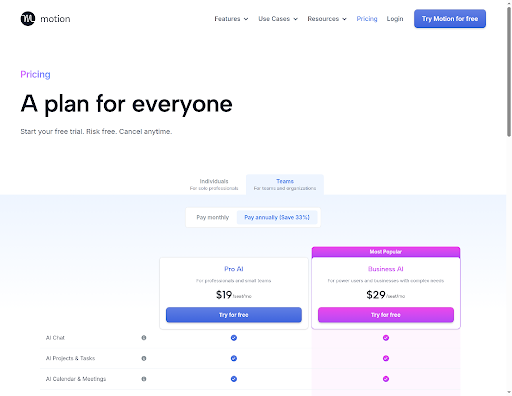
Motion sells automatic placement per seat, not per account: $19 for Pro AI, $29 for Business AI, both monthly-billed rates. usemotion.com/pricing, 11 November 2026.
You enter tasks with deadlines and duration estimates, and Motion builds the schedule around your existing meetings, then reshuffles when something slips. If you have ever spent twenty minutes arranging a calendar instead of working, the automatic placement is the feature. Pro AI lists $19 per seat per month; Business AI lists $29. Annual billing saves a stated 33 percent.
The trade-off is control and clarity. Automatic rescheduling means your afternoon can change without you touching it, which some people find clarifying and others find unnerving. Motion also does not state a trial length on its pricing page, only that one exists and that you can cancel. Ask before you commit a team.
3. Morgen — calendars first, tasks second, one window
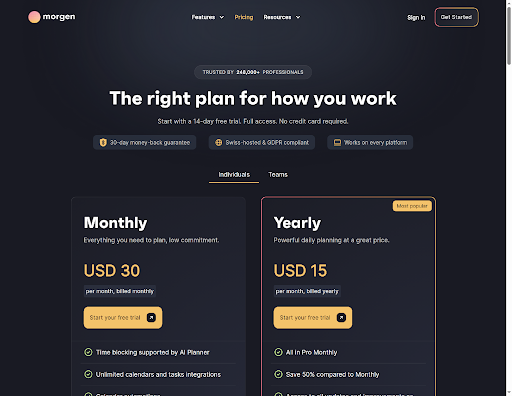
Morgen is the pick if you have more calendars than task sources, and the calendar is the thing that keeps breaking.
The widest monthly-versus-yearly gap in this comparison sits on Morgen: $30 monthly, $15 yearly. morgen.so/pricing, 11 November 2026.
It consolidates every calendar account and every task source into a single view, then adds an AI planner that proposes where work should sit in your week. It also ships a booking page, which quietly replaces a separate scheduling-link subscription — a real line item to delete from a stack.
Pricing splits hard between billing periods: $30 per month billed monthly against $15 per month billed yearly, a stated 50 percent saving. That is the steepest annual discount here, and it makes the yearly plan the only sensible way to buy it. The fourteen-day trial needs no card, and a thirty-day money-back guarantee covers the annual commitment.
The catch is that the free tier is platform-limited, so the desktop app most planners would actually use sits behind the paid plan.
4. Reclaim — the calendar-defense layer with a real free tier
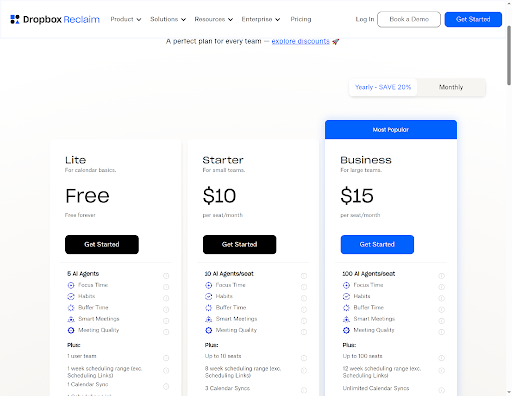
Reclaim does not try to be your task manager. It defends the time you have already decided to protect, which is a different job from the one Akiflow does.
Reclaim is the only paid-capable tool here that keeps a permanent free tier in the same table as its paid seats. reclaim.ai/pricing, 11 November 2026.
Give it habits, focus blocks and buffers, and it keeps them on the calendar by negotiating around meetings as they arrive. For people whose calendar is the thing that keeps getting destroyed while their task list stays tidy, this is the correct tool and the others on this list are not.
It is also the only genuine free tier among the paid-capable options here. The Lite plan is free forever for a single user with five AI agents and one calendar sync. Starter costs $10 per seat per month billed yearly, $12 monthly, capped at ten seats. Business is $15 yearly, $18 monthly, for up to a hundred seats. Enterprise runs $22 per seat per month.
The limitation is that Reclaim connects Google and Outlook calendars; if your planning runs on iCloud, this is not the tool.
5. Vimcal — speed is the product
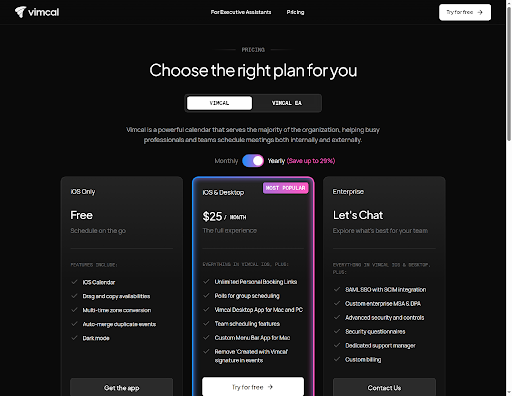
Vimcal is a calendar rather than a task consolidator, so it will not pull work out of Slack for you. What it does instead is schedule faster than anything else here, entirely from the keyboard.
Vimcal’s paid tier covers Mac and Windows; the free one stops at iOS. vimcal.com/pricing, 11 November 2026.
For people who live in a calendar — recruiters, sales, anyone whose day is meetings — that speed is worth more than a task inbox. The paid tier lists $25 per month, or $300 per year after the trial, and covers Mac and Windows desktop alongside team scheduling. Annual billing saves a stated 29 percent.
Be explicit about the trade before switching: if the specific job Akiflow was doing for you was collecting tasks from a dozen tools, Vimcal does not do that job. The free tier is iOS-only, so the desktop app sits behind the paid plan.
6. TickTick — the cheapest credible replacement
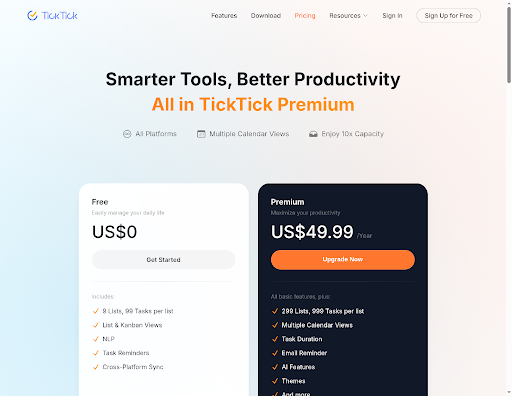
TickTick is the value pick, and it wins the cost table outright because it does not charge per seat at all.
One flat annual fee, no seat maths, which is why TickTick wins the cost table at every headcount above three. ticktick.com/about/upgrade, 11 November 2026.
One flat annual fee covers every platform an individual uses, with free apps on both iOS and Android — a real advantage over Akiflow, which is iOS-only on mobile. Premium lists at $49.99 per year, which the page frames as under $4.17 per month. The free tier is unusually usable: nine lists, ninety-nine tasks per list, natural-language input and reminders.
The feature that separates it from a plain to-do list is habit tracking, which most planners in this group do not offer. It also supports team collaboration, though that is not where it beats the others.
The trade-off is planning depth. TickTick time-blocks, but it does not schedule for you, and the AI features sit behind Premium.
7. Todoist — when you never wanted a calendar anyway
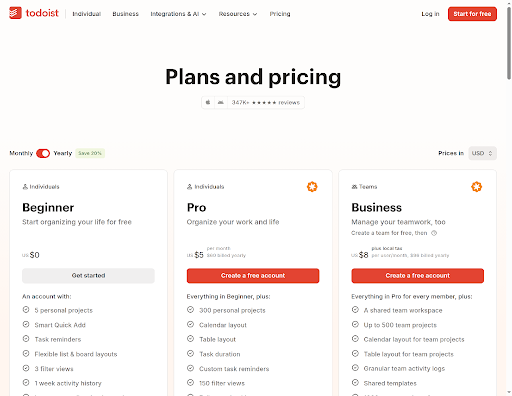
Todoist is the pick for people who left Akiflow because the command-center machinery felt like overhead, not because they wanted a worse version of it.
Shown here in USD via Todoist’s own currency selector; the page geo-serves local currency by default. todoist.com/pricing, 11 November 2026.
Capture is fast, recurring tasks are reliable, and natural-language input is the best in this group. There are apps everywhere, and a free tier with no time limit rather than a trial. Pro lists $5 per month billed yearly, or $60 per year — less than any other paid single-user plan here. Business lists $8 per user per month, $96 yearly, plus local tax.
The honest limitation is calendar work. Todoist has calendar and table layouts on paid plans, but the time-blocking that Akiflow is built around is not the point of the product. If your day genuinely needs to be laid out on a grid, this is the wrong tool, however good the list is.
8. Merlin — credit-metered, for AI-heavy workflows
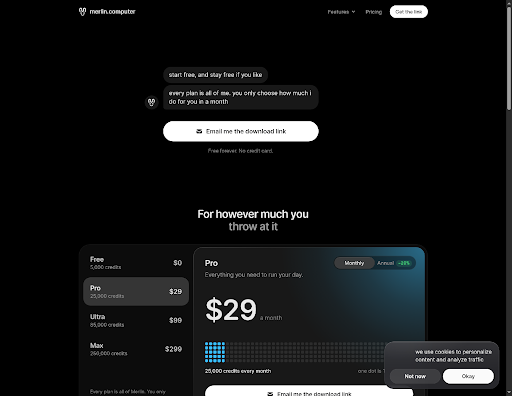
Merlin bills on AI credits rather than seats, which makes it the right fit for one specific buyer and an expensive mistake for everyone else.
Merlin charges for AI work, not people: every tier includes the full product and only the monthly credit allowance changes. merlin.computer/pricing, 11 November 2026.
Every tier includes the full product; the only thing that changes is the monthly credit allowance, read straight off merlin.computer’s pricing page. Its Free tier lists five thousand credits a month at no cost and no card, and Pro raises that to twenty-five thousand for $29. Pro is $29 for twenty-five thousand, Ultra $99 for eighty-five thousand, Max $299 for a quarter-million. Annual billing takes a stated twenty percent off.
This is the model to avoid if your usage is unpredictable, because the bill tracks activity rather than headcount. A fifteen-person team on Pro lands near $5,220 a year, the highest figure in the cost table above. Buy it when the AI work is the point, not when you wanted a task list.
9. Notion Calendar — free, if Notion is already your home
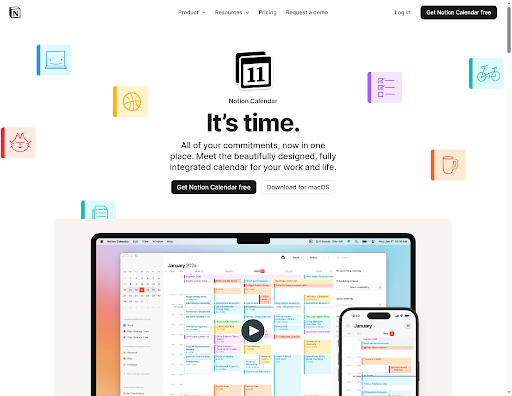
Notion Calendar costs nothing, and that single fact changes the maths for anyone already paying for Notion.
It is a standalone calendar that sits alongside Notion and your existing calendar accounts, with week views, scheduling snippets, availability sharing and quick meeting creation. If your projects, notes and tasks already live in Notion, adding the calendar closes the loop without another subscription.
It is not a task consolidator. There is no universal inbox, no command bar pulling work out of Slack, and no AI planner. The reason to take it is that it is free and it fits a stack you already pay for. The reason to skip it is that it does none of the specific jobs Akiflow was hired to do.
Which Alternative Fits Your Case
Pick Sunsama if the daily ritual mattered to you and you mostly work alone — it is the closest behavioral match, at $204 a year. Pick Reclaim if your calendar is the thing that keeps breaking and you want a free start. Pick Motion if you would rather the AI placed the work. Pick TickTick if cost is the deciding factor and you want to stop paying per seat. Pick Todoist if you never actually wanted a calendar.
Skip Sunsama and Motion if you are buying for a team over ten — the per-seat maths runs past three thousand dollars a year and Reclaim or TickTick does the individual job for a fraction. And before you buy any of them, open Akiflow’s own pricing page once more: the $19 that most articles still quote is not the price the vendor shows.
Frequently Asked Questions
Is there a free Akiflow alternative with no time limit?
Yes, two. Notion Calendar is free with no paid tier at all, and Reclaim’s Lite plan is free forever for a single user with one calendar sync. TickTick and Todoist both run permanent free tiers as well, though each caps lists, projects or views. Only Akiflow’s own trial is time-limited at seven days.
Why do different articles quote different Akiflow prices?
Because the pricing changed and most articles were not updated. Akiflow listed $19 monthly through much of 2025, and a large share of comparison posts still repeat that figure. The vendor’s own page in November 2026 shows $14 monthly and $8 per month billed yearly, so any article quoting $19 is working from an old capture.
Can I run any of these without a Google or Outlook calendar?
Partly. Reclaim connects Google and Outlook only, and its help center states there is no native mobile app today. Akiflow itself is the unusual one here because it connects iCloud Calendar directly, which Reclaim does not. If your planning runs on iCloud, check the integration list before switching, because most of the tools on this list assume a Google or Microsoft account.
Does the cheapest option actually do time blocking?
Not the same way. TickTick and Todoist both support time blocking or calendar layouts, but neither places work for you. Automatic placement is the feature you pay Motion for, at $19 per seat per month. If you want a planner that decides where tasks go, the cheap end of this list is the wrong end.
How much does a fifteen-person team actually save by switching away from Akiflow?
On annual billing, a fifteen-seat Akiflow plan runs $1,440. Switching to TickTick for the same headcount costs $749.85, a saving of roughly $690 a year. Switching to Reclaim’s Starter tier costs $1,800, which is more — the per-seat model only wins at small headcounts or on the free tier.