Mandarin vocabulary games can give Singapore families a relaxed way to practice Chinese between school lessons. The right choice depends on the child: a preschooler may enjoy matching pictures and sounds, while an older student may want a game that reinforces textbook vocabulary. These eight options offer different starting points for learning together.
Start with the words your child already meets: food at the hawker center, animals in a story or things on the way to school. A game can make repetition less tedious, but the most useful practice often comes afterwards, when someone uses the word in conversation.
How we chose these games
We reviewed publicly available provider information and app listings on 11 November 2026. Each option describes interactive or game-based Mandarin vocabulary practice, and several target Singapore learners specifically. The list is organized by likely fit, not a ranking based on independent tests. We did not test the apps with children; descriptions and curriculum-alignment claims come from their providers.
Availability, device compatibility, free content, subscription terms and privacy practices can change. Check your Singapore app store and the current product details before downloading or paying. Age and grade suggestions are starting points rather than guarantees of suitability.
1. Mandora — for Singapore primary-school practice
Mandora describes a Mandarin learning app for children in Singapore primary school, built around the local Chinese syllabus. Its listing combines reading, writing, speaking and dictation practice with game-based motivation. That makes it a possible fit for a family looking for a playful supplement to the words a child meets in class.
Ask your child to show you one word from a lesson and use it in a sentence at dinner. Before subscribing, check which grade levels and exercises are included, how speech features handle recordings, and whether the app’s vocabulary matches your child’s current textbook.
Why families may choose it: The mix of speaking, reading and dictation can help a parent connect a short activity to a word the child is already encountering at school. Ask the child to explain a familiar term in English or Mandarin, then use it in a new sentence rather than repeating the answer from the screen.
Best for: Primary-school children who enjoy guided practice and families who want a Singapore-focused starting point. Verify the current lesson sequence and how the app handles recorded speech.
2. Dim Sum Warriors — for families who enjoy bilingual stories
Dim Sum Warriors uses bilingual comics and stories alongside vocabulary games and reading practice. Its Chinese-English approach can be helpful when a child follows a story more confidently in one language and wants to revisit it in the other.
Try reading a short scene together: let the child choose a character, then look for one recurring word. The provider offers different books, app features and membership resources, so check which content is free and what requires payment. Story-based reading is broader than drilling a school’s weekly word list.
Why families may choose it: A funny story gives vocabulary a setting: a word belongs to a character, action or conversation rather than an isolated flashcard. Families can use the English version to follow the plot and return to the Chinese version to find a familiar expression.
Best for: Children who enjoy comics, reading aloud and making up stories. Check the subscription and device requirements, and whether a particular feature supports the child’s reading level.
3. Studycat Chinese — for early learners who like short games
Studycat presents Chinese vocabulary through games, songs and stories and describes its children’s product for ages two to eight. The mix of pictures and audio may appeal to a young learner who cannot yet read a long set of instructions.
A parent can play the first few activities alongside the child and repeat a word using an object in the room. Check what the trial includes, whether a subscription renews automatically, and whether the device and audio settings work for your family. Younger children may need help connecting a screen image to a real-world object.
Why families may choose it: Short games, songs and picture-led activities give younger children several ways to meet the same word. Parents can turn an on-screen activity into a quick game with household objects, allowing the child to hear and use the word away from the tablet.
Best for: Early learners who respond to playful audio and visuals. Look at the trial, renewal terms and the amount of adult support your child needs before purchasing.
4. Gus on the Go: Mandarin — for first themed words
Gus on the Go introduces Mandarin vocabulary through interactive lessons and review games. The publisher describes roughly 90 words, making it a narrower starting point than a full language curriculum. It can suit a beginner who enjoys completing a small set of themed activities.
Use a few words from a completed lesson in a picture hunt around the home. Check the Singapore store listing and current price on your device, as versions and purchase arrangements can change. Families wanting extensive reading or school-specific preparation may eventually need more than this introductory vocabulary set.
Why families may choose it: A modest vocabulary set is easier to fit into a routine than an extensive course. After a lesson about animals, for example, a parent can invite the child to identify a favorite animal in a picture book and say the Mandarin word together.
Best for: Beginners ready for basic themed vocabulary. It is an introduction, so families who need handwriting, longer stories or detailed school revision should check whether other resources are needed.
5. ZiLele (字乐乐) — for game-led primary vocabulary review
ZiLele’s listing describes material based on Singapore Primary 1–6 Chinese and Higher Chinese, with a game hub covering characters, pinyin, vocabulary and reading. It may be useful for a child who wants to revisit familiar school material in different formats.
Choose the appropriate level before starting and sample the available content together. Some lessons or features may require a purchase; confirm the latest terms. Provider claims of syllabus alignment should be checked against your child’s actual class materials rather than treated as an official endorsement.
Why families may choose it: Different activities for characters, pinyin and reading can give a student another way to revisit the same material. A family might choose one word from the lesson, find it in a book, and discuss its meaning in a familiar context.
Best for: Primary students who enjoy game-based repetition. The provider describes Singapore syllabus coverage, but parents should compare the chosen level with the current school materials and verify what the free version includes.
6. Huawenbao — for primary-school word practice
Huawenbao’s Singapore App Store listing describes vocabulary exercises, including matching, pinyin and missing-character questions, alongside mini-games. Its local primary-school focus may appeal to families looking for regular revision rather than an open-ended story library.
Watch whether the child can explain a word as well as recognize the right answer. Check the current grade coverage, available platforms and in-app purchases; a school-aligned description is a vendor claim, not proof that every exercise matches the current classroom sequence.
Why families may choose it: Matching and missing-character exercises provide a concrete way to practice distinctions that can be difficult to remember from a word list alone. Parents can ask the child to explain why an answer fits, then compose a short sentence using the word.
Best for: Primary-school students seeking focused word and pinyin revision. Check grade coverage, purchase terms and the current textbook match; the game should supplement classroom feedback.
7. Chinese Learning Buddy — for older students reviewing vocabulary
Chinese Learning Buddy is designed primarily around Singapore secondary-school Chinese vocabulary. Its site shows word selection, vocabulary cards and game reinforcement, making it a more appropriate candidate for a teen than for a preschooler.
It may help a student revisit a selected set of terms before applying them in a paragraph. Check the applicable level and current device support, and avoid assuming that a vocabulary game alone prepares a student for every part of an examination.
Why families may choose it: Selecting a specific set of words can make revision manageable for a secondary student who has a particular vocabulary gap. A short game session can be followed by writing a sentence or discussing how a term changes meaning in context.
Best for: Older students who want more control over their review. Confirm device compatibility and grade coverage, and remember that recognizing a word in a game is only one part of using it accurately.
8. HelloChinese — for an older beginner learning alongside family
HelloChinese describes game-based Mandarin learning across vocabulary, speaking, reading and writing. Unlike products built around Singapore primary textbooks, it is a general beginner course. It may suit an older child or parent who wants to learn basic Mandarin together and does not need every lesson to follow the school syllabus.
Try the introductory lessons before committing to paid features. Check the language used for instructions, account requirements, microphone permissions and whether the pace suits the learner. Younger children may need adult help navigating a course designed for a broader audience.
Why families may choose it: A general beginner pathway can give an adult and older child a shared way to practice even if the adult did not study Mandarin at school. Compare a lesson together, then use one phrase in a real conversation rather than aiming only for a completion streak.
Best for: Older beginners and parents learning alongside them. Check whether paid features are necessary, which permissions are requested and whether the activities suit the child’s age.
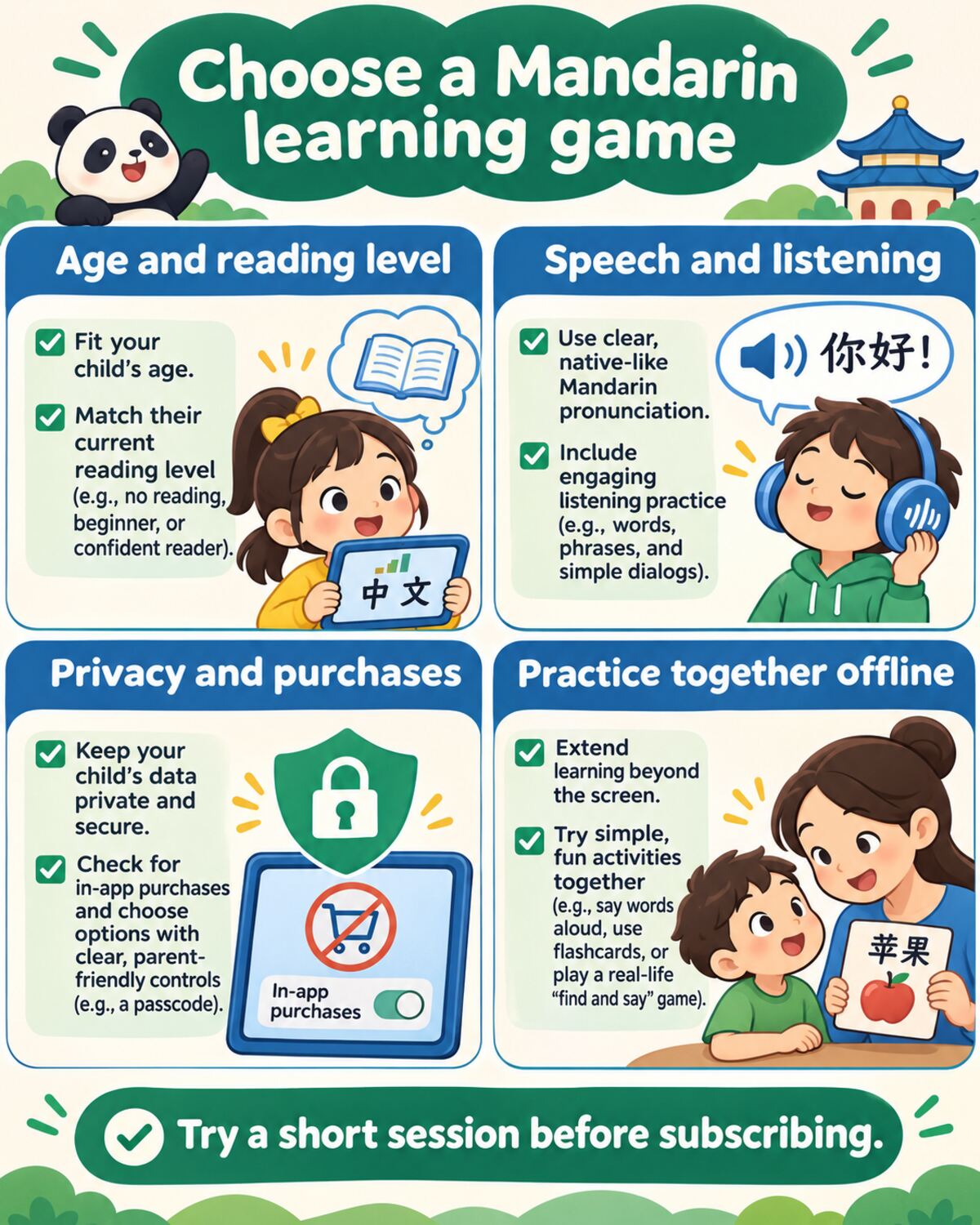
The graphic compares age and reading level, listening practice, privacy and purchases, and ways to practice together away from the screen.
Choosing a game your child will actually use
First match the activity to the child, not the longest feature list. A non-reader may need clear audio and pictures; a primary student may want familiar characters; a teenager may prefer choosing their own vocabulary set. Confirm whether the app uses simplified characters, traditional characters or both, and whether pinyin can be shown or hidden.
For more guidance, see how to choose learning apps for kids and making screen time educational. Look at privacy before creating an account. Check advertising, in-app purchases, subscriptions, voice recording, social features and parental controls. A shared device can also expose purchase buttons to children, so use the controls available on the device and review the provider’s current privacy notice.
Singapore’s Ministry of Education curriculum information can help parents understand the school context. For broader home language activities, the Lee Kuan Yew Fund for Bilingualism shares resources for families. Neither source endorses this shortlist.
Make the words part of everyday life
After a short session, invite your child to use one or two words while drawing, cooking or choosing a library book. If a game becomes frustrating, switch to a story or simply talk about something the child enjoys. The goal is a comfortable chance to hear and use Mandarin, with the app serving as one tool among many.