A SaaS customer can sign a contract, attend kickoff, import data, and still have nothing useful to show a manager. That gap is what Time to Value reveals: the period between a clear starting event and the first meaningful outcome the customer receives.
Self-service products may start the clock at signup; sales-led platforms may use contract signature or kickoff. A shorter result matters only when the milestone represents real progress, not another vendor checklist item.
What Time to Value Measures
TTV measures progress toward an outcome, not how busy onboarding looks. Account creation, training, data import, and colleague invitations may be necessary, but none proves that the product has delivered what the customer bought.
The milestone should connect directly to that purchase decision. For example:
- A scheduling product might use the first completed customer booking.
- An analytics platform might use the first report built from real data and used in a meeting or decision.
- Payroll software might use the first accurate payroll run.
- A project tool might use completion of a real team task through a shared workflow.
These are illustrations, not industry standards. A useful Time to Value milestone must be observable and meaningful. “Created a dashboard” is weaker than “used a trusted dashboard to answer a business question.”
Industry terminology is inconsistent. Some sources use TTV for the first meaningful outcome; others reserve it for sustained results. What matters is a documented definition that every team applies consistently.
Choose the Right Finish Line
“Customer activated” and “onboarding completed” are poor finish lines unless the underlying event is clear. A defensible milestone answers three questions:
- What result did the customer receive?
- Can the result be observed or confirmed?
- Does it relate to the reason the customer bought the product?
The starting event needs equal care. Kickoff can hide the wait after contract signature, while signup may include people who only explored. Choose the point that matches the journey, and do not compare reports based on different starting events.
Separate unlike customers. A solo designer may gain value after one usable export; an enterprise customer may need access controls, real data, and an approved review process. One combined average hides those differences.
How to Calculate Time to Value
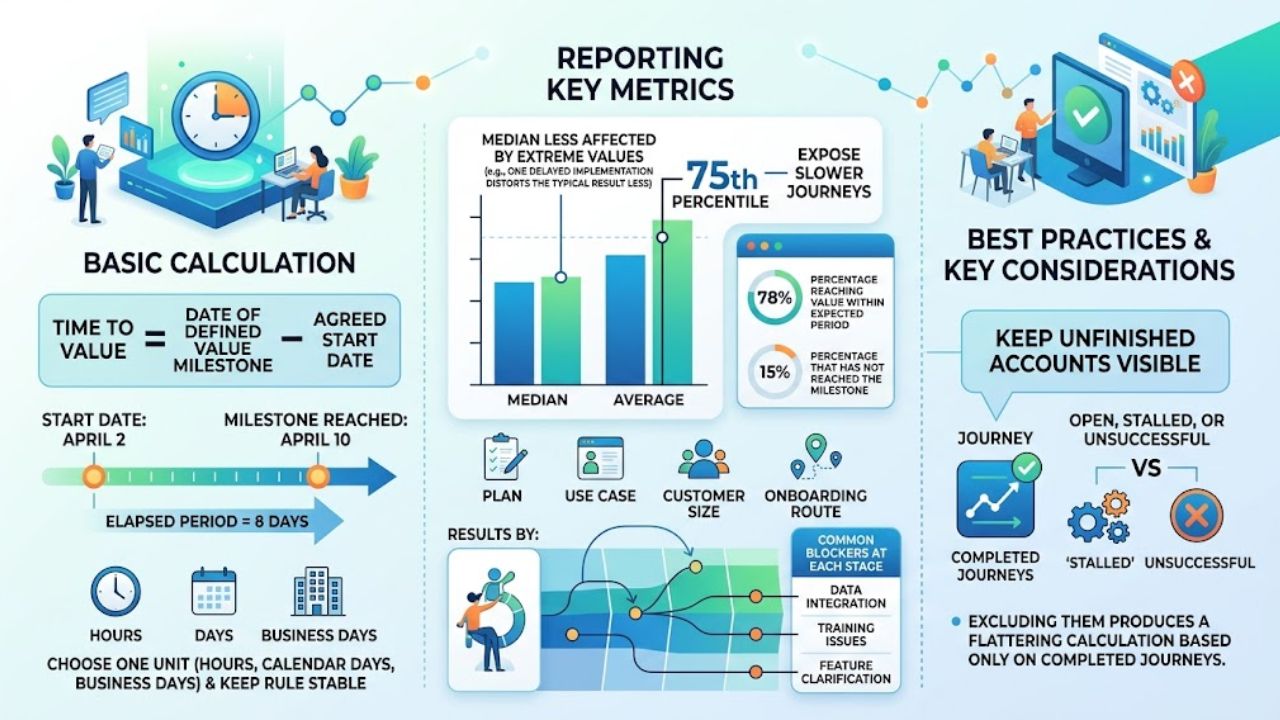
The basic calculation is simple:
Time to Value = Date of defined value milestone − Agreed start date
If implementation starts on April 2 and the milestone is reached on April 10, the elapsed period is eight days. Choose hours, calendar days, or business days, then keep the rule stable.
Report the median alongside the average. The median is less affected by extreme values, so one delayed implementation distorts the typical result less. The 75th percentile can expose slower journeys.
A practical report should show more than one headline number:
- Median and average TTV
- Percentage reaching value within the expected period
- Percentage that has not reached the milestone
- Results by plan, use case, customer size, or onboarding route
- The most common blocker at each stage
Keep unfinished accounts visible as open, stalled, or unsuccessful. Excluding them produces a flattering calculation based only on completed journeys.
Where Customers Lose Time
Slow progress is often blamed on onboarding screens, even when the delay began elsewhere. Common causes include:
- Sales promises that do not match implementation
- Forms that request information before it is needed
- Data, integration, security, or permission work with no clear owner
- One onboarding route for customers with different jobs and skill levels
- Training that covers the full product before the first useful task
- Poor handoffs or error messages with no practical recovery path
Product friction and operational delay require different fixes. A tooltip will not speed up a security review, secure admin access, or clean an unusable data file. Label the delay before assigning it.
How to Shorten Time to Value
Shortening Time to Value starts with the route to the first credible result. Cutting steps can help, but indiscriminate speed creates shallow milestones and avoidable mistakes.
Work Backward From the First Result
Map only the actions required to reach the milestone. Remove fields with no immediate purpose, automate repetitive setup, and delay advanced configuration. Product, sales, implementation, and customer success should review the path together.
Match the Path to Customer Intent
A customer building a sales dashboard should not receive the same tour as someone analyzing support performance. Ask about the intended outcome, then show the relevant workflow, template, or integration. Personalization should remove irrelevant work, not add a longer form.
Use Real Work Early
Templates, import tools, and sensible defaults reduce the friction of an empty workspace. Sample data can teach the interface, but it is a preview rather than proof of value.
A project platform could import one current project instead of rebuilding an entire operation. An analytics product could lead with one trusted report before presenting every dashboard option. One useful result beats a tour of ten features.
Expose External Dependencies
Enterprise onboarding may depend on single sign-on, legal review, security approval, or data access. Give each dependency an owner, due date, status, and next action. Run independent work in parallel where possible.
Intervene at the Stuck Point
Product analytics can reveal drop-offs: an integration started but not finished, a teammate invited but never activated, or a report created but never shared.
Match the response to the obstacle. Specific integration help beats a generic check-in. A complex account may need a working session that completes a task, not another status call.
Fix the Product, Not Just the Tour
When support repeatedly explains the same obstacle, inspect defaults, labels, required fields, errors, and step order. More tooltips are a poor substitute for fixing confusing design or unreliable imports.
When Faster Is Misleading
A company can improve reported TTV by choosing an easier milestone. A button click, completed tour, or sample dashboard may shorten the number without delivering a useful result.
Rushing can weaken the outcome. Skipping data checks may produce a fast report that nobody trusts. An unsuitable self-service route may reduce recorded onboarding time while increasing later support work.
Pair speed with quality. Check whether customers repeat the action, use the output in real work, and agree that it represents progress. Test any relationship with retention against the company’s own cohort data.
Make TTV an Operating Habit
A short weekly review can focus on customers that have missed the expected value window:
- Where did the account stop?
- Is the blocker inside the product or outside it?
- Who owns the next action, and when is it due?
- Is this an isolated delay or a repeated pattern?
Repeated problems belong in the product or onboarding backlog. Individual blockers need an owner and dated action. A dashboard without a response process only records the delay.
Final Thoughts
Time to Value is useful only when the clock stops at a result the customer recognizes. Start with one customer segment, define one defensible milestone, and review a recent cohort—including the accounts that never reached it.
The review will expose unnecessary steps, unclear ownership, product friction, and outside dependencies. Fix repeated problems first. Faster matters when it produces a credible outcome, not merely a better-looking metric.
Frequently Asked Questions (FAQs)
What Is a Good Time to Value?
There is no reliable universal benchmark. Self-service software may deliver value in one session, while enterprise platforms can require migrations, approvals, and integrations. Compare similar segments with their own baseline and purchase promise.
Who Should Own TTV?
One person should own reporting and review. Improvement is cross-functional: sales shapes expectations, product controls the workflow, implementation manages dependencies, and customer success supports real use.
Can TTV Be Measured Without Advanced Analytics?
Yes. A spreadsheet, CRM, or customer success system can record the segment, start date, milestone, completion date, blocker, and owner. Event tracking adds detail later; a simple record already exposes missed dates and repeated obstacles.