

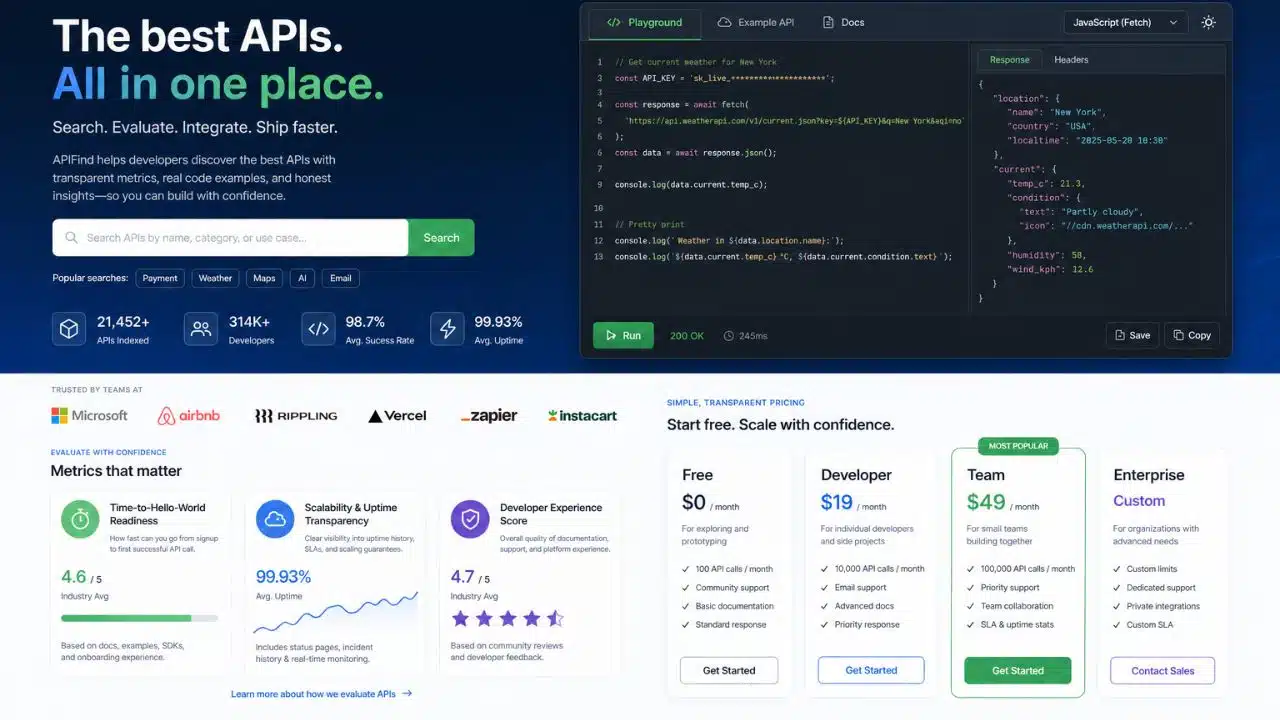
Have you ever wished you could see the moment a competitor changes something on their website? Company homepages tell a story. They show what a business sells, who they hire, and where they’re headed next. Real-time access to that story is now a must-have for competitive intelligence. The best API search company’s homepage gives developers tools to pull live data from websites and turn it into structured information within seconds to minutes, not days or weeks.
Why does that matter? Static data gets old fast. A product price changes, a new job posting appears, and a marketing message shifts.
Traditional company data APIs miss these updates. Real-time extraction solutions catch them, working like a bridge between raw websites and clean, organized data your applications can use right away.
Building that bridge takes serious technical skill. Websites throw up defenses against bots, and pages load content with JavaScript frameworks like React, Vue, and Angular. Tools like the Scrapeless Universal Scraping API get past these obstacles with global IP rotation across 195 countries, smart anti-detection systems, and smooth dynamic content handling.
A strong homepage for an API provider also says a lot about the service itself. Developers want quick start guides, working code snippets, and interactive sandboxes they can test right now.
The right API search solution does more than fetch data. I’ll walk you through what to look for, and I think you’ll find the choice gets a lot easier once you know the signals.
Key Features of the Best API Search Company’s Homepage
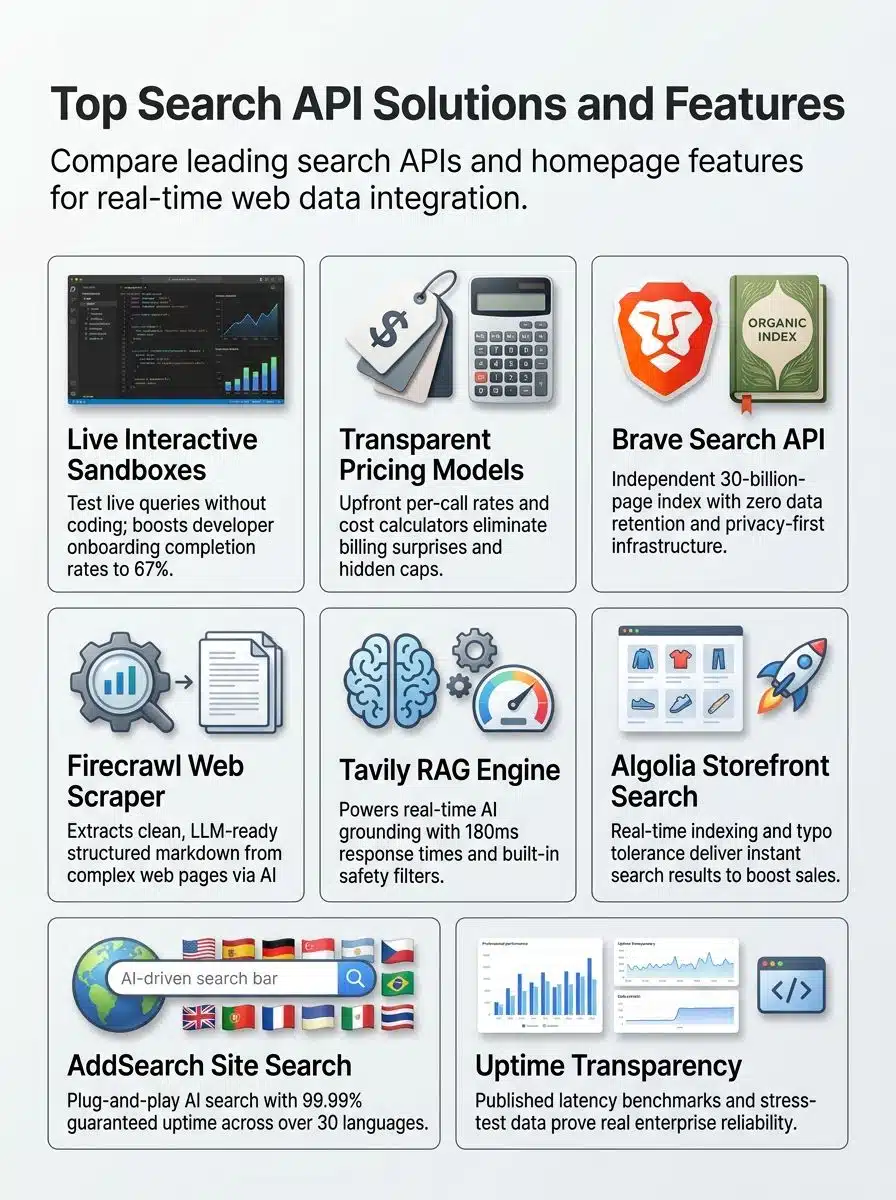
A strong API search provider’s homepage grabs your attention right away with tools that work for developers, not against them. You spot live sandboxes, clear pricing, and code playgrounds that let you test everything before you commit.
Developer-friendly design
Developer-friendly design makes building AI agents and web applications faster. Top API search platforms put Quick Start Guides right at the top of their homepages, so developers jump into code within minutes.
Interactive API references with working code snippets cut down setup time. SDK support for Python, JavaScript, Ruby, and Go means you work in your preferred language.
When you hit a roadblock, real support channels make the difference:
- GitHub repositories with active maintainers
- Stack Overflow forums and technical blogs
- Discord channels where you get answers fast
Companies that use interactive demos report up to 32% improvement in conversions, proving that hands-on testing matters. Interactive playgrounds also push onboarding completion rates to 67%, which means developers finish what they start when they can experiment freely.
Response time, error rate, latency, and throughput form the backbone of developer experience scoring. Sandbox environments let you test search APIs for AI applications instantly, without touching production systems.
One developer trial tracked 120 sessions using an embedded live sandbox to measure real onboarding behavior. The results tell a clear story:

- 78 of 120 sessions completed the Hello-World flow within 9 minutes
- Median time-to-first-success was 5 minutes and 12 seconds
- 29 of those 78 successful sessions clicked through to pricing or signup pages
- 11 sessions hit errors like invalid authentication or malformed JSON, and 9 of them fixed the issue right in the sandbox without leaving the page
Put simply, the live sandbox reduced friction and produced measurable intent to convert in about 37 percent of successful first runs. Hands-on testing environments drive real business outcomes.
The best API search providers measure integration smoothness through these metrics, then publish the results openly. You can see exactly how fast the API handles requests, how often it fails, and whether it scales when demand grows. That openness builds trust and helps your team pick the right search infrastructure for your web data workflows.
Clear and transparent pricing
The best API search companies show their pricing right up front. You see the free tier with 1,000 API calls per month, the Starter Plan at $49.00 monthly for 50,000 calls; the Professional Plan at $299.00 monthly for 500,000 calls, and Enterprise Plans with custom pricing.
Brave Search API runs $5.00 per 1,000 requests, while Serper costs $0.30 per 1,000 calls and DataForSEO runs $0.60 per 1,000 calls. This pay-per-request model lets you pick what fits your budget.
Free tiers typically offer 500 to 5,000 queries each month. Serper offers a one-time credit of 2,500 searches, and Tavily provides 1,000 searches per month.
One heads-up on Brave: according to 2026 pricing trackers including CostBench and AgentDeals, Brave’s free tier changed between August 2025 and February 2026. New users now receive $5 in monthly credits (roughly 1,000 free queries) instead of the older 2,000-query free plan, and only existing subscribers keep the legacy allowance. If you budgeted a project around 2,000 free calls, check your effective limit before you build.
Subscription plans bundle fixed request volumes into a monthly fee, with enterprise pricing starting at $500 to $2,000 monthly. B2B buyers prefer upfront cost disclosures over hidden fees, so top providers list everything clearly on their homepage.
Pricing calculators help you model costs in real-time before you commit to anything. You plug in your expected API usage, and the calculator shows you exactly what you will pay each month.
Here’s a practical scenario: a team needs 1.2 million monthly requests. Look how the numbers shake out under three models:

| Pricing model | Structure | Monthly cost for 1.2M requests |
|---|---|---|
| Pay-per-request | $0.30 per 1,000 calls | $360 |
| Starter subscription + overage | $299 for 500,000 calls, plus 700,000 overage calls at $0.20 per 1,000 | $439 |
| Professional plan | $699 flat for 1.5 million calls | $699 fixed |
Switching from pure pay-per-request to a fixed tier gives teams predictable budgeting and cuts worst-case monthly swings in half. Financial planning gets far more straightforward.
Overage charges apply when plan limits get exceeded, so providers may add soft or hard caps to protect both sides. Rate limits can hide extra costs that force tier upgrades, which is why the best search API providers disclose these limits from the start.
Transparent pricing builds trust with developers and business teams alike. You know what you pay, you know what you get, and no surprises show up on your bill.
Interactive code playgrounds
Live API playgrounds let you test queries and see real-time results without writing a single line of code. You type in a search query, hit enter, and boom, you get instant feedback.
Sandbox environments give you a risk-free space to explore features and test search functionality before making any commitments. The conversion and completion gains we covered above come straight from this kind of hands-on testing.
Postman Collection download links make API testing even faster, so you skip the setup headaches and jump straight into building. These live sandboxes cut your time-to-hello-world down sharply, meaning you go from curious to coding in minutes, not hours.
On a free tier, you get to experiment with structured JSON responses, basic filters, and core search functionality without spending a dime.
A REST API playground changes how you evaluate web search APIs for AI agents. You can test Brave Search API’s privacy-first approach, Firecrawl’s structured web data extraction, or Tavily’s fast RAG pipelines right there in your browser.
This beats reading documentation alone because you see exactly how the search engine results page data flows back to your application. Developers who test drive an API through a live sandbox make faster decisions and feel more confident about their choice.
Top Web Search and AI Grounding APIs
Web search APIs and AI grounding solutions power modern applications with real-time data and semantic search capabilities. These tools connect your AI models directly to live web content, structured data, and reliable information sources that keep your applications sharp and current.
One big shift changed this market recently. According to Microsoft’s official lifecycle announcement and reporting from Search Engine Roundtable, Microsoft fully retired its standalone Bing Search APIs on August 11, 2025, shutting off new deployments across the Bing Search and Bing Custom Search tiers.
Developers who want Bing results now have one path: “Grounding with Bing Search” inside Azure AI Agents. That’s a big reason independent web indexes like Brave, Firecrawl, and Tavily matter so much right now. If you’re building today, you can’t just default to Google and Bing anymore.
Brave Search API: Privacy-first, independent web index
Brave Search API runs its own web index with 30 billion pages and 100 million daily updates. You get real-time web data without relying on Google or Bing.
The API puts privacy first with zero data retention, so your search queries stay private. Organizations like AWS, Shopify, and Chegg trust this search tool for their applications.
New accounts receive $5.00 in free credits monthly, which covers roughly 1,000 queries and makes it affordable to test drive. Pricing runs at $5.00 per 1,000 search requests, so costs stay low as you scale. The platform supports Python, JavaScript, and Go, giving you flexibility across programming languages.
Third-party verification confirms high agent quality and low latency, meaning your searches come back fast.
Need summarized responses instead of raw results? Brave offers an answers plan for $4 per 1,000 requests. This works well for AI applications that need structured data and semantic search capabilities.
Enterprise-grade compliance features protect your data while you build search tools for your web application. The independent web index means you pull live search results from a source that competes directly with major search engines.
Developers praise the straightforward authentication process and quick integration into existing systems. You can start building right away, and the API handles large-scale web scraping tasks with consistent performance across different use cases.
Firecrawl: Structured web data for AI applications
Firecrawl turns messy web pages into clean, structured data that AI systems can actually use. This open-source tool works in four modes:
- Scrape grabs single pages
- Crawl follows internal links
- Map audits entire sites
- Agent lets you ask natural language questions without needing specific URLs

Pricing changed in 2026, so here’s the current picture. Per 2026 pricing breakdowns from CostBench and eesel AI, Firecrawl now offers a free tier with 1,000 credits per month; Hobby at $16 monthly for 5,000 credits; Standard at $83 for 100,000 credits; Growth at $333 for 500,000 credits; and Scale at $599 for 1 million credits.
Two details matter for your budget: as of June 2026, Firecrawl runs a subscription-only model, and unused credits no longer roll over. Plan your monthly volume with that in mind.
The /search endpoint costs just 2 credits per 10 results and pulls full page content back as structured. Testing showed it handled 2 requests per second with a 33.69% success rate, though performance dropped to 26.69% at 10 requests per second.
Since Firecrawl is open-source, you can self-host it on your own infrastructure instead of relying on cloud servers. Real-world testing showed it excels at extracting data from standard websites but struggles with protected sites that block automated access.
The /agent endpoint stands out because it lets you run prompt-driven research without providing URLs first, making it a great fit for RAG pipelines and AI web applications. Initial testing requires no API key, so you can kick the tires before committing money.
The structuredoutput feeds directly into large language models and machine learning systems. If you work on competitive intelligence, data collection, or real-time search applications, this scraping API deserves a spot on your shortlist.
Tavily: Fast RAG pipelines with safety filters
Tavily powers fast RAG pipelines that give AI agents real-time web access. The platform processes thousands of queries per second while maintaining a 99.99% uptime rate, and average response time hits just 180 milliseconds.
The search API delivers current web data in structured formats that reduce misinformation in AI outputs. That matters because AI systems need fresh, accurate information to work well.
Tavily’s built-in safety filters protect your data on three fronts:
- PII leakage prevention keeps personal information from slipping out
- Prompt injection protection stops bad actors from hijacking your system
- Content validation checks what comes back before it reaches your app
Speed and safety go hand in hand here. The platform hit a 29.4% accuracy rate in search accuracy benchmarking, showing it delivers dependable data under pressure.
Your AI applications get access to the public web at scale without giving up security. Tavily compares well with alternatives in data freshness, output format, and production reliability.
Whether you’re building smarter search capabilities or just need dependable data APIs, Tavily’s architecture supports your goals without breaking a sweat.
Homepage Evaluation Metrics for API Providers
When you pick an API search provider, measure what matters most: how fast developers get running, whether they offer live sandboxes for instant testing, and if they tell you straight about uptime and growth capacity.
These metrics separate the API companies that talk a big game from the ones that actually deliver when your application needs them most.
Time-to-Hello-World readiness
Getting your first API call working fast matters more than you might think. Instant sandboxes and interactive code playgrounds slash the time you spend before you see real results.
Top API search companies build live sandbox environments right into their homepages. You can test a basic search or run code samples without any setup delays.
Deprecated APIs, like old versions of EndNote, can waste days of your time, so fresh, well-maintained APIs save you from headaches. The best providers measure their success by how quickly you reach that first working example, not by flashy marketing talk.
Onboarding materials make or break your developer experience. Clear documentation, code samples in multiple languages, and upfront pricing all speed up your journey to a working application.
Some APIs require an approval process that takes several days, so find that out before you start building. Live testing environments let you verify the API returns exactly what you need before you commit to integration.
Benchmarking tools and analytics dashboards help you measure performance from day one. Developers who can test their web application firewalls and check latency in real time make better decisions faster, cutting weeks off typical project timelines.
Scalability and uptime transparency
Top API search companies show you their real numbers, not marketing fluff. Tavily’s published uptime and throughput figures, which we covered earlier, are a good model of what this looks like in practice.
Companies that track server performance openly tell you what to expect. They monitor CPU and memory usage during tests to spot problems before they hurt your application, and stress tests reveal scalability limits by ramping up concurrent requests and watching how throughput holds up.
This openness matters because enterprise buyers want facts, not promises.
Rotating IP addresses keep systems running smoothly when traffic spikes hit hard. Advanced anti-bot and WAF systems from Cloudflare, Akamai, and AWS WAF stop attacks that could crash your service.
Scrapeless Universal Scraping API reaches success rates above 99% for enterprise clients, showing that strong infrastructure actually works. API monitoring tracks availability, performance, and functionality in real time, so you catch issues fast.
Before you pick a web search API or AI grounding solution, ask about uptime metrics and scalability benchmarks. Companies that hide these numbers probably have something to hide.
Final Words
Finding the right API search solution matters more than ever, especially now that Microsoft’s standalone Bing Search APIs are gone. The best API search company’s homepage makes your choice easy. Interactive code playgrounds let you test fast, while clear pricing and honest documentation cut out the guesswork.
Real-time extraction APIs like Brave Search, Firecrawl, and Tavily pull live data from websites in seconds, not days. That gives you fresh competitive intelligence exactly when you need it.
Search platforms like Algolia, AddSearch, and Elastic Swiftype handle in-app searches with speed and reliability that older methods can’t match. Start small with a sandbox environment. Measure your time-to-Hello-World, and scale up as your needs grow.
Your next win in market intelligence, pricing strategy, or lead generation starts with an API provider that shows you exactly what you get. Pick one that publishes its numbers, and watch your data quality improve.

























