Common cybersecurity mistakes small businesses make rarely stems from ignoring security altogether, but rather from leaving critical gaps in daily operations. Organizations often invest in security tools while neglecting fundamental habits—reusing weak passwords, running untested data backups, or leaving administrator privileges unmonitored.
Cybercriminals target small businesses because these operational loopholes offer easy access to sensitive networks. Protecting your company requires fixing core vulnerabilities before an incident occurs.
To help you audit your business, the critical mistakes below are grouped by immediate impact. The first section highlights high-risk vulnerabilities that threaten entire systems, followed by operational gaps in vendor management, employee training, and incident readiness.
Cybersecurity Mistakes Small Businesses Cannot Fix With Software Alone
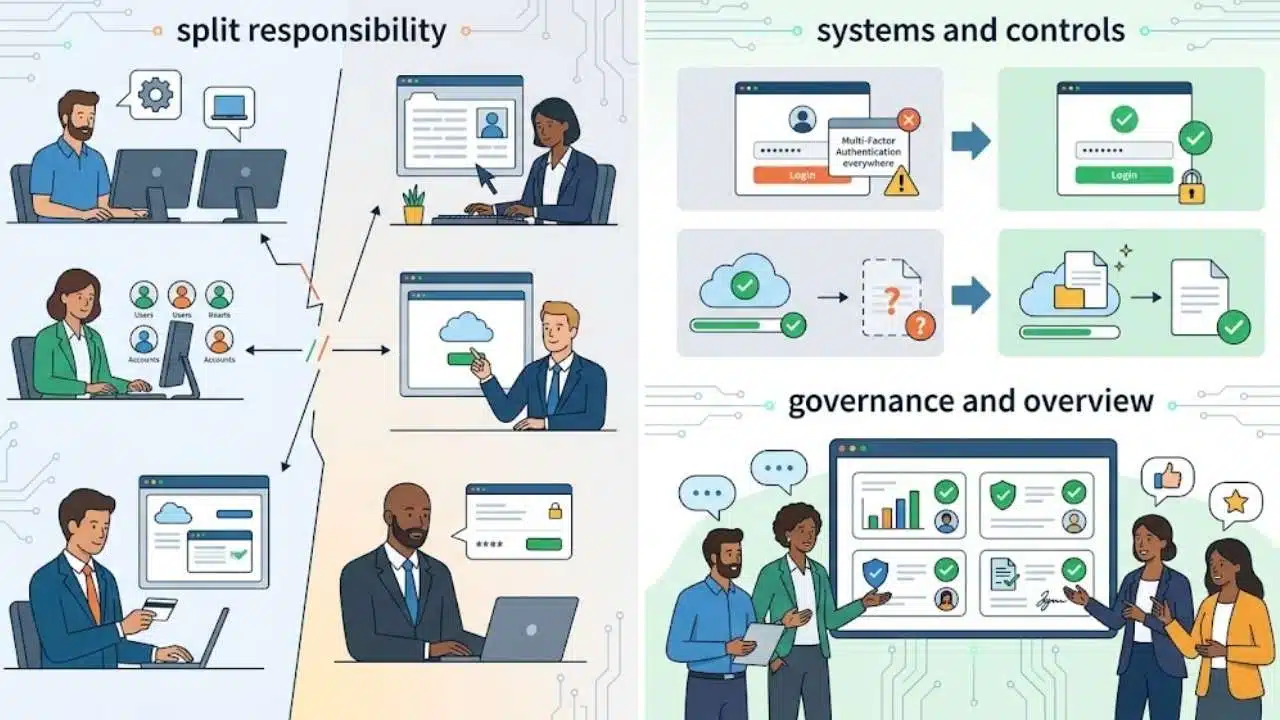
Responsibility is often scattered. An IT provider handles computers, the office manager creates accounts, department heads subscribe to cloud tools, and the owner approves payments. Each person sees only one part of the risk.
Every critical control needs a named owner and evidence that it works. “MFA available” is not the same as MFA enforced. “Backups completed” does not prove that the files can be recovered. A short quarterly review with clear ownership is more valuable than another dashboard nobody checks.
1. Leaving Critical Accounts Without MFA
A password alone should not protect the company’s primary email, domain registrar, payroll platform, password manager or cloud administration console. Control of one of these accounts may allow an intruder to reset other passwords, redirect communications or create additional users.
Phishing-resistant MFA should be the preferred option where it is supported. FIDO-based passkeys and physical security keys are tied to the legitimate service, making them harder to surrender to a fake login page. Authenticator codes and push notifications still improve password-only security, although they do not offer the same phishing resistance.
Protect these accounts first:
- Primary email and identity administrators
- Domain, website hosting and DNS accounts
- Banking, payroll and accounting services
- Remote-access tools
- Cloud infrastructure and storage administrators
- The company password manager
Do not ignore account recovery. Store backup codes securely, register more than one appropriate administrator and remove old authentication methods when someone leaves. Otherwise, a lost phone or departing employee can turn a sensible MFA rollout into an access problem.
2. Reusing Passwords or Sharing Credentials
Password reuse allows a credential exposed through one service to threaten several others. Shared logins cause a different kind of damage: the business cannot reliably identify who used the account, and removing one employee may require changing the password for an entire team.
A business password manager is the most practical answer for many small organizations. It can create unique credentials, control sharing and remove access during offboarding. Applications that support individual accounts should not be operated through one generic team login.
Current NIST guidance for password verifiers sets a 15-character minimum when a password is the only authentication factor and permits a minimum of eight characters when it is used as part of MFA. Those figures are guidance for digital identity systems, not a universal legal rule. The broader advice is more useful for daily operations: allow long passwords, block commonly used or compromised choices and support password managers.
Routine forced password changes are also overrated. Without evidence of compromise, they often produce predictable variations such as changing a month or number. Unique credentials and MFA provide a more meaningful improvement.
3. Updating Only the Obvious Devices
Laptops may update automatically while routers, firewalls, website plugins, browser extensions and old mobile devices remain exposed.
Enable automatic security updates where they are unlikely to interrupt operations. Systems that need testing should have a documented patch schedule and a faster process for urgent fixes. Unsupported hardware and software require a decision: replace them, isolate them or retire them.
The difficult part is knowing what exists. A simple inventory recording the system, owner, version, support status and update method is enough to expose many forgotten products.
4. Giving Too Many People Administrator Access
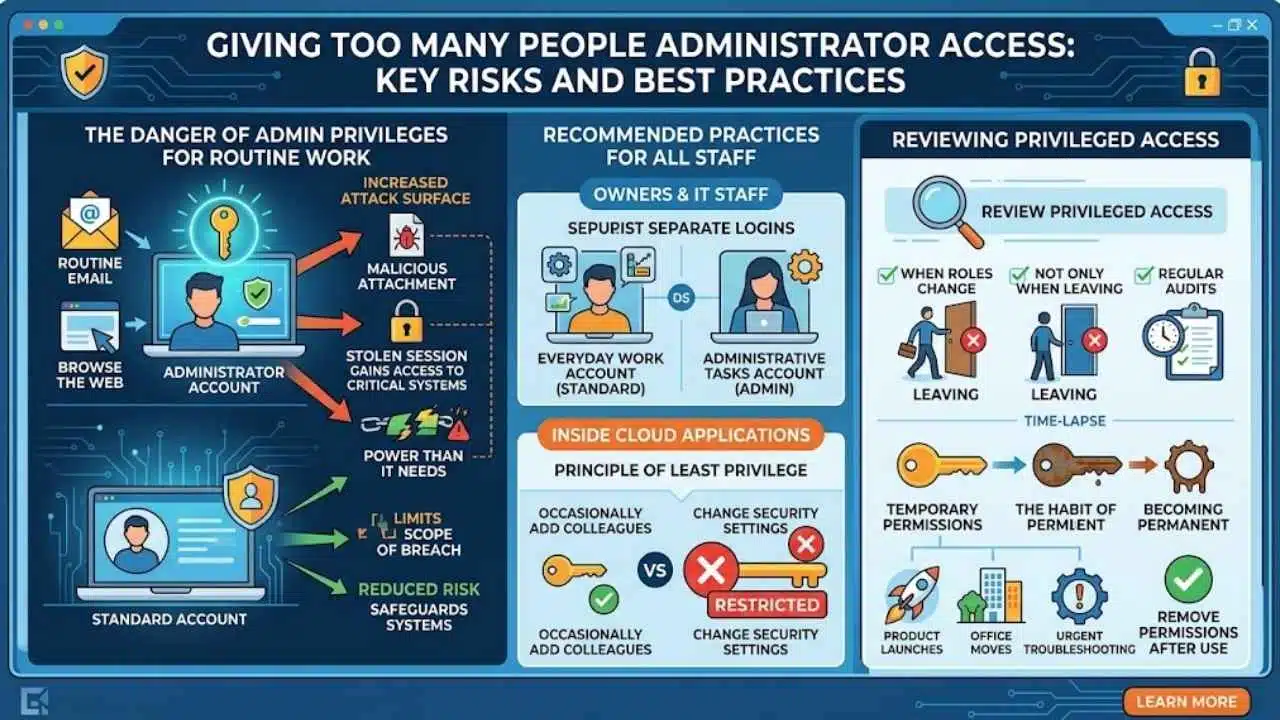
Using an administrator account for routine email and browsing gives a malicious attachment or stolen session more power than it needs.
Owners and IT staff should use standard accounts for everyday work and separate accounts for administrative tasks. The same principle applies inside cloud applications. Someone who occasionally adds colleagues to a project rarely needs authority to change security settings for the entire organization.
Review privileged access when roles change, not only when someone leaves. Temporary permissions have a habit of becoming permanent, especially during product launches, office moves and urgent troubleshooting.
5. Treating Phishing as a Staff Memory Test
Among the cybersecurity mistakes small businesses make, relying on awareness training alone is particularly weak. Employees are expected to spot fake invoices, shared-document alerts and urgent messages while also doing their actual jobs. Attackers only need one rushed decision.
Use training as one layer. Support it with MFA, email filtering, clear payment procedures and an easy reporting process. Employees should be able to flag a suspicious message without worrying that they will be blamed for asking.
Businesses using their own email domain should also configure SPF, DKIM and DMARC correctly. These technologies make it harder for attackers to impersonate that domain. They do not block every phishing message, especially when the message comes from a lookalike or compromised external account.
A bank-detail change deserves independent verification. Call the supplier using a number already on file or confirm through another established channel. Replying to the message that requested the change proves nothing.
6. Keeping Backups Within an Attacker’s Reach
A synchronized cloud folder may copy encrypted files or accidental deletions along with legitimate changes. Version history can help, but synchronization should not be mistaken for a complete recovery plan.
Critical data needs backup copies separated from ordinary user access. Depending on the system, that may involve offline media, an isolated backup account, immutable storage or protected versioned copies. Backup administrators should not simply use the same credentials as everyday network administrators.
Then test the restoration. Recover a representative set of files, confirm that they open and record how long the process takes. A small retailer might test its product records and recent orders; a professional-services firm may prioritize active client files, contracts and financial data.
For an outsourced service, ask who can delete recovery points, how privileged access is protected and how restoration would proceed if the provider’s normal dashboard were unavailable.
7. Forgetting What the Business Uses
Old laptops, abandoned SaaS subscriptions, temporary file-sharing accounts and former marketing domains frequently escape normal reviews.
Maintain an inventory of devices, software, cloud services, important data stores and outside providers. Give each significant entry a business owner and an administrator. Update the record when services are purchased, reassigned or retired.
Unknown tools may also reveal a usability problem. Employees often create workarounds because approved software is difficult or missing a necessary feature. Removing the unauthorized tool without addressing that problem usually invites another workaround.
8. Allowing Personal Devices Without Clear Conditions
Checking work email on a personal phone is one thing. Using a family-shared laptop to manage payroll or cloud administrators is another.
A bring-your-own-device policy should define supported operating systems, update requirements, encryption, screen locking and lost-device reporting. Access should be limited to the services required for the employee’s role, with MFA protecting business accounts.
Device-management software can enforce some rules, but it introduces privacy and support questions. Employees need to understand what the business can monitor or remove before enrollment. For administrators and staff handling highly sensitive information, company-owned equipment is usually the cleaner decision.
9. Assuming Cloud Defaults Are Secure Enough
A cloud provider may secure its infrastructure while the customer remains responsible for accounts, permissions, connected applications and tenant-specific settings.
Review external guests, public sharing links, dormant users, recovery methods and administrator roles. Connected applications deserve attention as well. A forgotten integration may retain access to files or messages long after the original project ends.
Some logging, retention and security features vary by service or subscription tier. Businesses should check what their plan actually includes before assuming an audit trail or recovery option will be available during an incident. Important SaaS data may require a separate export or backup when the provider’s recovery terms do not match the business’s requirements.
10. Giving Vendors Access Without Enough Oversight
Hiring a managed service provider does not transfer responsibility for company data. An IT provider may hold administrative access to email, endpoints, backups and network equipment, making its own controls relevant to the customer.
Before granting access, clarify:
- Which systems and information the provider can reach
- Whether its staff use individual accounts and MFA
- What administrative activity is logged
- How suspected incidents will be reported
- How access will be removed when the relationship ends
- Who owns backup and restoration responsibilities
These questions also apply to accountants, payroll processors, web agencies and other suppliers. Vendor access should be limited to the work being performed and reviewed when that work changes. A contract ending does not automatically disable the accounts, API keys or remote-support tools created during the relationship.
11. Collecting Logs Nobody Reviews
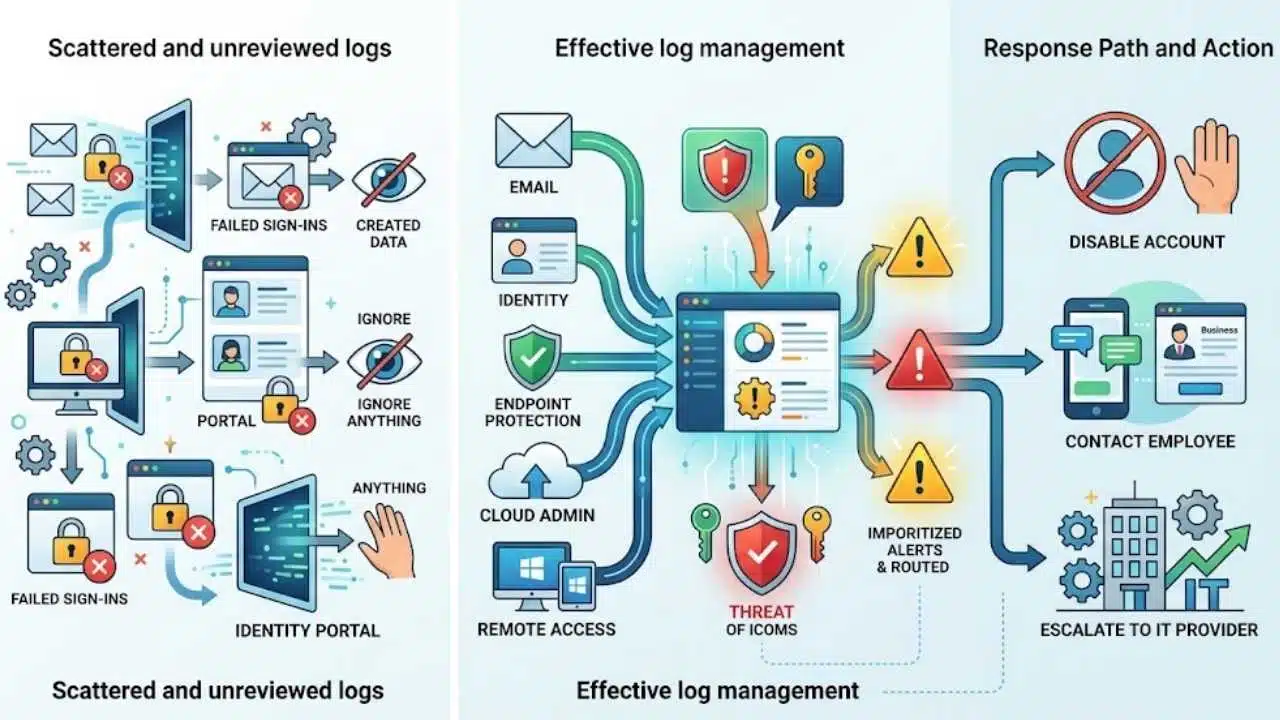
Logs can reveal failed sign-ins, new administrator accounts, unusual permission changes and suspicious remote access. They offer little value when scattered across several portals or examined only after damage has occurred.
Start with email, identity management, endpoint protection, cloud administration and remote access. Enable alerts for events that warrant action and assign someone to receive them.
Be selective. A flood of low-value notifications makes important warnings easier to miss. The business also needs a response path: who can disable the account, contact the employee or escalate the event to the IT provider?
12. Writing the Incident Plan After the Incident
The first hour of a security incident is a poor time to decide who can suspend accounts, contact the insurer or speak to customers.
A small-business response plan does not need to become a large manual. It should identify the decision-maker, technical contacts, critical providers, insurance contacts and relevant legal or privacy advisers. Include a communication method that does not depend entirely on company email.
The plan should cover credible events such as:
- A stolen email or administrator account
- A suspicious payment or bank-detail change
- A lost device containing business information
- Ransomware or inaccessible shared files
- A vendor reporting that its systems were compromised
Staff also need to know who decides whether a device should be disconnected or powered down and how logs or other evidence should be preserved.
Test the plan with a short tabletop exercise. Walk through a realistic incident, check whether the contact details still work and note where decisions stall. Reporting obligations differ by country, industry, contract and type of affected data, so local requirements should be confirmed before an incident occurs.
A Practical Starting Order
A small team should not attempt all 12 fixes at once. Start by protecting email, financial and administrator accounts with appropriate MFA. Remove reused credentials, patch exposed systems and complete one real backup restoration.
Then document critical systems, privileged users and incident contacts. These steps address several cybersecurity mistakes small businesses make without requiring an enterprise security budget.
Set a date to review the work again. Security improves when these checks become part of normal operations rather than a project that disappears after the first busy week.
Final Thoughts
The most damaging cybersecurity mistakes small businesses make usually come from inconsistent routines, unclear ownership and forgotten access. Start by protecting email, financial and administrator accounts with MFA and unique passwords.
Keep systems updated, restrict privileged access and test whether critical backups can actually be restored. Document important devices, cloud services, vendors and incident contacts so gaps do not remain hidden. Regular reviews and clear responsibility will protect the business more effectively than security tools nobody actively manages.