Bad software purchases rarely feel bad on day one. They feel fine for about six weeks. Then the team quietly stops logging in, the invoice keeps arriving, and nobody wants to be the person who picked it.
I have been on both sides of that. I help run ImagineLab.art, an AI creative studio that people pay for. I also buy tools for our own team, and I have wasted money doing it. Watching hundreds of people decide whether to trust our product taught me something I did not expect. The buyers who ended up happy were not the ones who read the most reviews. They were the ones who asked better questions before paying.
So here is my working list. These are the questions to ask before buying a SaaS tool, in the order I actually ask them. Some take two minutes. A few will save you a year of billing.
Four Questions I Ask Before I Even Open the Pricing Page
Most people start at pricing. That is backwards. Pricing pages are built to make you compare plans against each other, not to help you decide whether you need the thing at all.
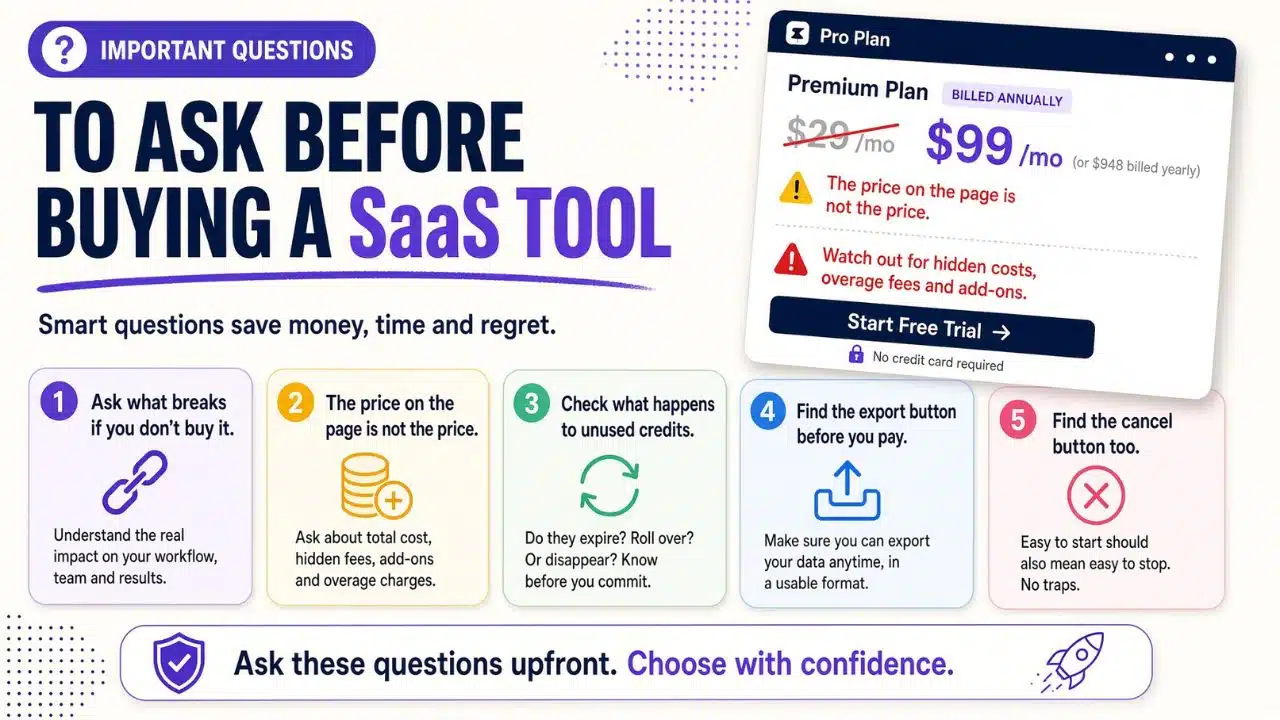
1. What breaks if I do not buy this?
If the honest answer is “nothing, it would just be nicer,” you are shopping, not solving. That is fine. Just know which one you are doing. My best purchases came from a real, specific pain. My worst came from a good demo video.
2. Who on my team will open this every week?
Not who could use it. Who will. Name the person. If you cannot name one, the tool becomes a login nobody remembers.
3. What am I cancelling to pay for this?
I made this rule after realizing we were paying for three tools that did overlapping work. Now, before I buy anything, I write down which subscription it replaces. If nothing gets cancelled, the new tool has to earn its cost on its own.
4. Is this a tool problem or a process problem?
Software will not fix a workflow that nobody agreed on. If your team argues about who approves what, a new dashboard just moves the argument somewhere else.
The Money Questions Where Most of the Damage Happens
Now you can look at pricing. Slowly.
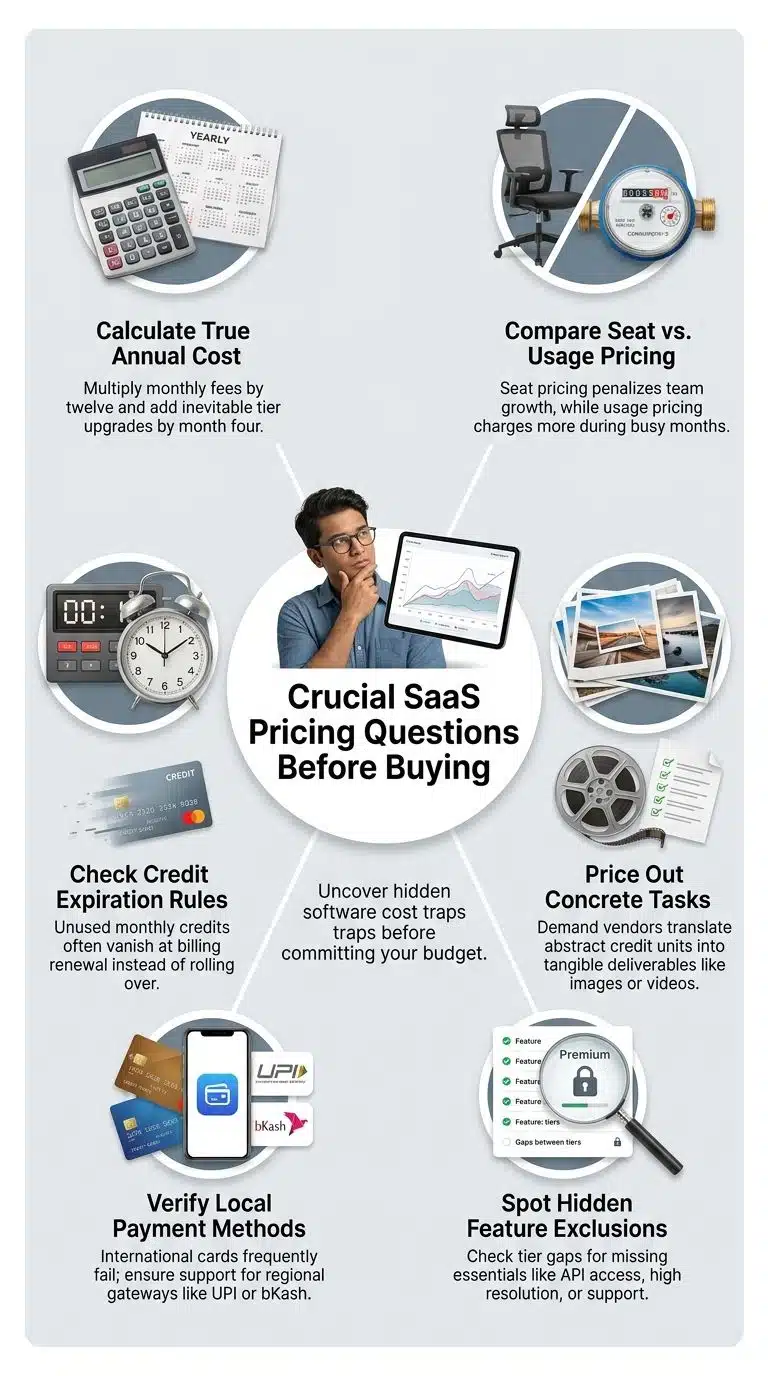
5. What is the real cost after twelve months?
Take the monthly price, multiply by twelve, then add the tier upgrade you will probably need by month four. That number is the real price. The one on the page is the entry price.
6. Am I paying for seats, usage, or both?
Seat pricing punishes you for growing your team. Usage pricing punishes you for a busy month. Both models are fine. You just need to know which one matches how you work.
We picked usage at ImagineLab.art for that reason. People buy Editorialge Digital Tokens and spend them across any lab from one balance, so a designer having a slow month is not paying for a busy one. That choice has a downside too, which brings me to the next question.
7. Do unused credits or minutes expire?
This is the single most common thing buyers forget to check, and it is the question our support inbox gets most often. Many credit-based tools reset your balance at the end of the billing cycle. Whatever you did not use is gone. Some do not expire at all. The difference is huge if your work comes in bursts, which is normal for agencies, freelancers, and anyone tied to client timelines.
Ask it in plain words: if I buy 5,000 credits and use 2,000, what happens on renewal day?
8. Can you show me what one real task costs?
Credits are a made-up currency. They mean nothing until someone translates them into output. When people ask us this, we give numbers instead of adjectives. At the time I am writing this, our Starter plan is $10 a month for 700 tokens, and we estimate that covers around 45 images at 1K or roughly five short videos, depending on the model and settings. Top-ups start at 500 tokens for $7.
You do not have to trust our estimate. But a vendor who cannot give you any estimate is telling you something.
9. Which payment methods do you actually accept?
This sounds small until it is not. A lot of good global tools only take international cards. If you are in Bangladesh, India, Nigeria, or plenty of other places, that is a wall. I have personally given up on buying software because my card kept getting declined at checkout.
It is also why we built bKash and UPI support in from the start alongside PayPal, Stripe, Visa, and Mastercard. Not as a nice extra. As the difference between a sale and a dead trial.
10. What is not included in my plan?
Read the feature table sideways. The column you are buying is less interesting than the rows with a blank space in it. API access, priority support, private generations, higher resolution, and team seats are the usual ones sitting one tier above wherever you are looking.
Testing It Properly and Not Just Poking at It
11. Can I test the exact thing I need, or only a demo version of it?
A trial that only lets you try the easy features is marketing, not a trial. Before you spend an hour on setup, check whether the one job you are buying this for is available to you.
12. What does the finished output actually look like?
This one is for anyone buying creative or export-heavy software. Trials often look great on screen and then hand you a watermarked file, a low-resolution export, or a PDF with someone else’s logo on it. Download something before you decide anything.
We went the other way and exported at full quality with no watermark on every plan, because a watermarked trial tells you nothing about the product. But you should never assume that. Check.
13. How long until I get one useful result?
Not one result. One useful one. If a tool needs three days of configuration before it does anything you can show someone, that cost is real even though it is not on the invoice. Give it a fixed window. An hour, a morning, whatever fits. If you get nothing usable in that window, either the product is wrong for you or the onboarding is broken, and both are good reasons to walk.
Your Data and How You Get It Back
I care about these more than I used to. Getting locked into a tool is a slow, boring disaster that you only notice when you try to leave.
14. Can I export my data, and in what format?
Ask for the format. “Yes, you can export” often means a PDF or a screenshot, which is not the same as your data. CSV, JSON, or a documented API is what you want.
15. Who owns what I create here?
For AI tools this matters a lot, and the answers vary more than people expect. Some platforms restrict commercial use on lower tiers. Some claim broad rights to your outputs. Find the exact clause in the terms, not the friendly summary on the homepage.
16. Where is my data stored, and who inside the company can see it?
If you handle client work, you may need a specific answer here rather than a reassuring one. Ask whether they have documentation you can send to your own client.
The Company Behind the Product
Software is a relationship with a company, not just a file you bought.
17. How do I reach a human, and how quickly do they reply?
Ask for the real number, not the promise. Then test it during your trial by sending a genuine question and timing the reply. On our side, we try to answer support emails within a few hours, and manual payment checks usually take 15 to 30 minutes. Whatever the vendor tells you, treat the trial as your chance to check whether it is true.
18. What happens if payment fails at 11pm on a deadline?
Slightly odd question. Extremely useful answer. Every SaaS product has a failure path, and how a company handles a stuck payment or a failed generation tells you more about them than their feature list does.
19. Who runs this company, and how long has it existed?
You do not need a famous founder. You need evidence that real people are accountable. A named team, a working address, public documentation, and a changelog are all reasonable things to expect. Our team sits across the United States and South Asia, and we publish who does what, because a buyer paying us money is entitled to know who “we” are.
20. How easy is it to cancel?
Save this for last, and answer it before you pay, not after. Find the cancel path in the account settings during your trial. If you cannot find it in two minutes, or if cancelling requires emailing someone and waiting, take that as data.
I would add one more habit here. Put the renewal date in your calendar with a reminder two weeks before. Auto renewal is not a scam, but it does count on you forgetting, and most of us do.
Why I Keep a List of Questions to Ask Before Buying a SAAS Tool
I started keeping this list because of a pattern I noticed from the vendor seat.
When someone came into a sales conversation with sharp questions, the conversation was short and the outcome was good either way. Sometimes they bought. Sometimes they figured out in ten minutes that we were not the right fit, which saved them money and saved us a refund request. The people who did not ask anything were the ones who churned two months later, usually annoyed about something they could have found out on day one.
Good questions are not adversarial. A vendor who is confident in the product will answer all twenty of these without flinching. The reaction you get is itself part of the answer.
What I Would Check First if I Only Have Ten Minutes
You will not always have time for the full list. When I am moving fast, I cut it to five.
- Does the trial let me do the one job I am buying this for?
- What happens to unused credits, minutes, or seats at renewal?
- What is the twelve-month cost, including the upgrade I will probably need?
- Can I export my work in a format I can actually use?
- Where is the cancel button, and can I find it right now?
Those five catch most of the expensive mistakes. The other fifteen catch the annoying ones.
Final Thoughts
None of this makes buying software risk-free. You will still pick a tool that looked right and turned out to be wrong, because everyone does. What this list does is move the discovery earlier, when leaving is cheap.
Keep your own version of these questions to ask before buying a SaaS tool in a note somewhere and paste it into the vendor chat window. It takes almost no effort, and it changes the conversation immediately. Ask the awkward ones first. If a company answers those well, the rest usually goes fine.