Ever ask yourself what is a learning management system and how to choose one when your training files are scattered across folders, shared drives, and inboxes?
That mess is more common than you might think. Capterra’s 2026 Software Buying Trends survey found that 42% of organizations cite training and upskilling as a top business challenge, which helps explain why so many teams start shopping for better training software.
An LMS gives you one place for online training, course management, learning analytics, and skill development. I’ll walk you through the features to check, the vendor questions to ask, and the budget traps that tend to show up late.
What Is a Learning Management System (LMS) and How to Choose One
A learning management system, or LMS, is the hub for your digital learning. It stores courses, delivers online training, tracks completion, and gives managers a clear view of progress, scores, and certifications.
For most businesses, the real win is control. Instead of sending people to a pile of slide decks, videos, and PDFs, you give them one digital classroom with assignments, due dates, reminders, and reporting in one place.
ADL’s guide on choosing an LMS makes a useful point: you should first decide whether you need a classic LMS or something broader. If your team also needs built-in authoring, instructor-led scheduling, or talent workflows, another category may fit better.
- LMS: Best for delivering and tracking courses, assessments, and compliance training.
- Learning content management system, or LCMS: Better if your team builds a large amount of content and needs a shared content repository.
- Learning experience platform, often called an LXP: Better when discovery, career paths, or skills data matter as much as formal courses.
- Training management system: Worth a look if most of your work is live classes, scheduling, and instructor logistics.
One detail buyers often skip is content portability. ADL recommends choosing systems that support SCORM-conformant eLearning, because SCORM is still the standard many legacy online courses use, and that can save you a lot of rework if you switch vendors later.
Key Features of a Learning Management System
A good LMS should help your team build courses quickly, deliver them cleanly, and report results without manual spreadsheet work. These are the features that usually decide whether a learning platform feels helpful six months after launch or starts collecting dust.
Course creation and management
Check how the platform handles the content you already own before you admire the course builder. If your library includes SCORM files, recorded webinars, or lessons built in authoring tools, you want smooth import, clean version control, and simple scheduling.
Look closely at three technical standards because they solve different problems. SCORM packages most legacy eLearning modules, xAPI captures learning activity in more places than the LMS itself, and 1EdTech says LTI 1.3 lets an LMS connect remote tools and content in a standard, more secure way.
| Standard | What It Handles | Why You Should Care |
|---|---|---|
| SCORM | Packaged online courses that launch inside the LMS | It protects older course libraries and reduces migration headaches. |
| xAPI | Learning activity across apps, devices, and off-platform experiences | It gives richer learning analytics, especially for simulations, coaching, and blended learning. |
| LTI 1.3 | Connections to outside tools and content | It saves sign-in friction and shortens integration work with teaching tools and assessment tools. |
If a vendor claims all three, ask them to upload one real SCORM course, launch one external LTI tool, and show xAPI data flowing into reports. A polished demo is nice, but a live test is what reveals the cracks.
Progress tracking and reporting
Reporting should do more than count completions. You want dashboards that show overdue learners, low quiz scores, missed certifications, and skill gaps by role, manager, or location.
xAPI reporting gets more useful when the platform has access to a learning record store, often called an LRS. That matters if you need to track learning that happens outside standard online courses, such as workshop attendance, practice tasks, or app-based coaching.
- Ask for custom filters: Role, department, location, hire date, and manager are the filters most teams miss.
- Ask for audit-ready exports: Compliance teams usually need date stamps, attempt history, completion status, and certificate expiry.
- Ask to see one failed case: The best vendors can show what happens when a learner drops halfway through a course or misses a deadline.
This is where learning analytics becomes practical. If managers can spot a low pass rate in one module and fix that course quickly, your LMS starts improving performance instead of just logging activity.
User-friendly interface
A clean interface is not fluff. If learners cannot find their next course in ten seconds, user engagement drops and support tickets rise.
W3C recommends using WCAG 2.2 for current accessibility work, so ask vendors how their learner experience handles keyboard navigation, captions, color contrast, focus states, and screen readers. That question quickly tells you whether a vendor has done the hard work behind the design.
Also check mobile behavior and account access. ADL’s LMS guide draws a useful line between systems that are merely mobile friendly and those that are truly mobile responsive, while Okta notes that SCIM can automate user provisioning so new hires and role changes do not have to be handled by hand.
Benefits of Using an LMS
The best LMS benefits show up in daily operations. Your team spends less time chasing files, learners know what to do next, and managers stop guessing who finished what.
Centralized training resources
Putting courses, policies, videos, and assessments in one learning platform removes a lot of avoidable confusion. It also gives you one place to update a course when a process changes, instead of hunting through old versions on different drives.
If you train multiple business units, clients, or franchise groups, Moodle Workplace offers a good example of why platform structure matters. Its multi-tenancy model lets separate divisions keep their own users, branding, permissions, reports, programs, and certifications inside one shared system.
That kind of setup helps teams stay organized without building a separate LMS for every audience. It also makes course management cleaner when one core course needs light variations for different groups.
Improved employee performance
People do better when expectations are clear. An LMS makes that easier by assigning the right course to the right learner, showing deadlines, and letting managers follow progress without constant email reminders.
The effect is bigger when learning connects to career growth. In LinkedIn Learning’s 2025 Workplace Learning Report, 84% of employees said learning adds purpose to their work, which is a good reminder that professional development is not just an HR checkbox.
Use your LMS to connect skill development to real roles, promotions, or certifications. Completion rates rise faster when learners can see why the course matters this quarter, not someday.
That is why skills tags, learning paths, and manager dashboards deserve a serious look during vendor evaluation. They turn online education from a one-off event into a repeatable talent development system.
Cost and time efficiency
An LMS can cut admin time, travel, printing, and duplicate course work, but the math only works if you compare total cost instead of the monthly sticker price. This is where many software purchases go sideways.
In its 2026 buying guide, Capterra warns buyers not to focus only on subscription fees while overlooking implementation, training, integrations, and overages. The same guide says usage limits on users, storage, API calls, or features can trigger surprise charges.
- Subscription: Check whether billing is per user, tiered, flat rate, or usage based.
- Implementation: Ask what setup, migration, and onboarding are included in writing.
- Overages: Check how the vendor counts active users, storage, API calls, and course libraries.
- Renewal risk: Ask about price caps, exit terms, data ownership, and export formats before you sign.
TalentLMS gives a simple example of why the counting method matters. Its public plan guide says the free plan supports up to 5 active users and 10 active courses, the Core plan supports up to 100 active users, the Grow plan up to 500, and the Pro plan up to 1,000, so even a small change in headcount can push you into a new tier.
How to Choose the Right LMS for Your Business
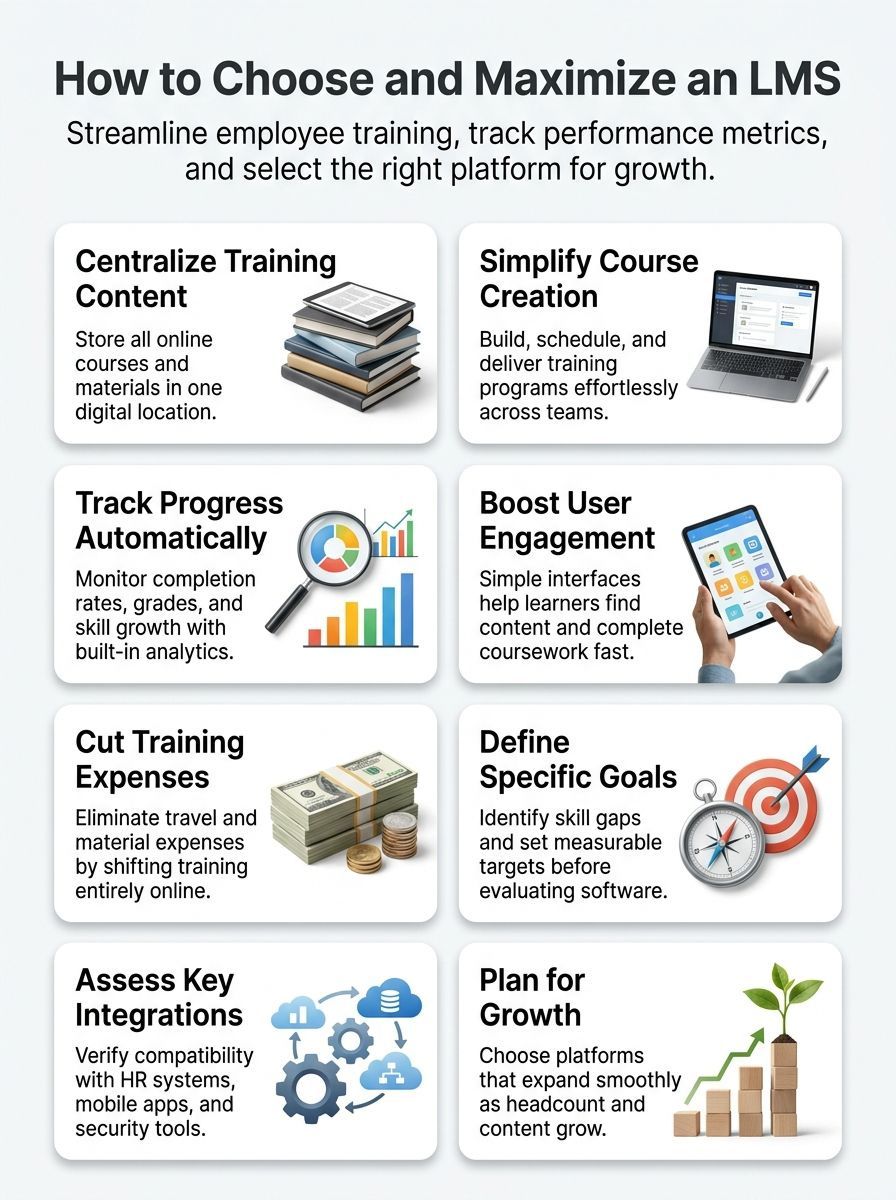
Choosing the right LMS gets easier when you stop shopping by feature count and start shopping by use case. Your goal is to find the learning platform that fits your team, your training workflows, and your budget for the next few years.
Identify your training needs and objectives
Start with the training problems you need to fix first. That might be slow onboarding, weak compliance reporting, scattered online courses, or too much admin time spent on enrollments and reminders.
ADL’s LMS selection guide says the first job is to decide the high-level functionality you need, because some organizations actually need instructor-led training management, authoring, or a broader talent system instead of a standard LMS. That one step can save you from buying the wrong category of software.
- Write down the audience: employees, managers, customers, partners, or students.
- Pick three business outcomes: faster onboarding, higher completion rates, cleaner compliance records, or lower admin time.
- Set a simple 90-day success check: adoption, working integrations, and progress toward your target outcomes.
If you can say, “We need onboarding cut from 18 days to 12,” or “We need mandatory course completion above 85%,” vendor conversations become much clearer. Course management and learning analytics are far easier to judge when you know the score you want the LMS to move.
Evaluate features and integrations
This is the section where smart buyers slow down. A feature list on a sales page is easy to love, but the real question is whether the LMS fits the rest of your stack.
| Feature | What It Does | Why It Matters | What to Test in a Trial |
|---|---|---|---|
| Course creation and management | Builds, imports, edits, and schedules lessons. | Keeps online training current and easy to assign. | Upload one SCORM package, one video course, and one quiz. |
| Progress tracking and reporting | Records completion, grades, time spent, and certificates. | Gives managers usable learning analytics instead of guesswork. | Create a report by manager and export it. |
| User experience | Controls navigation, search, dashboards, and mobile access. | Better usability usually means better user engagement. | Have a first-time learner find and finish one assigned course. |
| Assessments and assignments | Runs quizzes, collects work, and grades results. | Shows whether learning happened, not just whether a course was opened. | Build a quiz with passing rules and a retake limit. |
| Compliance and certification | Tracks mandatory training and renewal dates. | Helps audit teams pull proof quickly. | Issue a certificate and trigger a renewal reminder. |
| Automation | Auto-enrolls users, sends reminders, and updates statuses. | Cuts admin time on repeating tasks. | Auto-assign training to a new hire group. |
| Security and permissions | Limits access and protects learner data. | Reduces risk for HR, compliance, and customer training. | Test role-based access for admin, manager, and learner. |
| Integrations | Connects the LMS to HR, identity, and analytics systems. | Keeps training data tied to real business records. | Run one single sign-on login and one user sync. |
A quick integration audit can save you from months of manual fixes. EdTech describes LTI as the standard way to connect learning tools, and Okta explains that SCIM handles provisioning between your user store and downstream apps, so ask vendors exactly which standards they support and which ones need paid add-ons or custom work.
- Identity: Single sign-on, SAML, and SCIM for clean login and user provisioning.
- HR and people data: Workday, BambooHR, ADP, or your current HRIS.
- Content and live learning: SCORM, xAPI, webinar tools, and calendar sync.
- Analytics: CSV export, scheduled reports, BI connectors, and API access.
For security reviews, ask whether the vendor can share a recent SOC 2 report. The AICPA Trust Services Criteria cover security, availability, processing integrity, confidentiality, and privacy, which gives IT and compliance teams a common checklist instead of vague promises.
A practical tip from instructional designers on Reddit is simple: ask for a sandbox, then upload old and new courses yourself. That hands-on test tells you far more than another polished demo ever will.
Consider scalability and budget
Your LMS should fit the team you have now and the one you expect next year. That means checking user caps, branch or tenant limits, reporting depth, automation rules, and support levels before the contract gets signed.
Some platforms make their scaling model easy to understand. TalentLMS uses user brackets and optional flexible user limits, Docebo says its pricing is shaped by active users and two core tiers called Elevate and Enterprise, and Moodle Workplace is built around multi-tenant administration for divisions, departments, or franchises.
| Platform Type | Named Example | Best Fit | What to Watch |
|---|---|---|---|
| Quick-start SaaS LMS | TalentLMS | Small to midsize teams that want fast setup and clear user tiers. | Check active-user counting, tier jumps, and feature limits by plan. |
| Flexible workplace LMS | Moodle Workplace | Organizations with multiple brands, departments, or client groups. | Ask whether one shared database fits your privacy rules and IT model. |
| Enterprise learning platform | Docebo | Large programs that want deeper scale, add-ons, and AI features. | Check which features sit in Elevate versus Enterprise and how active users are counted. |
| HR-connected learning | Workday Learning | Organizations already using Workday that want learning tied closely to onboarding, talent, and career moves. | Test the learner experience and assessment tools if you also need heavy course management. |
Workday’s current learning datasheet is a good reminder of what this choice can mean in practice. It surfaces learning in the flow of work and inside onboarding, talent, and career workflows, which is great if your main goal is tight HR alignment rather than a standalone digital classroom.
Final Thoughts
What is a learning management system and how to choose one comes down to a simple test: pick the learning platform that makes online training easier to run, easier to measure, and easier for people to use.
Start with your real training goals, test live content in a sandbox, and price the full cost before you sign. Do that, and your LMS can turn course management, skill development, and professional development into work your team actually finishes.
FAQs about Learning Management System And How To Choose One
1. What is a learning management system?
A learning management system, or LMS, is software that hosts and delivers e-learning and training, it tracks learners, stores courses, and shows progress.
2. Why do teams use an LMS?
Teams use an LMS to centralize training, save time, and scale learning across groups.
3. How do I choose an LMS?
Match the LMS to your goals, pick one with a clear user experience and the right features for your training.
Check integrations with your tools, review reporting and analytics, and test with real users before you buy.
4. What features should I look for?
Look for easy course creation, mobile access, strong reporting, security, and good vendor support, so learners can train anywhere, and managers can measure results.