
Computer Vision and How It Works goes far beyond pointing a camera and getting a clean answer. The real hurdle is context. While your brain instantly registers a rainy street, pedestrians, and traffic lights, a computer only sees a massive grid of raw pixel numbers.
It has to decode those numeric patterns, match them to physical objects, and verify its accuracy before taking action.
At its core, the tech merges image processing, machine learning, and software engineering to turn chaotic visuals into clean data. But no single model does it all. Tagging an image, tracing object outlines, pulling text, or tracking a moving vehicle frame-by-frame each demand vastly different architectures. A algorithm trained to spot a delivery truck won’t magically know its speed, owner, or if the driver is being safe.
Getting a quick prediction takes milliseconds; building a system reliable enough to trust in the real world takes months.
What Computer Vision Actually Produces
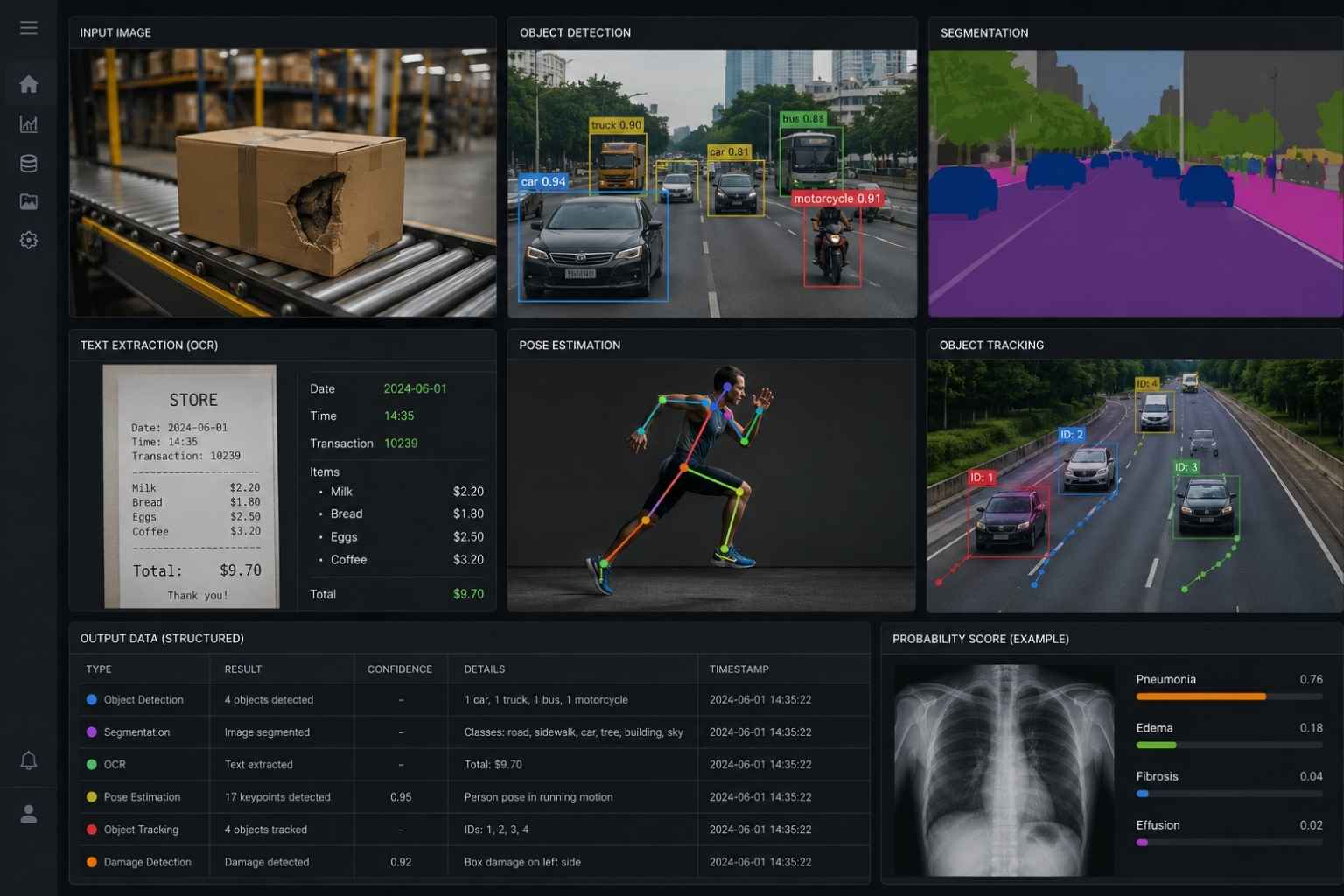
At its core, computer vision translates visual noise into structured database records that other software applications can process.
Depending on the setup, that output might be:
- A simple tag (like “damaged package”)
- A probability score on a medical scan
- Bounding box coordinates around vehicles in a lane
- A pixel-by-pixel mask separating the road from the sidewalk
- Extracted text fields from a receipt
- Skeletal joint coordinates for motion tracking
- An estimated trajectory path across a sequence of video frames
Don’t let the word “vision” fool you—these models don’t “see” or understand context the way humans do. A model can spot a spill on a warehouse floor, but it has no idea why it happened, who caused it, or that someone might slip. It simply returns the exact mathematical outputs it was trained to produce.
Take facial recognition as a case in point. A face detection system can locate human faces in a crowd and mark landmark features like eyes and noses without having any clue who those people are. Matching those faces against an identity database is a separate, far higher-stakes problem with distinct privacy and accuracy hurdles.
Projects usually fail when product managers write vague requirements like “analyze this image.” You have to get hyper-specific: what exact data point do you need out of this frame?
Computer Vision and How It Works: From Image to Decision
While edge cases abound, almost every production vision system follows a predictable multi-stage pipeline.
The Camera or File Defines the Starting Point
Visual data enters the pipeline from a variety of hardware sources—smartphones, flatbed scanners, industrial factory cameras, drones, security feeds, or satellite passes.
A standard digital photo is stored as a 2D grid of pixels containing numerical intensity values for red, green, and blue (RGB) color channels. Video simply adds a time dimension by running these frames in sequence. Advanced systems often combine this pixel data with depth maps, thermal imaging, radar, or motion sensors.
Your capture environment shapes the entire engineering effort.
A fixed camera positioned over an illuminated conveyor belt gives you controlled lighting, fixed angles, and consistent object distances. Conversely, a consumer-facing mobile app has to deal with dirty lenses, weird angles, motion blur, harsh shadows, and low-end camera sensors.
If you train a model exclusively on studio product catalog photos, don’t be surprised when it falls apart on grainy, dimly lit uploads from actual users.
Preparation Can Help (or Quietly Ruin) Your Data
Models expect inputs in exact tensor shapes, color spaces, and value ranges. Before feeding an image to a network, you usually need to resize, crop, convert, or normalize it.
During training, engineers use data augmentation—intentionally altering images by tweaking brightness, rotating frames, or adding noise—so the model learns not to rely on a single pristine layout.
The trick is keeping the underlying labels synced with the transformed images. If you crop an image during augmentation without updating your coordinate masks, you end up training your model to draw bounding boxes on thin air.
[ Raw Image Input ] ──> [ Preprocessing & Augmentation ] ──> [ Feature Extraction (CNN/ViT) ] ──> [ Task Output & Thresholding ]
More augmentation isn’t always better, either. Random cropping can cut out the very defect you’re trying to catch, while horizontal flips ruin asymmetrical medical scans, road signs, and text orientation.
The Model Extracts Visual Patterns
In the early days of computer vision, developers had to manually code mathematical rules to spot edges, corners, color thresholds, and geometric shapes.
Those classic techniques aren’t obsolete. If you’re building a simple quality check on a tightly controlled assembly line, a basic color threshold or edge counter is faster, cheaper, and far easier to maintain than dropping an heavy neural network into production.
For complex environments, deep learning models learn these features directly from labeled examples.
- Convolutional Neural Networks (CNNs): Use small mathematical filters that slide across the image pixel grid. The shallow early layers pick up basic lines, gradients, and textures; deeper layers group those basic shapes into recognizable components like tires, door handles, or human faces.
- Vision Transformers (ViTs): Break the image into a grid of non-overlapping patches and use self-attention mechanisms to weigh relationships across the entire frame at once.
Architecture matters, but it shouldn’t be your first decision. Real-world constraints like inferencing latency, hardware memory, edge deployment requirements, and dataset size almost always dictate your choices long before benchmark leaderboards do.
The Output Depends on the Task
Once the network processes the visual features, it converts them into a task-specific prediction. Classifiers spit out category scores, object detectors output bounding box coordinates, and segmentation models assign labels down to the individual pixel.
Pay close attention to confidence scores. A score of 0.95 isn’t a ironclad guarantee that the model is right 95% of the time—it simply reflects the model’s internal mathematical weighting, which can be wildly uncalibrated when exposed to real-world data it hasn’t seen before.
Setting decision thresholds determines how your product behaves in practice. On a manufacturing line, setting a high confidence threshold for “passing” parts means more questionable items get flagged for human review, reducing defect leaks at the cost of higher manual inspection work.
Another System Acts on the Result
A model’s raw prediction is rarely the end product. The output usually feeds directly into an downstream application:
- OCR text populates fields in an ERP or accounting suite.
- Bounding boxes trigger automated robotic arms in a warehouse.
- Anomaly scores in medical software highlight suspicious regions on a scan for a radiologist to review.
This downstream integration is where model errors carry real operational costs. A miscategorized photo on a social app is an inconvenience; a false negative on an industrial safety feed or a flawed identity match can derail lives, stall supply chains, or cause physical harm.
The Main Computer Vision Tasks Are Not Interchangeable
Choosing the simplest task that solves your problem cuts down annotation costs, lowers compute requirements, and reduces potential points of failure.
| Task Type | Primary Function | Ideal Use Case | Trade-offs |
| Image Classification | Assigns one or more global labels to an entire image | Sorting document types, broad image tagging | Cannot tell you where an object is located or handle multiple overlapping items well. |
| Object Detection | Identifies objects and draws bounding boxes around them | Autonomous driving, inventory tracking on store shelves | Requires more expensive bounding-box annotation; boxes include background pixels. |
| Semantic / Instance Segmentation | Outlines precise object boundaries at the pixel level | Medical tumor measurement, land-use mapping | Extremely labor-intensive to annotate; often overkill for basic business logic. |
| OCR & Document Processing | Converts visual text and document layouts into structured strings | Receipt processing, invoice automation, ID verification | Struggles with poor lighting, handwriting, crumpled paper, and non-standard layouts. |
Pose, Keypoints, Tracking, and Optical Flow
When moving from still images to video, new technical requirements emerge:
- Keypoint Estimation: Maps specific structural landmarks (like human elbows, knees, or mechanical joints).
- Object Tracking: Preserves an object’s unique ID across sequential video frames as it moves.
- Optical Flow: Calculates the motion vectors of pixels between consecutive frames.
Video introduces temporal edge cases that static images avoid. Objects occlude each other, walk behind pillars, change orientation, or move into shadow. A fast detector that performs brilliantly on still benchmark images can easily freeze or jitter when forced to track objects in a live, 60 FPS video stream.
How a Computer Vision Model Learns
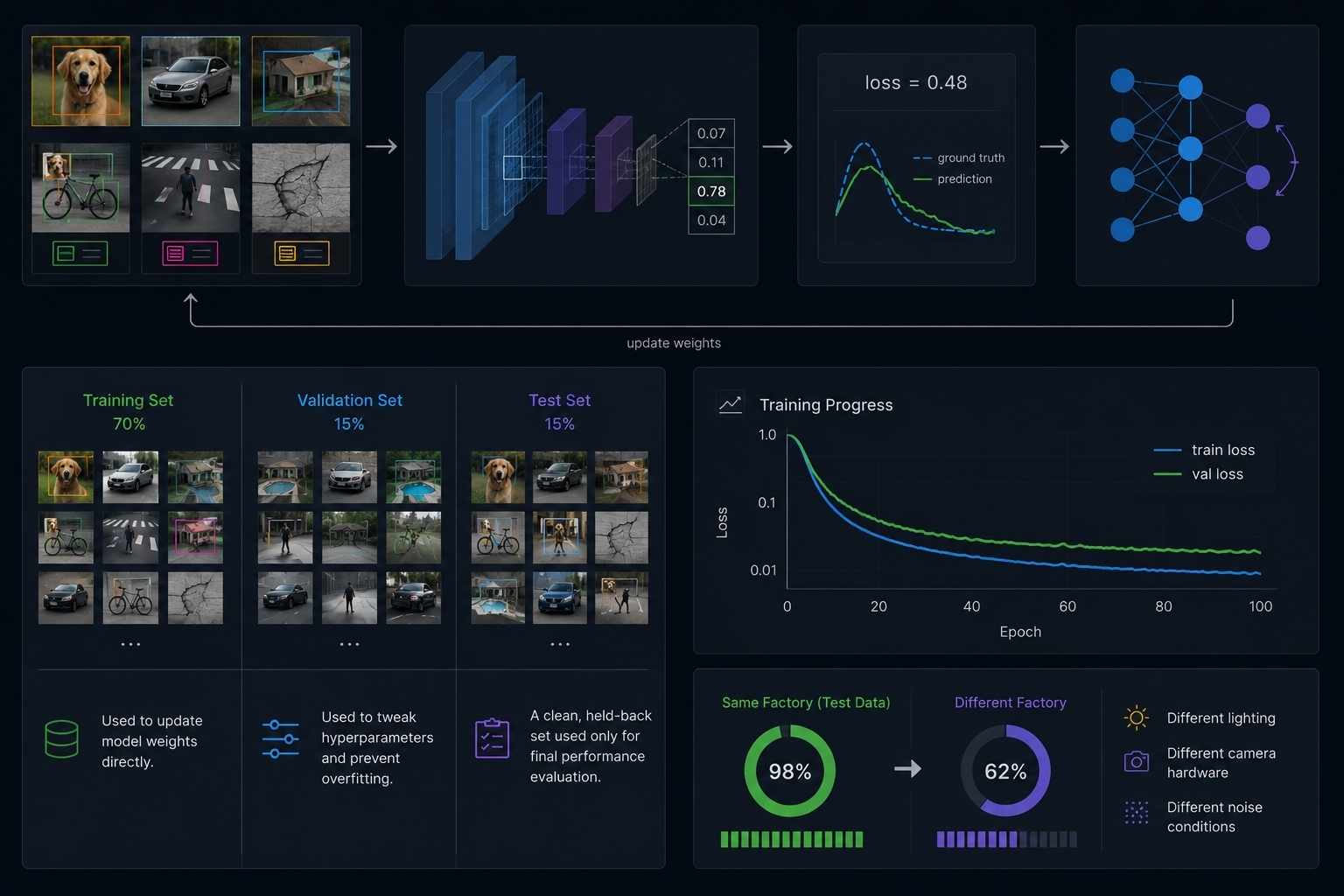
Supervised learning requires pairing input images with ground-truth annotations.
As annotation requirements get richer, human error increases. Two annotators will rarely draw the exact same pixel-perfect mask around a faint, blurry crack in a concrete wall. Measuring and auditing label consistency across your annotation team is mandatory if you want stable models.
[ Input Images + Labels ] ──> [ Forward Pass (Prediction) ] ──> [ Loss Function ] ──> [ Backpropagation (Model Adjustments) ]
During training, the model generates a prediction, measures its error against the ground truth using a loss function, and updates its internal weights through backpropagation.
To evaluate real performance, split your dataset carefully:
- Training Set: Used to update model weights directly.
- Validation Set: Used to tweak hyperparameters and prevent overfitting during development.
- Test Set: A clean, held-back set used only for final performance evaluation.
Pretrained backbones and self-supervised models reduce the sheer volume of custom labeling you need, but they don’t eliminate the need for rigorous testing. A model that achieves 98% accuracy on test data collected in one factory may crumble when installed in a facility with different lighting and camera hardware.
Where Computer Vision Is Most Useful
You’ll see computer vision making its biggest impact in areas where split-second decisions save lives or money—like self-driving cars, factory floors, and medical scanning. Instead of relying on human eyes to spot subtle flaws or hazards, this technology does the heavy lifting. The result is fewer costly mistakes, faster workflows, and a much safer environment overall.
Controlled Industrial Inspection
Manufacturing remains the gold standard for computer vision because you can control the physical environment. By fixing lighting, camera distance, and background contrast, systems reliably catch missing parts, packaging flaws, and surface scratches.
However, even factory systems need exposure to subtle edge cases—like dust specks, light reflections, and minor cosmetic variances—to prevent false alarms.
Medical Imaging
Vision models assist clinicians by highlighting potential anomalies in X-rays, CT scans, and MRIs, as well as automating organ volume measurements.
Because patient safety is on the line, these models act as decision-support tools rather than autonomous diagnostic engines. Regulators like the FDA mandate strict clinical trial performance, clear operational workflows, and continuous monitoring against data drift across different patient demographics.
Document Processing
Modern OCR goes far beyond basic character recognition. Modern document AI parses dense forms, extracts key-value pairs from receipts, and indexes unstructured archives.
When documents are wrinkled, dimly lit, or handwritten, error rates rise quickly. Building a human-in-the-loop review pipeline ensures that financial or legal workflows aren’t disrupted by a misread digit.
Transport and Autonomous Systems
From lane-departure warnings to fully autonomous vehicles, vision systems scan roads for signs, pedestrians, lane markers, and moving obstacles.
Operating in real time leaves zero margin for latency. A model processing archived dashcam footage can take two seconds per frame, but a vehicle traveling at 65 mph needs deterministic, millisecond-level processing across all weather conditions and lighting shifts.
Satellite and Earth Observation
Orbital imagery contains vast datasets that humans couldn’t possibly review manually. Machine learning models analyze these feeds to map land cover, measure deforestation, assess flood damage, and monitor agricultural yields.
Organizations like NASA utilize self-supervised visual search tools to organize massive Earth-observation archives, helping researchers discover visually similar geographical features across decades of imagery.
Why Computer Vision Systems Fail in Production
Most field failures aren’t caused by bad neural network code—they’re caused by data distribution shifts between your training set and real-world deployment conditions.
+———————————————————————–+
| COMMON FAILURE MODES |
+———————————–+———————————–+
| Environment Shifts | Shortcut Learning |
| Sudden lighting changes | Model relies on background |
| Camera angle / lens drift | cues (e.g., table color) |
| Motion blur and dirty lenses | Occluded or cropped objects |
+———————————–+———————————–+
Models are notoriously lazy learners. If every damaged item in your training set happens to be photographed on a blue worktable, the network might learn to associate the color blue with product damage. When you deploy that model to a production line with silver tables, accuracy drops instantly.
Biases in biometric systems present severe operational risks as well. Industry benchmarks from NIST demonstrate that facial recognition error rates fluctuate depending on lighting, demographic profiles, camera resolution, and matching thresholds. Relying on vendor marketing benchmarks without validating hardware and environmental performance leads to costly deployment failures.
What Teams Should Decide Before Building
A successful computer vision deployment starts with business logic and risk assessment, not model selection.
Before writing code or training networks, answer these operational questions:
- What exact output format does the downstream application require?
- What are the physical constraints of the deployment hardware and camera setup?
- What is the real-world cost of a false positive vs. a false negative?
- How does the system behave when model confidence drops below your threshold?
- Is there a clear UI for human reviewers to inspect and override edge-case predictions?
- What operational metrics will trigger an automatic model rollback or retraining cycle?
Testing shouldn’t be limited to clean, curated inputs. Test against low-end mobile devices, poor lighting, unusual angles, obstructed objects, and real-world environmental noise.
Once deployed, continuous monitoring is mandatory. If a factory upgrades its overhead lights, a vendor updates an app interface, or a warehouse updates its packaging, your model’s accuracy will quietly degrade while the software continues to report successful inferences.
Final Thoughts
Building dependable computer vision systems requires looking beyond raw model accuracy metrics.
A production-ready application relies on well-defined tasks, consistent label quality, realistic field testing, sensible confidence thresholds, and robust fallback workflows when predictions are uncertain. Classification, detection, segmentation, OCR, and tracking address fundamentally different problems; jumping straight to the most complex architecture rarely saves a poorly scoped project.
Start by scoping the smallest visual decision that yields tangible business value. Validate it using the exact hardware, lighting conditions, and messy inputs your software will encounter in the wild. That focus is what separates an impressive tech demo from a resilient production system.