A tool does not automate work simply because it can summarize an email or write a paragraph. Real automation requires action. The software needs to recognize that something happened, decide what should follow, and then update a system, move data, send a message, create a record, run a process, or route the work to the right person.
That is the standard I use when looking at AI task automation tools. The useful ones do not stop at generating suggestions. They can take part in the workflow.
A basic automation may copy a form submission into a spreadsheet. A more capable system can read the submission, decide whether the lead fits the company’s criteria, enrich the contact, update the CRM, notify the correct salesperson, and prepare a personalized follow-up. The AI does not need to control every step. In fact, it probably should not.
Predictable calculations, database updates, permissions, and high-impact actions are often safer inside fixed workflow logic. AI is more valuable where the input is messy, the categories are unclear, or the process requires interpretation.
In this guide, I’ll discuss about the best 12 AI task automation tools and what I think about using those tools.
What Is an AI Task Automation Tool?
An AI task automation tool is software that combines workflow execution with artificial intelligence to complete repetitive work. It may interpret unstructured information, make routing decisions, extract data, generate content, use connected applications, or choose which approved action should happen next.
The key word is complete. A chatbot that recommends what you should do is useful, but it has not automated the task. An automation platform becomes more valuable when it can carry the decision into the tools where the work actually happens.
For example:
Incoming support email → detect the issue → check the customer record → route the ticket → draft a response → request approval if a refund is needed
That workflow contains both deterministic automation and AI-assisted judgment.
12 Best AI Task Automation Tools
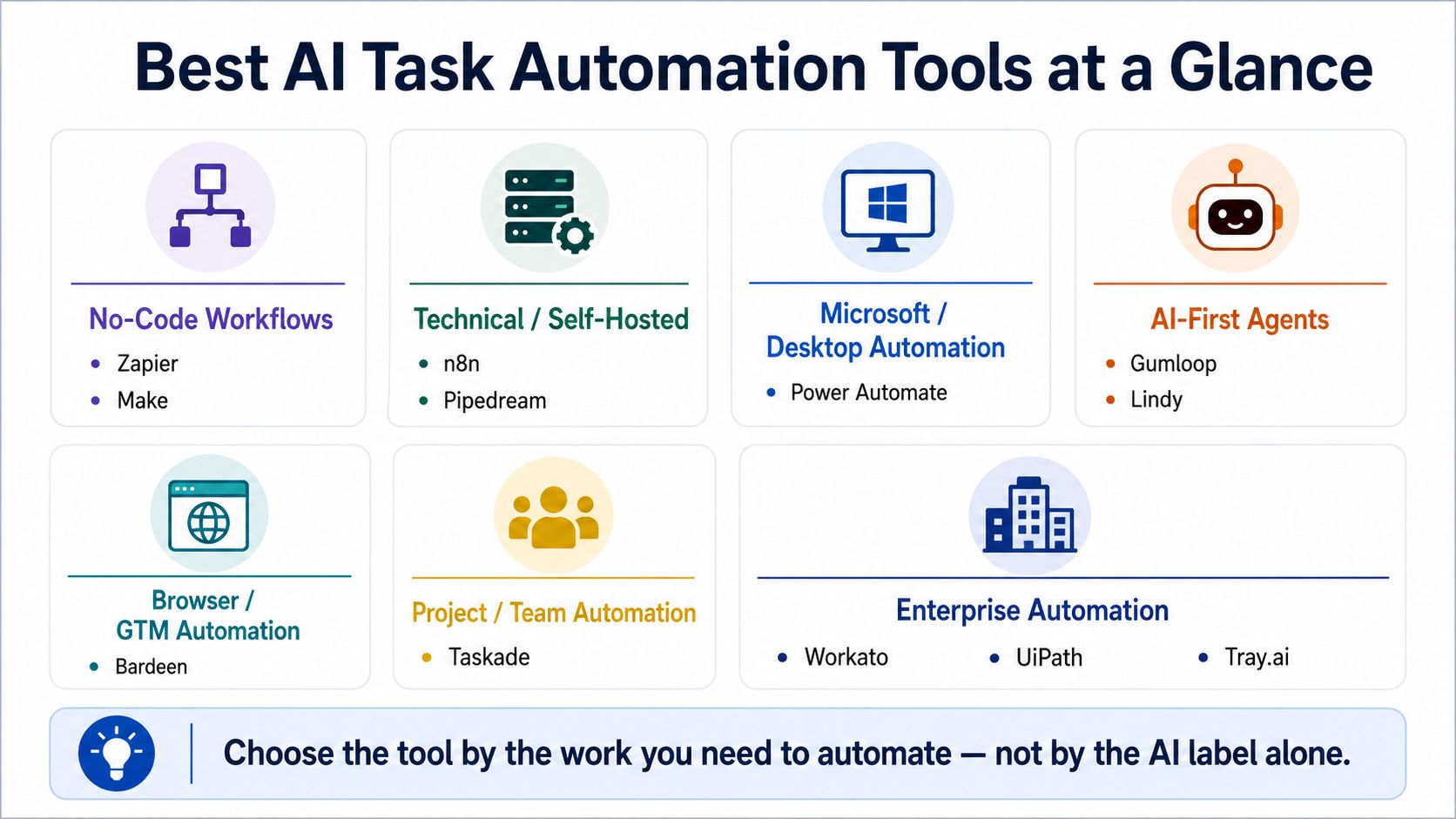
The best AI task automation tools do more than generate text or suggest what to do next. They can trigger workflows, interpret unstructured information, move data between systems, update records, control browser or desktop actions, and route decisions to people when approval is required.
The 12 tools below cover no-code automation, AI agents, developer platforms, browser workflows, RPA, and enterprise orchestration, so the right choice depends on the type of work you need to automate and how much technical control you want.
1. Zapier
Zapier remains the easiest recommendation for a business that wants to connect common cloud applications without hiring an automation engineer first.
Its basic model is familiar: When this happens, perform these actions.
A new form entry can create a CRM contact, assign an owner, generate a summary, post a Slack alert, and schedule a follow-up. The platform now combines traditional Zaps with AI workflows, agents, chatbots, forms, tables, MCP tools, and more than 9,000 app integrations.
That reach is its strongest advantage. Zapier is often the quickest way to connect the tools already sitting in a company’s sales, marketing, support, and operations stack.
Practical uses include:
- Qualifying and routing leads
- Sorting inbound emails
- Creating CRM records
- Summarizing documents
- Sending approval requests
- Updating project tools
- Repurposing content
- Connecting AI models to business applications
Zapier’s agents can also take actions across connected apps rather than remaining inside a chat window. The company has increasingly positioned the platform as an orchestration layer connecting AI tools, agents, and workflows across the business stack.
The limitation is not that Zapier lacks features. It is that broad convenience can hide operational complexity.
A workflow containing several branches, repeated AI calls, filters, and app actions may consume more tasks than expected. It can also become difficult to understand when dozens of Zaps update the same records independently.
My verdict: Start with Zapier when accessibility and integration breadth matter most. Move toward Make, n8n, or a developer platform when the process needs deeper control, unusual logic, or more transparent data handling.
2. Make
Make is easier to understand when you see it running. Its visual canvas shows data moving through modules, filters, routers, iterators, transformations, and error paths. That makes it well suited to processes that are too complicated for a short trigger-and-action list but still need to remain visible to an operations team.
A content workflow might:
- Receive a document.
- Extract text and metadata.
- Classify the content.
- Route it by topic.
- Create different outputs for several channels.
- Send unclear cases for review.
- Log the result in a database.
Make introduced its next-generation AI Agents in February 2026. The agents live inside the same scenario builder used for regular workflows, allowing teams to see decisions, tool calls, inputs, outputs, and fixed automation logic in one place. Make says the agents can work across more than 3,000 applications and can process files such as documents, images, and spreadsheets.
That visibility is valuable. An AI agent should not become a mysterious box placed between two business systems.
Make is particularly strong for:
- Multi-branch marketing workflows
- Data transformation
- Document and file processing
- Content operations
- Ecommerce processes
- Lead enrichment
- AI-assisted routing
- High-volume scenarios
The canvas can still become a problem. A large scenario filled with crossing routes, duplicated modules, and nested error handlers is not automatically easier to maintain because it is visual.
My verdict: Make is one of the best choices for operations-minded users who want more control than Zapier offers without moving fully into developer infrastructure.
3. n8n
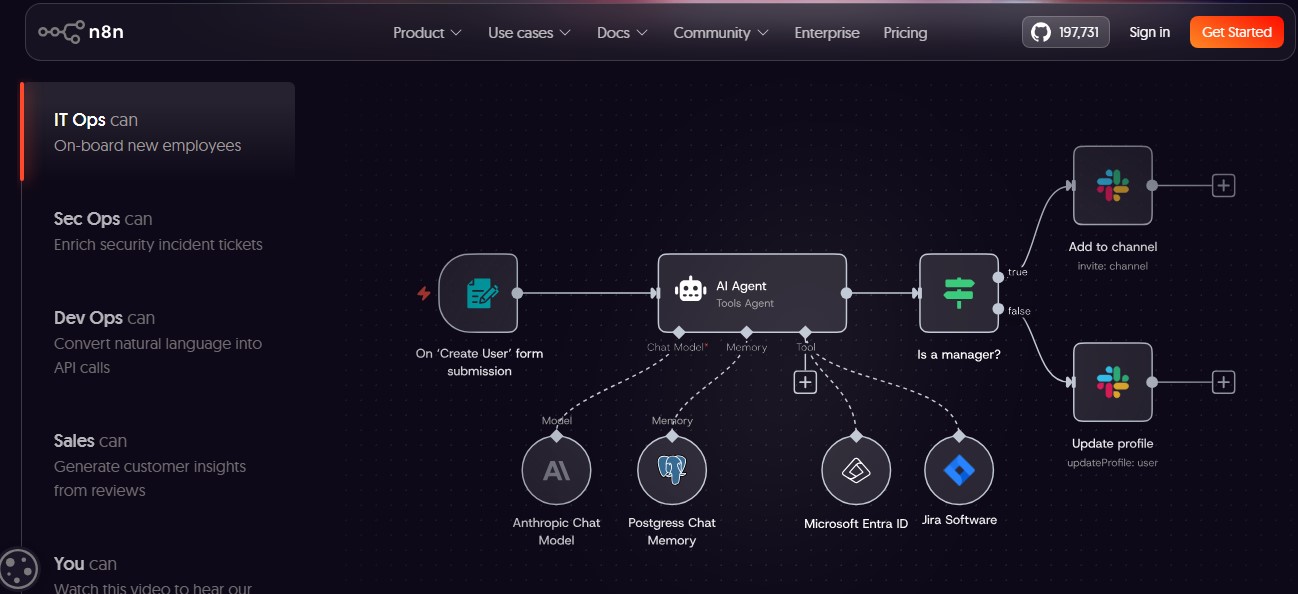
n8n is what I would look at when a team wants a visual builder but refuses to give up code, infrastructure control, or direct access to APIs.
The platform combines workflows, AI agents, human approvals, code steps, webhooks, databases, model integrations, and self-hosting. Its current AI tools support agent workflows, production controls, and explicit logic around inputs and outcomes.
A developer can start with drag-and-drop nodes, then add JavaScript, Python, custom API requests, expressions, credentials, queues, or community integrations where necessary.
That flexibility supports:
- Internal automation systems
- Custom API orchestration
- Private AI workflows
- Retrieval-augmented generation
- Support and sales agents
- Data pipelines
- Self-hosted automation
- Complex webhook processes
- Model evaluation and monitoring
Self-hosting is one of the main reasons technical teams choose n8n. It offers more control over where workflow data and credentials live, although third-party AI models may still receive information depending on how the flow is configured.
That control is not free. Someone must handle deployment, security, updates, uptime, backups, scaling, monitoring, and failed executions. A self-hosted platform is not automatically private or secure merely because it runs on your server.
n8n also exposes a common automation truth: flexibility shifts work rather than eliminating it. The platform removes some development effort but expects the user to understand APIs, data structures, authentication, and failure handling.
My verdict: n8n is the strongest option here for technical operators who find conventional no-code platforms too restrictive and are prepared to own more of the system.
4. Microsoft Power Automate
Power Automate becomes difficult to ignore inside an organization already built around Outlook, Teams, SharePoint, Excel, Dynamics, Dataverse, and Windows. Its advantage is not simply tighter Microsoft integrations.
Power Automate combines cloud workflows with robotic process automation, task and process mining, AI Builder, Copilot-assisted creation, and desktop flows that can interact with software and websites. Microsoft positions it as a platform for automating cloud systems, desktop applications, websites, and business processes through digital and robotic automation.
That makes it useful for work such as:
- Routing SharePoint approvals
- Processing Outlook attachments
- Updating Excel or Dataverse records
- Extracting data from invoices
- Automating Teams notifications
- Operating repetitive Windows interfaces
- Connecting modern cloud services to older software
- Running attended or unattended desktop processes
The desktop capability matters because not every business process has a clean API. Some companies still rely on software that expects a person to click through menus, copy data, and submit forms.
Power Automate can reproduce parts of that activity. The cost is complexity. Microsoft environments may involve premium connectors, separate desktop automation requirements, AI capacity, managed environments, user licenses, and governance decisions. A simple flow is approachable; an enterprise automation program is not.
My verdict: Power Automate is the natural fit for Microsoft-heavy organizations, particularly when cloud workflows and desktop applications must be handled by the same automation strategy.
5. Gumloop
Gumloop feels different from platforms that added AI after years of conventional workflow automation.
AI models, agents, unstructured data, and natural-language building sit near the center of the product. Teams can connect models, integrations, and workflow logic on a shared canvas while administrators control access, approved models, spending, and data policies. Gumloop also advertises model restrictions, usage monitoring, zero-data-retention agreements with supported providers, and enterprise security controls.
The platform is a strong fit for:
- Research and enrichment
- Document analysis
- Lead qualification
- Content workflows
- Data extraction
- Classification
- AI-assisted sales operations
- Multi-step agent processes
A useful Gumloop workflow might research a company, extract relevant facts, score the lead against internal criteria, draft a personalized message, and send the result for approval.
That is where AI adds real value. The inputs are unstructured, and the output needs interpretation before the fixed business process continues.
The trade-off is predictability. An AI-first workflow can produce inconsistent results when prompts, context, or source data are weak. It may also consume model credits in ways that are harder to estimate than a fixed operation count.
Every AI-heavy workflow needs clear output formats, validation, fallback paths, and review rules.
My verdict: Gumloop is one of the most compelling choices for teams that want AI reasoning throughout a workflow without building their own agent infrastructure.
6. Lindy
Lindy makes more sense when you think in terms of responsibilities rather than workflow diagrams. Instead of beginning with modules and branches, a user can create an assistant for a job such as:
- Triage my inbox
- Schedule meetings
- Follow up after sales calls
- Update the CRM
- Route support requests
- Prepare meeting notes
- Send reminders
Lindy describes automated assistants as systems that respond to triggers, use context, and complete work across email, calendars, CRMs, and messaging applications. The platform’s current positioning focuses heavily on email, meetings, scheduling, and follow-up work.
This makes Lindy attractive to professionals who do not want to think like automation architects. They want to hand off recurring administrative work. That convenience increases the importance of permissions.
An assistant capable of reading email, updating records, and sending messages can cause damage when the instructions are vague or the approval boundary is too loose.
I would keep human review around:
- Sensitive outbound messages
- Refunds
- Contractual commitments
- Account changes
- High-value sales communication
- Destructive CRM updates
My verdict: Lindy is well suited to professionals and small teams that want an AI assistant handling office routines rather than a general-purpose automation canvas.
7. Bardeen
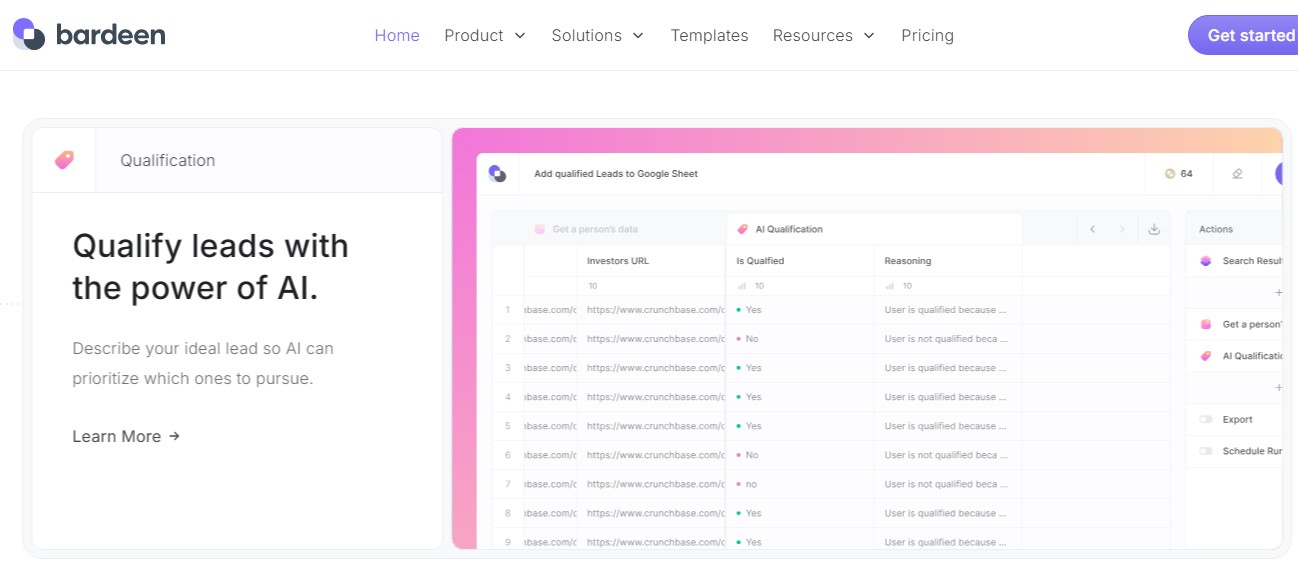
Bardeen is most useful when the work happens inside the browser.
Its current focus leans heavily toward prospecting, web research, enrichment, and go-to-market operations. Bardeen can collect information from websites, use AI search, work with browser-based applications, and move collected data into spreadsheets or other connected tools.
Common uses include:
- Gathering prospect information
- Extracting website data
- Enriching lead lists
- Moving browser data into a spreadsheet
- Updating CRM records
- Researching accounts
- Supporting recruiting workflows
- Reducing repetitive copy-and-paste work
Browser automation fills an important gap. Plenty of useful information sits on webpages that do not provide the exact API access a team needs.
It is also more fragile than API automation.
A changed page layout, login flow, pop-up, permission prompt, anti-bot control, or renamed button can break a workflow that previously worked. Web scraping and automated browser actions also need to respect the site’s terms, privacy rules, and applicable data regulations.
My verdict: Bardeen is a specialist choice for sales, recruiting, marketing, and research teams. I would not choose it as the central automation platform for an entire business.
8. Pipedream
Pipedream removes much of the repetitive plumbing developers face when connecting APIs and building event-driven workflows.
The platform offers managed authentication, prebuilt triggers and actions, code execution, workflows, and tools that can be exposed to AI agents. Pipedream currently advertises more than 3,000 integrated applications and over 10,000 available tools for apps and agents.
This is useful for:
- Webhook-driven workflows
- API orchestration
- Backend automations
- Custom JavaScript or Python steps
- Data pipelines
- SaaS product integrations
- Agent tool access
- Embedded user integrations
Pipedream is especially interesting for software companies building integrations into their own products. Managed authentication and prebuilt actions can save developers from recreating OAuth flows and API wrappers for every external service.
The platform assumes a higher level of technical comfort than Zapier or Lindy. A user needs to understand events, data payloads, authentication, API behavior, and code when the prebuilt steps are not enough.
My verdict: Pipedream is the stronger choice when the buyer is a developer who wants integration infrastructure, not a business user trying to avoid technical concepts.
9. Taskade
Taskade brings AI automation directly into projects, tasks, workspace memory, and team coordination.
Its agents can respond to triggers, analyze project information, make decisions, update databases, and take actions through connected tools. Taskade describes its automation model as a loop in which an event activates an agent, the agent reasons over workspace context, and an action updates another system or project.
This works well for:
- Breaking briefs into assigned tasks
- Creating sprint plans
- Summarizing project updates
- Routing requests
- Generating recurring reports
- Coordinating content production
- Tracking handoffs
- Turning meeting notes into project work
Taskade’s advantage is proximity. The agent is not acting from a separate automation layer that knows little about the project. It can work with the tasks, documents, and workspace context already inside the platform.
That also defines its limit. Taskade is not the best choice for deep API architecture, desktop RPA, or complex enterprise integration across legacy systems. Its strongest value appears when the work being automated already belongs inside projects and collaborative task systems.
My verdict: Choose Taskade when the objective is to automate project coordination and team execution, not to build the company’s central integration infrastructure.
10. Workato
Workato is designed for organizations where automation crosses departments, systems, security policies, and approval structures.
Its current platform combines integrations, traditional automation, RPA, agent development, and governance. Workato now positions itself as a control and execution platform for enterprise AI, with agents and workflows operating across a large connected application ecosystem.
Likely use cases include:
- Employee onboarding
- Finance operations
- IT service management
- Revenue operations
- Security workflows
- HR processes
- Cross-system data synchronization
- Governed enterprise agents
This is where the difference between a clever workflow and an automation program becomes obvious.
My verdict: Workato makes sense when scale, governance, and cross-department integration matter more than low-cost self-service.
11. UiPath
A great deal of business work still happens in software that was never designed for modern automation. Employees open desktop programs, copy information from PDFs, enter values into forms, navigate virtual desktops, and move data between systems that cannot communicate properly. UiPath was built for that reality.
Its current agentic platform combines AI agents, software robots, document processing, people, APIs, and orchestration. UiPath Maestro coordinates those components across long-running processes and provides controls for pauses, retries, exceptions, human tasks, and audit trails.
UiPath is particularly strong for:
- Desktop RPA
- Legacy application automation
- Invoice processing
- Claims workflows
- Finance operations
- Virtual desktop environments
- High-volume document handling
- Human-agent-robot processes
A robot can handle the predictable interface work. An AI agent can interpret an unstructured request. A person can review the exception. Maestro can coordinate the whole process. That is more substantial than attaching a text generator to a workflow.
It is also more work to implement. Reliable RPA requires process discovery, environment control, testing, credentials, exception handling, maintenance, and governance. A changed desktop interface can break an automation just as a changed website can break a browser workflow.
My verdict: UiPath is the strongest tool in this list for organizations that must automate work across documents, desktop interfaces, and legacy systems—not just modern SaaS products.
12. Tray.ai
Tray.ai sits at the intersection of integration, AI agents, and governed tool access. Its platform combines a visual integration layer with an agent builder and a gateway for exposing actions as controlled MCP tools. Tray.ai advertises more than 700 connectors alongside guardrails, auditability, observability, authentication, rate limits, and human-in-the-loop controls.
Tray.ai can support:
- Customer-data workflows
- AI agents using business tools
- Governed MCP access
- SaaS integration
- IT operations
- Data synchronization
- Human-reviewed agent actions
- Enterprise observability
The platform is not aimed at someone building a quick personal workflow. Its sales-led, enterprise positioning reflects the scale of the problem it is trying to solve.
My verdict: Tray.ai is a credible choice for enterprises that want integration, agents, and governed MCP access managed as one architecture instead of three separate experiments.
Automate the Repetition, Keep Control of the Consequences
The best AI task automation tools do not remove people from every process. They remove copying, sorting, waiting, routing, reformatting, and other repetitive work that consumes attention without requiring much judgment.
The product matters, but the design of the workflow matters more. Keep predictable work deterministic. Use AI where interpretation creates genuine value. Restrict permissions. Build exception paths. Require approval around decisions that can affect money, rights, safety, customers, or important data.
Automation should reduce repetitive effort without hiding responsibility. That is the difference between a useful AI workflow and an expensive system that quietly creates new problems.
Frequently Asked Questions on The Best AI Task Automation Tool
1. Can AI Automate Daily Office Tasks?
Yes. AI can help automate email triage, scheduling, meeting follow-up, CRM updates, document extraction, support routing, research, and reporting. High-impact decisions should still include human review.
2. What Is the Difference Between AI Automation and Workflow Automation?
Workflow automation follows predefined rules. AI automation adds interpretation, classification, generation, or decision-making. A strong system often combines both: AI handles uncertain inputs, while fixed workflow logic executes predictable actions.
3. Do AI Task Automation Tools Require Coding?
Many do not. Zapier, Make, Gumloop, Lindy, Bardeen, and Taskade support no-code or low-code use. n8n and Pipedream allow deeper customization through code, while enterprise RPA platforms may require specialist implementation.
4. Are AI Agents Better Than Traditional Workflows?
Not for every task. Agents are more useful when inputs are unstructured or the route changes with context. Traditional workflows are usually more reliable for fixed calculations, approvals, system updates, and other predictable processes.
5. Which AI Automation Tool Is Best for a Small Business?
Zapier is the simplest broad recommendation. Make may offer better control for complex workflows, Gumloop is attractive for AI-first processes, and Lindy suits teams that want to delegate administrative work to an assistant.