Managing a busy daily schedule without a reliable system leads to forgotten deadlines and unnecessary stress. Fortunately, you do not need a paid subscription to get your schedule under control. Using dedicated free daily task organizer apps allows you to capture ideas quickly, prioritize your daily tasks, and track your habits across all your devices.
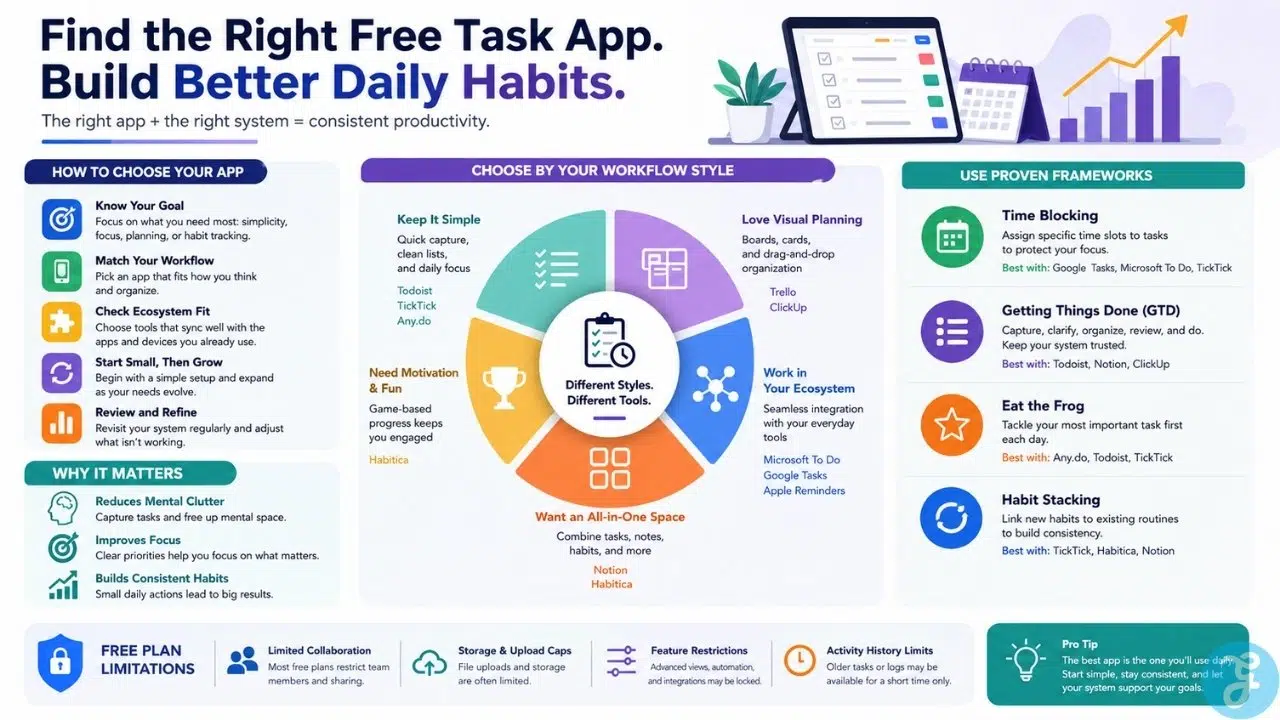
Whether you need a simple checklist app, a visual Kanban board, or an all-in-one digital planner, selecting the right software transforms how you manage your day. This guide covers the top ten free tools available today, along with key execution frameworks to help you stay organized and focused.
Minimalist To-Do Lists and Quick Task Capture
When you need to get tasks out of your head as quickly as possible, these tools focus on speed and frictionless input.
1. Todoist
Todoist is widely regarded as one of the most efficient task managers for fast data entry. Its standout feature is natural language processing, which automatically parses dates and times as you type your task. For example, typing “Submit expense report every Friday at 3 PM” creates a recurring reminder instantly. The free tier gives you access to core task sorting, filters, and cross-platform synchronization.
2. TickTick
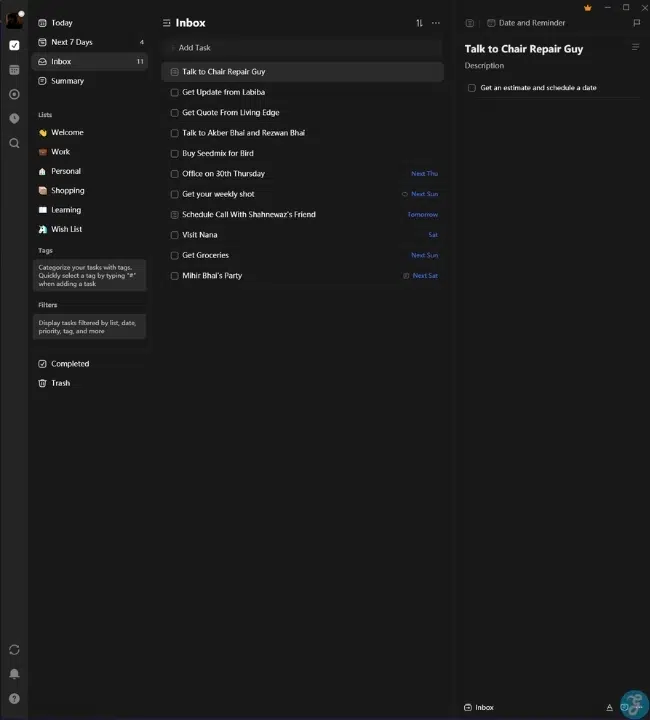
TickTick combines daily task management with built-in focus tools. Alongside a clean task list, TickTick offers a native Pomodoro timer and a dedicated habit tracker within its free plan. If you want an app that helps you manage your daily to-do items while encouraging focused work sessions and healthy routines, TickTick is a versatile choice.
3. Any.do
Any.do excels at turning cluttered task lists into a realistic daily itinerary. Its core feature, the “Plan My Day” routine, prompts you each morning to review your pending tasks and decide what you can realistically complete before evening. The app combines your tasks and calendar events in a single view, preventing you from overcommitting your available hours.
Visual Planners and Customizable Workspaces
If standard linear lists leave you feeling uninspired, these visual platforms offer dynamic ways to group and view your daily commitments.
4. Trello
If you prefer visual organization, Trello uses a classic card-and-board structure to manage your day. You can create lists for “To Do,” “In Progress,” and “Completed,” dragging cards across columns as you complete work. Trello’s free tier provides generous access to boards and cards, making it ideal for visual thinkers and freelancers managing multiple projects at once.
5. ClickUp
ClickUp offers one of the most feature-packed free plans on the market. It provides multiple ways to view your daily tasks, including lists, board views, and calendar layouts. You can break complex daily objectives down into detailed subtasks, add checklists, and customize task statuses without upgrading to a paid tier.
6. Microsoft To Do
Microsoft To Do is a completely free task manager that integrates deeply with Outlook and the Windows ecosystem. Its signature feature is “My Day,” a blank slate that resets every night so you can start each morning fresh. You can add tasks from your master lists or flag emails in Outlook to convert them directly into actionable to-do items.
Ecosystem Integration and Hybrid Planners
These applications bridge the gap between simple task lists and full digital workspaces.
7. Notion
Notion is a powerful option for users who want total control over their daily organization. Rather than giving you a rigid task list, Notion allows you to build custom daily planners, databases, and habit trackers from scratch. Its flexible block structure lets you store daily journal entries, project notes, and task lists in one unified workspace.
8. Google Tasks
For users already inside the Google Workspace ecosystem, Google Tasks provides a lightweight, frictionless solution. It lives in the side panel of Gmail, Google Calendar, and Google Drive. You can easily drag emails directly into Google Tasks to create reminders, which then synchronize automatically with your Google Calendar schedule.
9. Apple Reminders
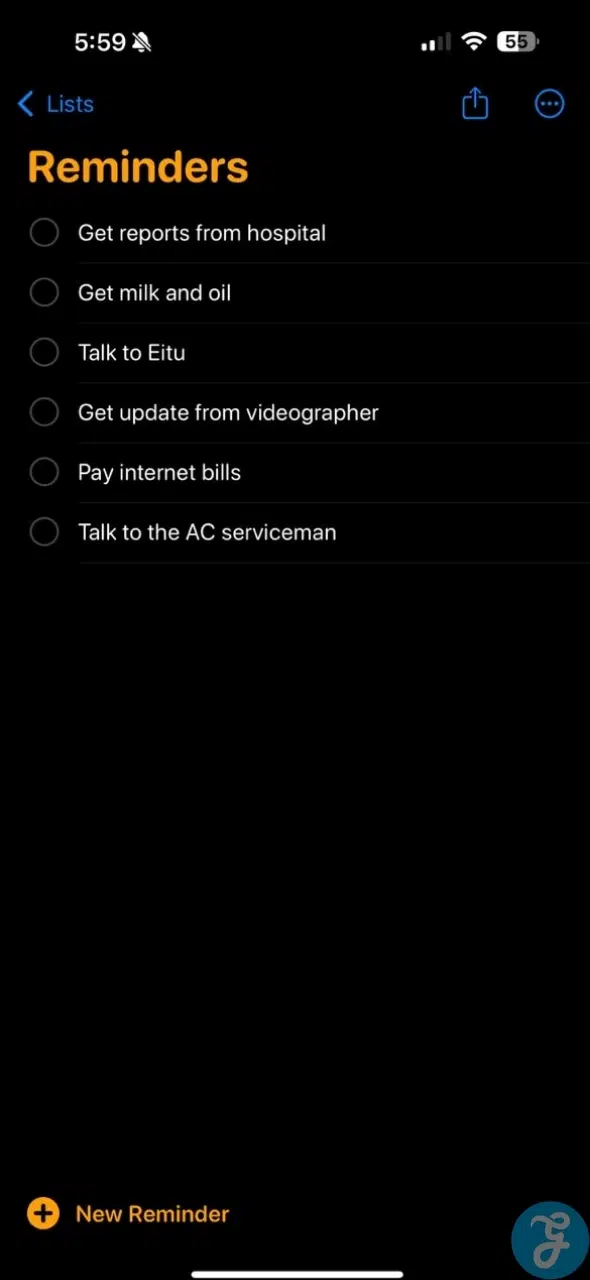
For Apple users, Apple Reminders offers a powerful built-in tool that requires no extra download or account setup. It supports location-based reminders, subtasks, tagged organization, and smart lists. With Siri integration, you can quickly capture tasks hands-free while on the go.
10. Habitica
Habitica turns daily task organization into a role-playing game. Completing your real-world tasks rewards your avatar with experience points, gold, and equipment, while ignoring your daily duties damages your character’s health. It is an engaging app for anyone who struggles with standard to-do lists and needs gamification to stay motivated.
How to Match Task Apps to Proven Productivity Frameworks
Selecting software is only half the battle; success depends on aligning your tool with a structured productivity methodology.
The Getting Things Done (GTD) Method
The GTD system relies on capturing every single obligation in a trusted digital inbox before clarifying and organizing those tasks into actionable lists. Free daily task organizer apps like Todoist and Google Tasks excel here. They allow you to rapidly input raw thoughts, add tags or priority levels, and process your inbox during a dedicated weekly review.
The Eisenhower Matrix Framework
This framework forces you to evaluate tasks based on two criteria: urgency and importance. Tasks are split into four quadrants: Do First (urgent and important), Schedule (not urgent but important), Delegate (urgent but not important), and Eliminate (neither). Apps like TickTick offer built-in Eisenhower Matrix views, while visual tools like ClickUp and Trello allow you to construct custom four-quadrant boards.
Time-Blocking and Calendar Integration
Time-blocking involves reserving specific chunks of time on your calendar for dedicated task execution. Rather than working off an infinite checklist, you drag tasks directly onto a daily schedule. Combining Google Tasks with Google Calendar, or using Any.do, allows you to practice time-blocking effortlessly by keeping your tasks and time commitments in a single unified interface.
Key Technical Features to Evaluate in Free Task Organizer Software
Before committing to a specific application, review these underlying functional capabilities to ensure long-term usability.
Natural Language Parsing and Voice Input
High-friction apps require you to tap multiple menus to select dates, times, and priority tags. Look for applications featuring advanced natural language parsing or voice recognition. The ability to speak or type a single command like “Review budget proposal next Tuesday at 10 AM” saves hours of manual data entry over time.
Offline Functionality and Local Data Syncing
Reliable offline access is crucial if you travel frequently or work in areas with spotty internet connectivity. Ensure your chosen app stores data locally on your device and syncs seamlessly with cloud servers once a connection is re-established, preventing accidental data overwrites or missing checklists.
Cross-App Automation and API Connections
A great daily task manager should not exist on an island. Check whether the free plan allows integrations with third-party automation services like Zapier or Make. Automatically converting starred emails, assigned Slack messages, or scheduled GitHub issues into daily tasks creates a central command center for all your work.
How to Migrate Between Task Apps Without Losing Data
Transitioning your entire workflow from one organizer to another requires care to ensure critical deadlines do not fall through the cracks.
Exporting and Cleaning Your Task Telemetry
Before shutting down your old app, export your current database into a standard CSV or JSON format. Take this opportunity to conduct a thorough cleanup. Delete completed, expired, or irrelevant tasks rather than migrating legacy clutter into your new digital workspace.
Setting Up a Dual-Run Protocol During Migration
Never make a sudden cutover from one task manager to another on a busy workday. Run both applications in parallel for 48 to 72 hours. Capture all new incoming tasks in your new app while using your old app exclusively to clear existing, short-term commitments. This overlap confirms that notification settings and calendar integrations are working perfectly before you archive the old platform.
What to Avoid: Limitations of Free Task Apps
While free daily task organizer apps provide immense value, free tiers come with specific constraints that you should keep in mind.
Artificial Feature Caps
Many free plans limit advanced tools like automated push notifications, custom recurring schedules, or location triggers behind paid paywalls. Always check if critical features like reminders are included in the free version before building your daily routine around a specific platform.
Restricted Collaboration Limits
If you intend to manage tasks with family members or team members, be aware that many free tiers restrict the number of collaborators or shared project boards you can create.
Over-Engineering Your Setup
Spending hours configuring custom views, tags, color-coded themes, and complex automation rules can become a form of productive procrastination. Choose an app that simplifies your daily workflow rather than making it unnecessarily complex.
Final Thoughts
Finding the right free daily task organizer apps can transform your personal productivity without costing a dime. Whether you prefer the natural language entry of Todoist, the visual boards of Trello, or the game elements of Habitica, consistency is the key to success. Select the app that best fits your workflow, align it with a framework like GTD or time-blocking, and take control of your daily schedule today.
Frequently Asked Questions(FAQs) on Daily Task Organizer Apps
What is the best overall free daily task organizer app?
Todoist and TickTick are widely considered the best options for individual daily planning due to their clean interfaces, fast task capture, and generous free tiers.
Can free task apps synchronize across multiple devices?
Yes. Most top task organizer apps offer cross-platform support across iOS, Android, web browsers, and desktop environments, ensuring your daily checklist remains in sync everywhere.
Are free task management apps secure for personal data?
Reputable task management platforms use industry-standard data encryption both in transit and at rest. However, avoid storing sensitive information like passwords or financial account numbers inside unencrypted task notes.