Does your school have rooms full of devices but still no actual digital learning plan? It’s a frustration you see everywhere. A classroom can be packed with tablets, laptops, and interactive screens, yet students still drift off-task, teachers end up feeling stretched thin, and parents wonder if all this screen time is doing any good.
We ran into this exact wall at St. Mary’s Primary School in Athlone. We had roughly 600 pupils with access to iPads, Chromebooks, interactive whiteboards, Bee-Bots, and LEGO Spike kits. But having hardware isn’t the same as having a strategy.
To build a plan that was practical and easy to measure, I dug into large-scale 1-to-1 deployment research from overseas, specifically examining data from the U.S. National Educational Technology Plan and statewide datasets from North Carolina, where over a million student devices are tracked. The goal wasn’t to copy foreign policy, but to see what actually works when managing tech at scale.
Here is the practical, step-by-step approach we used to bring clarity to digital learning for students, teachers, and parents.
Why a Digital Learning Plan Matters
A real digital plan gives every piece of technology a clear job. Instead of asking, “What gadget should we buy next?” your team starts asking, “What learning problem are we trying to solve, and how will we know if this tool helped?”
The U.S. Department of Education’s 2024 tech plan highlights three main breakdowns in school technology rollouts: access, lesson design, and meaningful student use. Counting devices only addresses access. It tells you nothing about whether children are learning to write more clearly, solve complex problems, or protect their privacy online.
If you look at statewide models like North Carolina’s framework, they keep things grounded by organizing the work into five core areas:
-
Leadership and vision
-
Staff capability
-
Curriculum instruction and assessment
-
Data privacy and cybersecurity
-
Infrastructure and hardware
Breaking the work into these buckets stops a school from constantly chasing trendy new apps. It connects daily instruction, teacher training, parent communication, and data security into one manageable system.
The sheer volume of devices makes this kind of organization necessary. According to the 2024–25 North Carolina Digital Learning Dashboard, public schools reported 1,190,045 student devices statewide, 90.3% of which are Chromebooks. Yet, even with that massive deployment, 4% of families reported their child had no home device, even though 93% had reliable home internet. That tells us something vital: every solid plan needs offline options, loaner routines, and flexible deadlines for students without steady access at home.
Digital safety has to be woven into weekly classwork, too. Online citizenship shouldn’t be a one-off annual assembly. Kids need regular practice with passwords, source-checking, academic honesty, data protection, and age-appropriate AI etiquette as part of their standard schoolwork.
| What to Measure | Why It Actually Matters |
| Home device and internet access | Identifies right away who needs printed work, loaner devices, mobile hotspots, or flexible deadlines. |
| Quality of student work | Shows whether technology is genuinely improving writing, research, math, or creative work. |
| Teacher confidence | Flags when staff need extra coaching before a new platform gets pushed schoolwide. |
| Safety and privacy habits | Helps spot gaps in digital citizenship, app vetting, and student data protection (such as GDPR compliance). |
| Parent involvement | Shows if parents can easily check assignments, flag connection problems, and support routines at home. |
5 Core Parts of an Effective Plan
I prefer to keep the overall structure straightforward. A good plan outlines what the school wants to improve, which tools it will use, how people will be supported, and how progress will be measured. Following SETDA’s implementation guidance—needs assessment, goal setting, and evaluation—stops schools from buying tech first and asking questions later.
-
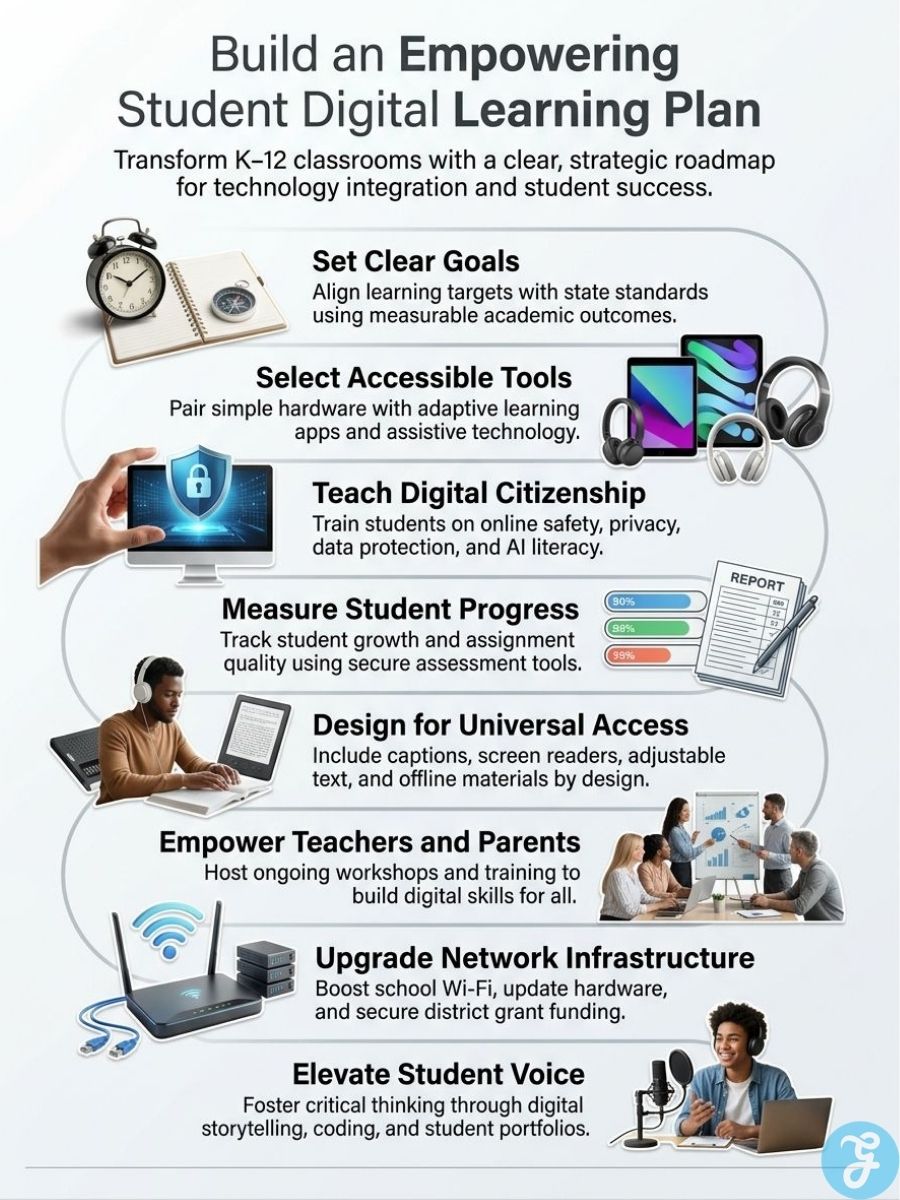
Targeted Learning Goals: Set 3 to 5 clear targets per grade band—such as reading response quality, typing fluency, research habits, or basic coding skills. Tech should always serve a learning outcome, not a device count.
-
A Tight Tool Stack: Stick to a small, approved list of platforms—usually one learning management hub, one creation tool, and one assessment app per age group. Standardizing on browser-based tools that run on almost anything saves IT teams immense stress.
-
Embedded Safety & Privacy Checks: Teach online safety, copyright, and AI guidelines directly through regular assignments. For staff privacy training, bite-sized modules (like standard 30-minute LEA privacy or GDPR courses) keep onboarding quick and manageable.
-
Accessibility from Day One: Turn on captions, screen readers, adjustable text, and text-to-speech features right out of the box. A 2024 U.S. Department of Education guidance letter highlighted word prediction and captioning as essentials—a good reminder that accessibility isn’t an afterthought.
-
Sustainable Infrastructure: Budget for web filters, repairs, warranties, and Wi-Fi load early. In major grant initiatives like NC’s $1.2 million Digital Learning fund, hardware-only proposals are outright ineligible. Devices are useless without ongoing training and maintenance.
The Six-Step Professional Development Cycle
For staff development, a staged cycle delivered the best results:
-
A 1-hour introductory webinar.
-
A 2-hour hands-on workshop (maintaining a tight 1:6 trainer-to-teacher ratio).
-
A co-taught demonstration lesson in a real classroom.
-
Two weeks of peer lesson exchanges.
-
Informal classroom observation with practical feedback.
-
A final group reflection session.
Across three terms, 72 teachers completed this cycle, and 88% adopted at least one new digital activity within four weeks. It worked because teachers got to practice with direct support before trying it on their own.
Integrating Technology Into Daily Learning
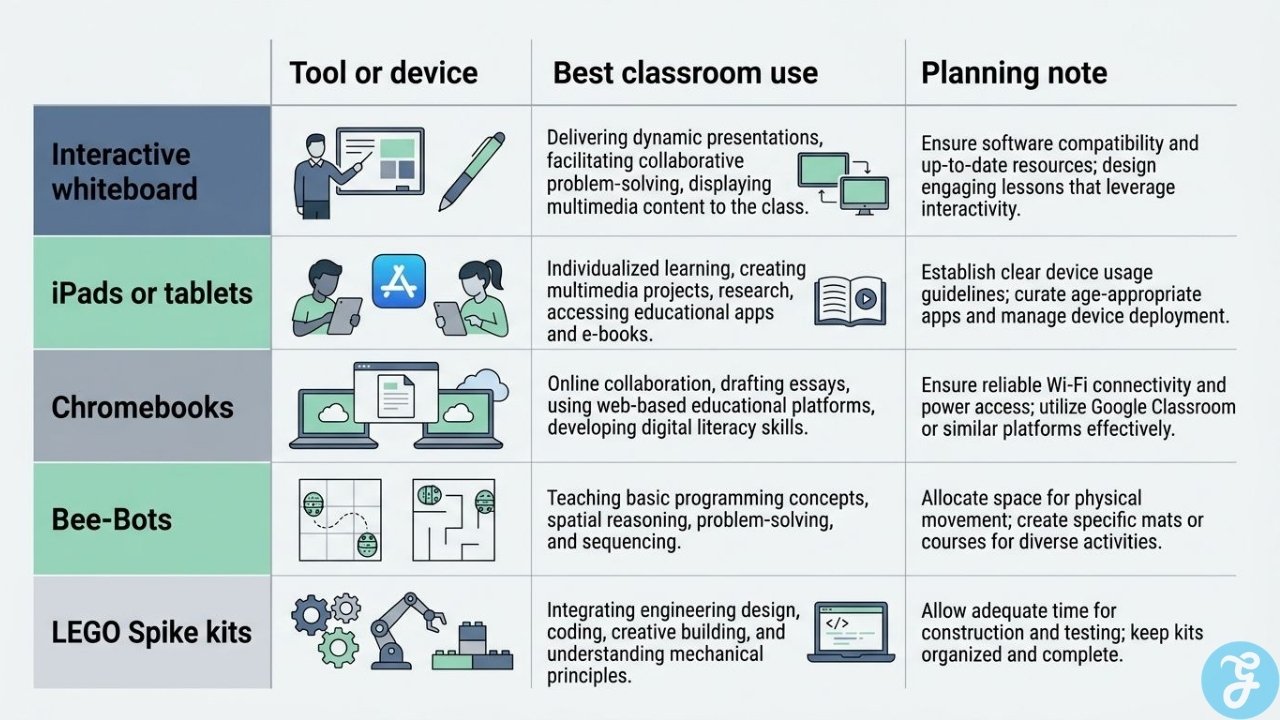
Different devices suit different jobs. A laptop isn’t the same as a floor robot, and an interactive whiteboard shouldn’t be used like a personal tablet.
| Tool or Device | Best Classroom Use | Practical Planning Note |
| Interactive whiteboard | Whole-class modeling, diagrams, shared problem solving | Great for teacher demonstrations, but it should lead into student practice, not replace it. |
| iPads or tablets | Early literacy, recording audio/video, quick check-ins | Ideal for younger grades where touchscreens and cameras make creation faster. |
| Chromebooks | Research, writing, LMS tasks, group documents, quizzes | Best for browser-heavy work, writing tasks, and take-home assignments. |
| Bee-Bots | Early coding, sequencing, directional language, math patterns | Works best in short learning stations focused on vocabulary and logic. |
| LEGO Spike kits | STEM projects, engineering design, teamwork, coding | Great for project-based learning where students build, test, adjust, and explain. |
Matching tools to specific tasks turns random screen time into intentional learning. In North Carolina’s state tracking, 44% of student devices were assigned as take-home units, which is why choosing tools with offline modes and easy logins is so important.
During our six-month pilot at St. Mary’s, we saw a massive shift once we aligned tech with specific learning targets. Before the pilot, about 12 lessons a month used devices loosely, and only 18% of student work matched targeted learning objectives.
After moving to 36 scheduled, goal-aligned lessons per month, 74% of student work directly reflected the intended objectives. Across 24 teachers and 600 pupils over two terms, staff confidence scores jumped from 2.3 to 4.1 on a 5-point scale.
Tech shouldn’t be isolated in a weekly computer lab slot either. Integrating coding, digital storytelling, and basic data projects directly into literacy, math, science, and history makes those subjects more engaging.
AI needs that same cross-curricular approach. AI guidance frameworks stress that even simple prompt-writing exercises should include fact-checking, disclosure rules, and conversations about where automated tools help versus where human critical thinking is required.
The Role of Educators and Parents
The adults in the building—and at home—are what make the plan work.
-
Teachers: Focus on using a few core tools deeply so students spend less time navigating new software menus and more time learning the subject. Hands-on practice with physical tools like Scratch or BBC micro:bit gives staff a safe space to test workflows before going live in front of a class.
-
Parents & Families: Need one central, predictable place to check assignments, due dates, and teacher announcements each week. Because 93% of families in the North Carolina survey had steady internet while others relied on hotspots or public libraries, keeping printable directions, downloadable files, and flexible deadlines in your plan ensures no student gets left behind.
-
School Leaders & IT: Must vet and approve apps centrally so privacy and safety checks happen before software reaches a classroom. Policies restricting social media and restricting access to age-appropriate materials keep students focused and give parents peace of mind.
Empowering Students Through Agency
Digital learning works best when it gives kids ownership over their work. Following modern student tech standards (like the ISTE framework), schools should treat students as active creators and problem solvers:
-
Create & Express: Turn standard written book reports into podcasts, explainer videos, or digital stories.
-
Collaborate: Use shared documents and discussion boards for peer editing and group projects.
-
Track Growth: Maintain simple digital portfolios so students can see their own progress over the school year.
-
Direct Independent Learning: Use math or language practice apps for targeted skill-building without waiting for the next whole-class lesson.
-
Self-Regulate Focus: Build in intentional “screens-down” time and clear transitions. With a 2025 Common Sense Media survey showing that 72% of high school teachers consider phone distraction a major problem, teaching students when not to use a device is just as important as teaching them how to use one.
What a Complete Plan Achieves
A clear digital learning plan links hardware, teaching strategies, safety, and family support into one clear path forward.
Looking at the multi-year outlook for St. Mary’s, every piece of hardware from tablets and laptops to floor robots, whiteboards, and AI tools now has a defined classroom job. When teachers get solid training, parents get clear visibility, and students get purposeful tasks, digital learning stops feeling chaotic. It simply becomes part of good teaching.
Frequently Asked Questions (FAQs) on Digital Learning Plan For Students
1. What is a digital learning plan?
It is a practical roadmap that connects a school’s tech tools directly to its teaching goals. It shows teachers, families, and students which tools are being used, why they were chosen, and how everyone will be supported.
2. Why is having a formal plan so important right now?
With classrooms full of devices and software, a plan stops technology from becoming a daily distraction. It protects student data, keeps costs under control, and ensures tech is actually improving learning outcomes.
3. What are the first steps to building one?
Start with your learning goals rather than the hardware. Select a small set of safe, approved apps, give teachers low-stakes hands-on training, and track simple metrics like work quality and teacher confidence to see what’s working.
4. How do you keep the plan useful over time?
Review your results regularly, gather honest feedback from staff and parents, and don’t be afraid to drop tools that aren’t delivering. A good plan adapts as classroom needs change.
5. How do we answer parents who are worried about excessive screen time?
Shift the conversation from screen time to screen type. Differentiate between passive consumption (scrolling or watching videos) and active creation (coding, podcasting, or building digital portfolios). Clear “screens-down” windows during the school day also show parents that technology is a tool, not a replacement for traditional learning.