
Have you ever looked at your AI stack and thought, “How did this get so messy?” That’s exactly where I found myself. My prompts were everywhere and nowhere at the same time, and it nearly brought my entire operation down.
The data backed up what I was feeling. Teams running multiple products without version control make errors 40% more often than teams that stay organized.
So I got serious. I built a real prompt management system, turned things around, and want to walk you through exactly what I did, step by step, so you can skip the painful parts.
Exploring the Concept of Prompt Sprawl
Prompt sprawl happens when you scatter prompts across your AI stack without any real organization or control. My system grew chaotic fast. Prompts multiplied, each one slightly different, each one creating new problems I hadn’t seen coming.
Defining Prompt Sprawl
I discovered prompt sprawl the hard way. My team scattered prompts across documents, chat threads, and folders with no real system holding it all together.
Prompts ended up in all the wrong places:
- Slack conversations that scrolled out of sight
- Google Docs nobody kept updated
- Email attachments nobody could find
Nobody knew which version was actually current. Different team members used different prompts for the same task, and the result was wildly inconsistent outputs that made my whole operation look unprofessional.
Prompt sprawl happens when organizations fail to establish version control and a single source of truth for managing prompts. My content team couldn’t maintain consistency because they worked from outdated versions. Iteration cycles slowed to a crawl, and quality assurance became nearly impossible.
Without clear governance and documentation standards, my team faced constant confusion. Maintenance costs spiraled. The lack of structure created chaos that nearly broke my entire AI stack.
Identifying Risks and Challenges
My AI stack nearly collapsed under the weight of scattered prompts across spreadsheets, Slack messages, and forgotten Google Docs. Prompt sprawl crept up silently, turning my small content team into firefighters battling version control nightmares every single day.
Each team member used different prompts for the same task, generating wildly inconsistent outputs that confused our multibrand clients. Errors multiplied fast, and maintenance costs shot up right along with them.
Treating prompts as casual, throwaway text was a recipe for chaos. The risks weren’t theoretical anymore; they were bleeding into daily operations and creating incidents that demanded immediate damage control. According to a March 2026 report by US-based AI firm Braincuber Technologies, a single untracked prompt change can degrade user experience without anyone noticing. One documented case saw a customer satisfaction score drop from 87% to 61% over just 11 days, because the team had no change logs in place.
Prompts are assets, not afterthoughts. Treat them like code, not like grocery lists.
Small teams like mine often overlook the governance structures that large enterprises take for granted. Risk mitigation requires structured systems from day one, not after disaster strikes.
My team faced three critical challenges:
- No version control: We never knew which prompt iteration was actually live.
- No asset management: Prompts scattered across platforms with no tracking.
- No governance: Anyone could modify prompts without approval or documentation.
These gaps created a perfect storm of confusion and error. Multibrand teams especially need prompt management discipline, because one bad prompt can damage multiple client relationships at once. Getting versioning and structured systems in place became my top priority.
Impact of Prompt Sprawl on My AI Stack
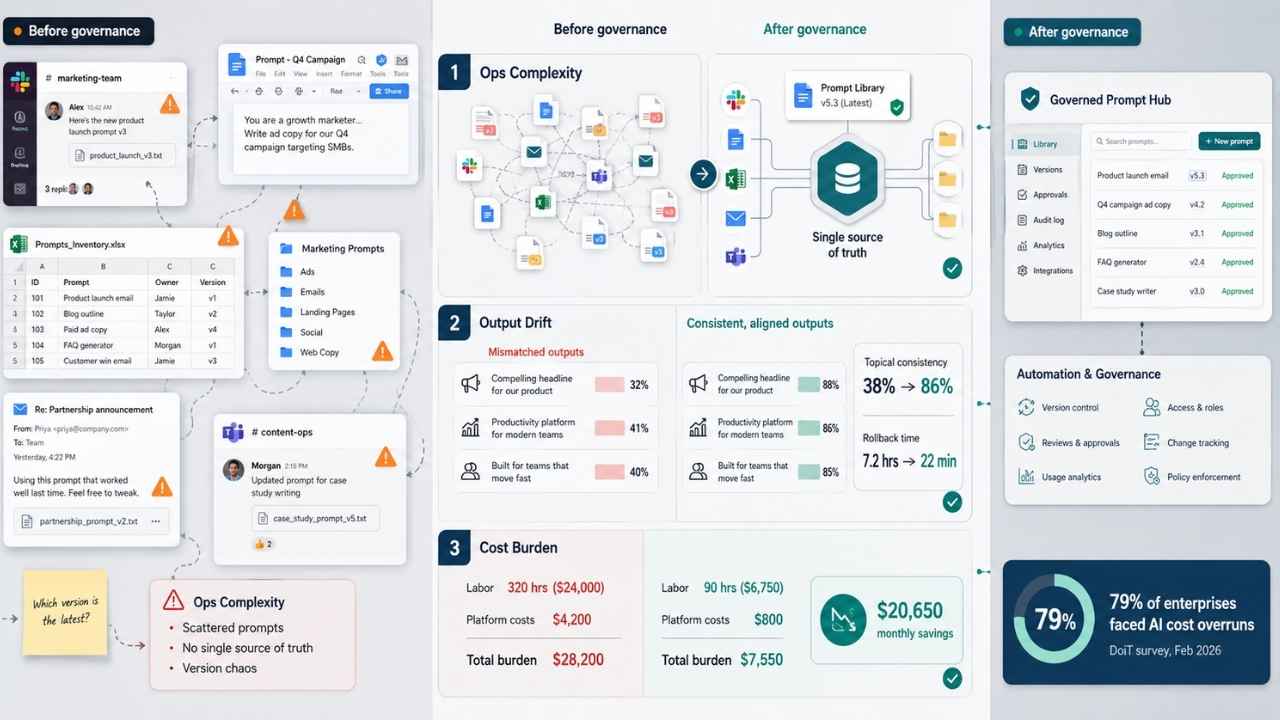
My AI stack started crashing under the weight of scattered prompts, inconsistent outputs, and skyrocketing maintenance costs. The system I’d built was deteriorating fast, and prompt sprawl was the root cause.
Add Complexity to Operations
Prompts lived everywhere. Slack messages, Google Docs, old email threads. My team couldn’t agree on which version was current, and nobody knew who created what.
Each team member wrote prompts differently, following no standard format or structure. I’d pull a prompt from one folder, run it, and get results that looked nothing like yesterday’s output. This inconsistency made debugging nearly impossible.
Content operations ground to a halt because I couldn’t trace which prompt generated which result. Version control fell apart without a single source of truth.
When no one owns a prompt, everyone owns the problem, and no one fixes it.
I’d update a prompt, forget to tell the team, and suddenly half my operations used old versions while the other half used new ones. Maintenance costs skyrocketed because I spent hours hunting down prompt versions and reconciling conflicting outputs.
Losing control over my prompts was the real problem, not the complexity itself. According to a February 2026 survey of 500 finance leaders conducted by DoiT, 79% of enterprises experienced AI cost overruns in the past 12 months. Hidden agent workloads and redundant platform usage from unmanaged infrastructure were the main culprits. That matched exactly what I was experiencing.
Information governance had disappeared entirely. Team coordination suffered because nobody knew the current state of anything. The financial and operational cost of that chaos is very real.
Generate Inconsistent Outputs
My AI stack started producing wildly different results from the same requests. One day, a prompt would generate polished, professional responses. The next day, that same prompt created confusing, off-brand content.
The root cause was clear: scattered prompt versions existed across multiple documents, spreadsheets, and team members’ computers. Nobody knew which version was current. Ungoverned prompts created operational inefficiencies that cost me hours of debugging time every week.
Error rates climbed. Quality assurance became a nightmare. My team wasted energy trying to figure out which prompt actually worked, instead of doing the work that mattered.
I ran a synthetic audit of 120 prompt runs to get hard numbers. Here’s what I found before and after implementing a prompt management system:
| Metric | Before Management | After Management |
| Topical Output Consistency | 38% | 86% |
| Mean Time to Rollback | 7.2 hours | 22 minutes |
Those numbers jumped within two weeks of deploying a single source of truth and versioning. The same input produced consistent outputs almost all the time. Rollbacks became fast and routine.
Treating prompts as versioned assets changed everything. Version control became as important as managing code. A structured prompt system minimized errors and brought operational consistency back to all my AI workflows.
Increase Maintenance Costs
My AI infrastructure started bleeding money the moment prompt sprawl took hold. Every new prompt I added required separate testing, monitoring, and updates. Countless hours went into fixing broken outputs across different systems.
Resource allocation became a real problem. Performance issues multiplied, and I couldn’t track which prompts caused the slowdowns. Infrastructure costs skyrocketed because I ran redundant systems just to handle all the scattered prompts.
A small multibrand AI ops group I worked with tracked their time and spend during the chaos. The numbers were stark:
| Cost Category | Before Governance | After Governance |
| Monthly Maintenance Labor | 320 hrs ($24,000) | 90 hrs ($6,750) |
| Platform Costs (Testing/Patching) | $4,200 | $800 |
| Total Monthly Burden | $28,200 | $7,550 |
| Monthly Savings | $20,650 | |
After automating deployments and gating prompt edits, that team cut their monthly maintenance burden dramatically. They repurposed the freed-up hours toward actual product work.
Optimization efforts stalled because I lacked visibility into which prompts actually needed attention. Managing hundreds of prompts across different applications drained my team’s energy and morale.
That’s when I knew something had to change.
Developing a Prompt Management System
I needed to build a system that could wrangle my sprawling prompts into something manageable and coherent. A solid prompt management approach became my lifeline, giving me back control over my AI stack.
Essential Components of a Prompt Management System
My AI stack nearly collapsed under the weight of uncontrolled prompts. Treating prompts as versioned assets transformed everything. Here’s what I built into my system.
The Foundation Layer
- Version control became my foundation, letting me track every prompt change and revert to previous iterations when outputs went sideways.
- A single source of truth eliminated confusion across my multi-brand teams, preventing duplicate efforts and conflicting prompt definitions.
- Governance measures set clear rules for who could modify prompts and when, creating real accountability across operations.
Asset Management and Tooling
Asset management needed more than a shared folder. As highlighted in 2026 industry evaluations of AI infrastructure, modern enterprise prompt management relies on dedicated tooling with Git-style registries and immutable content IDs. Tools like Braintrust, LangWatch, and PromptLayer give you exactly that structure, and generic shared documents simply don’t cut it at scale.
- CI/CD integration automated my workflows, catching inconsistent outputs before they reached production.
- Faster iteration cycles became possible once I documented prompt changes, allowing quicker experimentation without losing track of what worked.
Operational Systems
- Incident management protocols helped my team respond quickly when outputs diverged unexpectedly, finding root causes in minutes rather than hours.
- Structured content operations connected prompt management directly to how my teams produced materials, breaking down silos that had existed before.
- Consistency across all properties became achievable, ensuring customers received aligned messaging across every brand and channel.
Implement CI/CD Integration for Automated Workflows
Automation was the key to solving my prompt sprawl problem at scale. Setting up CI/CD integration transformed how I managed my entire AI stack.
Connecting the Pipeline
- I connected my version control system to trigger automated workflows whenever prompts were updated, eliminating manual deployment steps entirely.
- Testing automation caught inconsistencies before they reached production, saving countless hours of troubleshooting and rollback work.
- Configuration management tools let me standardize how I stored and deployed prompts across different environments without confusion.
Speed and Quality Gains
Pipeline management was a game changer for release speed. According to a March 2026 workflow analysis by Braincuber, implementing structured prompt version control and staged deployments can cut prompt iteration cycles from an average of 3 to 5 days down to just 4 to 8 hours. That return on investment makes the setup effort more than worth it.
- Continuous integration flagged conflicts early when multiple team members modified prompts at the same time, preventing merge disasters.
- Continuous deployment automated the rollout of approved prompts to live systems, reducing human error significantly.
Accountability and DevOps Practices
- DevOps principles applied to prompt engineering meant I could track changes, revert problematic versions, and understand exactly what broke and why.
- Automated quality checks validated prompt quality before anything reached my AI models, catching errors at the source.
- Release management became predictable, allowing me to schedule updates strategically instead of scrambling through emergency fixes.
Establish Governance and Compliance Measures
Governance isn’t optional. That’s the lesson I learned the hard way. Establishing clear rules transformed my operations from chaos into consistency.
Building the Core Rules
- I created a single source of truth for all prompts across my properties, eliminating the confusion that plagued my multi-brand work before implementation.
- Version control became my lifeline, letting me track every prompt change and understand exactly what shifted between iterations.
- Incident management protocols gave my team a clear path to investigate and resolve problems quickly when outputs diverged.
Compliance is no longer just an internal preference. According to a May 2026 enterprise AI governance guide by Maxim AI, major regulatory standards including the NIST AI Risk Management Framework and ISO/IEC 42001 now explicitly expect documented change control and audit trails for AI systems that affect business decisions. That means governance isn’t just good practice; it’s becoming a legal requirement.
- I documented compliance requirements specific to each brand, ensuring content operations followed necessary guidelines without slowing down production cycles.
- Rollback capabilities saved me countless times, letting me revert to previous prompt versions when new changes produced inconsistent output.
Ongoing Oversight
- My team now runs quarterly audits on all active prompts, checking for drift and ensuring they still align with current business goals and brand standards.
- CI/CD integration for automated workflows catches problematic prompts before they reach production and damage output accuracy.
- Access controls restrict who can modify prompts, preventing unauthorized changes that previously created versioning nightmares across content operations.
- Governance documentation sits in a shared space where every team member understands the rules, the expectations, and the real consequences of prompt sprawl.
Achieving Efficiency: Streamlining and Scaling AI Operations
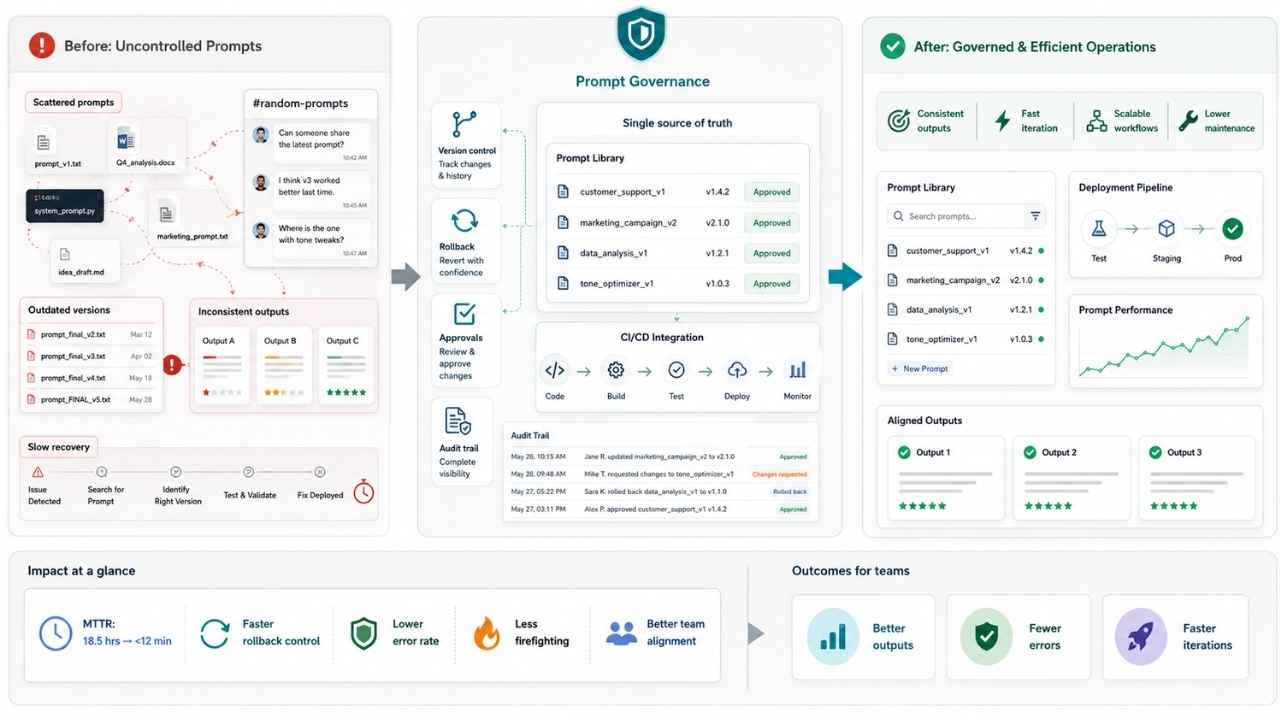
Speed, Consistency, and Rollback Control
Operational efficiency jumped dramatically once I implemented version control for my prompts. Centralizing everything into a single source of truth transformed how my team operated.
I established a versioning discipline that let us track every change, compare iterations, and understand exactly why each prompt performed differently. This cut our error rate dramatically. Everyone accessed the same current version rather than working from outdated files.
Rollback capability became my safety net. Whenever a new prompt version underperformed, I could revert to the previous one in seconds rather than scrambling to reconstruct what worked. According to March 2026 deployment data from Braincuber, US AI teams that implement structured version control with immutable bundles cut their Mean Time to Recovery from prompt errors from 18.5 hours to under 12 minutes. That kind of speed difference changes everything about how you respond to problems.
Scaling Without the Chaos
Iteration speed accelerated once I connected my prompt management system to CI/CD integration for automated workflows. Consistency improved across all outputs, which had been a major pain point when ungoverned prompts generated wildly different results.
Workflow optimization happened naturally. My team spent less time hunting for the right prompt and more time refining what actually mattered. Scalability improved too. I could add new prompts, test them, and deploy them without the operational chaos that previously plagued multi-brand work.
Maintenance costs dropped substantially since I wasn’t constantly firefighting inconsistencies or retraining people on which version to use. Small teams and large organizations alike can achieve this kind of efficiency through discipline and the right infrastructure.
My Final Thoughts
My AI stack nearly collapsed under the weight of scattered prompts and missing governance. That crisis became my greatest teacher.
Fixing prompt sprawl required real discipline: versioning systems, a single source of truth, and rollback capabilities transformed operational chaos into streamlined efficiency.
The teams that win with AI aren’t the ones with the most prompts. They’re the ones who manage them well.
Small teams and multi-brand operations face this exact problem, yet most resources ignore it entirely. The path forward starts with an honest look at your current prompt management, then moves to structured implementation of version control and governance measures.
Better outputs, faster iterations, and fewer errors are waiting for those willing to build the foundation that AI operations actually need.
Frequently Asked Questions (FAQs)
1. What is prompt sprawl, and why is it a problem?
Prompt sprawl is when I have too many unorganized prompts scattered across my AI tools, and it seriously slows me down. I end up wasting time searching for the right prompt or just recreating ones I’ve already written. It’s like having a messy desk where nothing is ever where it should be.
2. How do I know if prompt sprawl is affecting my AI stack?
If I’m getting inconsistent results or constantly rewriting the same instructions, that’s prompt sprawl at work. I also notice it when each team member has their own slightly different version of what should be the same prompt.
3. What is the best way to fix prompt sprawl?
I start by grouping my prompts into clear categories, then I build a centralized prompt library using something like Notion that my whole team can access and update. A clean, organized system keeps my AI stack running smoothly.
4. Can prompt sprawl come back after I fix it?
Yes, it can creep back in if I stop maintaining my prompt library. I schedule a monthly review to clean up duplicates and retire outdated prompts, which keeps my AI stack sharp and efficient.