


Most public prompt libraries offer variations of the same weak instruction: “Write a 1,000-word blog post about X.” The output is almost always a predictable, fluff-filled draft that screams machine-generated text. Relying on AI to handle the entire creative process from scratch usually yields disappointing results.
True efficiency comes from treating large language models as collaborative research assistants, structural editors, and critical sounding boards. Finding the right templates is less about outsourcing your voice and more about setting strict mechanical boundaries for your drafts.
Why Most Content Prompts Fail in Production
Standard AI writing often fails because it lacks constraint. When a text model is given free rein over tone, length, and structure, it defaults to the statistical average of its training data, which means heavy reliance on clichés, balanced three-part sentences, and predictable transitions.
To get publication-ready text, a prompt must enforce strict negative constraints (what not to do) and clear structural inputs. Instead of asking the model to think for you, use it to analyze, organize, and sharpen ideas you have already validated.
The Master List of 11 ChatGPT Prompts for Content Writing
The following frameworks are designed to address specific friction points in production, from repairing broken article structures to stripping out corporate jargon.
1. The Inverse Outline Generator
When a rough draft feels disorganized, it is difficult to see where the logical flow breaks down. This prompt forces the model to strip away the fluff and reveal the bare skeleton of your writing, making structural gaps obvious.
Prompt Template:
Act as a structural editor. Read the draft below and create an inverse outline. Map out each paragraph by its core argument (What is being stated?) and its functional purpose (e.g., introducing a problem, providing an example, countering an objection). Do not rewrite the text; only list the structural components.
This approach prevents the model from generating random text and keeps it entirely focused on analyzing your existing framework.
2. The Counter-Argument Injector
Monotonous articles happen when a writer forgets to address alternative viewpoints. Use this template to expose weak assertions in your arguments before your readers do.
The Risk: Articles that ignore opposing views read like shallow marketing brochures.
The Fix: Force the AI to play devil’s advocate against your specific claims.
Prompt Template:
Review this section of my article. Identify three potential objections, edge cases, or counter-arguments a skeptical professional might raise against this position. For each objection, provide a brief suggestion on how the draft can be updated to address the critique naturally.
3. The Analogy Finder for Complex Concepts
Technical jargon can easily alienate general audiences. When editing complex industry ideas, the goal is to make dense theories digestible without sounding condescending.
| Technical Topic | Bad Analogy Approach | Better Analogy Approach |
| API Integrations | “It’s a digital bridge for data.” | “It’s like a waiter taking your order to the kitchen.” |
| Latency | “It’s the speed delay in networks.” | “It’s the lag between flipping a switch and the bulb lighting up.” |
Prompt Template:
I am trying to explain the technical concept described below to a non-technical reader. Provide three distinct analogies from everyday life (such as cooking, home maintenance, or travel) that illustrate how this system works. Avoid clichés like “building a bridge” or “well-oiled machine.”
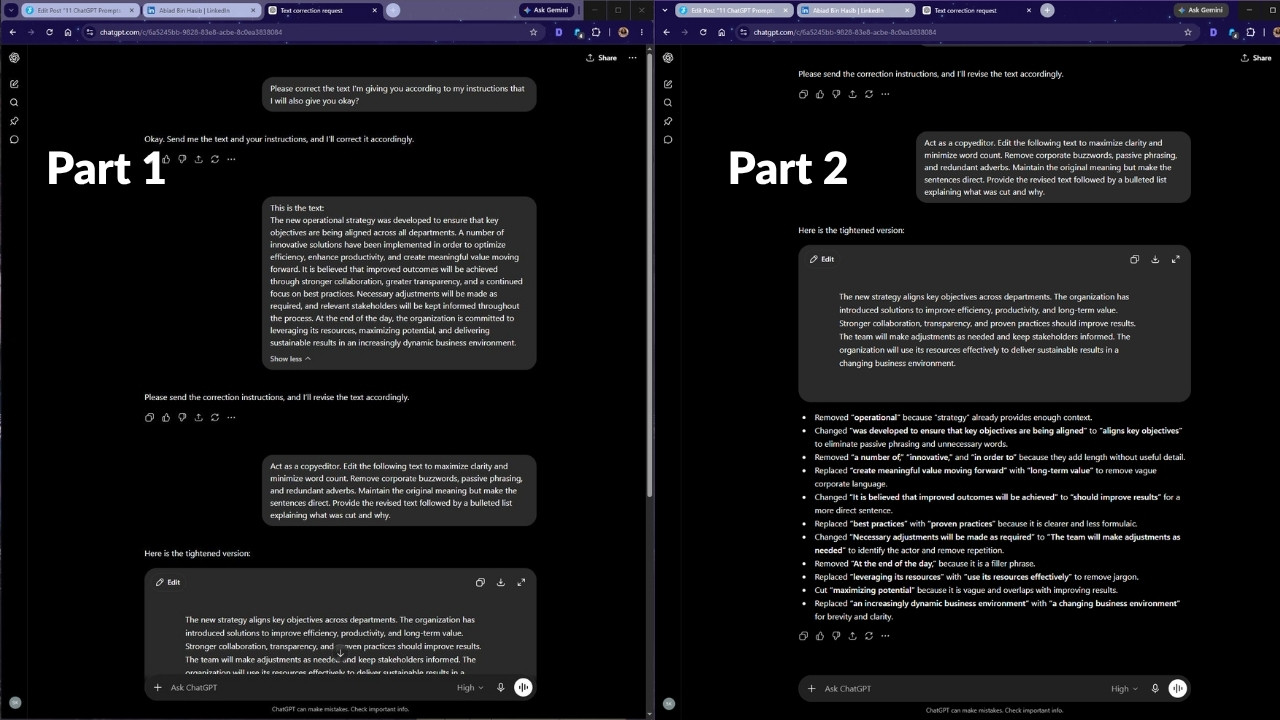
4. The Jargon and Fluff Cutter
AI models are notoriously wordy, but they are highly efficient at identifying wordiness in human writing. This template strips out passive voice and empty corporate filler.
Prompt Template:
Act as a copyeditor. Edit the following text to maximize clarity and minimize word count. Remove corporate buzzwords, passive phrasing, and redundant adverbs. Maintain the original meaning but make the sentences direct. Provide the revised text followed by a bulleted list explaining what was cut and why.
5. The Introduction Hook Overhauler
Boring introductions usually start with broad statements about the history of an industry. This prompt forces a tighter focus, moving directly to the reader’s immediate problem.
Prompt Template:
Look at the introductory paragraph of this draft. Rewrite it in three different styles: 1) A direct statement that immediately highlights a costly mistake, 2) A scenario that mirrors a specific daily friction point for the target audience, and 3) A data-driven observation. Do not use rhetorical questions or phrases like “Imagine a world where.”
6. The Subheading Repositioner
Predictable subheadings (like “Benefits,” “Challenges,” and “Next Steps”) make an article look like a mechanical SEO checklist. This prompt helps turn static headers into informative signposts.
Old Subheading: Why Security Matters
New Subheading: The Hidden Cost of Delayed Patch Management
Prompt Template:
Review the following list of subheadings for a blog post. Suggest alternative variations for each that are highly descriptive, action-oriented, and set clear expectations for the section content. Ensure they incorporate these specific focus keywords naturally without sounding forced.
7. The Search Intent Realignment Template
If a draft is accurate but fails to address what searchers actually want, it will struggle to rank. This framework aligns the text with organic search expectations.
Prompt Template:
The primary user intent for the keyword [Insert Keyword] is [Informational/Commercial/How-to]. Analyze my current draft draft outline against this intent. Point out any sections that deviate from what a searcher looking for this keyword wants to solve immediately, and suggest structural shifts to fix it.
8. The Case Study Framework Maker
Raw data and dry bullet points rarely stick with readers. This prompt takes simple customer success metrics and arranges them into a clear narrative flow.
Prompt Template:
I have the following raw customer notes and performance metrics. Structure this information into a classic case study narrative template: The Friction Point, The Implementation Reality, and The Measurable Outcome. Keep the focus entirely on verifiable details and clear cause-and-effect relationships.
9. The Tone Adjuster for B2B Audiences
Shifting copy from overly academic to an approachable professional tone requires precise guardrails. This prompt helps balance authority with readability.
Prompt Template:
Analyze the tone of the attached copy. It currently sounds too formal and academic. Adjust it to match the tone of an experienced industry practitioner speaking directly to a peer. Use simple vocabulary, shorter sentence variations, and direct verbs while retaining the technical accuracy of the subject matter.
10. The Micro-Copy and Meta-Data Optimizer
Writing meta descriptions and social hooks is a specific skill. This prompt helps you generate concise variants that stay within strict character constraints.
Prompt Template:
Generate three distinct meta descriptions and two social sharing snippets based on this article text. The meta descriptions must be between 130 and 155 characters (including spaces) and include the focus phrase naturally. The social snippets must emphasize a surprising statistic or counter-intuitive takeaway from the piece.
11. The Internal Transition Fixer
Abrupt shifts between paragraphs disrupt readability. This final prompt helps bridge separate ideas cleanly without relying on generic roadmap statements.
Prompt Template:
Read the consecutive paragraphs provided below. The transition between the first topic and the second feels disconnected. Provide three different options to rephrase the final sentence of paragraph one or the opening sentence of paragraph two to create a logical, narrative bridge between these two ideas.
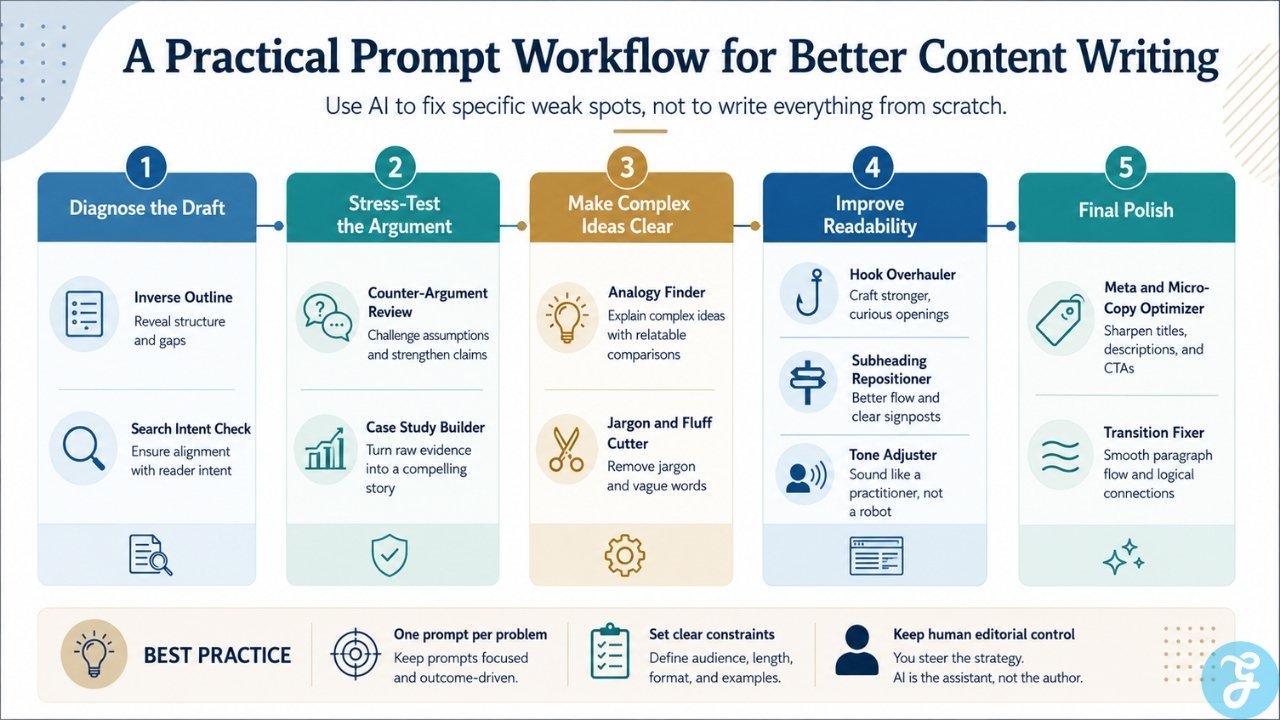
A Practical Path to Integration
Incorporating specific tools into your production line works best when handled in stages. Instead of trying to run a full article through a single workflow, apply individual prompt templates to targeted problem areas. Use the model to audit your outlines, refine your headers, and challenge your arguments. By maintaining control over the core structure and strategic direction of the content, you ensure the final output reads like it was built by a professional editor rather than an automated script.

























